
Files in Memry card converted to unreadable files with size in GBz

kamranali406

New member
Local time
4:21 AM
Messages
3
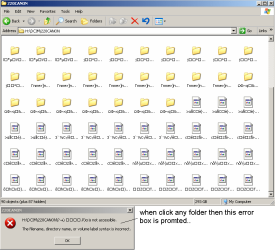
i have a camera named "Canon PC 1264",,the pictures in the memory card are converted to some unknown file type with size GBz....some of the picture's folders are in the original conditions but 3 to 4 folder are change due to some known reason,,
Please suggest me someone a solution,,the pics are very important..

i have attached the screen-shot image of the folder
 

Attachments
  • untitled.PNG
    untitled.PNG
    16.4 KB · Views: 7

My Computer My Computer

At a glance

Windows 7 Ultimate x64Intel Core i5 2520M @ 2.50GHz4.00GB Single-Channel DDR3 @ 798MHzThinkPad Display 1366x768 (1366x768@60Hz) Int...
Computer Manufacturer/Model Number
Lenovo E430c
OS
Windows 7 Ultimate x64
CPU
Intel Core i5 2520M @ 2.50GHz
Motherboard
LENOVO 33651H7 (CPU Socket - U3E1)
Memory
4.00GB Single-Channel DDR3 @ 798MHz
Graphics Card(s)
ThinkPad Display 1366x768 (1366x768@60Hz) Intel HD Graphics
Sound Card
Conexant 20671 SmartAudio HD
1. Are you using an SD Card Reader or the card slot in the PC?

2. Were you able to see the files/folders correctly from that SD Card and that PC before?

3. Are you able to see the folders and files in the camera itself with the SD card in your camera?

4. Does your camera come with any software with which you can download the contents of the SD card right from the camera? If so did you try it?

Just to eliminate your system fault as the reason, try reading the SD card on another computer and then report. (using a different SD card reader, if you are using a Card Reader)

Note:1. Do not format the SD card. 2. Do not run check disk.
 

My Computer My Computer

At a glance

Windows 7 Home Premium 32 bit
OS
Windows 7 Home Premium 32 bit
1. Are you using an SD Card Reader or the card slot in the PC?

2. Were you able to see the files/folders correctly from that SD Card and that PC before?

3. Are you able to see the folders and files in the camera itself with the SD card in your camera?

4. Does your camera come with any software with which you can download the contents of the SD card right from the camera? If so did you try it?

Just to eliminate your system fault as the reason, try reading the SD card on another computer and then report. (using a different SD card reader, if you are using a Card Reader)

Note:1. Do not format the SD card. 2. Do not run check disk.

Thank u for replying :)

u have marked same numbers to questions,,May b unintentionally,,so i will use bullets for convenience


* I m using SD Card Reader

* yes previously it was working fine for me,,

*no, now i cant see the files in the camera it self with SD card in camera,,the size shown is OK but with no files shown in camera SD card


let me try the last two queries (to chk the software and to chk it on another pc and card reader ),,and then will report ... :)
 

My Computer My Computer

At a glance

Windows 7 Ultimate x64Intel Core i5 2520M @ 2.50GHz4.00GB Single-Channel DDR3 @ 798MHzThinkPad Display 1366x768 (1366x768@60Hz) Int...
Computer Manufacturer/Model Number
Lenovo E430c
OS
Windows 7 Ultimate x64
CPU
Intel Core i5 2520M @ 2.50GHz
Motherboard
LENOVO 33651H7 (CPU Socket - U3E1)
Memory
4.00GB Single-Channel DDR3 @ 798MHz
Graphics Card(s)
ThinkPad Display 1366x768 (1366x768@60Hz) Intel HD Graphics
Sound Card
Conexant 20671 SmartAudio HD
Ok, go ahead and try to transfer the data from the SD card on another PC with a card slot or with a different SD Card Reader on that PC. So a different PC and a different SD Card Reader if that PC does not have a card slot.

From the information you had given, I am inclined to think that your SD card is corrupted. The above test is required to categorically confirm it. May be you have to get into data recovery mode then.. Let us see.

Also, take a screen capture of how your SD card looks in the Disk Management and post it. http://www.sevenforums.com/tutorials/274797-disk-management-post-screen-capture-image.html
 

My Computer My Computer

At a glance

Windows 7 Home Premium 32 bit
OS
Windows 7 Home Premium 32 bit
Back
Top