Solved files messed up after check disk - how to recover correctly?

robin77

New member
Member
VIP
Local time
5:12 PM
Messages
93
a folder on one of my external HDs had problems. I ran checkdisk - first without automatic fix activated. Windows complained. said I need to turn on the option otherwise errors cannot be fixed.
next turn took forever.
in the end it seems like all files are back, but lots of them dont open and some are messed up.

for example there are lots of movie files... but the movies dont fit the titles. and some of them dont start at all in the player. windows obviously messed up something while recovering the files.


now the question. is there a chance to recover those files correctly? with a professional recovery software? if yes, could someone please point me in the right direction?
 

My Computer My Computer

At a glance

Windows7
OS
Windows7
The correct procedure is to back up the files first before doing that repair since it should have explained it can damage files.


I would have backed up all the data, wiped the hard drive, run the maker's drive diagnostics, repartitioned and formatted and then run the full Disk Check. Then you'd know the actual condition of the disk which isn't even certain now. You can install Crystal Disk Info now to check its SMART status which is a good indicator of its condition.


I'm sorry but I doubt the files are recoverable.
 
Thanks Gregrocker, I guess you missunderstood my question a bit.
My focus is not on the hardware. This disk is not broken.

Over the years I had similar problems like this. chekcdisk does a good job with revovering the files... but only in about 90% of the times.

As I said this is an external disk.
During the last 2-3 days I had 3 times a BSOD while I was running Betasoftware. I am almost positive that the filesysstem on the disk got corrupted.... maybe there were some files in the middle of writing when the BSOD occured

The data is still on the disk. windows just associated the wrong data chunks with the wrong filenames.

I have done recovery before and therefor I am a bit familiar with the procedures - but that was many years ago I expect that a lot of things have changed since then and that the up to date tools a a lot better.

The particular problem which I expect running into is that the names of the files I am attempting to fix are not marked as "lost, damaged or deleted"
 

My Computer My Computer

At a glance

Windows7
OS
Windows7
Whenever there are file system issues requiring Disk Check then its indicated to test the drive with the maker's diagnostics, or at least get a cursory reading of SMART, to know for certain the disk's actual condition.


I will elevate your request to make sure if there is a way to recover from not backing up before a Disk Check that repairs file system.
 

My Computer My Computer

At a glance

Windows 10 ProAMD Ryzen 5 2400G Processor with Radeon RX Ve...G.SKILL Ripjaws V Series 16GB (2 x 8GB) 288-P...2047MB NVIDIA GeForce GTX 1060 6GB (EVGA)
Computer type
PC/Desktop
Computer Manufacturer/Model Number
Custom Built
OS
Windows 10 Pro
CPU
AMD Ryzen 5 2400G Processor with Radeon RX Vega 11 Graphics
Motherboard
ASRock X470 Master SLI/AC AM4 AMD Promontory X470 SATA 6Gb/s
Memory
G.SKILL Ripjaws V Series 16GB (2 x 8GB) 288-Pin DDR4 SDRAM D
Graphics Card(s)
2047MB NVIDIA GeForce GTX 1060 6GB (EVGA)
Sound Card
Motherboard Built in
Monitor(s) Displays
Acer R240HY bidx 23.8-Inch IPS HDMI DVI VGA (1920 x 1080) Wi
Screen Resolution
1920 x 1080
Hard Drives
1TB Sandisk SSD PLUS (Main drive)
500 GB Seagate 7200 RPM (Games)
500 GB Western Digital 7200 RPM (Virtual Machines)
PSU
CORSAIR TX Series TX650M 650W 80+ Gold Modular Power Supply
Case
CORSAIR CARBIDE SPEC-02 Mid-Tower Gaming Case, Red LED Fan
Cooling
220mm, two 120mm, and four 60mm fans
Keyboard
Wired Dell keyboard
Mouse
Wireless Logitech mouse
Internet Speed
250mb down, 30mb up
Antivirus
Panda Cloud Antivirus
Browser
Chrome-ish x64
Other Info
Your awesome for reading this.
An option is my personal favourite


BOOTABLEUBUNTU

Makea bootable Ubuntu disk http://www.ubuntu.com/download

Setthe BIOS to boot from the optical when the machine boots it will show you ascreen with TRY or INSTALL > select TRY. You can of course remove the hard drive and any otherdrives when doing this as if the optical alone is the only drive left in themachine then the BIOS will only find it to boot from.

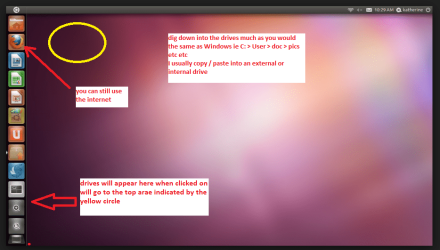
Whenit is finished - it takes very little time you will get a screen like in thepic .

Openthe drive you want > User and dig down until you get to the data / settingsyou may be able to copy / paste the material you want to an external source orother installed drive doing this.

Iam not sure if it will but I have recovered tons of data etc using this methodboth on "dead" or just plain drives that you cannot get data fromusing Windows.
This will not have to utilize Windows at all.
 

Attachments

  • UBUTUX.PNG
    UBUTUX.PNG
    128.9 KB · Views: 1

My Computer My Computer

At a glance

Desk1 7 Home Prem / Desk2 10 Pro / Main lap A...Desk1 i5 3750K / Laptop i7 GTX 860M / Desk2 i...Desk1 8GB (1866) / Desk2 16GB (1333) / Laptop...Desk 1& 2NVidia GTX 650 & Laptops on board Intel
Computer type
PC/Desktop
Computer Manufacturer/Model Number
Own build (new) Desk1 / Asus ROG Win 7 / Desk2 1st build
OS
Desk1 7 Home Prem / Desk2 10 Pro / Main lap Asus ROG 10 Pro 2 laptop Toshiba 7 Pro Asus P2520 7 & 10
CPU
Desk1 i5 3750K / Laptop i7 GTX 860M / Desk2 i5 2500
Motherboard
Desk1 Asus P877-V / Desk2 Gigabyte H67 UD3H / Laptop ?
Memory
Desk1 8GB (1866) / Desk2 16GB (1333) / Laptop 8Gb DDR3
Graphics Card(s)
Desk 1& 2NVidia GTX 650 & Laptops on board Intel
Sound Card
Desk 1 & 2 -XONAR DG Realtek High Def audio Laptop
Monitor(s) Displays
Desk 1 Benq HD 2450 / Desk2 Philips 24" / Laptop 17.5"
Screen Resolution
1920x1080 D1 & D2 & Laptop 1
Hard Drives
Desk1 Samsung 120GB 830 SSD
Asus ROG 256GB 850 Pro SSD
Desk2 Samsung 840 256 SSD
Toshiba 120GB EVO
PSU
Desk 1 Corsair HX 1050/ Laptop ? / Desk 2 Corsair HX 650
Case
Desk 1 Cooler HAF XM ? Toshiba laptop / Desk2 Coolermaster
Cooling
Fans on all Desk1 -2 Desk2 - all Coolermasters 5 Laptop ?
Keyboard
Desk 1 MS Sidewinder X6 Desk 2 MS Sidewinder X 4
Mouse
Desk 1&2 - Gigabyte MS 900 gamer - laptop - Logitec wireless
Internet Speed
ADSL2+
Other Info
One other Desktop (tester) and spare Toshba laptop both with SSD's
Running Kaspersky 2016 ISS on all machines config'd identically
Logitec audio stereo systems on each machine (x3)
Canon MG5250MFC
Router/modem TP-Link running WPA2SK
EDIT:
just to save you from reading the rest which I already wrote earlier in this post.

>Files are all back and ALL are working correctly now!
All I did was to unplug the Disk and put it into a different (faster) external Box.
I guess windows still might have had the corrupted version of the filesystem cached. (I did not reboot after the checkdisk)
So thanks again for being so helpful!!!


===================================


Thanks to everyone.
Before I go the next step I just want to make sure one more time if I have phrased the question correctly and write down a few more details.

The real problem in this case is, that all the files that I am looking for "are basically there" as I mentioned in the first post. The problem is that the "contents" of many of these files are messed up - "swapped". For example there are contents of file "examplefile 1" visible when I open file "examplefile 3"
It's not like they were manually deleted and I am 99.9% certain that it's a disk hardware issue.
As I also mentioned I have successfully recovered lost files from HDs in the past - even rebuilt a lost RAID 0.

I have VERY rudimentary knowledge about file systems and from what I know the problem here is something like this.
Windows has some files that act like a index. this index tells it where to look when a file is opened. larger files are ususally fragmented into many smaller chunks. and the locations of these chunks are all recorded in some place.

in my case something like the following has happened:
When the last BSOD occured that I mentioned earlier, windows was writing to this index and a few parts got messed up. As a result some folders were missing in explorer. > The files are still there.... windows just did not know where they are located since the index was messed up. So I used Disk Check to fix this as I have often done in the past.
Now here comes the problem.
Windows "Fixed" all the lost files. I can see them all in explorer. its just that some of them contain the wrong data.

Recuva was actually the first program that I've used before I made the first post. But the thing is... and maybe I am making a mistake here because I havn't digged very deep yet -
Recuva doesn't seem to see any problem with the "lost" files. Because they are already there when I open recuva. They don't appear to be deleted or anything. So when I mark them for recovery it will just recover the same corrupted version - right?

Anyhow - if I have missed something please let me know

 
Last edited:

My Computer My Computer

At a glance

Windows7
OS
Windows7

My Computer My Computer

At a glance

Vista, Windows7, Mint Mate, Zorin, Windows 8from 1.6GHz Duo to i7
Computer Manufacturer/Model Number
HP, Dell, Gateway, Toshiba - 4 laptops and 2 desktops
OS
Vista, Windows7, Mint Mate, Zorin, Windows 8
CPU
from 1.6GHz Duo to i7
Monitor(s) Displays
2x HP w2207
Hard Drives
5x HDD, 7x SSD, 12x Externals
Keyboard
with trackball - no mices
Mouse
Trackball mice
Internet Speed
DSL 6000
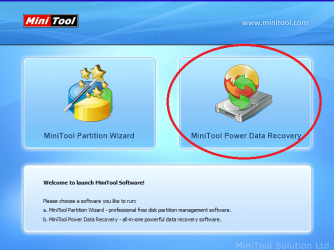
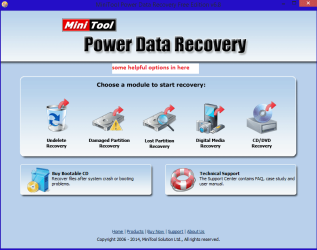
Yup WHS's way is really good and one that I haven't tried yet but might be worth keeping in mind is the mini tools PW - the data recovery section in the start up GUI.
 

Attachments

  • MINI1.PNG
    MINI1.PNG
    74.4 KB · Views: 8
  • MINI2.PNG
    MINI2.PNG
    37 KB · Views: 1

My Computer My Computer

At a glance

Desk1 7 Home Prem / Desk2 10 Pro / Main lap A...Desk1 i5 3750K / Laptop i7 GTX 860M / Desk2 i...Desk1 8GB (1866) / Desk2 16GB (1333) / Laptop...Desk 1& 2NVidia GTX 650 & Laptops on board Intel
Computer type
PC/Desktop
Computer Manufacturer/Model Number
Own build (new) Desk1 / Asus ROG Win 7 / Desk2 1st build
OS
Desk1 7 Home Prem / Desk2 10 Pro / Main lap Asus ROG 10 Pro 2 laptop Toshiba 7 Pro Asus P2520 7 & 10
CPU
Desk1 i5 3750K / Laptop i7 GTX 860M / Desk2 i5 2500
Motherboard
Desk1 Asus P877-V / Desk2 Gigabyte H67 UD3H / Laptop ?
Memory
Desk1 8GB (1866) / Desk2 16GB (1333) / Laptop 8Gb DDR3
Graphics Card(s)
Desk 1& 2NVidia GTX 650 & Laptops on board Intel
Sound Card
Desk 1 & 2 -XONAR DG Realtek High Def audio Laptop
Monitor(s) Displays
Desk 1 Benq HD 2450 / Desk2 Philips 24" / Laptop 17.5"
Screen Resolution
1920x1080 D1 & D2 & Laptop 1
Hard Drives
Desk1 Samsung 120GB 830 SSD
Asus ROG 256GB 850 Pro SSD
Desk2 Samsung 840 256 SSD
Toshiba 120GB EVO
PSU
Desk 1 Corsair HX 1050/ Laptop ? / Desk 2 Corsair HX 650
Case
Desk 1 Cooler HAF XM ? Toshiba laptop / Desk2 Coolermaster
Cooling
Fans on all Desk1 -2 Desk2 - all Coolermasters 5 Laptop ?
Keyboard
Desk 1 MS Sidewinder X6 Desk 2 MS Sidewinder X 4
Mouse
Desk 1&2 - Gigabyte MS 900 gamer - laptop - Logitec wireless
Internet Speed
ADSL2+
Other Info
One other Desktop (tester) and spare Toshba laptop both with SSD's
Running Kaspersky 2016 ISS on all machines config'd identically
Logitec audio stereo systems on each machine (x3)
Canon MG5250MFC
Router/modem TP-Link running WPA2SK
MiniTool Power Data Recovery will only recover 1GB using the free version - for larger data recovery, you will need to use a purchased version.
 

My Computer My Computer

At a glance

Windows 10 Pro x64 ; Xubuntu x64Intel i7 860 @ 2.80 GHz O/C'ed to 4.0GHz16GB Corsair Vengance DDR3 @ 661 MHz Dual Cha...EVGA NVidia GTX 560 1024MB
Computer type
PC/Desktop
Computer Manufacturer/Model Number
Golden Mk. I.4
OS
Windows 10 Pro x64 ; Xubuntu x64
CPU
Intel i7 860 @ 2.80 GHz O/C'ed to 4.0GHz
Motherboard
Gigabyte P55A-UD3R Rev.1. Award BIOS F13
Memory
16GB Corsair Vengance DDR3 @ 661 MHz Dual Channel (9-9-9-24)
Graphics Card(s)
EVGA NVidia GTX 560 1024MB
Sound Card
Realtek Integrated
Monitor(s) Displays
Dual Samsung SyncMaster 2494HS
Screen Resolution
1920*1080 and 1920*1080
Hard Drives
1*Samsung 840 EVO 120GB SSD;
1*OCZ Vertex 2 60GB SSD;
2*Samsung F3 SpinPoint 1TB in RAID0;
1*Samsung F1 SpinPoint 1TB;
2*Western Digital 1TB External USB 3.0
1*Western Digital 500GB External USB 3.0
1*Seagate 500GB External USB 2.0
PSU
Thermaltake ToughPower QFan 750W
Case
Thermaltake Element S VK60001W2Z
Cooling
Corsair H60 Water Cooling, 2*230mm and 2*80mm case fans
Keyboard
Logitech G110
Mouse
Logitech MX518
MiniTool Power Data Recovery will only recover 1GB using the free version - for larger data recovery, you will need to use a purchased version.
Yep I had noticed that but still for smaller drives etc it is good at $69 it would not be for me but someone with a large setup not a bad program:)
 

My Computer My Computer

At a glance

Desk1 7 Home Prem / Desk2 10 Pro / Main lap A...Desk1 i5 3750K / Laptop i7 GTX 860M / Desk2 i...Desk1 8GB (1866) / Desk2 16GB (1333) / Laptop...Desk 1& 2NVidia GTX 650 & Laptops on board Intel
Computer type
PC/Desktop
Computer Manufacturer/Model Number
Own build (new) Desk1 / Asus ROG Win 7 / Desk2 1st build
OS
Desk1 7 Home Prem / Desk2 10 Pro / Main lap Asus ROG 10 Pro 2 laptop Toshiba 7 Pro Asus P2520 7 & 10
CPU
Desk1 i5 3750K / Laptop i7 GTX 860M / Desk2 i5 2500
Motherboard
Desk1 Asus P877-V / Desk2 Gigabyte H67 UD3H / Laptop ?
Memory
Desk1 8GB (1866) / Desk2 16GB (1333) / Laptop 8Gb DDR3
Graphics Card(s)
Desk 1& 2NVidia GTX 650 & Laptops on board Intel
Sound Card
Desk 1 & 2 -XONAR DG Realtek High Def audio Laptop
Monitor(s) Displays
Desk 1 Benq HD 2450 / Desk2 Philips 24" / Laptop 17.5"
Screen Resolution
1920x1080 D1 & D2 & Laptop 1
Hard Drives
Desk1 Samsung 120GB 830 SSD
Asus ROG 256GB 850 Pro SSD
Desk2 Samsung 840 256 SSD
Toshiba 120GB EVO
PSU
Desk 1 Corsair HX 1050/ Laptop ? / Desk 2 Corsair HX 650
Case
Desk 1 Cooler HAF XM ? Toshiba laptop / Desk2 Coolermaster
Cooling
Fans on all Desk1 -2 Desk2 - all Coolermasters 5 Laptop ?
Keyboard
Desk 1 MS Sidewinder X6 Desk 2 MS Sidewinder X 4
Mouse
Desk 1&2 - Gigabyte MS 900 gamer - laptop - Logitec wireless
Internet Speed
ADSL2+
Other Info
One other Desktop (tester) and spare Toshba laptop both with SSD's
Running Kaspersky 2016 ISS on all machines config'd identically
Logitec audio stereo systems on each machine (x3)
Canon MG5250MFC
Router/modem TP-Link running WPA2SK
file messed up after chkdsk

Robin,

I tried the same method of buying another enclosure but seems the changes made to file system is permanent by chkdsk/f, can you advise how to get the previous files back correctly. I am having the same problems of the cannot be opened or filename is not same as content etc..

appreciate your help urgently!!!


EDIT:
just to save you from reading the rest which I already wrote earlier in this post.

>Files are all back and ALL are working correctly now!
All I did was to unplug the Disk and put it into a different (faster) external Box.
I guess windows still might have had the corrupted version of the filesystem cached. (I did not reboot after the checkdisk)
So thanks again for being so helpful!!!


===================================


Thanks to everyone.
Before I go the next step I just want to make sure one more time if I have phrased the question correctly and write down a few more details.

The real problem in this case is, that all the files that I am looking for "are basically there" as I mentioned in the first post. The problem is that the "contents" of many of these files are messed up - "swapped". For example there are contents of file "examplefile 1" visible when I open file "examplefile 3"
It's not like they were manually deleted and I am 99.9% certain that it's a disk hardware issue.
As I also mentioned I have successfully recovered lost files from HDs in the past - even rebuilt a lost RAID 0.

I have VERY rudimentary knowledge about file systems and from what I know the problem here is something like this.
Windows has some files that act like a index. this index tells it where to look when a file is opened. larger files are ususally fragmented into many smaller chunks. and the locations of these chunks are all recorded in some place.

in my case something like the following has happened:
When the last BSOD occured that I mentioned earlier, windows was writing to this index and a few parts got messed up. As a result some folders were missing in explorer. > The files are still there.... windows just did not know where they are located since the index was messed up. So I used Disk Check to fix this as I have often done in the past.
Now here comes the problem.
Windows "Fixed" all the lost files. I can see them all in explorer. its just that some of them contain the wrong data.

Recuva was actually the first program that I've used before I made the first post. But the thing is... and maybe I am making a mistake here because I havn't digged very deep yet -
Recuva doesn't seem to see any problem with the "lost" files. Because they are already there when I open recuva. They don't appear to be deleted or anything. So when I mark them for recovery it will just recover the same corrupted version - right?

Anyhow - if I have missed something please let me know
 

My Computer My Computer

At a glance

64 windows 7
Computer type
PC/Desktop
OS
64 windows 7
plz help,my important files were gone!
I have a 1T external hard drive( NTFS, my passport Western Digital) .yesterday i right click on drive in windows 7 my computer --> properties --> tools --> check now --> and i check both these boxes :
-Check Disk dialog box Automatically fix file system errors
-Scan for and attempt recovery of bad sectors
after about 2 hour, process finished.but when i go to my external hard drive. i just found 30 gb of my files and folder was remain and other(about 900 gb!) were lost! and the free space of disk wasn't changed that maybe shows folder and files are not deleted.

why were the data deleted? Chkdsk tell nothing me when it completed! If data disappears it usually is because files are damaged and the Chkdsk utility attempts to separate the damaged files out BUT there aren't any files or folders with such as these names "found.000" or "*.chk" in my external hdd.( showing hidden and system files is on)

note: i found my chkdsk log in event view in windows cp :
there ware a lot of records like this : Deleting orphan file record segment 60010.

plz help to find prob and get my files back .
 

My Computer My Computer

At a glance

Windows 7
Computer type
PC/Desktop
OS
Windows 7
Now am not trying to be overly trite about this but the last two posters should really do their own thread - it makes it too difficult by creating confusion to have more than the original thread starter in a thread.

So please worldisgonee and weixing do start your own thread/s it makes helping you a whole lot easier.
 

My Computer My Computer

At a glance

Desk1 7 Home Prem / Desk2 10 Pro / Main lap A...Desk1 i5 3750K / Laptop i7 GTX 860M / Desk2 i...Desk1 8GB (1866) / Desk2 16GB (1333) / Laptop...Desk 1& 2NVidia GTX 650 & Laptops on board Intel
Computer type
PC/Desktop
Computer Manufacturer/Model Number
Own build (new) Desk1 / Asus ROG Win 7 / Desk2 1st build
OS
Desk1 7 Home Prem / Desk2 10 Pro / Main lap Asus ROG 10 Pro 2 laptop Toshiba 7 Pro Asus P2520 7 & 10
CPU
Desk1 i5 3750K / Laptop i7 GTX 860M / Desk2 i5 2500
Motherboard
Desk1 Asus P877-V / Desk2 Gigabyte H67 UD3H / Laptop ?
Memory
Desk1 8GB (1866) / Desk2 16GB (1333) / Laptop 8Gb DDR3
Graphics Card(s)
Desk 1& 2NVidia GTX 650 & Laptops on board Intel
Sound Card
Desk 1 & 2 -XONAR DG Realtek High Def audio Laptop
Monitor(s) Displays
Desk 1 Benq HD 2450 / Desk2 Philips 24" / Laptop 17.5"
Screen Resolution
1920x1080 D1 & D2 & Laptop 1
Hard Drives
Desk1 Samsung 120GB 830 SSD
Asus ROG 256GB 850 Pro SSD
Desk2 Samsung 840 256 SSD
Toshiba 120GB EVO
PSU
Desk 1 Corsair HX 1050/ Laptop ? / Desk 2 Corsair HX 650
Case
Desk 1 Cooler HAF XM ? Toshiba laptop / Desk2 Coolermaster
Cooling
Fans on all Desk1 -2 Desk2 - all Coolermasters 5 Laptop ?
Keyboard
Desk 1 MS Sidewinder X6 Desk 2 MS Sidewinder X 4
Mouse
Desk 1&2 - Gigabyte MS 900 gamer - laptop - Logitec wireless
Internet Speed
ADSL2+
Other Info
One other Desktop (tester) and spare Toshba laptop both with SSD's
Running Kaspersky 2016 ISS on all machines config'd identically
Logitec audio stereo systems on each machine (x3)
Canon MG5250MFC
Router/modem TP-Link running WPA2SK
This thread is high on the google search for related keywords and functions as repository of knowledge for those facing this kind of problem. I consider the following to be directly related to the discussion (or issue) so take the liberty of posting here.

Sometimes I am forced to use chkdsk when Windows 7 says that I must format an external drive in order to access it.

This often results in chkdsk making any broken folder hierarchy invisible (although the files inside it appear to be still taking up space inte drive).

In the past I have found that after chkdsk removes my main folder tree, that if I go to the place where the folder should be the folder is found. E.g. if the disk is M: and appears to be empty, going to M:\Foldername has in the past allowed me to access the files. But not this time.

Programs like Recuva (for which there are many, often expensive, but I have yet to find one better) do seem to find most of the files lost by chkdsk but instead of being in a tree format they are Recuva-ed to a folder on another drive (it is important to Recuva to another drive so as not to overwrite lost files).

1) Instead of a file recover program it would be nice to find a folder recover program but I fear that the damage done by chkdsk is permanent.

2) Another possibility would be to use something other than chkdsk in the face of the "you must format this drive" error.

should anyone have any suggestions on either of these two options, at any point in the future, then I would be most grateful for them.
 

My Computer My Computer

At a glance

Windows 7 Home x64,quad pentium3GB
Computer Manufacturer/Model Number
self built
OS
Windows 7 Home x64,
CPU
quad pentium
Memory
3GB
Back
Top