Files needed to play videos are not installed

tdd1224

New member
Local time
3:06 PM
Messages
7
I can play no videos within WMC. I can through my extenders, but not through WMC itself I get the following message.
Files needed to display video are not installed or are not working correctly. Restart Windows Media Center or restart computer.
I have done both with no results. Any ides?
 

My Computer My Computer

At a glance

Windows 74gb
Computer Manufacturer/Model Number
HP Pavilion dv9000
OS
Windows 7
Memory
4gb
Hello tdd1224 and welcome :D
What file extensions are you trying to use?
WMC needs a minimum video card memory of 64 MB, what Graphics card do you have? Does it exceed the requirement?
Have you tried disabling it and re-enabling it WMC?
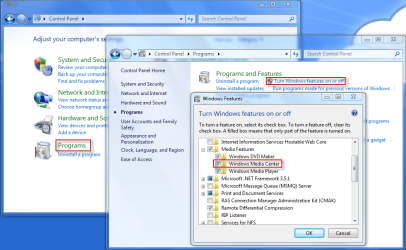
Go to Control Panel > Programs > Turn Windows features on or off > Under Media Features, uncheck WMC, reboot, recheck and reboot again. See how that goes! :D
23-10-2009 09-27-33.png
 

My Computer My Computer

At a glance

Windows 7 Ultimate x64AMD Turion(tm) 64 X2 Mobile Technology TL-563GB Nanya PC2-6400 DDR2-SDRAM SO-DIM (400MHz)NVIDIA GeForce Go 7600 256MB GDDR3 SDRAM
Computer Manufacturer/Model Number
HP Touchsmart IQ771.uk
OS
Windows 7 Ultimate x64
CPU
AMD Turion(tm) 64 X2 Mobile Technology TL-56
Motherboard
ASUS Pheonix
Memory
3GB Nanya PC2-6400 DDR2-SDRAM SO-DIM (400MHz)
Graphics Card(s)
NVIDIA GeForce Go 7600 256MB GDDR3 SDRAM
Sound Card
High Definition Intergrated NVIDIA MCP51
Monitor(s) Displays
46" Sony Bravia HDTV
Screen Resolution
1600x1200
Hard Drives
1.5TB Samsug
320GB Seagate ST3320820AS - SATA 3Gb/s 8MB
500GB Maxtor Basics STM305003EHD301-RK
Internet Speed
↓6.32 Mb/s ↑0.35 Mb/s ↔26ms
Other Info
BIOS - American Megatrends Inc. 5.07
Ethernet Port - NVIDIA nForce 10/100/1000 Mbps
DVD Drive - TSSTcorp DVDR/RW TS-T632L
Is WMC like Windows Media Player? Maybe you're missing the codecs?
 

My Computer My Computer

At a glance

Windows 7 Professional (x64)AMD Phenom II X4 955 Black Edition6GB (3 x 2GB) Kingston DDR3 1333 SDRAMNVIDIA GeForce GTX 260
Computer Manufacturer/Model Number
Cyberpower, Inc.
OS
Windows 7 Professional (x64)
CPU
AMD Phenom II X4 955 Black Edition
Motherboard
Gigabyte AMD MA770T-UD3P AM3 DDR3 1666+/1333/1066
Memory
6GB (3 x 2GB) Kingston DDR3 1333 SDRAM
Graphics Card(s)
NVIDIA GeForce GTX 260
Sound Card
Onboard 7.1 Sound
Monitor(s) Displays
Samsung 24" SyncMaster 2422
Screen Resolution
1920 x 1200
Hard Drives
500GB Sata II 3.0GB 16MB 7200RPM,
Western Digital 1TB USB 2.0 External Hard Drive
PSU
Kingwin 700 Watt Power Supply
Case
Silver X-Cruiser 2 Mid No Power
Cooling
Asetek 120MM Watercooler
Keyboard
HTK-1001
Mouse
Razer Viper
Internet Speed
Incoming: 2496 kbps, Outgoing: 512 kbps
Thanks guys - I will look into these changes. I have attempted to play several different file types, and none have played. I will give an update after I check some of these suggestions. A follow-up question is in regards to Video_TS files. I was able to play these when I had vista by going into the registry and inputing gallary, I can no longer do this in W7 (as it appears) do you know a way to play these (I only have files like this for owned DVD's), if you do have a solution, will they play via my XBox as a media center extender?
 

My Computer My Computer

At a glance

Windows 74gb
Computer Manufacturer/Model Number
HP Pavilion dv9000
OS
Windows 7
Memory
4gb
FWIW, I could play Matroska's fine in Media Player
but not within Media Center, until I added
following in the registry:

[HKEY_CLASSES_ROOT\.mkv]
"PerceivedType"="video"
"Content Type"="video/mkv"

/Per
 

My Computer My Computer

At a glance

Windows 7 Ultimate x64 RC1
OS
Windows 7 Ultimate x64 RC1
After installing K-Lite Mega Codec, WMP can play anything including DVDs and any downloaded movies. Not sure if it's specific to your problem though.
 

My Computer My Computer

At a glance

Windows 7 Professional (x64)AMD Phenom II X4 955 Black Edition6GB (3 x 2GB) Kingston DDR3 1333 SDRAMNVIDIA GeForce GTX 260
Computer Manufacturer/Model Number
Cyberpower, Inc.
OS
Windows 7 Professional (x64)
CPU
AMD Phenom II X4 955 Black Edition
Motherboard
Gigabyte AMD MA770T-UD3P AM3 DDR3 1666+/1333/1066
Memory
6GB (3 x 2GB) Kingston DDR3 1333 SDRAM
Graphics Card(s)
NVIDIA GeForce GTX 260
Sound Card
Onboard 7.1 Sound
Monitor(s) Displays
Samsung 24" SyncMaster 2422
Screen Resolution
1920 x 1200
Hard Drives
500GB Sata II 3.0GB 16MB 7200RPM,
Western Digital 1TB USB 2.0 External Hard Drive
PSU
Kingwin 700 Watt Power Supply
Case
Silver X-Cruiser 2 Mid No Power
Cooling
Asetek 120MM Watercooler
Keyboard
HTK-1001
Mouse
Razer Viper
Internet Speed
Incoming: 2496 kbps, Outgoing: 512 kbps

My Computer My Computer

At a glance

Windows 7 Ultimate 32bit SP1Intel(R) Core(TM)2 Quad CPU @ 2.40GHz, 2400 MHz4 GBATI Radeon HD 2600 Pro
Computer type
PC/Desktop
Computer Manufacturer/Model Number
Bruce ... somewhere in his 40's
OS
Windows 7 Ultimate 32bit SP1
CPU
Intel(R) Core(TM)2 Quad CPU @ 2.40GHz, 2400 MHz
Motherboard
INTEL/D975XBX2
Memory
4 GB
Graphics Card(s)
ATI Radeon HD 2600 Pro
Monitor(s) Displays
Samsung SyncMaster 914v
Screen Resolution
1280 x 1024
Hard Drives
2/500GB each ... ST3500630AS ATA Device.
One is not connected
PSU
Rocketfish 700 W
Case
G.Skill Gigabyte Chassis
Keyboard
Standard PS/2 Keyboard
Mouse
Microsoft PS/2 Mouse
Internet Speed
DSL
Antivirus
Avira Internet Security
Browser
IE 11
Other Info
ATI HDMI Audio
Everyone thank you for all of your help. The issue was: Win7 did not install, or carry over the correct driver for my Nvedia graphics card. Installed the correct driver and all is well. Thanks a bunch everyone.
 

My Computer My Computer

At a glance

Windows 74gb
Computer Manufacturer/Model Number
HP Pavilion dv9000
OS
Windows 7
Memory
4gb
Hello

I have an ASROCK HT330-BD machine

It has onboard ION graphics. I've hooked it up to my TV via HDMI

STrange thing is, I can play regular free to air TV chnnels just fine through Win7 MC. But any of the HD channels will not play. I see a quick glimpse of the channel for about half a sec with no audio then it says "Files needed to display video are not installed or are not working correctly. Restart Windows Media Center or restart computer."

I've updated all of my drivers and am using a USB Digital Now Tiny Twin TV tuner.

ANy ideas? Really strange problem! SD TV plays but HD does not? This PC is capable of playing Blu-Ray at 1080p... surely HD TV would not cause it problems?

Is it to do with memory allocation to the onboard graphics? Can I adjust this manually?
 

My Computer My Computer

At a glance

Windows 7 RC1
OS
Windows 7 RC1
OK, You guys are NOT gonna believe this! Exact same problem here, but I just fixed it literally seconds ago. I don't know if this is the fix for all you posters but it worked like a charm for me.

While fiddling around trying to figure this out, I happened to notice that the little "ding" sounds used in WMC when you navigate around were not playing. I went into control panel>sounds and made sure my speakers were the default for playback. They were not, so I changed it. BOOM! WMC starts playing those video files! Go figure. :confused:
 

My Computer My Computer

At a glance

Windows 7 Home Premium (64 bit)Core 2 Quad Q6600 (K) 2.4 GHz (95W) 1066 MHz ...6 GBEVGA 01G-P3-N959-TR GeForce 9500 GT 1GB 128-b...
Computer Manufacturer/Model Number
HP Pavilion a6658f
OS
Windows 7 Home Premium (64 bit)
CPU
Core 2 Quad Q6600 (K) 2.4 GHz (95W) 1066 MHz front side bus
Motherboard
ASUS IPIBL-LB HP/Compaq motherboard name: Benicia-GL8E
Memory
6 GB
Graphics Card(s)
EVGA 01G-P3-N959-TR GeForce 9500 GT 1GB 128-bit DDR2 PCI Exp
Sound Card
Realtek ALC 888S chipset
Monitor(s) Displays
HP w2007 21" Widescreen
Screen Resolution
1680x1050 @59Hz
Hard Drives
(after market) 1TB Western Digital SATA x 2 plus 4 externals of various sizes
Keyboard
Logitech 920-000914 Wired Ultra-thin Illuminated
Mouse
Logitech MX-510
Internet Speed
ping 23ms / ↓ 24.07Mbps / ↑ 2.02Mbps
THANKS drtalk!!!

I was having the same problem and tried reinstalling video drivers, service packs and rolling back the system, nothing worked. Luckily I came across this thread while Googling and saw your post. BOOYAH!!!! IT WORKED!!! Thanks!:D
 

My Computer My Computer

At a glance

Win7 x64
OS
Win7 x64
Files needed to play video - not installed

After updating my BIOS I had the same issue and thanks to the tip about audio drivers I quickly discovered a reload of my HDMI audio driver was required.

Why does Win 7 says it's a video file issue ?????

Thanks to the forum for helping to resolve this - Great.
 

My Computer My Computer

At a glance

win 7 home premium 64bit
OS
win 7 home premium 64bit
Windows 7. Same issue and same fix. I needed to fix my audio driver. Thanks.
 

My Computer My Computer

At a glance

Windows 7 Ultimatex64
OS
Windows 7 Ultimatex64
Sorry for digging up this oldie having same problem, reinstall drivers samething
 

My Computer My Computer

At a glance

windows 7 64 bit
OS
windows 7 64 bit
Back
Top