
Solved Filling unallocated space in front and back of the existing partition

MrMateczko

New member
Local time
2:57 PM
Messages
3
I have one big partition, with 1GB of unallocated space in the front, and back of the partition as seen here:
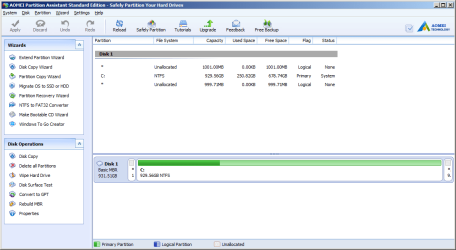
iJdKmka.png

Now, will extending both from the front and back corrupt the boot/legality of my Windows 7?
Will it cause some other problems?
In the program seen above, I need to move the partition, to fill the unallocated space, will moving partition screw something up?
Would it be better to do it from a Live CD on a USB Flash Drive?
I'm very careful with my data.
 

My Computer My Computer

At a glance

Win 7 SP1 Ultimate x64
Computer type
Laptop
OS
Win 7 SP1 Ultimate x64

My Computer My Computer

At a glance

Windows 10 Pro x64Intel Core i7 6700KGSkill TridentZ RGB 16GB 3600 16-16-16-36EVGA GTX 980 Ti SC x2
Computer type
PC/Desktop
Computer Manufacturer/Model Number
Skylake Special #666
OS
Windows 10 Pro x64
CPU
Intel Core i7 6700K
Motherboard
Asus Sabertooth Z170 Mark 1
Memory
GSkill TridentZ RGB 16GB 3600 16-16-16-36
Graphics Card(s)
EVGA GTX 980 Ti SC x2
Sound Card
Realtek High Definition
Monitor(s) Displays
AOC G2460PG
Screen Resolution
1920 x 1080 144Hz
Hard Drives
Samsung 860 Pro 256GB, Seagate Barracuda 4TB x2
PSU
EVGA 1000 P2, EVGA White Custom Braided Cables
Case
Corsair Vengeance C70 Gunmetal Black
Cooling
Corsair H100i v2, Corsair ML120 x2, Thermal Grizzly Kryonaut
Keyboard
Logitech G910 Orion Spectrum
Mouse
Logitech G700s
Internet Speed
Verizon Fios Quantum Gateway 75/75
Antivirus
Windows Defender, Malwarebytes Free 3.8.3
Browser
Chrome
Other Info
Corsair SP120 x4, LG Blu-ray Drive, Durabrand HT-395 100 Watt Dolby Digital Amp, Corsair H2100 Wireless 7.1 Headset
And before you do, make an image of the C partition - just in case.
 

My Computer My Computer

At a glance

Vista, Windows7, Mint Mate, Zorin, Windows 8from 1.6GHz Duo to i7
Computer Manufacturer/Model Number
HP, Dell, Gateway, Toshiba - 4 laptops and 2 desktops
OS
Vista, Windows7, Mint Mate, Zorin, Windows 8
CPU
from 1.6GHz Duo to i7
Monitor(s) Displays
2x HP w2207
Hard Drives
5x HDD, 7x SSD, 12x Externals
Keyboard
with trackball - no mices
Mouse
Trackball mice
Internet Speed
DSL 6000
I heard the AOMEI is more reliable than MiniTool, which I've used before to delete the useless partitions that were there.
Even if I made the image, I can't store it anywhere, I only have a 16GB USB flash drive.

I have installed Windows on my laptop, yes, I was stupid not to delete the pre-made partitions in the first place.
 

My Computer My Computer

At a glance

Win 7 SP1 Ultimate x64
Computer type
Laptop
OS
Win 7 SP1 Ultimate x64
I would highly recommend you get an external disk. Performing such operations without an image to back you up is like jumping from a plane without a parachute. And frequent images are also recommended to keep you safe. With one itty bitty flash drive you are not able to do much.

BTW: I have used AOMEI and Mini Tool. I would rely more on the Mini Tool. I had quite some problems with AOMEI - that is work in progress as I learned from my correspondence with the developers. But for imaging on 64bit systems, it works although here also I prefer free Macrium.
 

My Computer My Computer

At a glance

Vista, Windows7, Mint Mate, Zorin, Windows 8from 1.6GHz Duo to i7
Computer Manufacturer/Model Number
HP, Dell, Gateway, Toshiba - 4 laptops and 2 desktops
OS
Vista, Windows7, Mint Mate, Zorin, Windows 8
CPU
from 1.6GHz Duo to i7
Monitor(s) Displays
2x HP w2207
Hard Drives
5x HDD, 7x SSD, 12x Externals
Keyboard
with trackball - no mices
Mouse
Trackball mice
Internet Speed
DSL 6000
Thanks for the suggestions. I'll stick with MiniTool then.
I have some experience with drives failing (though not from partitions, but mechanically) on other laptops, so I'll just leave it as it is for now. Better to have 2GB's less, than to lose everything.
I'll try this only if I do manage to obtain an external drive.
The imaging program looks interesting, I've never heard of it.
Thanks again.
 

My Computer My Computer

At a glance

Win 7 SP1 Ultimate x64
Computer type
Laptop
OS
Win 7 SP1 Ultimate x64
You are very welcome. Imaging is really a life saver. Nobody should operate without.
 

My Computer My Computer

At a glance

Vista, Windows7, Mint Mate, Zorin, Windows 8from 1.6GHz Duo to i7
Computer Manufacturer/Model Number
HP, Dell, Gateway, Toshiba - 4 laptops and 2 desktops
OS
Vista, Windows7, Mint Mate, Zorin, Windows 8
CPU
from 1.6GHz Duo to i7
Monitor(s) Displays
2x HP w2207
Hard Drives
5x HDD, 7x SSD, 12x Externals
Keyboard
with trackball - no mices
Mouse
Trackball mice
Internet Speed
DSL 6000
Back
Top