Windows 7: Okay, I just spent the better part of two days without sleep, trying to figure out why suddenly my MS Office FIND command didn't work. During that time, I uninstalled and reinstalled TWO VERSIONS of MS Office three times each (maybe four, gotta be three), along with reinstalling Acrobat, Bibleworks, whatever seemed to be the 'last man up' when I noticed the problem.
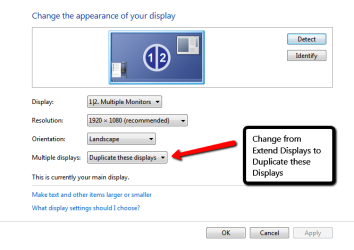
But guess what: none of the programs were the problem. The problem, was that the FIND command dialogue box was 'disappearing' to my OTHER MONITOR, which hadn't been on in days. Never mind, the graphics were only reconfigured for the one monitor. Never mind, Intel settings and Windows both agreed only one monitor was on and connected. Didn't matter: because SOMEDAY IN THE PAST MS Office HAD BEEN in the other monitor, the 'FIND' command dialogue box WENT TO that other monitor.
So the next time something disappears on you, turn on your other monitor, even if it's been disconnected for weeks.
Now I can go back to the other bizillion glitches I can't explain. Hope this one helps someone, as the complaint is all over the internet, with everyone suggesting uninstall and reinstall and all kinds of useless solutions.
Of course, maybe you have the problem for other reasons: but try this one first, it costs only 5 minutes, rather than the two days I spent.
But guess what: none of the programs were the problem. The problem, was that the FIND command dialogue box was 'disappearing' to my OTHER MONITOR, which hadn't been on in days. Never mind, the graphics were only reconfigured for the one monitor. Never mind, Intel settings and Windows both agreed only one monitor was on and connected. Didn't matter: because SOMEDAY IN THE PAST MS Office HAD BEEN in the other monitor, the 'FIND' command dialogue box WENT TO that other monitor.
So the next time something disappears on you, turn on your other monitor, even if it's been disconnected for weeks.
Now I can go back to the other bizillion glitches I can't explain. Hope this one helps someone, as the complaint is all over the internet, with everyone suggesting uninstall and reinstall and all kinds of useless solutions.
Of course, maybe you have the problem for other reasons: but try this one first, it costs only 5 minutes, rather than the two days I spent.
Last edited:
My Computer
At a glance
Win7 Pro 32-bit and XP Pro (17 windows machines)Core 2 Duo i7 quad 1st gen i5 3rd gen Pentium 41.5 GB to 8 GB in quad corevaries nVidia in the quad core laptop
- Computer type
- PC/Desktop
- Computer Manufacturer/Model Number
- Dell Dimension Optiplex and Latitude
- OS
- Win7 Pro 32-bit and XP Pro (17 windows machines)
- CPU
- Core 2 Duo i7 quad 1st gen i5 3rd gen Pentium 4
- Motherboard
- I don't know, Go by Dell brand name
- Memory
- 1.5 GB to 8 GB in quad core
- Graphics Card(s)
- varies nVidia in the quad core laptop
- Sound Card
- varies
- Monitor(s) Displays
- Dell FP several models
- Screen Resolution
- Dell FP 1280 x 1024, 1600x900, 1920x1080
- Hard Drives
- Varies from 80 GB to 1TB
- PSU
- don't know what that is, sorry
- Case
- Dell chassis
- Cooling
- none
- Keyboard
- Dell
- Mouse
- Dell wireless and wired and many others
- Internet Speed
- XFINITY 1 GIG
- Antivirus
- varies
- Browser
- Firefox
- Other Info
- XP die-hard just starting into Win7.