Find files created between two dates in any year...how ?

DBenz

New member
Member
Local time
2:26 AM
Messages
55
Hi,
I created some files between lets say 15 and 19 August, not sure of the year, in the last 10 years, how can I find them in win7 64bit pro ?

I am hoping to avoid doing a search each time for a specific year, can one search on date disregarding year ?

Furthermore find only has a filter date modified, it says add a search filter yet doesnt have a list of choices, where are other filters to be found ?

In all, it seems archaic compared to winXP explorer search, as I cant see the options that I was used to.

DBenz
 

My Computer My Computer

Computer type
PC/Desktop
Computer Manufacturer/Model Number
Custom built
OS
Windows 7 64bit pro
CPU
Intel Core i7 4790
Motherboard
Gigabyte Z97P-D3 Intel Z97 Socket 1150 DDR3
Memory
32Gb DDR3
Graphics Card(s)
GeForce GTX970
Hard Drives
Samsung SSD for OS and WD green for data
Antivirus
Kaspersky Internet Security 2014
Browser
Firefox

My Computer My Computer

Computer type
PC/Desktop
Computer Manufacturer/Model Number
Golden Mk. I.4
OS
Windows 10 Pro x64 ; Xubuntu x64
CPU
Intel i7 860 @ 2.80 GHz O/C'ed to 4.0GHz
Motherboard
Gigabyte P55A-UD3R Rev.1. Award BIOS F13
Memory
16GB Corsair Vengance DDR3 @ 661 MHz Dual Channel (9-9-9-24)
Graphics Card(s)
EVGA NVidia GTX 560 1024MB
Sound Card
Realtek Integrated
Monitor(s) Displays
Dual Samsung SyncMaster 2494HS
Screen Resolution
1920*1080 and 1920*1080
Hard Drives
1*Samsung 840 EVO 120GB SSD;
1*OCZ Vertex 2 60GB SSD;
2*Samsung F3 SpinPoint 1TB in RAID0;
1*Samsung F1 SpinPoint 1TB;
2*Western Digital 1TB External USB 3.0
1*Western Digital 500GB External USB 3.0
1*Seagate 500GB External USB 2.0
PSU
Thermaltake ToughPower QFan 750W
Case
Thermaltake Element S VK60001W2Z
Cooling
Corsair H60 Water Cooling, 2*230mm and 2*80mm case fans
Keyboard
Logitech G110
Mouse
Logitech MX518
thats a question i just posted in another thread, not sure how that answers this question ? !

Also it starts searching before I even finish entering the dates, and then if I alter 2007 to 2008, nothing happens, there is no activate search button, I have to sometimes close the window, then open it, go back to that search window select my last entry then it starts searching.
Its total crap compared to winxp and searching is crucial to pc use.

DBenz
 
Last edited:

My Computer My Computer

Computer type
PC/Desktop
Computer Manufacturer/Model Number
Custom built
OS
Windows 7 64bit pro
CPU
Intel Core i7 4790
Motherboard
Gigabyte Z97P-D3 Intel Z97 Socket 1150 DDR3
Memory
32Gb DDR3
Graphics Card(s)
GeForce GTX970
Hard Drives
Samsung SSD for OS and WD green for data
Antivirus
Kaspersky Internet Security 2014
Browser
Firefox
Well in my opinion you'd need a file search utility. Here's one that I use. "Search My Files"

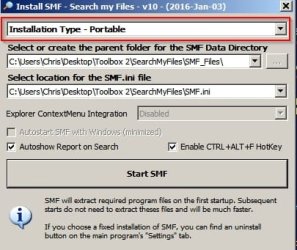
It can be run in portable mode without installation:

SMF1.jpg

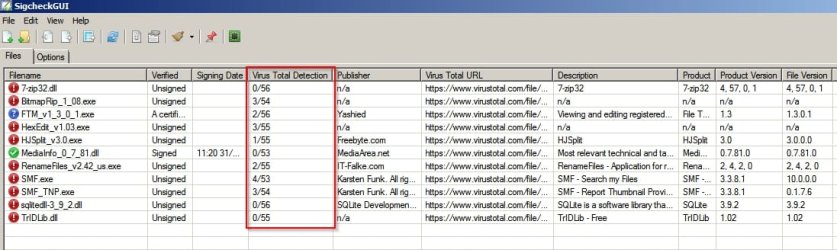
Note: This app might get flagged up as malware by some scanners.

Scan reports for Search My Files - author Karsten Funk:

https://www.reasoncoresecurity.com/smf.exe-1261389bde3c98f2da801290df412724b78f352f.aspx

https://www.virustotal.com/en-gb/fi...94bbec71b7befaaf109f95e0070fd8e55e1/analysis/

File Safety.jpg

Some applications are designed to be used by sophisticated users and often, these types of applications dig deep into the operating system replicating the behavior of malware - at least according to many online virus scanners.

Make up your own mind on the issue. I say this app is safe to use and that the detections are false positives.

Configuration:

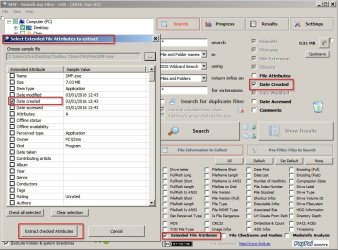
SMF2.jpg

Check "date created" but also check "extended file attributes" and check "date created" there as well.

If you mess up settings at any time exit the program and delete the SMF.ini file from the program's folder.

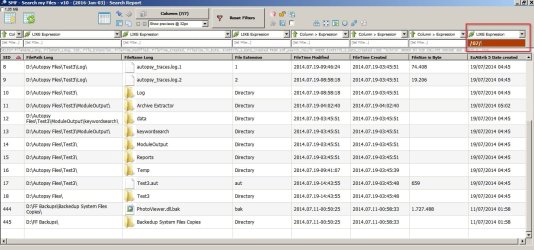
Select locations to search and run the search. In the results window filter by month. So for July (any year) use /07/

Results:

SMF3.jpg

So you get a list of all files created in specified locations in July regardless of the year.

If it is a huge list you can export to .csv and sort/ filter by day(s) of month using your spreadsheet application.
 

My Computer My Computer

Computer type
Laptop
Computer Manufacturer/Model Number
ASUS
OS
Microsoft Windows 7 Home Premium 64-bit 7601 Multiprocessor Free Service Pack 1
CPU
AMD C-60 APU with Radeon(tm) HD Graphics
Motherboard
ASUSTeK COMPUTER INC. X501U
Memory
4.00 GB
Graphics Card(s)
AMD Radeon HD 6290 Graphics
Sound Card
(1) AMD High Definition Audio Device (2) Realtek High Defi
Screen Resolution
1366 x 768 x 32 bits (4294967296 colors) @ 60 Hz
Hard Drives
Hitachi HTS545050A7E380 SATA Disk Device
Antivirus
Comodo CIS & FW, SecureAplus App Whitelisting, Threatfire
Browser
Cyberfox 64bit, Opera 64bit, Airfox
Other Info
Spy-The-Spy, HitmanPro.Alert, Norton Connect Safe, MJRegWatcher, BitDefender TrafficLight, Voodoo Shield, Zemana AntiMalware
Hi, bit late re-lying, I shall consider that prog, so MS doesnt have such function then.

DBenz
 

My Computer My Computer

Computer type
PC/Desktop
Computer Manufacturer/Model Number
Custom built
OS
Windows 7 64bit pro
CPU
Intel Core i7 4790
Motherboard
Gigabyte Z97P-D3 Intel Z97 Socket 1150 DDR3
Memory
32Gb DDR3
Graphics Card(s)
GeForce GTX970
Hard Drives
Samsung SSD for OS and WD green for data
Antivirus
Kaspersky Internet Security 2014
Browser
Firefox
I shall consider that prog, so MS doesnt have such function then.
If by that you mean Windows doesn’t offer a way to do this, then no, it’s not impossible with builtin tools; Windows Explorer just doesn't allow you to go so precise with dates.

For example, using the OP’s example, these PowerShell lines will list items that were created between the dates August 15 to August 19 (inclusive), of any year, and only if created after the current date, ten years ago.

Code:
$lower = (Get-Date 'Jul 15')
$upper = (Get-Date 'Aug 19')
$since = (Get-Date).AddYears(-10)

$lower = [Tuple]::Create($lower.Month, $lower.Day)
$upper = [Tuple]::Create($upper.Month, $upper.Day)

gci -r | ?{
	$curr = [Tuple]::Create($_.CreationTime.Month, $_.CreationTime.Day)
	($lower -le $curr) -and ($curr -le $upper) -and ($_.CreationTime -gt $since)
} | %{
	$_.FullName
}
 

My Computer My Computer

Computer type
PC/Desktop
OS
Windows 10, Windows 8.1 Pro, Windows 7 Professional, OS X El Capitan
Back
Top