Solved Finding downloads in Win 7

Tharwatime

New member
Member
Local time
12:26 PM
Messages
51
I'm attempting to download
https://addons.mozilla.org/en-US/thunderbird/addon/manually-sort-folders/
to allow Thunderbird to be manually sorted. The DL is fine, but it just vanishes. I think that it goes into
c:\Users\user\AppData\Roaming\Microsoft\cannot find this!!\manage*.something
where the manage bit is the file in question.

The folder after MS is the last one, and it is not coming up on several ways for looking at folders, not even with command line dir ~ /AH. It would be nice if Win 7 allowed a user to select where the DL went instead of just parking it somewhere, location not specified.

Advice is sought to either select a DL location or find the one above that is missing in action. TIA.
 

My Computer My Computer

At a glance

Windows 7 Pro 64 bitDual core4 MBn/k
Computer type
PC/Desktop
Computer Manufacturer/Model Number
Dell Optiplex
OS
Windows 7 Pro 64 bit
CPU
Dual core
Motherboard
n/k
Memory
4 MB
Graphics Card(s)
n/k
Hard Drives
120 MB SSD
USB HDs for data
Antivirus
MSE
Browser
Firefox
Can you save it to your Downloads folder by clicking on the down arrow (next to Save) shown below? Select "Save as", then choose your Downloads folder.
 

Attachments

  • save.PNG
    save.PNG
    3 KB · Views: 0

My Computer My Computer

At a glance

Windows 7 Professional 64bitIntel i7-5960X64GB Corsair Dominator 2400MHz3 EVGA GTX980's
Computer type
PC/Desktop
Computer Manufacturer/Model Number
custom build
OS
Windows 7 Professional 64bit
CPU
Intel i7-5960X
Motherboard
EVGA X99 Classified
Memory
64GB Corsair Dominator 2400MHz
Graphics Card(s)
3 EVGA GTX980's
Sound Card
on board
Monitor(s) Displays
3 Dell E2715H 27"
Screen Resolution
1920x1080 (5760x1080)
Hard Drives
Samsung 950 Pro 1TB M.2 SSD,
Western Digital Black 2TB HDD's x5
Western Digital Black 1TB HDD's x3
PSU
Corsair AX1200i
Case
Corsair 750D
Cooling
Corsair H110i GT
Keyboard
Corsair K70
Mouse
Corsair M45
Internet Speed
250 down/10 up
Antivirus
Microsoft Security Essentials
Browser
IE 11, Google Chrome
Havoc, thanks, that was most helpful. My screen does not have the screen shot you posted but you gave me an idea. I started clicking on things and eventually found I could select a DL folder, which I did, ~\user\Manual sort TB\*.*. This worked. However, after reading the review on the website I've now got my doubts about the functionaility. The matter has been sorted, but I'm unsure if this thread should be left open so that I can hopefully report on how the program works in TB. This is a TB issue, not Win 7, but may be of interest here. I still cannot find the hidden folder in the first post.
 

My Computer My Computer

At a glance

Windows 7 Pro 64 bitDual core4 MBn/k
Computer type
PC/Desktop
Computer Manufacturer/Model Number
Dell Optiplex
OS
Windows 7 Pro 64 bit
CPU
Dual core
Motherboard
n/k
Memory
4 MB
Graphics Card(s)
n/k
Hard Drives
120 MB SSD
USB HDs for data
Antivirus
MSE
Browser
Firefox
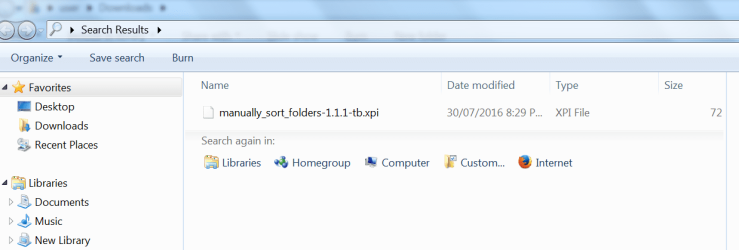
Just search for .xpi files on your HD. The download should show up in the results list.
 

My Computer My Computer

At a glance

Microsoft Windows 7 Home Premium 64-bit 7601 ...AMD C-60 APU with Radeon(tm) HD Graphics4.00 GBAMD Radeon HD 6290 Graphics
Computer type
Laptop
Computer Manufacturer/Model Number
ASUS
OS
Microsoft Windows 7 Home Premium 64-bit 7601 Multiprocessor Free Service Pack 1
CPU
AMD C-60 APU with Radeon(tm) HD Graphics
Motherboard
ASUSTeK COMPUTER INC. X501U
Memory
4.00 GB
Graphics Card(s)
AMD Radeon HD 6290 Graphics
Sound Card
(1) AMD High Definition Audio Device (2) Realtek High Defi
Screen Resolution
1366 x 768 x 32 bits (4294967296 colors) @ 60 Hz
Hard Drives
Hitachi HTS545050A7E380 SATA Disk Device
Antivirus
Comodo CIS & FW, SecureAplus App Whitelisting, Threatfire
Browser
Cyberfox 64bit, Opera 64bit, Airfox
Other Info
Spy-The-Spy, HitmanPro.Alert, Norton Connect Safe, MJRegWatcher, BitDefender TrafficLight, Voodoo Shield, Zemana AntiMalware
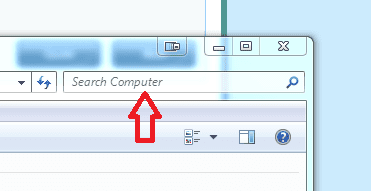
Click the Start button, click Computer, in the top right of the window, in the search field, type
*.xpi
 

Attachments

  • search.PNG
    search.PNG
    5.4 KB · Views: 27

My Computer My Computer

At a glance

Windows 7 Professional 64bitIntel i7-5960X64GB Corsair Dominator 2400MHz3 EVGA GTX980's
Computer type
PC/Desktop
Computer Manufacturer/Model Number
custom build
OS
Windows 7 Professional 64bit
CPU
Intel i7-5960X
Motherboard
EVGA X99 Classified
Memory
64GB Corsair Dominator 2400MHz
Graphics Card(s)
3 EVGA GTX980's
Sound Card
on board
Monitor(s) Displays
3 Dell E2715H 27"
Screen Resolution
1920x1080 (5760x1080)
Hard Drives
Samsung 950 Pro 1TB M.2 SSD,
Western Digital Black 2TB HDD's x5
Western Digital Black 1TB HDD's x3
PSU
Corsair AX1200i
Case
Corsair 750D
Cooling
Corsair H110i GT
Keyboard
Corsair K70
Mouse
Corsair M45
Internet Speed
250 down/10 up
Antivirus
Microsoft Security Essentials
Browser
IE 11, Google Chrome
I'm aware of the Voltaire quote, and the computer word PICNIC. One of the first things I did was Start > Search and got the screen below. This did not state which folder the file was in. I found that via the command line. Nothing came up in Total Commander, Explorer and other programs. First attempt at posting a picture. Uploaded, not sure if it is attached. cannot find a preview screen.
 

Attachments

  • xpi.png
    xpi.png
    32.4 KB · Views: 0

My Computer My Computer

At a glance

Windows 7 Pro 64 bitDual core4 MBn/k
Computer type
PC/Desktop
Computer Manufacturer/Model Number
Dell Optiplex
OS
Windows 7 Pro 64 bit
CPU
Dual core
Motherboard
n/k
Memory
4 MB
Graphics Card(s)
n/k
Hard Drives
120 MB SSD
USB HDs for data
Antivirus
MSE
Browser
Firefox
Can you right click on that and choose "open file location"?
 

My Computer My Computer

At a glance

Windows 7 Professional 64bitIntel i7-5960X64GB Corsair Dominator 2400MHz3 EVGA GTX980's
Computer type
PC/Desktop
Computer Manufacturer/Model Number
custom build
OS
Windows 7 Professional 64bit
CPU
Intel i7-5960X
Motherboard
EVGA X99 Classified
Memory
64GB Corsair Dominator 2400MHz
Graphics Card(s)
3 EVGA GTX980's
Sound Card
on board
Monitor(s) Displays
3 Dell E2715H 27"
Screen Resolution
1920x1080 (5760x1080)
Hard Drives
Samsung 950 Pro 1TB M.2 SSD,
Western Digital Black 2TB HDD's x5
Western Digital Black 1TB HDD's x3
PSU
Corsair AX1200i
Case
Corsair 750D
Cooling
Corsair H110i GT
Keyboard
Corsair K70
Mouse
Corsair M45
Internet Speed
250 down/10 up
Antivirus
Microsoft Security Essentials
Browser
IE 11, Google Chrome
That worked in the new folder, but when I downloaded to
C:\Users\user\AppData\Roaming\Microsoft\cannot find this!!\manual*.xpi
the "cannot find this" folder was hidden. The new folder, set up as a result of your helpful advice, is visible:
c:\Users\user\Manual sort TB\manually_sort_folders-1.1.1-tb.xpi

So the question is now why did not the ~MS\cannot find this!! folder not appear? Is it hidden, admin, only available on Tuesdays? I suspect PICNIC and a lack of knowledge by me regarding areas of Win 7 where I have not gone before. Please bear in mind that while my knowledge is limited, I've downloaded and installed software before, and have never come across this hidden folder aspect.

It would have been simpler if Thunderbird had a sort function.
 

My Computer My Computer

At a glance

Windows 7 Pro 64 bitDual core4 MBn/k
Computer type
PC/Desktop
Computer Manufacturer/Model Number
Dell Optiplex
OS
Windows 7 Pro 64 bit
CPU
Dual core
Motherboard
n/k
Memory
4 MB
Graphics Card(s)
n/k
Hard Drives
120 MB SSD
USB HDs for data
Antivirus
MSE
Browser
Firefox
Back
Top