Finding Out Where Files Get Installed To During Software Installation

miketurn1234

New member
Member
Local time
10:54 PM
Messages
84
I don't really want to have to install a 3rd party piece of software to determine this, but does anyone know of a way (within Windows 7) to find out all the locations a piece of software installs its files and folders?

Obviously, most software will create a folder within the "Program Files" folders, but they will also put files in other locations, sometimes hidden locations. Is there anyway to determine all the locations easily?
I guess you could keep an eye on the updated dates, but you would still need to know in certain cases where to look.

Not a big deal, I mean for the most part programs install the files because they are needed, but every now and then you find some random files / folders here and there that you were not aware that software created them.

Not sure if there is something built into Windows 7 that can show you these locations?

Thank you to anyone who reads this and has any information.
 

My Computer My Computer

Computer type
PC/Desktop
OS
Windows 7 Professional
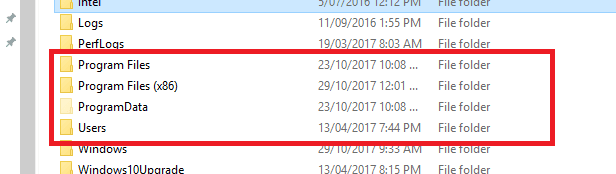
Hello Mike now as far as I know the obvious places are as you say in the program files ie Progam Files Program Fies x86 Program Data and User see pic

This is a pic of my 10 machine but as I said as far as I know these are the sites for what you are looking for and also the registry of course if you want to go there.

Of course I stand to be corrected
 

Attachments

  • PROGRAMS.PNG
    PROGRAMS.PNG
    4.7 KB · Views: 43

My Computer My Computer

Computer type
PC/Desktop
Computer Manufacturer/Model Number
Own build (new) Desk1 / Asus ROG Win 7 / Desk2 1st build
OS
Desk1 7 Home Prem / Desk2 10 Pro / Main lap Asus ROG 10 Pro 2 laptop Toshiba 7 Pro Asus P2520 7 & 10
CPU
Desk1 i5 3750K / Laptop i7 GTX 860M / Desk2 i5 2500
Motherboard
Desk1 Asus P877-V / Desk2 Gigabyte H67 UD3H / Laptop ?
Memory
Desk1 8GB (1866) / Desk2 16GB (1333) / Laptop 8Gb DDR3
Graphics Card(s)
Desk 1& 2NVidia GTX 650 & Laptops on board Intel
Sound Card
Desk 1 & 2 -XONAR DG Realtek High Def audio Laptop
Monitor(s) Displays
Desk 1 Benq HD 2450 / Desk2 Philips 24" / Laptop 17.5"
Screen Resolution
1920x1080 D1 & D2 & Laptop 1
Hard Drives
Desk1 Samsung 120GB 830 SSD
Asus ROG 256GB 850 Pro SSD
Desk2 Samsung 840 256 SSD
Toshiba 120GB EVO
PSU
Desk 1 Corsair HX 1050/ Laptop ? / Desk 2 Corsair HX 650
Case
Desk 1 Cooler HAF XM ? Toshiba laptop / Desk2 Coolermaster
Cooling
Fans on all Desk1 -2 Desk2 - all Coolermasters 5 Laptop ?
Keyboard
Desk 1 MS Sidewinder X6 Desk 2 MS Sidewinder X 4
Mouse
Desk 1&2 - Gigabyte MS 900 gamer - laptop - Logitec wireless
Internet Speed
ADSL2+
Other Info
One other Desktop (tester) and spare Toshba laptop both with SSD's
Running Kaspersky 2016 ISS on all machines config'd identically
Logitec audio stereo systems on each machine (x3)
Canon MG5250MFC
Router/modem TP-Link running WPA2SK
ICIT2LOL
Thank you for your response, yeah those are the places that I know about as well.
On occasion I get software that will install directly to my C:\ drive or I will find a single file or do just dropped somewhere.
jerrysmith
Thank you, every now and then I would go into this folder to clear it out as things build up.
I also would run "temp" as well without the %'s
Does anyone know if these are the only two "temp" folders for where temporary installation extracted data gets stored, are these the only two default locations where temporary installation files get stored?

Both of your responses are generally what I am referring to, files get put in many folders, was hoping there was something Windows had to offer to let its users know, probably not something they want to share with its users.

As mentioned, would rather not have to install some kind of 3rd party piece of software to find this out.
May get a little tedious to have to keep on generating, but does anyone know if there is some kind of log file Windows 7 can generate regarding this?

Anyways thank you both again for your responses
 

My Computer My Computer

Computer type
PC/Desktop
OS
Windows 7 Professional
Well Mike there are a few handy software like WinDirStat WinDirStat - Windows Directory Statistics that is light weight and handy for finding files etc it doesn't do any harm trying it and there are more softwares available see this list Best Free Disk Space Analyzer | Gizmo's Freeware

I mean you can try them and always uninstall when you want if it is not what you want and some are portable meaning you don't necessarily have to install them.

Just as by the by the site I linked is very good for all sorts of software I use it all the time and the stuff they have is pretty safe to use.

If you also want to get a bit more out of your machine see this too
USING OPTIMISE TUTORIAL
Just a little something that will make your machine a little faster and more efficient is this Optimize Windows 7 - Windows 7 Help Forums
It is my bible when installing an OS on my machines and also when I am fixing friends and family machines too.
Now if you go through it slowly you will find lots of tweaks and they are all really thoroughly done by the authour Brink a fellow who is in my mind brilliant and if you need to ask questions he is just the most obliging person around.
The other thing is that you may lose some of the "bling" such as transparency (you don't have to I find it unnecessary) and all the tweaks are reversible.
If you do get stuck just post back in that tutorial and you will get help. Another bonus using this tutorial is that it helps you find your way around your machine and Windows 7!
Just one tip I would say you start with is do this Registry - Backup and Restore - Windows 7 Help Forums do this and it will save you a lot of grief if you are ever doing things in the registry and even if you don't it is a good back up to have if your system ever gets corrupted.
(pretyped to save time)
 

My Computer My Computer

Computer type
PC/Desktop
Computer Manufacturer/Model Number
Own build (new) Desk1 / Asus ROG Win 7 / Desk2 1st build
OS
Desk1 7 Home Prem / Desk2 10 Pro / Main lap Asus ROG 10 Pro 2 laptop Toshiba 7 Pro Asus P2520 7 & 10
CPU
Desk1 i5 3750K / Laptop i7 GTX 860M / Desk2 i5 2500
Motherboard
Desk1 Asus P877-V / Desk2 Gigabyte H67 UD3H / Laptop ?
Memory
Desk1 8GB (1866) / Desk2 16GB (1333) / Laptop 8Gb DDR3
Graphics Card(s)
Desk 1& 2NVidia GTX 650 & Laptops on board Intel
Sound Card
Desk 1 & 2 -XONAR DG Realtek High Def audio Laptop
Monitor(s) Displays
Desk 1 Benq HD 2450 / Desk2 Philips 24" / Laptop 17.5"
Screen Resolution
1920x1080 D1 & D2 & Laptop 1
Hard Drives
Desk1 Samsung 120GB 830 SSD
Asus ROG 256GB 850 Pro SSD
Desk2 Samsung 840 256 SSD
Toshiba 120GB EVO
PSU
Desk 1 Corsair HX 1050/ Laptop ? / Desk 2 Corsair HX 650
Case
Desk 1 Cooler HAF XM ? Toshiba laptop / Desk2 Coolermaster
Cooling
Fans on all Desk1 -2 Desk2 - all Coolermasters 5 Laptop ?
Keyboard
Desk 1 MS Sidewinder X6 Desk 2 MS Sidewinder X 4
Mouse
Desk 1&2 - Gigabyte MS 900 gamer - laptop - Logitec wireless
Internet Speed
ADSL2+
Other Info
One other Desktop (tester) and spare Toshba laptop both with SSD's
Running Kaspersky 2016 ISS on all machines config'd identically
Logitec audio stereo systems on each machine (x3)
Canon MG5250MFC
Router/modem TP-Link running WPA2SK
ICIT2LOL
Thank you for your response.
Thank you for the recommendation of Gizmo's, I have used this site quite a few times before as well, it really is a very helpful site.
I actually looked at the Gizmo list link you mentioned once in the past for something else, I didn't think of looking on that site for something like this, I will have to look through some of these items, not sure which ones will display the information that I am looking for. It isn't necessarily a space issue I am having but more of a curiousity of where programs are deciding to install files and folders. I will check the WinDirStat program you mention.

Also thank you for the tutorial recommendation.
 

My Computer My Computer

Computer type
PC/Desktop
OS
Windows 7 Professional
Back
Top