
You are using an out of date browser. It may not display this or other websites correctly.
You should upgrade or use an alternative browser.
You should upgrade or use an alternative browser.
Finding pictures on a specific date
- Thread starter dgudgel
- Start date

- Local time
- 12:40 PM
- Messages
- 8,608
In the start search box, type .jpg 4 09
My Computer
- Computer type
- PC/Desktop
- Computer Manufacturer/Model Number
- Bruce ... somewhere in his 40's
- OS
- Windows 7 Ultimate 32bit SP1
- CPU
- Intel(R) Core(TM)2 Quad CPU @ 2.40GHz, 2400 MHz
- Motherboard
- INTEL/D975XBX2
- Memory
- 4 GB
- Graphics Card(s)
- ATI Radeon HD 2600 Pro
- Monitor(s) Displays
- Samsung SyncMaster 914v
- Screen Resolution
- 1280 x 1024
- Hard Drives
- 2/500GB each ... ST3500630AS ATA Device.
One is not connected
- PSU
- Rocketfish 700 W
- Case
- G.Skill Gigabyte Chassis
- Keyboard
- Standard PS/2 Keyboard
- Mouse
- Microsoft PS/2 Mouse
- Internet Speed
- DSL
- Antivirus
- Avira Internet Security
- Browser
- IE 11
- Other Info
- ATI HDMI Audio
My Computer
- OS
- XP / Win7 x64 Pro
- CPU
- Intel Quad-Core Q9450 @ 3.2GHz
- Motherboard
- Asus P5-E
- Memory
- 2x2GB GSkill DDR2
- Graphics Card(s)
- NVIDIA GeForce 8600 GTS (EVGA)
- Monitor(s) Displays
- Dell 2408WFP
- Screen Resolution
- 1920x1200

You can use search parameters datetaken and datemodified:
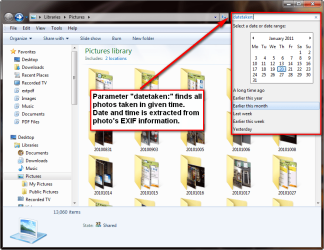
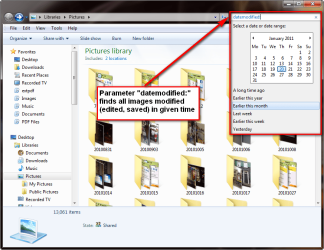
Some examples. A search datetaken:14/04/2010 would find all photos taken on April 14th, 2010. The date is extracted from photo's exif information. Notice that the date format in search must be the same used by the current user account, here in my computer for instance the typical European format with DD/MM/YYYY:

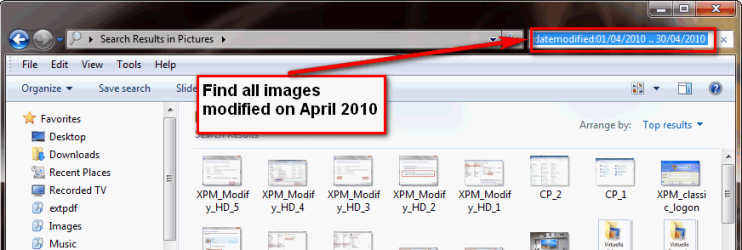
A search datemodified:01/04/2010 .. 30/04/2010 would find all images modified (for instance saved) on April, 2010:
More about Windows Search:
Kari
Some examples. A search datetaken:14/04/2010 would find all photos taken on April 14th, 2010. The date is extracted from photo's exif information. Notice that the date format in search must be the same used by the current user account, here in my computer for instance the typical European format with DD/MM/YYYY:
A search datemodified:01/04/2010 .. 30/04/2010 would find all images modified (for instance saved) on April, 2010:
More about Windows Search:
- http://www.sevenforums.com/tutorials/129437-windows-search-configure-use.html
- Windows Search Advanced Query Syntax
Kari
My Computer
- Computer type
- Laptop
- Computer Manufacturer/Model Number
- HP ENVY 17-1150eg
- OS
- Windows 10 Pro x64 EN-GB
- CPU
- 1.6 GHz Intel Core i7-720QM Processor
- Memory
- 6 GB
- Graphics Card(s)
- ATI Mobility Radeon HD 5850 Graphics
- Sound Card
- Beats sound system with integrated subwoofer
- Monitor(s) Displays
- 17" laptop display, 22" LED and 32" Full HD TV through HDMI
- Screen Resolution
- 1600*900 (1), 1920*1080 (2&3)
- Hard Drives
- Internal: 2 x 500 GB SATA Hard Disk Drive 7200 rpm
External: 2TB for backups, 3TB USB3 network drive for media
- Cooling
- As Envy runs a bit warm, I have it on a Cooler Master pad
- Keyboard
- Logitech diNovo Media Desktop Laser (bluetooth)
- Mouse
- Logitech Performance Mouse MX
- Internet Speed
- 50/10 Mbps VDSL
- Antivirus
- Windows Defender 4.3.9431.0
- Browser
- Maxthon 3.5.2., IE11
OK Thanks
Thanks everyone, it would be easier to search for a certain time frame period but I can do it on a certain date. Adding the date after the type of file works great. For instance I did a lot of scanning around 3/15/09 and would have liked a search to find the scans from about 3/10 to 3/15 I just have to do each day singly. I cant imagine windows 7 not having that capability whereas xp has the capability. Very useful.
Thanks everyone, it would be easier to search for a certain time frame period but I can do it on a certain date. Adding the date after the type of file works great. For instance I did a lot of scanning around 3/15/09 and would have liked a search to find the scans from about 3/10 to 3/15 I just have to do each day singly. I cant imagine windows 7 not having that capability whereas xp has the capability. Very useful.
My Computer
- OS
- windows home premium 32bit
Thanks everyone, it would be easier to search for a certain time frame period but I can do it on a certain date. Adding the date after the type of file works great. For instance I did a lot of scanning around 3/15/09 and would have liked a search to find the scans from about 3/10 to 3/15 I just have to do each day singly. I cant imagine windows 7 not having that capability whereas xp has the capability. Very useful.
Kari just showed you how to do this above...
A search datemodified:01/04/2010 .. 30/04/2010 would find all images modified (for instance saved) on April, 2010:
View attachment 133257
More about Windows Search:
* http://www.sevenforums.com/tutorials/129437-windows-search-configure-use.html
* Windows Search Advanced Query Syntax
Kari
My Computer
- OS
- XP / Win7 x64 Pro
- CPU
- Intel Quad-Core Q9450 @ 3.2GHz
- Motherboard
- Asus P5-E
- Memory
- 2x2GB GSkill DDR2
- Graphics Card(s)
- NVIDIA GeForce 8600 GTS (EVGA)
- Monitor(s) Displays
- Dell 2408WFP
- Screen Resolution
- 1920x1200
(1) = You can do that, as I told in my previous post:Thanks everyone, it would be easier to search for a certain time frame period but I can do it on a certain date. (1) Adding the date after the type of file works great. For instance I did a lot of scanning around 3/15/09 and would have liked a search to find the scans from about 3/10 to 3/15 I just have to do each day singly. I cant imagine windows 7 not having that capability whereas xp has the capability. Very useful. (2)
A search datemodified:3/10/2010 .. 3/15/2010 (US date format) or datemodified:10/03/2010 .. 15/03/2010 (European date format) would find all those scans you saved between 10th of March and 15th of March, as you want to.
(2) = You can do so much more with new Windows Search. Everything that was possible in XP, and some more. Did you bother to check those links I gave you?
Kari
My Computer
- Computer type
- Laptop
- Computer Manufacturer/Model Number
- HP ENVY 17-1150eg
- OS
- Windows 10 Pro x64 EN-GB
- CPU
- 1.6 GHz Intel Core i7-720QM Processor
- Memory
- 6 GB
- Graphics Card(s)
- ATI Mobility Radeon HD 5850 Graphics
- Sound Card
- Beats sound system with integrated subwoofer
- Monitor(s) Displays
- 17" laptop display, 22" LED and 32" Full HD TV through HDMI
- Screen Resolution
- 1600*900 (1), 1920*1080 (2&3)
- Hard Drives
- Internal: 2 x 500 GB SATA Hard Disk Drive 7200 rpm
External: 2TB for backups, 3TB USB3 network drive for media
- Cooling
- As Envy runs a bit warm, I have it on a Cooler Master pad
- Keyboard
- Logitech diNovo Media Desktop Laser (bluetooth)
- Mouse
- Logitech Performance Mouse MX
- Internet Speed
- 50/10 Mbps VDSL
- Antivirus
- Windows Defender 4.3.9431.0
- Browser
- Maxthon 3.5.2., IE11