Fingerprint reader stopped working

Kika

New member
Member
VIP
Local time
1:27 PM
Messages
113
Location
England
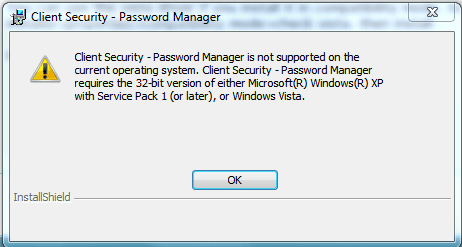
Hope someone can help me with this, Windows update offer me newer driver for my fingerprint reader AuthenTec AES2501A and after that update reader simply stopped working. If I try to enroll fingerprints it sais Windows did not find any biometric devices, also it says same at logon screen and I always need type password which is annoying. There are no 7 drivers for my laptop model, only Vista. I upgraded from Vista to 7, driver was installed under Vista and it did always work with 7 with no problem, stupid me I went and updated it :( I removed driver and now when I do new hardware scan Windows can not find driver for my device or if I tell it look online, it will install same driver that does not work. Vista driver comes with ThinkVantage security solutions and the installer simply will not run under 7 (operating system not supported error). What to do? Is there any way to make installer not check my system? Or how I get driver out from exe file? I don't want install Vista and then 7 again and all the programs, I will spend all day on it :(
 

My Computer

Computer Manufacturer/Model Number
IBM
OS
Windows 7 x64
CPU
Intel Core 2 T8100 @ 2.10GHz
Memory
3 GB SO-DIMM DDR2-800
Graphics Card(s)
Nvidia GeForce Go 7300
Sound Card
SteelSeries Siberia 7.1 3D
Screen Resolution
1680x1050
Mouse
Logitech MX
Hope someone can help me with this, Windows update offer me newer driver for my fingerprint reader AuthenTec AES2501A and after that update reader simply stopped working. If I try to enroll fingerprints it sais Windows did not find any biometric devices, also it says same at logon screen and I always need type password which is annoying. There are no 7 drivers for my laptop model, only Vista. I upgraded from Vista to 7, driver was installed under Vista and it did always work with 7 with no problem, stupid me I went and updated it :( I removed driver and now when I do new hardware scan Windows can not find driver for my device or if I tell it look online, it will install same driver that does not work. Vista driver comes with ThinkVantage security solutions and the installer simply will not run under 7 (operating system not supported error). What to do? Is there any way to make installer not check my system? Or how I get driver out from exe file? I don't want install Vista and then 7 again and all the programs, I will spend all day on it :(


You can use the vista driver if you install it in compatibility mode. to do this right click the installer>properties>compatibility mode>check vista. then install

Ken
 

My Computer

Computer Manufacturer/Model Number
HP Pavillion dv-7 1005 Tx
OS
Win 8 Release candidate 8400
CPU
[email protected]
Memory
4 gigs
Graphics Card(s)
Nvidia 9600M
Sound Card
HD built-in
Monitor(s) Displays
17" Wxga
Screen Resolution
1440x900
Cooling
none
Internet Speed
45Mb down 5Mb up
No it still gives me operating system not supported message. The driver is installed with this program. The program is already installed under Vista here and did work okey before driver update, so guess I will only need driver? But how to get driver from that package? Did try with 7zip already, it will not extract it.
 

Attachments

  • Capture.PNG
    Capture.PNG
    10.6 KB · Views: 10

My Computer

Computer Manufacturer/Model Number
IBM
OS
Windows 7 x64
CPU
Intel Core 2 T8100 @ 2.10GHz
Memory
3 GB SO-DIMM DDR2-800
Graphics Card(s)
Nvidia GeForce Go 7300
Sound Card
SteelSeries Siberia 7.1 3D
Screen Resolution
1680x1050
Mouse
Logitech MX
No it still gives me operating system not supported message. The driver is installed with this program. The program is already installed under Vista here and did work okey before driver update, so guess I will only need driver? But how to get driver from that package? Did try with 7zip already, it will not extract it.

What OS are you using? 64 Bit?
 

My Computer

Computer Manufacturer/Model Number
HP Pavillion dv-7 1005 Tx
OS
Win 8 Release candidate 8400
CPU
[email protected]
Memory
4 gigs
Graphics Card(s)
Nvidia 9600M
Sound Card
HD built-in
Monitor(s) Displays
17" Wxga
Screen Resolution
1440x900
Cooling
none
Internet Speed
45Mb down 5Mb up
32 Bit 7 home premium
 

My Computer

Computer Manufacturer/Model Number
IBM
OS
Windows 7 x64
CPU
Intel Core 2 T8100 @ 2.10GHz
Memory
3 GB SO-DIMM DDR2-800
Graphics Card(s)
Nvidia GeForce Go 7300
Sound Card
SteelSeries Siberia 7.1 3D
Screen Resolution
1680x1050
Mouse
Logitech MX
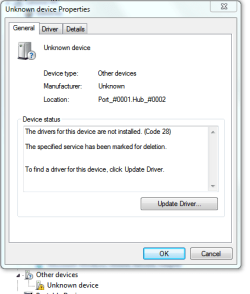
I found single driver but... Now new problem, it will say the driver will get deleted and will not install it even install finished without errors


Edit: no matter how I install Vista driver, with installer or manually, after boot is always back that new driver which does not work :cry: When removing I choose to delete driver but it will come back
 

Attachments

  • Capture.PNG
    Capture.PNG
    12.2 KB · Views: 5
Last edited:

My Computer

Computer Manufacturer/Model Number
IBM
OS
Windows 7 x64
CPU
Intel Core 2 T8100 @ 2.10GHz
Memory
3 GB SO-DIMM DDR2-800
Graphics Card(s)
Nvidia GeForce Go 7300
Sound Card
SteelSeries Siberia 7.1 3D
Screen Resolution
1680x1050
Mouse
Logitech MX
up :(
 

My Computer

Computer Manufacturer/Model Number
IBM
OS
Windows 7 x64
CPU
Intel Core 2 T8100 @ 2.10GHz
Memory
3 GB SO-DIMM DDR2-800
Graphics Card(s)
Nvidia GeForce Go 7300
Sound Card
SteelSeries Siberia 7.1 3D
Screen Resolution
1680x1050
Mouse
Logitech MX
I found single driver but... Now new problem, it will say the driver will get deleted and will not install it even install finished without errors


Edit: no matter how I install Vista driver, with installer or manually, after boot is always back that new driver which does not work :cry: When removing I choose to delete driver but it will come back

Do you have a backup we can restore from?
 

My Computer

Computer Manufacturer/Model Number
HP Pavillion dv-7 1005 Tx
OS
Win 8 Release candidate 8400
CPU
[email protected]
Memory
4 gigs
Graphics Card(s)
Nvidia 9600M
Sound Card
HD built-in
Monitor(s) Displays
17" Wxga
Screen Resolution
1440x900
Cooling
none
Internet Speed
45Mb down 5Mb up
No, with those multiple removing and reinstalling drivers so many restore points were made that now old ones are gone and last one is already with that wrong driver. :(
 

My Computer

Computer Manufacturer/Model Number
IBM
OS
Windows 7 x64
CPU
Intel Core 2 T8100 @ 2.10GHz
Memory
3 GB SO-DIMM DDR2-800
Graphics Card(s)
Nvidia GeForce Go 7300
Sound Card
SteelSeries Siberia 7.1 3D
Screen Resolution
1680x1050
Mouse
Logitech MX
Hi people! I came to say I fixed this finally. Did have to open windows installed biometric device from control panel and disable it and IBM program did start work again, I get logon at boot and at password manager again, all is working perfictly fine (: Just the useless icon now on control panel but that is just cosmetical stuff, important is it works and I didn't have to do reinstall. Ah, and I was able to install old driver after disabling windows installed biometrics.
Thanks to everyone who did try to help find me solution with this (:
 

My Computer

Computer Manufacturer/Model Number
IBM
OS
Windows 7 x64
CPU
Intel Core 2 T8100 @ 2.10GHz
Memory
3 GB SO-DIMM DDR2-800
Graphics Card(s)
Nvidia GeForce Go 7300
Sound Card
SteelSeries Siberia 7.1 3D
Screen Resolution
1680x1050
Mouse
Logitech MX
Back
Top