Firefox 3.6.3 Private Data ?

brightsun

Banned
Local time
5:53 AM
Messages
256
I have Firefox 3.6.3 am trying to clear cookies cache history in other versions I did

  1. Click the Tools menu.
  2. Select Clear Private Data.
  3. Select the 'Cache' checkbox.
  4. Click the 'Clear Private Data Now' button.
I do not see the Clear Private Data. in Firefox 3.6.3 dose anyone know where it is ?
 

My Computer

OS
w7
I have Firefox 3.6.3 am trying to clear cookies cache history in other versions I did

  1. Click the Tools menu.
  2. Select Clear Private Data.
  3. Select the 'Cache' checkbox.
  4. Click the 'Clear Private Data Now' button.
I do not see the Clear Private Data. in Firefox 3.6.3 dose anyone know where it is ?

If you're not using Firefox under profile settings, just check all the boxes when clearing its data. Otherwise download and install Ccleaner from: CCleaner - Slim

Let us know the results!

"PLEASE REP ANYONE WHO HELPS YOU"
 

Attachments

  • Capturar.JPG
    Capturar.JPG
    28.3 KB · Views: 2

My Computer

Computer Manufacturer/Model Number
WALLONN7 / LIN BLACK SERIES II
OS
Windows 7 Ultimate x64 SP1
CPU
AMD PHENOM II X6 1090T 3.2GHz
Motherboard
GIGABYTE GA-890FXA-UD7
Memory
8GB G.SKILL RIPJAWS - F3-10666CL7D
Graphics Card(s)
SAPPHIRE ATI RADEON HD 5870 VAPOR X OC
Sound Card
REALTEK DOLBY HOME THEATER
Monitor(s) Displays
LED LG W2486L
Screen Resolution
1080p
Hard Drives
SEAGATE 1TB -ST31000528AS - AHCI MODE - AS SATA
PSU
ZALMAN ZM1000-HP 1000W
Case
THERMALTAKE XASER VI VG4000SWA
Cooling
140MM x3 / 120MM x1 AIR COOLING - THERMALTAKE
Keyboard
MICROSOFT DIGITAL MEDIA KEYBOARD 3000 - USB
Mouse
MICROSOFT BASIC OPTICAL MOUSE 2.0 - USB
Internet Speed
600KBPS
Other Info
MICROSOFT XBOX 360 CONTROLLER
I think it is now labelled "Clear recent History" which is available under "Tools".
 

My Computer

Computer Manufacturer/Model Number
Too many to describe...
OS
Windows 7 x64 pro/ Windows 7 x86 Pro/ XP SP3 x86
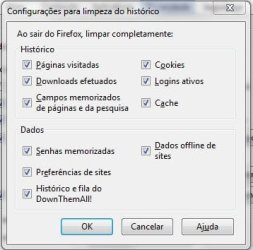
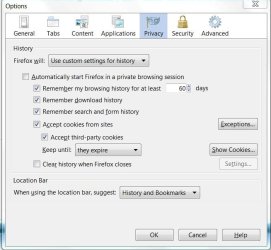
Also under Tools: Privacy -- Clear history when firefox closes (tick) -- Settings.

Yes, as Wallonn7 shows in his screenshot (might look slightly different in 3.6)

clear.png
 

My Computer

OS
Windows XP - Now Windows 7 Home Premium (64-bit).
Firefox? Privacy -- Clear history

I see it under Tools: Privacy -- Clear history. when you click on Clear history a box comes up then under detials which do I check to clear cookies cache history ?
 

My Computer

OS
w7
^there are options for both cookies and cache

clear.png
 

My Computer

OS
Windows XP - Now Windows 7 Home Premium (64-bit).
Firefox? Privacy -- Clear history

I checked the settings under Tools: Privacy --now when . I click on Clear Recent history it will clear cookies cache history ?
 

My Computer

OS
w7
I checked the settings under Tools: Privacy --now when . I click on Clear Recent history it will clear cookies cache history ?

Yes, it'll do. You can use keyboard shortcut too > "Ctrl + Shift + Delete".

Are your doubts solve?!

"PLEASE REP ANYONE WHO HELPS YOU"
 

My Computer

Computer Manufacturer/Model Number
WALLONN7 / LIN BLACK SERIES II
OS
Windows 7 Ultimate x64 SP1
CPU
AMD PHENOM II X6 1090T 3.2GHz
Motherboard
GIGABYTE GA-890FXA-UD7
Memory
8GB G.SKILL RIPJAWS - F3-10666CL7D
Graphics Card(s)
SAPPHIRE ATI RADEON HD 5870 VAPOR X OC
Sound Card
REALTEK DOLBY HOME THEATER
Monitor(s) Displays
LED LG W2486L
Screen Resolution
1080p
Hard Drives
SEAGATE 1TB -ST31000528AS - AHCI MODE - AS SATA
PSU
ZALMAN ZM1000-HP 1000W
Case
THERMALTAKE XASER VI VG4000SWA
Cooling
140MM x3 / 120MM x1 AIR COOLING - THERMALTAKE
Keyboard
MICROSOFT DIGITAL MEDIA KEYBOARD 3000 - USB
Mouse
MICROSOFT BASIC OPTICAL MOUSE 2.0 - USB
Internet Speed
600KBPS
Other Info
MICROSOFT XBOX 360 CONTROLLER
Firefox? Privacy -- Clear history

I click on Clear Recent history under time range which do I put ?
 

My Computer

OS
w7

My Computer

Computer Manufacturer/Model Number
Too many to describe...
OS
Windows 7 x64 pro/ Windows 7 x86 Pro/ XP SP3 x86
Firefox? Privacy -- Clear history

Which option do most people leave it on "Everything" in the time range. ?
 

My Computer

OS
w7
Brightsun, the answer to that depends on what you are trying to accomplish. If you want to browse without a trace, you can always use the private browsing option and everything is automatically gone when you close the private browsing session.

I keep history for 30 days. Many times, I want to go back to a site or a specific part of a site and I can do this through the history. I keep cookies to facilitate logging in to various websites and to keep my settings on some websites. I do go through my cookies monthly and delete those I don't want. If I want to browse without a trace, I use private browsing.
 

My Computer

Computer Manufacturer/Model Number
Home built
OS
Windows 7 Ultimate 32 bit
CPU
Intel(R) Pentium(R) 4 CPU 3.00GHz
Motherboard
ASUS P4P800-VM Motherboard Chipset: Intel 865G + ICH5
Memory
2.50 GB RAM
Graphics Card(s)
NVIDIA GeForce 7600 GS
Sound Card
SoundMax Integrated Digital Audio (Chip)
Monitor(s) Displays
ViewSonic VX 1962 wm
Screen Resolution
1680 X 1050
Hard Drives
Seagate Barracuda 7200.10 80 GB
ST380215A ATA Device 18.6 GB
Western Digital "My Book" external hard drive 750 GB
Cooling
Fan based
Keyboard
Microsoft Comfort Curve Keyboard 2000 v10 USB
Mouse
Logitec optic USB
Internet Speed
3.01 Mb/s download 0.64 Mb/s upload
Firefox? Privacy -- Clear history

When you leave it on "Everything" in the time range. it clears "Everything" then will it remember to save the passwords when you start going back to sites ?
 

My Computer

OS
w7
In the Settings for Clearing History window, click the check mark boxes next to the items you want to have cleared automatically when Firefox closes. In this window, under "Data" leave unchecked the boxes "Saved Passwords' and "Site Preferences" if you want to retain your passwords.

Brightsun, i beg of you, please go through the support artice i linked in my previous post. It describes all the available options and will answer all your questions.
 

My Computer

Computer Manufacturer/Model Number
Too many to describe...
OS
Windows 7 x64 pro/ Windows 7 x86 Pro/ XP SP3 x86
I don't have Firefox store my passwords. I enter a password every time. However, many sites have an option to "stay logged in". If you select this option, it is done through cookies. So when I am deleting cookies, I don't delete sevenforums cookies. By doing so, I don't have log in - I don't enter my username nor my password.
 

My Computer

Computer Manufacturer/Model Number
Home built
OS
Windows 7 Ultimate 32 bit
CPU
Intel(R) Pentium(R) 4 CPU 3.00GHz
Motherboard
ASUS P4P800-VM Motherboard Chipset: Intel 865G + ICH5
Memory
2.50 GB RAM
Graphics Card(s)
NVIDIA GeForce 7600 GS
Sound Card
SoundMax Integrated Digital Audio (Chip)
Monitor(s) Displays
ViewSonic VX 1962 wm
Screen Resolution
1680 X 1050
Hard Drives
Seagate Barracuda 7200.10 80 GB
ST380215A ATA Device 18.6 GB
Western Digital "My Book" external hard drive 750 GB
Cooling
Fan based
Keyboard
Microsoft Comfort Curve Keyboard 2000 v10 USB
Mouse
Logitec optic USB
Internet Speed
3.01 Mb/s download 0.64 Mb/s upload
Firefox? Privacy -- Clear history

I went through the support artice It describes all the available options and and answered my questions I got the clearing history cookies cache I did not understand when you clear everything do you have to check passwords to resave passwords ?
 

My Computer

OS
w7
I went through the support artice It describes all the available options and and answered my questions I got the clearing history cookies cache I did not understand when you clear everything do you have to check passwords to resave passwords ?

This is how I have mine setup. For security reasons, I do not save passwords on my computer.
 

Attachments

  • Capture.JPG
    Capture.JPG
    53.1 KB · Views: 10
  • Capture1.JPG
    Capture1.JPG
    45.1 KB · Views: 7

My Computer

Computer Manufacturer/Model Number
Home built
OS
Windows 7 Ultimate 32 bit
CPU
Intel(R) Pentium(R) 4 CPU 3.00GHz
Motherboard
ASUS P4P800-VM Motherboard Chipset: Intel 865G + ICH5
Memory
2.50 GB RAM
Graphics Card(s)
NVIDIA GeForce 7600 GS
Sound Card
SoundMax Integrated Digital Audio (Chip)
Monitor(s) Displays
ViewSonic VX 1962 wm
Screen Resolution
1680 X 1050
Hard Drives
Seagate Barracuda 7200.10 80 GB
ST380215A ATA Device 18.6 GB
Western Digital "My Book" external hard drive 750 GB
Cooling
Fan based
Keyboard
Microsoft Comfort Curve Keyboard 2000 v10 USB
Mouse
Logitec optic USB
Internet Speed
3.01 Mb/s download 0.64 Mb/s upload
Firefox? Privacy -- Clear history

when you clear everything do you have to check passwords to resave passwords ?
 

My Computer

OS
w7
If you want Firefox to save passwords, you must have "Remember passwords for sites" checked.
 

My Computer

Computer Manufacturer/Model Number
Home built
OS
Windows 7 Ultimate 32 bit
CPU
Intel(R) Pentium(R) 4 CPU 3.00GHz
Motherboard
ASUS P4P800-VM Motherboard Chipset: Intel 865G + ICH5
Memory
2.50 GB RAM
Graphics Card(s)
NVIDIA GeForce 7600 GS
Sound Card
SoundMax Integrated Digital Audio (Chip)
Monitor(s) Displays
ViewSonic VX 1962 wm
Screen Resolution
1680 X 1050
Hard Drives
Seagate Barracuda 7200.10 80 GB
ST380215A ATA Device 18.6 GB
Western Digital "My Book" external hard drive 750 GB
Cooling
Fan based
Keyboard
Microsoft Comfort Curve Keyboard 2000 v10 USB
Mouse
Logitec optic USB
Internet Speed
3.01 Mb/s download 0.64 Mb/s upload
Firefox? Privacy -- Clear history

when I clear everything from the history do I have to recheck save passwords, in the "Remember passwords for sites"
 

My Computer

OS
w7
Back
Top