Firefox 3.6

Dj Gudda

New member
Member
Local time
6:29 PM
Messages
30
Is it possible to keep the zoom for all webpages e.g IE 8 custom zoom, in firefox. I have a screen resolution of 1360 x 768 n everytime I visit a new webpage I have to press & hold Ctrl + mouse scroll button to zoom using Firefox 3.6, my computer DPI scale is 135% IE 8 recognizes this n its zoom is set at 135% unless i want more n stays the same for all webpages but FF 3.6 doesn't recognize this n i have to constantly zoom webpages.
 

My Computer

OS
Windows 7 x64
Hi Dj Gudda:)

Follow the following link and it will allow you to download an add on for Firefox that does exactly what you are looking for.

NoSquint: Firefox Extension

It will allow you to:


  • Override the default text-only and full-page (both text and images) zoom levels for all websites
  • Enforce your own foreground and background colors
  • Remember your zoom levels and color settings per site, automatically applying them when you return.
Hope this helps;)


.
 

My Computer

Computer Manufacturer/Model Number
Samsung R60 Plus
OS
Operating System Microsoft Windows 7 Ultimate Build 7600
CPU
Mobile DualCore Intel Core 2 Duo T5550, 1833 MHz (1
Motherboard
ATI Radeon Xpress 1100/1250
Memory
2GB (DDR2-667 DDR2 SDRAM)
Graphics Card(s)
ATI Radeon Xpress 1200 Series (256 MB)
Sound Card
Realtek ALC262 @ ATI SB600 - High Definition
Monitor(s) Displays
Samsung LTN154X3-L01 [15.4" LCD]
Screen Resolution
1280x800
PSU
na
Case
na
Cooling
na
Keyboard
na
  • Like
Reactions: Dom
No problems! I hope it works the way you want it to.:)


.
 

My Computer

Computer Manufacturer/Model Number
Samsung R60 Plus
OS
Operating System Microsoft Windows 7 Ultimate Build 7600
CPU
Mobile DualCore Intel Core 2 Duo T5550, 1833 MHz (1
Motherboard
ATI Radeon Xpress 1100/1250
Memory
2GB (DDR2-667 DDR2 SDRAM)
Graphics Card(s)
ATI Radeon Xpress 1200 Series (256 MB)
Sound Card
Realtek ALC262 @ ATI SB600 - High Definition
Monitor(s) Displays
Samsung LTN154X3-L01 [15.4" LCD]
Screen Resolution
1280x800
PSU
na
Case
na
Cooling
na
Keyboard
na
Wow I thought I wud eventually have to get glasses thanks to u guys I don't & hopefully won't have to.
UNLIMITED THANKS!!!!!!!!!!!
 

My Computer

OS
Windows 7 x64
Wow I thought I wud eventually have to get glasses thanks to u guys I don't & hopefully won't have to.
UNLIMITED THANKS!!!!!!!!!!!


It's a pleasure Dj Gudda.I know the feeling when you have to squint to see the screen.:(

Enjoy.:)


.
 

My Computer

Computer Manufacturer/Model Number
Samsung R60 Plus
OS
Operating System Microsoft Windows 7 Ultimate Build 7600
CPU
Mobile DualCore Intel Core 2 Duo T5550, 1833 MHz (1
Motherboard
ATI Radeon Xpress 1100/1250
Memory
2GB (DDR2-667 DDR2 SDRAM)
Graphics Card(s)
ATI Radeon Xpress 1200 Series (256 MB)
Sound Card
Realtek ALC262 @ ATI SB600 - High Definition
Monitor(s) Displays
Samsung LTN154X3-L01 [15.4" LCD]
Screen Resolution
1280x800
PSU
na
Case
na
Cooling
na
Keyboard
na
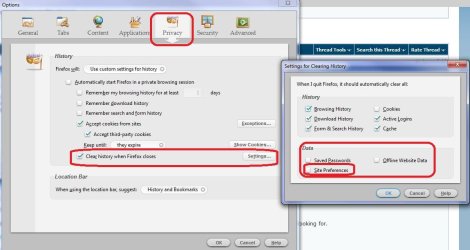
Dj Gudda can you check something for me. In Firefox click on Options then Tools and go here,

ffsettings.JPG

Just curious if the "Site Preferences" is checked under Data, and if it is that is why Firefox isn't remembering your zoom settings.

Another reason for asking is that I have two computers both with Firefox on them and using the same profile in both (just copy and pasted the profile from my main computer). Anyway just checked on the second computer for a couple of sites that I have zoomed on my main, and the zoom settings were still there even after moving the profile.

Guess what I am trying to say is that it isn't a problem with Firefox remembering the zoom settings, but a setting in Firefox that is clearing them (or possibly even a 3rd party cleaning utility like ccleaner for example).

P.S. Disable that plugin before testing, don't need ton uninstall it.

Edit: Just tested it and that setting is the one responsible for the zoom settings (among any other things). Pretty sure if you go into the options and uncheck it you won't need that plugin anymore.
 

My Computer

Computer type
PC/Desktop
Computer Manufacturer/Model Number
Me
OS
Win 7 Ultimate x64
CPU
FX-8350 @ 4.6 GHz so far
Motherboard
Asus M5A97 EVO
Memory
ADATA XPG V1 Series Black 8GB DDR3 1600
Graphics Card(s)
Sapphire R9 270x Dual-X
Sound Card
Xonar DGX w/ Corsair Vengence 1300
Monitor(s) Displays
Acer S232HL Abid
Screen Resolution
1920x1080
Hard Drives
120 GB OCZ Vertex 3
500 GB Seagate 7200.12
PSU
Antec Earthwatts 650W Green
Case
Antec Three Hundred
Cooling
Cooler Master 212 EVO
Keyboard
Logitech G510
Mouse
Logitech G500s
Internet Speed
35000/3000
Juz 1 2 ask,since i'm using FF 3.6,everytime i click another link,it x open in another window,only another tab.can some1 here tell me y?
 

My Computer

Computer Manufacturer/Model Number
Acer Aspire 4520
OS
Windows 7 Ultimate x86/Ubuntu 10.10
Memory
2.5 GB
Graphics Card(s)
Nvidia GeForce 7000M
it does this by default, to disable it go tools>options>tabs and deselect "open new windows in a new tab instead"
 

My Computer

Computer type
PC/Desktop
Computer Manufacturer/Model Number
Medion Erazer (note to self: insert model number) - with custom additions
OS
Windows 10 Pro x64
CPU
Intel Core i5 7400 @ 3.00GHz
Motherboard
OEM supllied with PC
Memory
8GB 2133Mhz DDR4 (OEM supplied)
Graphics Card(s)
Gygabyte Windforce GTX 1050Ti (Factory Overclocked)
Sound Card
Realtek
Monitor(s) Displays
Acer Al1980 + HKC
Screen Resolution
1360*768(HKC) / 1280*1024(Acer)
Hard Drives
1TB Toshiba
1TB WD Caviar Green
120GB Samsung Evo 840
PSU
OEM supplied (no power rating on case)
Case
OEM Supplied
Cooling
Stock
Keyboard
Logitech Wireless
Mouse
Logitect Wireless
Internet Speed
40Mb/s Down 10Mb/s Up
Antivirus
Defender
Browser
Firefox

My Computer

Computer Manufacturer/Model Number
Acer Aspire 4520
OS
Windows 7 Ultimate x86/Ubuntu 10.10
Memory
2.5 GB
Graphics Card(s)
Nvidia GeForce 7000M
no problem, glad to help
 

My Computer

Computer type
PC/Desktop
Computer Manufacturer/Model Number
Medion Erazer (note to self: insert model number) - with custom additions
OS
Windows 10 Pro x64
CPU
Intel Core i5 7400 @ 3.00GHz
Motherboard
OEM supllied with PC
Memory
8GB 2133Mhz DDR4 (OEM supplied)
Graphics Card(s)
Gygabyte Windforce GTX 1050Ti (Factory Overclocked)
Sound Card
Realtek
Monitor(s) Displays
Acer Al1980 + HKC
Screen Resolution
1360*768(HKC) / 1280*1024(Acer)
Hard Drives
1TB Toshiba
1TB WD Caviar Green
120GB Samsung Evo 840
PSU
OEM supplied (no power rating on case)
Case
OEM Supplied
Cooling
Stock
Keyboard
Logitech Wireless
Mouse
Logitect Wireless
Internet Speed
40Mb/s Down 10Mb/s Up
Antivirus
Defender
Browser
Firefox
Hi Dj Gudda:)

Follow the following link and it will allow you to download an add on for Firefox that does exactly what you are looking for.

NoSquint: Firefox Extension

It will allow you to:


  • Override the default text-only and full-page (both text and images) zoom levels for all websites
  • Enforce your own foreground and background colors
  • Remember your zoom levels and color settings per site, automatically applying them when you return.
Hope this helps;)


.

Thank YOU very much bro
I searched the forum for fixing the erroneous zooming, thanks God i found it here..
I swear I was planning to quit FF only for it's SILLY zoom technique (I wonder does Mozilla happy with it !)
but again, FireFox still holds the crown .. :D

Tnx again ...
 

My Computer

Computer Manufacturer/Model Number
Gigabyte
OS
Win7 Ultimate 32bit
CPU
3Ghz /2MB L2
Motherboard
Gigabyte 945 S3P
Memory
2GB
Graphics Card(s)
1GB nVidia 5800 GT
Sound Card
built in
Monitor(s) Displays
Acer 17"
Hard Drives
320 GB
160 GB
PSU
400 W
Case
Discovery
Cooling
n/a
Interesting info from Stormy13, but the Screen shot he posted does not appear on my version of FF (updated last week to latest version). Tools /Options brings up a different set of headings than he shows, altogether.
 

My Computer

OS
Windows 7
Hi I just tried the NoSquint addon not bad. Another good addon for anyone who's interested is QuickPageZoom 1.6.3 (here) sits by the lower RH coner of the taskbar, a zoom in and zoom out button right click to reset either no need to drag multiple buttons to where you want them.
 

My Computer

Computer type
PC/Desktop
Computer Manufacturer/Model Number
My own abomination, I call it the Money Pit
OS
Windows 10 Pro x 2/Windows 11 Home
CPU
Intel i7 2600K @ 3.40 GHz
Motherboard
ASUS Sabertooth P67
Memory
Corsair Vengeance 16GB DDR3 1600MHz CL8 Dual Channel Kit
Graphics Card(s)
EVGA GeForce RTX 3080 XC3 ULTRA GAMING 10GB GDDR6X
Sound Card
Onboard Realtek or Nvidia High Definition Audio (HDMI)
Monitor(s) Displays
Samsung JS7000 50" SUHD TV or Samsung 27" FHD 60Hz 8ms GTG V
Screen Resolution
1920 x 1080
Hard Drives
1 x Samsung 870 EVO 250 GB SSD (Windows 10 Pro), 1 x Samsung 850 EVO 250 GB SSD (Windows 10 Pro)
PSU
Corsair AX860 - 860W Modular Power Supply
Case
Phanteks Enthoo Luxe Full Tower Case - Black
Cooling
CORSAIR Hydro Series H150i PRO RGB 360mm Liquid CPU Cooler
Keyboard
Logitech K830 Illuminated Living-Room Keyboard
Mouse
Logitech MX Anywhere 2S Wireless Mouse
Internet Speed
100 Mbps
Antivirus
ESET Internet Security
Browser
Latest Version Of Firefox & Microsoft Edge Chromium Stable
Other Info
LG Super Multi Blue Internal Blu-ray Disk Rewriter - BH10LS30
6x2 HDMI Switcher (6 inputs, 2 outputs) so I can send the output of my Cable Box, Roku, or any my 4 computers to either my TV or Monitor separately or simultaneously.
Back
Top