Firefox 34 Launches With Yahoo As Its Default Search Engine

You're welcome.

One way may have been adding the Yahoo!7 toolbar, but if you:
I hate the combined Address/Search bars that most browsers use.
One reason I hate using IE and Chrome.
Then that's not an option, but that is your call.

Two other avenues might be:
1.) Posting on the PM forum to see if anybody there might have a way to force Yahoo!7 to install.
And,
2.) Contact Yahoo!7 directly, or their Forum they might know of a way.

Especially #2, I would think Yahoo!7 would feel insulted that a fellow countryman couldn't install one of their features.


Related:
https://au.help.yahoo.com/kb/search
 

My Computer My Computer

At a glance

Originally Win 7 Hm Prem x64 Ver 6.1.7600 Bui...Intel i3 530 2.93GHz, 2933MHz 2 Cores 4 Logic...6GB of 1,333MHz DDR3 SDRAM32MB Intel Graphics Media Accelerator HD IGChip
Computer type
PC/Desktop
Computer Manufacturer/Model Number
Gateway DX4831-01e (Mid-Tower Desktop)
OS
Originally Win 7 Hm Prem x64 Ver 6.1.7600 Build 7601-SP1 | Upgraded to Windows 10 December 14, 2019
CPU
Intel i3 530 2.93GHz, 2933MHz 2 Cores 4 Logical Processors
Motherboard
Gateway H57M01 133 megahertz
Memory
6GB of 1,333MHz DDR3 SDRAM
Graphics Card(s)
32MB Intel Graphics Media Accelerator HD IGChip
Sound Card
Realtek High Definition Audio
Monitor(s) Displays
Gateway HX2000 20inch TFT active matrix TN
Screen Resolution
1600 x 900 x 59 hertz
Hard Drives
WDC WD10EADS-00M2B0 [HDD] (1000.20 GB) -- drive 0,
HL-DT-ST DVDRAM GH41N [CD-ROM dr]
Four card readers, and Four USB 2.0
PSU
300watts.
Case
Mid-Tower Desktop
Cooling
Stock from Gateway
Keyboard
Natural Ergonomic Keyboard 4000, see Other Info
Mouse
Orig. Gateway wore out now using Insignia USB wired optical
Internet Speed
Vz FIOS 10ms png 57.64Mbps down 65.53Mbps up Speedtest.org
Antivirus
Zamana Anti-logger with Anti-malware, MSE, Windows Firewall,
Browser
IE11.0.9600.19399-Upd ver11.0.135, Firefox 68.0.1 x64
Other Info
System Specs by Belarc.

BIOS: American Megatrends Inc. P01-A0 11/17/2009

Replaced the MS 'Natural' Standard PS/2 Enhanced 101-102 Keyboard with a new Natural Ergonomic Keyboard 4000 on August 1st 2014.

Canon Pixma MG3222 Printer.

Updated to IE11 on 12102015 | Fios Quantum Router g1100

Additional AV: SpywareBlaster, manual Mbam, SAS
FF34 Search Box Issues

One way may have been adding the Yahoo!7 toolbar, but if you:
I hate the combined Address/Search bars that most browsers use.
One reason I hate using IE and Chrome.
Then that's not an option, but that is your call.
It was just a standard search engine (like Yahoo! UK).

:focus:
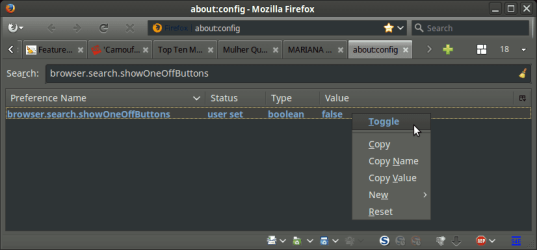
If you are having problems with the Search box in FF34, try this:

  • Type about:config in the address bar to open the Config page
  • Click the "I'll be careful, I promise!" button
  • Search for browser.search.showOneOffButtons
  • Set the value to false (I'd already toggled it before I took the screenshot)
FF34 Search Config 02.png
 

My Computer My Computer

At a glance

W7 Ultimate SP1, LM19.2 MATE, W10 Home 1703, ...AMD Phenom II x6 1100T, 3.3 GHz12GB DDR3 1333 G-Skill (4GB x 2), G-Skill (2G...NVIDIA GeForce GTX 660
Computer type
PC/Desktop
Computer Manufacturer/Model Number
n/a
OS
W7 Ultimate SP1, LM19.2 MATE, W10 Home 1703, W10 Pro 1703 VM, #All 64 bit
CPU
AMD Phenom II x6 1100T, 3.3 GHz
Motherboard
ASUS M4A88T-M/USB3 (AM3)
Memory
12GB DDR3 1333 G-Skill (4GB x 2), G-Skill (2GB x 2)
Graphics Card(s)
NVIDIA GeForce GTX 660
Sound Card
Realtek?
Monitor(s) Displays
Samsung S23B350
Screen Resolution
1920x1080
Hard Drives
WD Green 2TB (SATA), WD Green 3TB (SATA), WD Blue 4TB (SATA), WD Blue 6TB (SATA)
PSU
Cooler Master
Case
Antec GX300 Tower
Cooling
3x Antec TRICOOL 120mm Fans
Mouse
Wired Optical
Internet Speed
DSL
Antivirus
Avast
Browser
Pale Moon (64 bit)
Other Info
2018-12-27 Upgraded HDDs
2015-12-10 Upgraded case, graphics card, storage
2015-08-15 Upgraded motherboard & RAM
2015-07-15 Upgraded LM17.1 to LM17.2
I hate the combined Address/Search bars that most browsers use.
One reason I hate using IE and Chrome.

See, this is something that I don't understand at all. Like, at all!
Try to type something in the address bar that does not correlate to any webpage you've ever visited in Firefox, it'll act stupid for up to ten seconds wondering what to do, then just do a web search based on your search engine anyway, so what's the point of having a separate search bar? If I had a € for every time I accidentally started typing a search in FF's address bar, then having to move over to the search bar and start typing again, I'd be retired by now and on my way to Hawaii or something.
 

My Computer My Computer

At a glance

Windows 7 Home Premium x64Intel Core i5 2500K8GB DDR3nVidia GeForce GTX650 Ti BOOST
Computer type
Laptop
Computer Manufacturer/Model Number
Custom
OS
Windows 7 Home Premium x64
CPU
Intel Core i5 2500K
Motherboard
MSI MS-7750
Memory
8GB DDR3
Graphics Card(s)
nVidia GeForce GTX650 Ti BOOST
Sound Card
Realtek
Monitor(s) Displays
21' Philips
Screen Resolution
Full HD
Hard Drives
1TB
PSU
500W
I hate the combined Address/Search bars that most browsers use.
One reason I hate using IE and Chrome.
See, this is something that I don't understand at all. Like, at all!
Try to type something in the address bar that does not correlate to any webpage you've ever visited in Firefox, it'll act stupid for up to ten seconds wondering what to do, then just do a web search based on your search engine anyway, so what's the point of having a separate search bar? If I had a € for every time I accidentally started typing a search in FF's address bar, then having to move over to the search bar and start typing again, I'd be retired by now and on my way to Hawaii or something.
How do you view the current page URL once you start typing in the Address bar?

Chrome seems to be very popular for some unknown reason, so obviously a lot of people like (or at least don't object to) the horrible system. :confused:

Personally I hardly ever use the Address bar, other than to copy URLs from it.
I almost always use the Search box or the Context Menu (I have Context Search installed).
I also have Tab Mix Plus installed and set to open a new tab when searching.

Even if I want to go to some site, I'll search for it and then choose it from the results (unless I have already bookmarked it).

I also hate the all-in-one buttons that all browsers use these days.
Luckily, I can still run my modified Personal Menu add-on in PM25 (it has broken icons in FF34).
Pale Moon GUI.png
 

My Computer My Computer

At a glance

W7 Ultimate SP1, LM19.2 MATE, W10 Home 1703, ...AMD Phenom II x6 1100T, 3.3 GHz12GB DDR3 1333 G-Skill (4GB x 2), G-Skill (2G...NVIDIA GeForce GTX 660
Computer type
PC/Desktop
Computer Manufacturer/Model Number
n/a
OS
W7 Ultimate SP1, LM19.2 MATE, W10 Home 1703, W10 Pro 1703 VM, #All 64 bit
CPU
AMD Phenom II x6 1100T, 3.3 GHz
Motherboard
ASUS M4A88T-M/USB3 (AM3)
Memory
12GB DDR3 1333 G-Skill (4GB x 2), G-Skill (2GB x 2)
Graphics Card(s)
NVIDIA GeForce GTX 660
Sound Card
Realtek?
Monitor(s) Displays
Samsung S23B350
Screen Resolution
1920x1080
Hard Drives
WD Green 2TB (SATA), WD Green 3TB (SATA), WD Blue 4TB (SATA), WD Blue 6TB (SATA)
PSU
Cooler Master
Case
Antec GX300 Tower
Cooling
3x Antec TRICOOL 120mm Fans
Mouse
Wired Optical
Internet Speed
DSL
Antivirus
Avast
Browser
Pale Moon (64 bit)
Other Info
2018-12-27 Upgraded HDDs
2015-12-10 Upgraded case, graphics card, storage
2015-08-15 Upgraded motherboard & RAM
2015-07-15 Upgraded LM17.1 to LM17.2
Personally I hardly ever use the Address bar, other than to copy URLs from it.
I almost always use the Search box or the Context Menu (I have Context Search installed).
I also have Tab Mix Plus installed and set to open a new tab when searching.

Even if I want to go to some site, I'll search for it and then choose it from the results (unless I have already bookmarked it).

Hey lehnerus, you sound exactly like me! I hardly ever use the address bar nowadays. Also, the Context Search extension has conveniently replaced the search box for me. Lots of times I Google, or use bookmarks to get to where I want to go. That address bar is mostly just for show now.. lol.
 

My Computer My Computer

At a glance

Windows 7 Home Premium x64
OS
Windows 7 Home Premium x64
External Sources

Personally I hardly ever use the Address bar, other than to copy URLs from it.
I almost always use the Search box or the Context Menu (I have Context Search installed).
I also have Tab Mix Plus installed and set to open a new tab when searching.

Even if I want to go to some site, I'll search for it and then choose it from the results (unless I have already bookmarked it).
Hey lehnerus, you sound exactly like me! I hardly ever use the address bar nowadays. Also, the Context Search extension has conveniently replaced the search box for me. Lots of times I Google, or use bookmarks to get to where I want to go. That address bar is mostly just for show now.. lol.
When I am surfing I almost always use Context Search. :)

I use the Search box if I have copied something from a outside of the browser (like error codes in the Event Viewer).
 

My Computer My Computer

At a glance

W7 Ultimate SP1, LM19.2 MATE, W10 Home 1703, ...AMD Phenom II x6 1100T, 3.3 GHz12GB DDR3 1333 G-Skill (4GB x 2), G-Skill (2G...NVIDIA GeForce GTX 660
Computer type
PC/Desktop
Computer Manufacturer/Model Number
n/a
OS
W7 Ultimate SP1, LM19.2 MATE, W10 Home 1703, W10 Pro 1703 VM, #All 64 bit
CPU
AMD Phenom II x6 1100T, 3.3 GHz
Motherboard
ASUS M4A88T-M/USB3 (AM3)
Memory
12GB DDR3 1333 G-Skill (4GB x 2), G-Skill (2GB x 2)
Graphics Card(s)
NVIDIA GeForce GTX 660
Sound Card
Realtek?
Monitor(s) Displays
Samsung S23B350
Screen Resolution
1920x1080
Hard Drives
WD Green 2TB (SATA), WD Green 3TB (SATA), WD Blue 4TB (SATA), WD Blue 6TB (SATA)
PSU
Cooler Master
Case
Antec GX300 Tower
Cooling
3x Antec TRICOOL 120mm Fans
Mouse
Wired Optical
Internet Speed
DSL
Antivirus
Avast
Browser
Pale Moon (64 bit)
Other Info
2018-12-27 Upgraded HDDs
2015-12-10 Upgraded case, graphics card, storage
2015-08-15 Upgraded motherboard & RAM
2015-07-15 Upgraded LM17.1 to LM17.2
Google is tge best but causes problems outside USA

I live outside the USA and as a search engine Google is the best by far, but in this country, Google frequently changes all its settings including changing to local language and begins to apply its geolocation rules, meaning I can't even understand the menu and change the settings back. Even worse, search content is limited, in line with the local rules, youtube has ridiculous advertisements and suggestions I can't even understand. Yahoo doesn't have these deficiencies. I change the Google options back to normal every time it goes local, but somehow, even with updates turned off, it reverts back to local options. If I log in using my account, settings work only partially.
 

My Computer My Computer

At a glance

W7 Pro 64bitAMD X4 640
Computer type
PC/Desktop
Computer Manufacturer/Model Number
Custom Built
OS
W7 Pro 64bit
CPU
AMD X4 640
Hi ao2014, welcome to 7F! :)

I change the Google options back to normal every time it goes local, but somehow, even with updates turned off, it reverts back to local options. If I log in using my account, settings work only partially.
The driving force in geolocation is called "Bucketfuls of money", and its :party:time for any entity that delivers the internet to you.

It doesn't matter if the webmaster sets the target country or not they can sniff you out by your IP address:
If no information is entered in Webmaster Tools, we'll rely largely on the site's country domain (such as .ca, .de). If you use an international domain (.com, .org, .eu), we'll rely on several signals, including IP address, location information on the page, links to the page, and any relevant information from Google My Business. If you change hosting provider for a country domain, there should be no impact. If you change the hosting provider of an international domain to a provider in another country, we recommend using Webmaster Tools to tell us which country your site should be associated with.

Source: https://support.google.com/webmasters/answer/62399?hl=en

Related Link:
A google search on; Google search options apply its geolocation rules automatically in the US.
   Note
Unfortunately I can't guarantee that what you see is the same as what I see because my location is different than yours. :p
 

My Computer My Computer

At a glance

Originally Win 7 Hm Prem x64 Ver 6.1.7600 Bui...Intel i3 530 2.93GHz, 2933MHz 2 Cores 4 Logic...6GB of 1,333MHz DDR3 SDRAM32MB Intel Graphics Media Accelerator HD IGChip
Computer type
PC/Desktop
Computer Manufacturer/Model Number
Gateway DX4831-01e (Mid-Tower Desktop)
OS
Originally Win 7 Hm Prem x64 Ver 6.1.7600 Build 7601-SP1 | Upgraded to Windows 10 December 14, 2019
CPU
Intel i3 530 2.93GHz, 2933MHz 2 Cores 4 Logical Processors
Motherboard
Gateway H57M01 133 megahertz
Memory
6GB of 1,333MHz DDR3 SDRAM
Graphics Card(s)
32MB Intel Graphics Media Accelerator HD IGChip
Sound Card
Realtek High Definition Audio
Monitor(s) Displays
Gateway HX2000 20inch TFT active matrix TN
Screen Resolution
1600 x 900 x 59 hertz
Hard Drives
WDC WD10EADS-00M2B0 [HDD] (1000.20 GB) -- drive 0,
HL-DT-ST DVDRAM GH41N [CD-ROM dr]
Four card readers, and Four USB 2.0
PSU
300watts.
Case
Mid-Tower Desktop
Cooling
Stock from Gateway
Keyboard
Natural Ergonomic Keyboard 4000, see Other Info
Mouse
Orig. Gateway wore out now using Insignia USB wired optical
Internet Speed
Vz FIOS 10ms png 57.64Mbps down 65.53Mbps up Speedtest.org
Antivirus
Zamana Anti-logger with Anti-malware, MSE, Windows Firewall,
Browser
IE11.0.9600.19399-Upd ver11.0.135, Firefox 68.0.1 x64
Other Info
System Specs by Belarc.

BIOS: American Megatrends Inc. P01-A0 11/17/2009

Replaced the MS 'Natural' Standard PS/2 Enhanced 101-102 Keyboard with a new Natural Ergonomic Keyboard 4000 on August 1st 2014.

Canon Pixma MG3222 Printer.

Updated to IE11 on 12102015 | Fios Quantum Router g1100

Additional AV: SpywareBlaster, manual Mbam, SAS
Back
Top