Firefox 39.0 login issue

vlassis

New member
Member
Local time
9:16 AM
Messages
50
Hello,

I just installed Firefox and I have an issue with auto log in.

I have logged in to a website and asked Firefox to save the user and pass.

If I close Firefox and re-open it, the website is not logged in BUT if I press the log in button the fields (user and pass) are already filled with the correct info.

Is there a way to have it auto log in? I mean, not logging out at all.

In the privacy settings I have set History to use custom settings and selected:

Remember my browsing and dl history
Remember search and form history
Accept cookies from sites
--Accept third party cookis: Always
--Keep untl: I close firefox
Clear history when Firefox closes.

Furthermore I have set an exception of the cookies for the website I want to stay logged in.

In the additional settings (located after clear history when Firefox closes) in the History part I have them all checked except Active Logins and Cookies. In the Data part I have nothing checked.

Any ideas?

Thank you!
 

My Computer

Computer type
PC/Desktop
Computer Manufacturer/Model Number
Custom Build
OS
Windows 7 Professional N (x64)
CPU
Intel i7-4770 @3.40GHz
Motherboard
GIGABYTE H87-D3H (BIOS version F8)
Memory
8,00GB Dual-Channel DDR3 @ 665MHz (9-9-9-24)
Graphics Card(s)
2048MB ATI AMD Radeon R7 200 Series (Sapphire/PCPartner)
Hard Drives
Crucial CT480M (447GB SSD) <-- Windows running here

Seagate Barracuda ST1000DM003 (1TB SATA)
Antivirus
Microsoft Security Essentials
Browser
Safari, Chrome
Hello,

In the privacy settings I have set History to use custom settings and selected:

Remember my browsing and dl history
Remember search and form history
Accept cookies from sites
--Accept third party cookis: Always
--Keep untl: I close firefox
Clear history when Firefox closes.

You've set Firefox to clear cookies when you exit Firefox so obviously it will not keep your login cookie. Not sure why you always accept third party cookies.

Some login cookies for some sites may not persist or may expitre when you leave the site anyway.

EDIT:

Just have a look at cookies that are kept when you re-lauch Firefox. Any cookies left?
 
Last edited:

My Computer

Computer type
Laptop
Computer Manufacturer/Model Number
ASUS
OS
Microsoft Windows 7 Home Premium 64-bit 7601 Multiprocessor Free Service Pack 1
CPU
AMD C-60 APU with Radeon(tm) HD Graphics
Motherboard
ASUSTeK COMPUTER INC. X501U
Memory
4.00 GB
Graphics Card(s)
AMD Radeon HD 6290 Graphics
Sound Card
(1) AMD High Definition Audio Device (2) Realtek High Defi
Screen Resolution
1366 x 768 x 32 bits (4294967296 colors) @ 60 Hz
Hard Drives
Hitachi HTS545050A7E380 SATA Disk Device
Antivirus
Comodo CIS & FW, SecureAplus App Whitelisting, Threatfire
Browser
Cyberfox 64bit, Opera 64bit, Airfox
Other Info
Spy-The-Spy, HitmanPro.Alert, Norton Connect Safe, MJRegWatcher, BitDefender TrafficLight, Voodoo Shield, Zemana AntiMalware
Vlas,

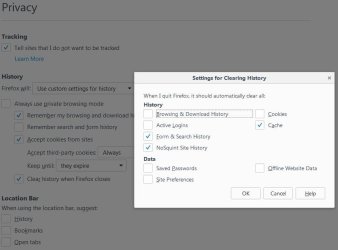
These are the settings I use for auto-logging. I don't have "Clear history when Firefox closes" checked off for me but I wanted to show the clear history settings, you can follow the grayed out settings if you like:
   Note
If you're going to leave your clear history settings checked; Notice the Active Logins, cookies, and Data section are unchecked
Capture.JPG
Cal; Vlas may have sites s/he visits like I have, where the site requires third-party cookies to work properly, like my power utility site.


Related Link:
Clear History When Firefox Closes
 

My Computer

Computer type
PC/Desktop
Computer Manufacturer/Model Number
Gateway DX4831-01e (Mid-Tower Desktop)
OS
Originally Win 7 Hm Prem x64 Ver 6.1.7600 Build 7601-SP1 | Upgraded to Windows 10 December 14, 2019
CPU
Intel i3 530 2.93GHz, 2933MHz 2 Cores 4 Logical Processors
Motherboard
Gateway H57M01 133 megahertz
Memory
6GB of 1,333MHz DDR3 SDRAM
Graphics Card(s)
32MB Intel Graphics Media Accelerator HD IGChip
Sound Card
Realtek High Definition Audio
Monitor(s) Displays
Gateway HX2000 20inch TFT active matrix TN
Screen Resolution
1600 x 900 x 59 hertz
Hard Drives
WDC WD10EADS-00M2B0 [HDD] (1000.20 GB) -- drive 0,
HL-DT-ST DVDRAM GH41N [CD-ROM dr]
Four card readers, and Four USB 2.0
PSU
300watts.
Case
Mid-Tower Desktop
Cooling
Stock from Gateway
Keyboard
Natural Ergonomic Keyboard 4000, see Other Info
Mouse
Orig. Gateway wore out now using Insignia USB wired optical
Internet Speed
Vz FIOS 10ms png 57.64Mbps down 65.53Mbps up Speedtest.org
Antivirus
Zamana Anti-logger with Anti-malware, MSE, Windows Firewall,
Browser
IE11.0.9600.19399-Upd ver11.0.135, Firefox 68.0.1 x64
Other Info
System Specs by Belarc.

BIOS: American Megatrends Inc. P01-A0 11/17/2009

Replaced the MS 'Natural' Standard PS/2 Enhanced 101-102 Keyboard with a new Natural Ergonomic Keyboard 4000 on August 1st 2014.

Canon Pixma MG3222 Printer.

Updated to IE11 on 12102015 | Fios Quantum Router g1100

Additional AV: SpywareBlaster, manual Mbam, SAS
Something I noticed while testing, and failed to mention....:o

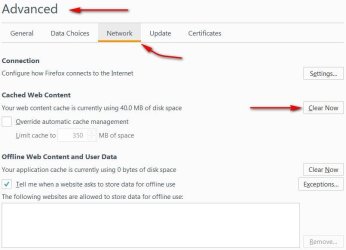
Before you use these settings you should go to: Tools >Options >Advanced >Network Tab and clear the cache. To see if the cache has been cleared, go up to the address bar and refresh the tab, you should see whatever amount listed for total cache used, drop to zero.

393.JPG


If your new settings still don't hold and allow you to auto-login there may be a problem with clearing the cache and it may take several tries to get it right; Depending on your system you may even have to restart FF.
 

My Computer

Computer type
PC/Desktop
Computer Manufacturer/Model Number
Gateway DX4831-01e (Mid-Tower Desktop)
OS
Originally Win 7 Hm Prem x64 Ver 6.1.7600 Build 7601-SP1 | Upgraded to Windows 10 December 14, 2019
CPU
Intel i3 530 2.93GHz, 2933MHz 2 Cores 4 Logical Processors
Motherboard
Gateway H57M01 133 megahertz
Memory
6GB of 1,333MHz DDR3 SDRAM
Graphics Card(s)
32MB Intel Graphics Media Accelerator HD IGChip
Sound Card
Realtek High Definition Audio
Monitor(s) Displays
Gateway HX2000 20inch TFT active matrix TN
Screen Resolution
1600 x 900 x 59 hertz
Hard Drives
WDC WD10EADS-00M2B0 [HDD] (1000.20 GB) -- drive 0,
HL-DT-ST DVDRAM GH41N [CD-ROM dr]
Four card readers, and Four USB 2.0
PSU
300watts.
Case
Mid-Tower Desktop
Cooling
Stock from Gateway
Keyboard
Natural Ergonomic Keyboard 4000, see Other Info
Mouse
Orig. Gateway wore out now using Insignia USB wired optical
Internet Speed
Vz FIOS 10ms png 57.64Mbps down 65.53Mbps up Speedtest.org
Antivirus
Zamana Anti-logger with Anti-malware, MSE, Windows Firewall,
Browser
IE11.0.9600.19399-Upd ver11.0.135, Firefox 68.0.1 x64
Other Info
System Specs by Belarc.

BIOS: American Megatrends Inc. P01-A0 11/17/2009

Replaced the MS 'Natural' Standard PS/2 Enhanced 101-102 Keyboard with a new Natural Ergonomic Keyboard 4000 on August 1st 2014.

Canon Pixma MG3222 Printer.

Updated to IE11 on 12102015 | Fios Quantum Router g1100

Additional AV: SpywareBlaster, manual Mbam, SAS
Back
Top