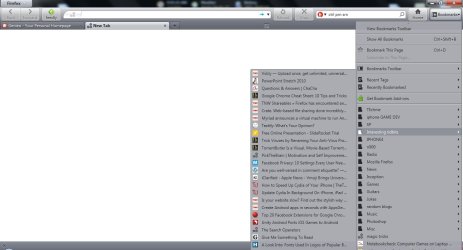
Firefox 4 layout issue.

Raynian

New member
Member
VIP
Local time
7:53 AM
Messages
126
Firefox has been working fine for me for the past few weeks.. Till today, when the whole layout in FF seemed to have decreased in size.the length/thickness of the tabs, bookmarks getting smaller.. =/ . I tried to re-adjust to default zoom but nothing happened.

Any help will be appreciated :D
 

My Computer

Computer type
Laptop
Computer Manufacturer/Model Number
Sony Vaio S 13 A
OS
Microsoft Windows 7 Professional 64-bit
CPU
Intel(R) Core(TM) i7-3520M CPU @ 2.90GHz
Memory
12.00 GB
Graphics Card(s)
(1) Intel(R) HD Graphics 4000 (2) NVIDIA GeForce GT 640M L

Screen Resolution
1600x900
Hard Drives
ATA SAMSUNG SSD 830 SCSI Disk Device
Mouse
Logitech / Microsoft touch Mouse
Other Info
Weight: 1.67 Kg
could you provide a screenshot?

Also - is this a fresh install/upgrade?
Have you downloaded any themes/exts as of late?

comparing 4.0 to 3.6 - my bookmark tab squeezed 1 extra shortcut in
 

My Computer

OS
Windows 7
Also have you updated your Firefox to the most recent version (I think it's 4.1.0)? Maybe it was the update that caused the problem although I doubt this.
 

My Computer

Computer Manufacturer/Model Number
Hewlett-Packard 100-5050
OS
Windows 7 Home Premium SP1 x64
CPU
AMD Athlon II X2 260u, 1800 mHz, 2 Core
Memory
6.0 GB
Sound Card
Realtek High Defenition Audio
Screen Resolution
1600*900
Hard Drives
600 GB
Internet Speed
1.44 Mbps
Doing a screenshot asap. I compared between FF 4.0 and 4.0.1, it is still the same ..
 

My Computer

Computer type
Laptop
Computer Manufacturer/Model Number
Sony Vaio S 13 A
OS
Microsoft Windows 7 Professional 64-bit
CPU
Intel(R) Core(TM) i7-3520M CPU @ 2.90GHz
Memory
12.00 GB
Graphics Card(s)
(1) Intel(R) HD Graphics 4000 (2) NVIDIA GeForce GT 640M L
Screen Resolution
1600x900
Hard Drives
ATA SAMSUNG SSD 830 SCSI Disk Device
Mouse
Logitech / Microsoft touch Mouse
Other Info
Weight: 1.67 Kg
Here's the screenshot. Previously, I needed to scroll down a little under my bookmarks to see the misc folder and below. Now, misc folder can be seen without even scrolling down :sarc:. Tab size seems diminished too :cry:
 

Attachments

  • SSFF1.jpg
    SSFF1.jpg
    71.8 KB · Views: 34

My Computer

Computer type
Laptop
Computer Manufacturer/Model Number
Sony Vaio S 13 A
OS
Microsoft Windows 7 Professional 64-bit
CPU
Intel(R) Core(TM) i7-3520M CPU @ 2.90GHz
Memory
12.00 GB
Graphics Card(s)
(1) Intel(R) HD Graphics 4000 (2) NVIDIA GeForce GT 640M L
Screen Resolution
1600x900
Hard Drives
ATA SAMSUNG SSD 830 SCSI Disk Device
Mouse
Logitech / Microsoft touch Mouse
Other Info
Weight: 1.67 Kg
It appears that you have a theme installed. Try removing it.
 

My Computer

Computer Manufacturer/Model Number
Hewlett-Packard 100-5050
OS
Windows 7 Home Premium SP1 x64
CPU
AMD Athlon II X2 260u, 1800 mHz, 2 Core
Memory
6.0 GB
Sound Card
Realtek High Defenition Audio
Screen Resolution
1600*900
Hard Drives
600 GB
Internet Speed
1.44 Mbps
Hmm themes does affect the size of tabs and bookmarks.. But on the same theme, the size was changed all of a sudden. Guess I will look for other themes then.

Thanks for the help :D
 

My Computer

Computer type
Laptop
Computer Manufacturer/Model Number
Sony Vaio S 13 A
OS
Microsoft Windows 7 Professional 64-bit
CPU
Intel(R) Core(TM) i7-3520M CPU @ 2.90GHz
Memory
12.00 GB
Graphics Card(s)
(1) Intel(R) HD Graphics 4000 (2) NVIDIA GeForce GT 640M L
Screen Resolution
1600x900
Hard Drives
ATA SAMSUNG SSD 830 SCSI Disk Device
Mouse
Logitech / Microsoft touch Mouse
Other Info
Weight: 1.67 Kg
No problem :)
 

My Computer

Computer Manufacturer/Model Number
Hewlett-Packard 100-5050
OS
Windows 7 Home Premium SP1 x64
CPU
AMD Athlon II X2 260u, 1800 mHz, 2 Core
Memory
6.0 GB
Sound Card
Realtek High Defenition Audio
Screen Resolution
1600*900
Hard Drives
600 GB
Internet Speed
1.44 Mbps
Back
Top