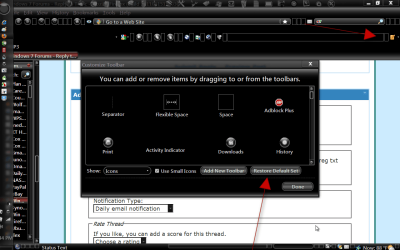
Ok I'm stumped. Right clicked on toolbar in Firefox 5 and clicked Customize. I started to move the Refresh Button over to the left where it was traditionally located. I dropped it. Now it has disappeared!!!
Where is Firefox Button Limbo? Anyone know? Tried Customize a bunch of times. It's not in the panel with the assorted buttons. It's not on any of the toolbars or frame anywhere. It's just gone missing!!! Now I'm stuck pressing F5 with the unwashed!! Help!!!
My Computer
Computer Manufacturer/Model Number
HP Media Center
OS
Windows 7 32 bit
CPU
AMD 5200+ dual core
Memory
2 GB
Graphics Card(s)
NVidia GeForce 6150SE 128 MB
Monitor(s) Displays
CRT
Screen Resolution
1280x1024
Hard Drives
500 GB Sata internal :
SIIG USB 3.0 docking stations w/WD Caviar Black 6 Gb/s drives
It seems that you cannot simply drag and drop icons into place.
At least, that's what happened to me when trying what you suggested.
After doing the Restore Default as Jerry suggested, you can bring up Customize and drag and drop an icon to the Customize field, then drag and drop the icon from the Customize field to where you want it.
My Computer
Computer type
PC/Desktop
Computer Manufacturer/Model Number
Custom Build
OS
Windows 7 Home Premium 64 bit
CPU
Intel Core i7-4790
Motherboard
GA-Z87X-D3H
Memory
G.SKILL 8GB (2 x 4GB) DDR3 F3-10666CL9D-8GBNT
Graphics Card(s)
AMD Radeon R7 250
Sound Card
Realtek ALC892
Monitor(s) Displays
Samsung UN32EH5000, Dell 1703FPT
Screen Resolution
1920 x 1080, 1280 x 1024
Hard Drives
WD5003AZEX
WD10EZEX
Samsung HD103SJ
Samsung 128 GB 840 PRO
Restore Default only applies to toolbars? I was reluctant because I just spent 20 minutes fiddling with Speed Dial settings. Guess I'll give it a try. You would think after FF being around how many years they'd fix this? It's not the first time stuff has just gone away like this.
My Computer
Computer Manufacturer/Model Number
HP Media Center
OS
Windows 7 32 bit
CPU
AMD 5200+ dual core
Memory
2 GB
Graphics Card(s)
NVidia GeForce 6150SE 128 MB
Monitor(s) Displays
CRT
Screen Resolution
1280x1024
Hard Drives
500 GB Sata internal :
SIIG USB 3.0 docking stations w/WD Caviar Black 6 Gb/s drives
btw just a tip I tried and it worked. I have search set to work in the address bar like chrome. I did Customize and just dragged the search bar off the toolbar onto that button dialog. Now I just have the address bar and do my searches there. Avoids wasted toolbar real estate.
Oh and I got my refresh button back. Thanks.
I did manage to put it on the left this time without losing it.
My Computer
Computer Manufacturer/Model Number
HP Media Center
OS
Windows 7 32 bit
CPU
AMD 5200+ dual core
Memory
2 GB
Graphics Card(s)
NVidia GeForce 6150SE 128 MB
Monitor(s) Displays
CRT
Screen Resolution
1280x1024
Hard Drives
500 GB Sata internal :
SIIG USB 3.0 docking stations w/WD Caviar Black 6 Gb/s drives
I couldn't find my refresh button nor my home button. They just disappeared for no reason. I finally found the home button, don't know how, and now my refresh button is on the right hand side. Just this morning it was on the left. Do you know how you got yours to be on the left hand side again. I went to customize, but that did no good. thanks.