- Local time
- 6:46 AM
- Messages
- 7,146
i'm not sure if this should be in the 'browsers' or 'customisation' part of forums, but anyway...
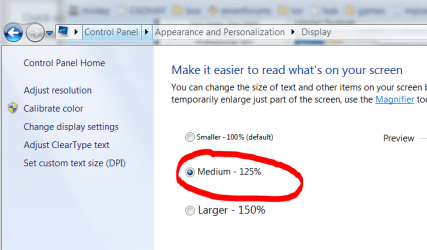
i have a hi-res monitor but poor eyes, so i've set a custom windows text-size of 125% to help me read on-screen text easier. so things like the start-menu text and icons get bigger etc.
however, it also seems to affect firefox's webpage rendering. other browsers (ie8 and chrome) respect the 125% for UI menus and whatnot, but don't affect the text within a webpage, this gets rendered according to the css. however, firefox seems to read the css fontsize, then adds a bit to it, not always 25%.
i'm designing a website, and it's annoying that all the text looks bigger in firefox.
how do i make firefox obey the css and ignore windows custom dpi settings for webpage content? i'm using 3.6.13 if it makes any difference.
i know i could just revert to normal 100% dpi, but i like the big UI text - i find it much easier to read, with less strain on the eyes after a long day's computing. i just want all my browsers to display the page text according to the css.
i have a hi-res monitor but poor eyes, so i've set a custom windows text-size of 125% to help me read on-screen text easier. so things like the start-menu text and icons get bigger etc.
however, it also seems to affect firefox's webpage rendering. other browsers (ie8 and chrome) respect the 125% for UI menus and whatnot, but don't affect the text within a webpage, this gets rendered according to the css. however, firefox seems to read the css fontsize, then adds a bit to it, not always 25%.
i'm designing a website, and it's annoying that all the text looks bigger in firefox.
how do i make firefox obey the css and ignore windows custom dpi settings for webpage content? i'm using 3.6.13 if it makes any difference.
i know i could just revert to normal 100% dpi, but i like the big UI text - i find it much easier to read, with less strain on the eyes after a long day's computing. i just want all my browsers to display the page text according to the css.
My Computer
At a glance
- Computer Manufacturer/Model Number
- mickey megabyte 1234
- OS
- ultimate 64 sp1
- CPU
- i5 2500K [email protected]
- Motherboard
- MSI P67A-GD53
- Memory
- 8 gigs GSkill Ripjaws 1600
- Graphics Card(s)
- amd hd6950
- Sound Card
- creative x-fi gamer
- Monitor(s) Displays
- samsung 24"
- Screen Resolution
- 1920x1080
- Hard Drives
- ocz vertex 2e 60 gig, samsung f3 1tb, buffalo 2tb ext
- PSU
- antec 550
- Case
- antec three hundred
- Cooling
- i'm a cooling fan
- Keyboard
- saitek eclipse ii
- Mouse
- logitech g3
- Internet Speed
- about 4 Mbps
- Other Info
- i love win7