Firefox Bookmarks

BluePeter

Banned
Local time
6:58 AM
Messages
42
Location
Dublin, Ireland
Hello,

At present, to access all of my Bookmarks I have to click the arrow at the end
of the Toolbar.
There is a way of enlarging this Toolbar so that I can see ALL of my Bookmarks
without having to click that arrow.
Advice on this would be appreciated. I cannot see to reference to it in any of
the Mozilla Firefox tutorials.:confused:
 

My Computer

Computer Manufacturer/Model Number
HP Pavilion HDX 18 - 1005EA
OS
Windows 7 Home Premium 64 bit SP1
CPU
Intel(R) Core(TM)2 Duo P8400 @ 2.26GHz 2.27 GHz
Motherboard
?
Memory
4 gb
Graphics Card(s)
NVIDIA GeForce 9600M GT
Sound Card
NVIDIA HDMI Audio
Monitor(s) Displays
NVIDIA Generic PnP 1920 by 1080
Hard Drives
ST 9250827AS (Microsoft) Driver 6.0.6002. 18005
WDC WD 2500BEVT-00SCST0 (Microsoft) " " "
PSU
?
Case
Laptop
Cooling
?
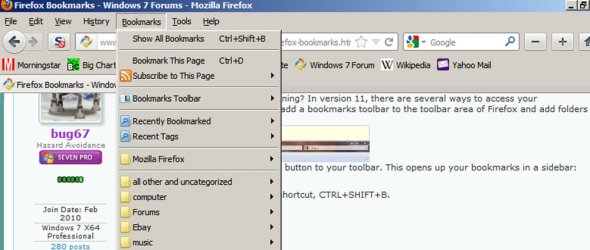
What version of Firefox are you running? In version 11, there are several ways to access your bookmarks. Personally, I prefer to add a bookmarks toolbar to the toolbar area of Firefox and add folders for different bookmark categories:
FFToolbar.jpg

Another way is to add a bookmarks button to your toolbar. This opens up your bookmarks in a sidebar:
FFBookmarkButton.jpg

And, finally, there is the keyboard shortcut, CTRL+SHIFT+B.
 

My Computer

Computer Manufacturer/Model Number
Dell XPS 400
OS
Windows 7 X64 Professional
CPU
Intel® Pentium D Dual Core 3.6GHZ
Motherboard
DELL Dimension 9150 MotherBoard DXP051 XPS400 FJ030
Memory
4GB DDR2 PC2-5300
Graphics Card(s)
GeForce GT 440 (Fermi) 2GB 128-bit DDR3 PCI Express 2.0 x16
Sound Card
ASUS XONAR DG 5.1 Channels PCI Interface Xonar DG
Monitor(s) Displays
2 X 23" Apple Cinema Display
Screen Resolution
1920 X 1200p
Hard Drives
250GB Intel® 510 Series SSD SATA 6G (w/TRIM) [500MB/s Reads]
1.0TB Western Digital Caviar Black SATA 6G 7200rpm 64MB Cache
PSU
375 Watt Dell
Case
Dell XPS 400 BTX Case
Cooling
Dell XPS 400 Air Cooling
Keyboard
Logitech Illuminated Keyboard
Mouse
Logitech M705 Marathon
Internet Speed
+/- 9929 Kbps
Other Info
This machine was given to me when my dad bought a new computer. I keep throwing upgrades at it and it keeps on ticking. Think I've done everything to it that can be done outside a PSU upgrade so I can run an even BETTER GPU.
I put my most often used bookmarks on the bookmarks toolbar immediately below the address bar.

Then I have all bookmarks available from a bookmarks menu next to file/edit/view/history.

I can't remember how I moved bookmarks from the right to the top of the screen, but it isn't difficult--probably a right click and then choosing from a dropdown menu.
 

Attachments

  • Untitled-1.jpg
    Untitled-1.jpg
    73.4 KB · Views: 11

My Computer

Computer type
PC/Desktop
Computer Manufacturer/Model Number
Ignatz Special; 4 speed manual gearbox; factory air conditioning; one of one
OS
Windows 7 Home Premium SP1, 64-bit
CPU
Intel Skylake i5-6600K, not overclocked
Motherboard
AsRock Z170M Extreme 4, micro ATX
Memory
8 GB HyperX DDR4-2666 (2 x 4 GB)
Graphics Card(s)
none; graphics are integrated on CPU
Sound Card
onboard: Realtek ALC1150; external: USB Behringer UF0-202
Monitor(s) Displays
Dell S2340M 23 inch IPS
Screen Resolution
1600 x 900
Hard Drives
System: Crucial MX100 series SSD, 128 GB;
Data: Samsung Spinpoint 103SJ, 1 TB;
Backup: WD Caviar Green WD30EZRX-00D8PB0, 3 TB
PSU
Rosewill SilentNight 500 watt fanless, semi-modular
Case
Antec Solo II
Cooling
Noctua NH-U12S; Noctua F12 intake, Noctua S12A exhaust
Keyboard
Microsoft 200 6JH-00001 USB
Mouse
Dell or Microsoft optical wired; USB
Antivirus
Microsoft Security Essentials and Malwarebytes Premium
Browser
Pale Moon
Other Info
All fans PWM; speeds at idle: CPU circa 500 rpm; intake circa 600 rpm; exhaust circa 600 rpm; CPU temps 27 idle and 47 C load in a warm room (27 C/81 F) when running Intel Extreme Tuning Utility stress test.

My Computer

Computer type
PC/Desktop
Computer Manufacturer/Model Number
Novatech iRush Pro
OS
Windows 7 Ultimate SP1 - 64 Bit
CPU
Intel Core i5 2500k
Motherboard
Foxconn H67M-S/H67M-V/H67
Memory
2x4GB DDR3 1333Hz
Graphics Card(s)
Ati Radeon 6770
Sound Card
None
Monitor(s) Displays
Samsung S22B150
Screen Resolution
1920x1080
Hard Drives
2x500GB
PSU
500W
Cooling
Fan
Keyboard
HP KU0316
Mouse
Wireless Logitech M185
Internet Speed
20MB/s
Antivirus
Avast Free
Browser
Google Chrome
Other Info
Logitech M185 Mouse
KU-M316 Keyboard
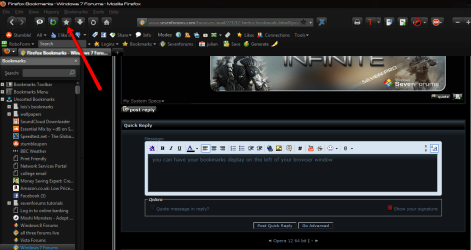
you can have your bookmarks display on the left of your browser window ,
to do so you need to right click at the top of the firefox window and select customize ,in the new pane that opens drag the bookmarks button to where you want it on the toolbar.
clicking the button will open and close the bookmarks sidebar.
an alternate way to have the bookmark sidebar showing is to click view/sidebar/bookmarks.
i prefer to have the button as you can open and close it with a click.

2012-03-26_1949.png
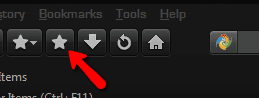
note: there are two bookmark buttons, one has a dropdown arrow beside it and one is just a star,its the second one you want as the button with the dropdown opens a pop up bookmarks list that dissapears when you click in the browser again.

2012-03-26_1955.png
 

My Computer

Computer Manufacturer/Model Number
Hewlett packard/p6512uk
OS
Microsoft Windows 7 Home Premium 64-bit 7600
CPU
IIx4 amd athelon 635 processor
Motherboard
FOXCONN 2AA9
Memory
2x2gb
Graphics Card(s)
ati radeon HD 5450
Sound Card
(1) Realtek High Definition Audio (2) AMD High Definition
Monitor(s) Displays
samsung lcd tv 32"
Screen Resolution
1360x 768
Hard Drives
(1) WDC WD10 01FAES-60Z2A0 SATA Disk Device (2) Maxtor OneTouch USB Device (3) ST310003 33AS USB Device (4) WD My Book 1111 USB Device
PSU
?
Cooling
air!
Keyboard
wireless hp
Mouse
wireless Hp,optical
Internet Speed
1.10mb/s
Antivirus
MSE
Browser
Firefox
Back
Top