
Hi,
My Windows 7 had a little wobble the other night and switched itself from Aero to Basic. I did the "type areo into the search box " thing and it righted itself but now my Firefox looks odd!
I noticed, before the 'wobble' that the forwards/back buttons had changed from blue to green which I hadn't noticed before.
They've now gone back to blue and look smaller!
Also I have a thick black outline around the tabs and the currently selected tab is now shaded black which I don't particularly like!
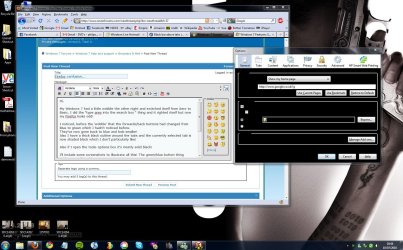
Also if I open the tools-options box it's mostly solid black!
I'll include some screenshots to illustrate all this! The green/blue button thing intrigues me though!
All I want to know is how to set it back to the way it was!
If I change the Windows theme to 'basic' then Firefox looks as it did before, but then I have the rather ugly basic windows for everything else!
It's most puzzling, any help would be welcome!
Mark
My Windows 7 had a little wobble the other night and switched itself from Aero to Basic. I did the "type areo into the search box " thing and it righted itself but now my Firefox looks odd!
I noticed, before the 'wobble' that the forwards/back buttons had changed from blue to green which I hadn't noticed before.
They've now gone back to blue and look smaller!
Also I have a thick black outline around the tabs and the currently selected tab is now shaded black which I don't particularly like!
Also if I open the tools-options box it's mostly solid black!
I'll include some screenshots to illustrate all this! The green/blue button thing intrigues me though!
All I want to know is how to set it back to the way it was!
If I change the Windows theme to 'basic' then Firefox looks as it did before, but then I have the rather ugly basic windows for everything else!
It's most puzzling, any help would be welcome!
Mark
Attachments
My Computer
- OS
- Windows 7 Ultimate
- Memory
- 4 GB Corsair
- Graphics Card(s)
- NVIDIA GT9800
