firefox help.

aakshat

Stay Calm
Power User
Local time
4:45 AM
Messages
129
Location
India
Yesterday i added a theme to my FF( Bloomind FT Deepderk 2 2.4.6.1). Its lucking good but the problem is that every time i tries to download something my browser fresed up for 25 to 30 seconds and then starts download.i cant do anything in browser for that 30sec sometimes it takes morethen 30sec. can anyone help me please.:(. is the prob with the theme?
 

My Computer

Computer type
Laptop
Computer Manufacturer/Model Number
Dell Insperon N5010
OS
Windows 7 Ultimate x64
CPU
i3 M380 2.53GHz
Motherboard
TOSHIBA MK5076GSX
Memory
4 Gb
Graphics Card(s)
intel HD
Sound Card
IDT
Screen Resolution
1366x768
Keyboard
Standerd PS2
Antivirus
ESET Smart Security 7
Browser
Google Chrome
Yesterday i added a theme to my FF( Bloomind FT Deepderk 2 2.4.6.1). Its lucking good but the problem is that every time i tries to download something my browser fresed up for 25 to 30 seconds and then starts download.i cant do anything in browser for that 30sec sometimes it takes morethen 30sec. can anyone help me please.:(. is the prob with the theme?


uninstal and install again :party:
 

My Computer

OS
ultimte x64
i've already done that. nothing happne problem is still remain. and i feguard that the theme is buggy. on the default theme all things r alright.
 

My Computer

Computer type
Laptop
Computer Manufacturer/Model Number
Dell Insperon N5010
OS
Windows 7 Ultimate x64
CPU
i3 M380 2.53GHz
Motherboard
TOSHIBA MK5076GSX
Memory
4 Gb
Graphics Card(s)
intel HD
Sound Card
IDT
Screen Resolution
1366x768
Keyboard
Standerd PS2
Antivirus
ESET Smart Security 7
Browser
Google Chrome
I just tried downloading a program using that theme and it worked fine I was able to load other webpages and scroll them.
You may want to create a new profile to see if there is a problem with your profile or some extensions you can do this to test for problems.
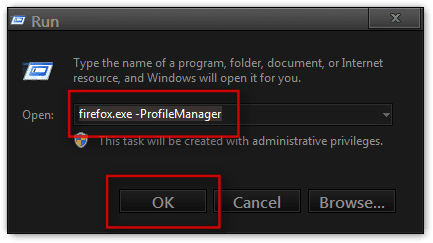
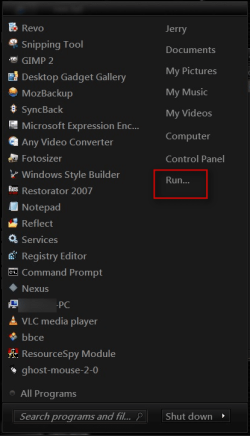
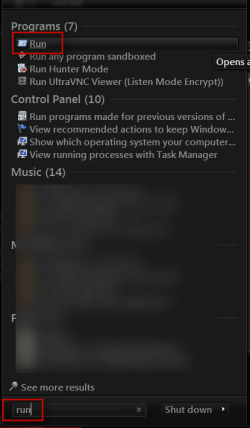
Click on the :orb: Start Button and if you have it on the right side of the start menu click on Run if it is not there type "run" without quote marks in the search box and choose Run.
1.png2.png


In the Run box type "firefox.exe -ProfileManager" without quote marks and click OK
3.png


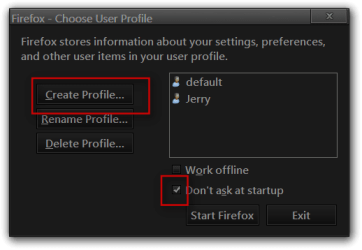
Click on Create Profile you can also uncheck don't ask at startup now.
4.png


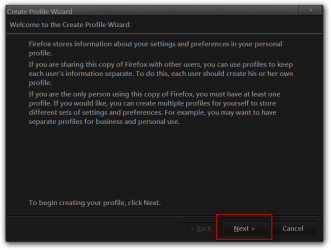
Follow the Wizard and click Next.
5.png


Enter new profile name and click Finish.
6.png


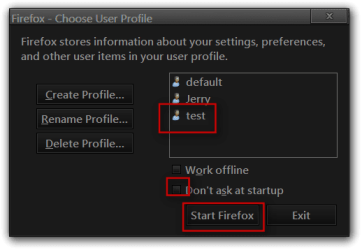
Make sure that you have unchecked don't ask at startup and select your new profile and click on Start Firefox. This profile manager box will open each time you start Firefox until you check the Don't ask at startup box again.
7.png


After you have tested your new profile you can check the don't ask at startup box again and you will not get the profile manager starting each time you start Firefox.
Jerry
 

My Computer

Computer type
Laptop
Computer Manufacturer/Model Number
Sager NP9170
OS
Win 7 Pro x64 / Win 10 Pro
CPU
Intel(R) Core(TM) i7-3630QM CPU @ 2.40GHz
Motherboard
CLEVO P170EM
Memory
12 GB
Graphics Card(s)
(1) Intel(R) HD Graphics 4000 (2) NVIDIA GeForce GTX 675M
Sound Card
(1) Realtek High Definition Audio (2) Intel(R) Display Aud
Monitor(s) Displays
17.3
Screen Resolution
1920x1080
Hard Drives
(1) Samsung 860 EVO 500GB(OS) (1) Samsung 860 EVO 500GB(Data)
Keyboard
Backlite
Antivirus
MSE, Malwarebytes Pro
Browser
Firefox
Other Info
DESKTOP: Custom-built.
OS: Win 10 Pro x64.
CASE: Rosewill R5.
CPU: Intel I5 4670K CPU @ 3.40GHz.
CPU COOLER: Cool Master Hyper 212 EVO.
MOTHERBOARD: Asus Z87-A.
MEMORY: Kingston HyperX 2x4 GB.
GPU: Nvidia Geforce 650 TI.
PSU: Corsair TX750.
DRIVES: (1) Samsung 840 120 GB SSD (2) Western Digital blue 500 GB 7200 RPM.
hay! thanx for the help
 

My Computer

Computer type
Laptop
Computer Manufacturer/Model Number
Dell Insperon N5010
OS
Windows 7 Ultimate x64
CPU
i3 M380 2.53GHz
Motherboard
TOSHIBA MK5076GSX
Memory
4 Gb
Graphics Card(s)
intel HD
Sound Card
IDT
Screen Resolution
1366x768
Keyboard
Standerd PS2
Antivirus
ESET Smart Security 7
Browser
Google Chrome
You're Welcome
Did you get it sorted out?
Jerry
 

My Computer

Computer type
Laptop
Computer Manufacturer/Model Number
Sager NP9170
OS
Win 7 Pro x64 / Win 10 Pro
CPU
Intel(R) Core(TM) i7-3630QM CPU @ 2.40GHz
Motherboard
CLEVO P170EM
Memory
12 GB
Graphics Card(s)
(1) Intel(R) HD Graphics 4000 (2) NVIDIA GeForce GTX 675M
Sound Card
(1) Realtek High Definition Audio (2) Intel(R) Display Aud
Monitor(s) Displays
17.3
Screen Resolution
1920x1080
Hard Drives
(1) Samsung 860 EVO 500GB(OS) (1) Samsung 860 EVO 500GB(Data)
Keyboard
Backlite
Antivirus
MSE, Malwarebytes Pro
Browser
Firefox
Other Info
DESKTOP: Custom-built.
OS: Win 10 Pro x64.
CASE: Rosewill R5.
CPU: Intel I5 4670K CPU @ 3.40GHz.
CPU COOLER: Cool Master Hyper 212 EVO.
MOTHERBOARD: Asus Z87-A.
MEMORY: Kingston HyperX 2x4 GB.
GPU: Nvidia Geforce 650 TI.
PSU: Corsair TX750.
DRIVES: (1) Samsung 840 120 GB SSD (2) Western Digital blue 500 GB 7200 RPM.
Back
Top