
firefox memory usage - 1GB!

tgfyhre

New member
Member
VIP
Local time
5:31 PM
Messages
332
My firefox uses tons of memory. It's not unusual after an hour or two of browsing to end up with 800mb-1gb of memory usage, according to windows task manager. I do have a lot of add-ons enabled.

So I installed the "about:addons-memory" add-on today, which shows the current memory usage of each add-on. According to the add-on, all the add-ons together, including Firefox itself, is using 79.81mb currently. I also installed the plugin "Tab Data" which shows how much memory each tab is using. Currently the one open tab is using 1.42mb.

Currently Windows task manager shows Firefox is using 303mb, with just a single tab open (about:addons-memory).

I have a few plugins enabled but most are set to either "ask to activate" or "never activate".

So why is Firefox using 303mb with only a single tab open when the add-ons seem to be using so little memory? I did notice one little bit of info at the bottom of "about:addons-memory":

"Note: Many Add-ons, especially non-JetPack ones, may include static or dynamic overlays that may add scripts, DOM or styles directly to the browser. Such things cannot be distinguished from the browser itself and hence cannot be counted towards the add-on. As a result the actual add-on memory usage may be a lot higher than reported here!"

When I start Firefox in safe mode, it starts with around 100mb memory usage according to windows task manager. With add-ons re-enabled it starts back up at around 250mb on Google's search page. Is the "about:addons-memory" add-on just reporting false memory readings about the addons? It must. Is there any way to get actually memory usage of each add-on so I can pinpoint what is causing the issue, or could it be that they are all using more than it is showing? The thing is, my add-ons are installed for a reason - I use them. But 1gb of memory usage seems extreme - it seems that even after I close all my tabs, it still uses the same amount of memory until I close Firefox and restart.
 

My Computer

Computer type
PC/Desktop
Computer Manufacturer/Model Number
custom build
OS
Windows 7 32bit Home Premium
CPU
Intel Core I7 920 Bloomfield
Motherboard
Asus P6T Deluxe v1
Memory
3 GB Corsair DDR3 (3x1GB)
Graphics Card(s)
NVidia GTX 570 (1 GB RAM)
Sound Card
on board
Monitor(s) Displays
Dell P2314H
Screen Resolution
1920x1080
Hard Drives
Western Digital Black 1TB (main OS)
PSU
XION Supernova XON-800R14N 800W
Case
Antec 1200
Cooling
Arctic Freezer 7 Pro Rev. 2
Keyboard
AZIO Prism
Mouse
Logitech G700S
Internet Speed
Verizon FiOS 85/85
Antivirus
Avast
Browser
Firefox/Chrome
Other Info
SansDigital rr622 RocketRaid (with non-raid Driver)
Renesas USB 3.0 card
How many threads on this are needed? So enable add ons one at a time and exit - relauch FF and check memory usage after each add on is enabled.

Also consider that you might eventually need to back up your profile and clean install firefox.

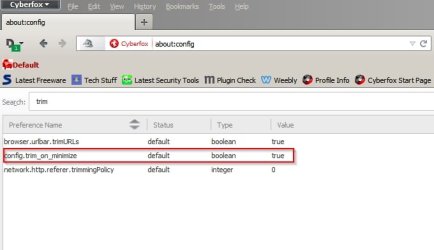
Re: Tabs. Did you ever try the trim_on_minimize tweak?

about_config - Cyberfox.jpg

Also a quick note to say that personally I had an issue recently with an add on that was no longer supported but was left installed. Removing that add on solved the issue.
 

My Computer

Computer type
Laptop
Computer Manufacturer/Model Number
ASUS
OS
Microsoft Windows 7 Home Premium 64-bit 7601 Multiprocessor Free Service Pack 1
CPU
AMD C-60 APU with Radeon(tm) HD Graphics
Motherboard
ASUSTeK COMPUTER INC. X501U
Memory
4.00 GB
Graphics Card(s)
AMD Radeon HD 6290 Graphics
Sound Card
(1) AMD High Definition Audio Device (2) Realtek High Defi
Screen Resolution
1366 x 768 x 32 bits (4294967296 colors) @ 60 Hz
Hard Drives
Hitachi HTS545050A7E380 SATA Disk Device
Antivirus
Comodo CIS & FW, SecureAplus App Whitelisting, Threatfire
Browser
Cyberfox 64bit, Opera 64bit, Airfox
Other Info
Spy-The-Spy, HitmanPro.Alert, Norton Connect Safe, MJRegWatcher, BitDefender TrafficLight, Voodoo Shield, Zemana AntiMalware
The trim_on_minimize tweak does nothing for me. I created the entry and set it to true but minimizing makes zero difference in memory usage by Firefox.
 

My Computer

Computer type
PC/Desktop
Computer Manufacturer/Model Number
custom build
OS
Windows 7 32bit Home Premium
CPU
Intel Core I7 920 Bloomfield
Motherboard
Asus P6T Deluxe v1
Memory
3 GB Corsair DDR3 (3x1GB)
Graphics Card(s)
NVidia GTX 570 (1 GB RAM)
Sound Card
on board
Monitor(s) Displays
Dell P2314H
Screen Resolution
1920x1080
Hard Drives
Western Digital Black 1TB (main OS)
PSU
XION Supernova XON-800R14N 800W
Case
Antec 1200
Cooling
Arctic Freezer 7 Pro Rev. 2
Keyboard
AZIO Prism
Mouse
Logitech G700S
Internet Speed
Verizon FiOS 85/85
Antivirus
Avast
Browser
Firefox/Chrome
Other Info
SansDigital rr622 RocketRaid (with non-raid Driver)
Renesas USB 3.0 card
The thead I started on Amazon working oddly was totally separate from the memory usage of Firefox in general. Amazon is the only site that gives me that issue which is why I started a different thread about it.

Anyways, this was a nice waste of an afternoon. Totally uninstalled Firefox following your guide on the other thread. Used MozBackup, Revo uninstaller, ran ccleaner, wiped profile, rebooted, ran ccleaner again, then re-installed the latest Firefox.

Memory usage immediately after re-installing: 160mb - just as before

Used Mozbackup to restore bookmarks and extensions. Memory usage immediately after restarting and configuring extensions: 350mb, just as before.

After a short while browsing - memory usage: 500mb - 1GB, just as before.

So I give up. I tried individually disabling each and every extension last night, and restarting Firefox between tries. No individual extension seemed to have any noticeable effect on memory usage, other than a few MB at most. Yet in safe mode it immediately drops from 350mb at startup to 160mb. So I can't figure it out. It seems disabling individual extensions only makes a small impact, yet all disabled in safe mode makes a huge impact. According to "about:addons-memory" all my extensions added together are only hitting under 80MB, so I don't get it. Also, there seems to be major memory leaks, as the longer I surf, the more memory gets used up, even after I close all but 1 tab. I think Firefox just has terrible memory manamagement. That might not be so important on a 64bit system with 8-16GB, but on my 32bit system with 3GB, Firefox is taking a significant chunk of memory from me.

I'm giving up on this I guess - I'm hoping to get a new system later this year once Windows 10 comes out, depending on what processors are out there. For now I guess I just have to suffer with the high memory usage.
 

My Computer

Computer type
PC/Desktop
Computer Manufacturer/Model Number
custom build
OS
Windows 7 32bit Home Premium
CPU
Intel Core I7 920 Bloomfield
Motherboard
Asus P6T Deluxe v1
Memory
3 GB Corsair DDR3 (3x1GB)
Graphics Card(s)
NVidia GTX 570 (1 GB RAM)
Sound Card
on board
Monitor(s) Displays
Dell P2314H
Screen Resolution
1920x1080
Hard Drives
Western Digital Black 1TB (main OS)
PSU
XION Supernova XON-800R14N 800W
Case
Antec 1200
Cooling
Arctic Freezer 7 Pro Rev. 2
Keyboard
AZIO Prism
Mouse
Logitech G700S
Internet Speed
Verizon FiOS 85/85
Antivirus
Avast
Browser
Firefox/Chrome
Other Info
SansDigital rr622 RocketRaid (with non-raid Driver)
Renesas USB 3.0 card

My Computer

Computer type
PC/Desktop
Computer Manufacturer/Model Number
Intel(R) Core(TM) i5-2320 CPU @ 3.00GHz (Gateway computer)
OS
Microsoft Windows 7 Home Premium 64-bit 7601 Multiprocessor Free Service Pack 1
CPU
Intel(R) Core(TM) i5-2320 CPU @ 3.00GHz
Motherboard
Gateway IPISB-VR
Memory
8.00 GB
Graphics Card(s)
Intel(R) HD Graphics
Sound Card
(1) Realtek High Definition Audio (2) Intel(R) Display Aud
Monitor(s) Displays
ViewSonic 2250 Series
Screen Resolution
1920 x 1080 x 32 bits (4294967296 colors) @ 60 Hz
Hard Drives
(1) WDC WD10EADX-22TDHB0 (2) Generic Mini SD Reader USB Device (3) Generic USB CF Reader USB Device (4) Generic USB MS Reader USB Device (5) Generic USB SD Reader USB Device (6) Generic USB xD/SM Reader USB Device (7) Seagate FreeAgent Go
Keyboard
Gateway
Mouse
Logitech
Internet Speed
20 Mbps (Theoretical.)
Antivirus
Avast
Browser
Firefox
First thing I try to do according to that guide is:

image.mem.min_discard_timeout_ms

and that doesn't even exist in about:config.

So I created an integer value and set it to 10000. I'll see if that makes any difference.

EDIT: yeah, as expected, that made no difference from what I can see. Right now I'm at 580MB with only a few tabs open. All the tabs together are using about 60MB total. And firefox starts up around 350MB. So... why is it now up to almost 600MB? Firefox has awful memory management.
 
Last edited:

My Computer

Computer type
PC/Desktop
Computer Manufacturer/Model Number
custom build
OS
Windows 7 32bit Home Premium
CPU
Intel Core I7 920 Bloomfield
Motherboard
Asus P6T Deluxe v1
Memory
3 GB Corsair DDR3 (3x1GB)
Graphics Card(s)
NVidia GTX 570 (1 GB RAM)
Sound Card
on board
Monitor(s) Displays
Dell P2314H
Screen Resolution
1920x1080
Hard Drives
Western Digital Black 1TB (main OS)
PSU
XION Supernova XON-800R14N 800W
Case
Antec 1200
Cooling
Arctic Freezer 7 Pro Rev. 2
Keyboard
AZIO Prism
Mouse
Logitech G700S
Internet Speed
Verizon FiOS 85/85
Antivirus
Avast
Browser
Firefox/Chrome
Other Info
SansDigital rr622 RocketRaid (with non-raid Driver)
Renesas USB 3.0 card
I've always clean reinstalled Firefox if it ever developed problems (after backing up profile, bookmarks and extensions) - problems can arise after installing major upgrades (updates) for Firefox and after installing or failing to remove problem add ons.

I've got the portable version (used for test purposes only) and use 64bit Firefox variants instead. Not sure why you want to stick with the 32bit version unless you need Java enabled in your browser.
 

My Computer

Computer type
Laptop
Computer Manufacturer/Model Number
ASUS
OS
Microsoft Windows 7 Home Premium 64-bit 7601 Multiprocessor Free Service Pack 1
CPU
AMD C-60 APU with Radeon(tm) HD Graphics
Motherboard
ASUSTeK COMPUTER INC. X501U
Memory
4.00 GB
Graphics Card(s)
AMD Radeon HD 6290 Graphics
Sound Card
(1) AMD High Definition Audio Device (2) Realtek High Defi
Screen Resolution
1366 x 768 x 32 bits (4294967296 colors) @ 60 Hz
Hard Drives
Hitachi HTS545050A7E380 SATA Disk Device
Antivirus
Comodo CIS & FW, SecureAplus App Whitelisting, Threatfire
Browser
Cyberfox 64bit, Opera 64bit, Airfox
Other Info
Spy-The-Spy, HitmanPro.Alert, Norton Connect Safe, MJRegWatcher, BitDefender TrafficLight, Voodoo Shield, Zemana AntiMalware
Why wouldn't I use the 32bit version? My system is 32bit.
 

My Computer

Computer type
PC/Desktop
Computer Manufacturer/Model Number
custom build
OS
Windows 7 32bit Home Premium
CPU
Intel Core I7 920 Bloomfield
Motherboard
Asus P6T Deluxe v1
Memory
3 GB Corsair DDR3 (3x1GB)
Graphics Card(s)
NVidia GTX 570 (1 GB RAM)
Sound Card
on board
Monitor(s) Displays
Dell P2314H
Screen Resolution
1920x1080
Hard Drives
Western Digital Black 1TB (main OS)
PSU
XION Supernova XON-800R14N 800W
Case
Antec 1200
Cooling
Arctic Freezer 7 Pro Rev. 2
Keyboard
AZIO Prism
Mouse
Logitech G700S
Internet Speed
Verizon FiOS 85/85
Antivirus
Avast
Browser
Firefox/Chrome
Other Info
SansDigital rr622 RocketRaid (with non-raid Driver)
Renesas USB 3.0 card
What version are you using ? I found v29 worked well and once they changed the GUI in v30 things started to go wrong v32 and v37 is sort of ok v38 lots of problems again.

I am using v37 and after completely un-installing and deleting the profile (all I saved was an export of my bookmarks) then re-downloading all the plugins / extensions again it is working better than it was (still no where near perfect though) I noticed that by not having Silverlight installed made a significant difference also... I avoided all the usual recommended tweaks in about:config also this time as I found that in my case they never made any noticeable difference anyway. In comparison to yours I would say mine is using roughly 100mb less however if I have more than 4 tabs open with sites that use Flash then the memory usage is unpredictable. IDM and KeeFox can cause it to be troublesome also... make sure plugin container is not blocked by your firewall as that repeatedly trying to access the net and failing bumps the memory usage up.

I dunno I am no expert on the subject, to me it seems like FF is a bit foxed in the last 9 versions and does not play nice with Flash being the bottom line... I just thought it might be of some use to you if I told you what I have tried... not really found a concrete solution as yet but like I say it is better than it was.
 

My Computer

Computer type
Laptop
Computer Manufacturer/Model Number
Sony
OS
Windows 7 x64 SP1
CPU
Intel
Motherboard
Sony
Memory
4gb
Graphics Card(s)
Nvidia
Hard Drives
WD
Internet Speed
Dial up wasn't as bad as this !
Antivirus
Avast
Browser
Firefox

My Computer

Computer type
Laptop
Computer Manufacturer/Model Number
ASUS
OS
Microsoft Windows 7 Home Premium 64-bit 7601 Multiprocessor Free Service Pack 1
CPU
AMD C-60 APU with Radeon(tm) HD Graphics
Motherboard
ASUSTeK COMPUTER INC. X501U
Memory
4.00 GB
Graphics Card(s)
AMD Radeon HD 6290 Graphics
Sound Card
(1) AMD High Definition Audio Device (2) Realtek High Defi
Screen Resolution
1366 x 768 x 32 bits (4294967296 colors) @ 60 Hz
Hard Drives
Hitachi HTS545050A7E380 SATA Disk Device
Antivirus
Comodo CIS & FW, SecureAplus App Whitelisting, Threatfire
Browser
Cyberfox 64bit, Opera 64bit, Airfox
Other Info
Spy-The-Spy, HitmanPro.Alert, Norton Connect Safe, MJRegWatcher, BitDefender TrafficLight, Voodoo Shield, Zemana AntiMalware
There's either something seriously wrong with one of my addons or Firefox is the worst browser ever at memory management.

I've been surfing Amazon and Newegg for about 2 hours now, and currently have only a single tab open - this one. Memory usage: 780MB!

Brand new fresh install of the latest Firefox last night.
 

My Computer

Computer type
PC/Desktop
Computer Manufacturer/Model Number
custom build
OS
Windows 7 32bit Home Premium
CPU
Intel Core I7 920 Bloomfield
Motherboard
Asus P6T Deluxe v1
Memory
3 GB Corsair DDR3 (3x1GB)
Graphics Card(s)
NVidia GTX 570 (1 GB RAM)
Sound Card
on board
Monitor(s) Displays
Dell P2314H
Screen Resolution
1920x1080
Hard Drives
Western Digital Black 1TB (main OS)
PSU
XION Supernova XON-800R14N 800W
Case
Antec 1200
Cooling
Arctic Freezer 7 Pro Rev. 2
Keyboard
AZIO Prism
Mouse
Logitech G700S
Internet Speed
Verizon FiOS 85/85
Antivirus
Avast
Browser
Firefox/Chrome
Other Info
SansDigital rr622 RocketRaid (with non-raid Driver)
Renesas USB 3.0 card
There's either something seriously wrong with one of my addons or Firefox is the worst browser ever at memory management.

I've been surfing Amazon and Newegg for about 2 hours now, and currently have only a single tab open - this one. Memory usage: 780MB!

Brand new fresh install of the latest Firefox last night.

Quite possibly.... however you said you had reinstated your backed up profile a lot of the time the problem is with the actual profile ! only sure way to know is to do what I said, export your bookmarks, completely un-install FF along with your profile folder (best to use something like Revo uninstaller to clean up reg entries also) then reinstall FF import your bookmarks back and go searching for your add-ons again one at a time...

That way it really is a fresh install.... but try and get FF V37 rather than V38 if you can.
 

My Computer

Computer type
Laptop
Computer Manufacturer/Model Number
Sony
OS
Windows 7 x64 SP1
CPU
Intel
Motherboard
Sony
Memory
4gb
Graphics Card(s)
Nvidia
Hard Drives
WD
Internet Speed
Dial up wasn't as bad as this !
Antivirus
Avast
Browser
Firefox
1. No reason to delete your existing profile, as you are going to want to use at least some of its files when you create a new profile:.

2. Create a new profile: Creating a new Firefox profile on Windows - MozillaZine Knowledge Base

3. Next, start moving files from the old to the new profile; those files are delineated here: Profile folder - Firefox - MozillaZine Knowledge Base . Move a file, start Fx, see what happens; if all is well, repeat, until/unless you find a file that is causing your memory use problem. If that happens, then, obviously, rename that file, restart Fx, which in many cases will generate a new version of that file. Retest and continue the process.

This can be time consuming, but it can also save time, by helping you find and eliminate the culprit(s) and in the process save you the time it is taking you to post on this forum.
 

My Computer

Computer type
PC/Desktop
Computer Manufacturer/Model Number
Intel(R) Core(TM) i5-2320 CPU @ 3.00GHz (Gateway computer)
OS
Microsoft Windows 7 Home Premium 64-bit 7601 Multiprocessor Free Service Pack 1
CPU
Intel(R) Core(TM) i5-2320 CPU @ 3.00GHz
Motherboard
Gateway IPISB-VR
Memory
8.00 GB
Graphics Card(s)
Intel(R) HD Graphics
Sound Card
(1) Realtek High Definition Audio (2) Intel(R) Display Aud
Monitor(s) Displays
ViewSonic 2250 Series
Screen Resolution
1920 x 1080 x 32 bits (4294967296 colors) @ 60 Hz
Hard Drives
(1) WDC WD10EADX-22TDHB0 (2) Generic Mini SD Reader USB Device (3) Generic USB CF Reader USB Device (4) Generic USB MS Reader USB Device (5) Generic USB SD Reader USB Device (6) Generic USB xD/SM Reader USB Device (7) Seagate FreeAgent Go
Keyboard
Gateway
Mouse
Logitech
Internet Speed
20 Mbps (Theoretical.)
Antivirus
Avast
Browser
Firefox
There's either something seriously wrong with one of my addons or Firefox is the worst browser ever at memory management.

I've been surfing Amazon and Newegg for about 2 hours now, and currently have only a single tab open - this one. Memory usage: 780MB!

Brand new fresh install of the latest Firefox last night.

Quite possibly.... however you said you had reinstated your backed up profile a lot of the time the problem is with the actual profile ! only sure way to know is to do what I said, export your bookmarks, completely un-install FF along with your profile folder (best to use something like Revo uninstaller to clean up reg entries also) then reinstall FF import your bookmarks back and go searching for your add-ons again one at a time...

That way it really is a fresh install.... but try and get FF V37 rather than V38 if you can.

I used Mozbackup to backup my extensions because I was told to by another member. I used Revo, as I mentioned above. I also ran ccleaner and rebooted before installing Firefox fresh.


I have been having this trouble for ages - this is nothing new. The last version was just as bad as the latest version.
 

My Computer

Computer type
PC/Desktop
Computer Manufacturer/Model Number
custom build
OS
Windows 7 32bit Home Premium
CPU
Intel Core I7 920 Bloomfield
Motherboard
Asus P6T Deluxe v1
Memory
3 GB Corsair DDR3 (3x1GB)
Graphics Card(s)
NVidia GTX 570 (1 GB RAM)
Sound Card
on board
Monitor(s) Displays
Dell P2314H
Screen Resolution
1920x1080
Hard Drives
Western Digital Black 1TB (main OS)
PSU
XION Supernova XON-800R14N 800W
Case
Antec 1200
Cooling
Arctic Freezer 7 Pro Rev. 2
Keyboard
AZIO Prism
Mouse
Logitech G700S
Internet Speed
Verizon FiOS 85/85
Antivirus
Avast
Browser
Firefox/Chrome
Other Info
SansDigital rr622 RocketRaid (with non-raid Driver)
Renesas USB 3.0 card
Dare I suggest that you try Cyberfox? You can install it and keep Firefox as Cyberfox uses it's own profile unlike some other Firefox variants that share profiles with Firefox.

Here's a link to the version you need.

Cyberfox Intel Version x86

If you install it keep an eye on the install options. If you like Firefox Australis look then choose that - otherwise choose Classic (CTR) if you prefer the old Firefox layout and squared tabs.

Check memory usage and if you're happy go ahead and download Profile Buddy from the same page and use it to import your Firefox Profile. The existing Firefox profile will remain untouched.

If you like it and it works for you with lower memory usage there are lots of cosmetic changes that can be made.
 

My Computer

Computer type
Laptop
Computer Manufacturer/Model Number
ASUS
OS
Microsoft Windows 7 Home Premium 64-bit 7601 Multiprocessor Free Service Pack 1
CPU
AMD C-60 APU with Radeon(tm) HD Graphics
Motherboard
ASUSTeK COMPUTER INC. X501U
Memory
4.00 GB
Graphics Card(s)
AMD Radeon HD 6290 Graphics
Sound Card
(1) AMD High Definition Audio Device (2) Realtek High Defi
Screen Resolution
1366 x 768 x 32 bits (4294967296 colors) @ 60 Hz
Hard Drives
Hitachi HTS545050A7E380 SATA Disk Device
Antivirus
Comodo CIS & FW, SecureAplus App Whitelisting, Threatfire
Browser
Cyberfox 64bit, Opera 64bit, Airfox
Other Info
Spy-The-Spy, HitmanPro.Alert, Norton Connect Safe, MJRegWatcher, BitDefender TrafficLight, Voodoo Shield, Zemana AntiMalware
I used Mozbackup to backup my extensions because I was told to by another member. I used Revo, as I mentioned above. I also ran ccleaner and rebooted before installing Firefox fresh.

I have been having this trouble for ages - this is nothing new. The last version was just as bad as the latest version.

Mozbackup works great but if there is a problem with your profile then it will restore that problem along with the profile.... Problems with your profile mostly happen over a period of time be it a combination of FF updates and also extension updates...

Either way you will not know until you repeat the un-install process again but this time round do not reinstate your previous profile... sure once you get it working correctly then make a new backup using Mozbackup so if it happens again you can go back to that.

That or do it Not Myself's way or try what Callender has just suggested...
 

My Computer

Computer type
Laptop
Computer Manufacturer/Model Number
Sony
OS
Windows 7 x64 SP1
CPU
Intel
Motherboard
Sony
Memory
4gb
Graphics Card(s)
Nvidia
Hard Drives
WD
Internet Speed
Dial up wasn't as bad as this !
Antivirus
Avast
Browser
Firefox
As far as I know MozBackup allows selective restoration of profile elements so simply restoring bookmarks and extensions doesn't corrupt a new freshly installed FF profile.

Re: previous profile. Copy it to USB and delete all trace from your hard drive. Then fresh install FF.
 

My Computer

Computer type
Laptop
Computer Manufacturer/Model Number
ASUS
OS
Microsoft Windows 7 Home Premium 64-bit 7601 Multiprocessor Free Service Pack 1
CPU
AMD C-60 APU with Radeon(tm) HD Graphics
Motherboard
ASUSTeK COMPUTER INC. X501U
Memory
4.00 GB
Graphics Card(s)
AMD Radeon HD 6290 Graphics
Sound Card
(1) AMD High Definition Audio Device (2) Realtek High Defi
Screen Resolution
1366 x 768 x 32 bits (4294967296 colors) @ 60 Hz
Hard Drives
Hitachi HTS545050A7E380 SATA Disk Device
Antivirus
Comodo CIS & FW, SecureAplus App Whitelisting, Threatfire
Browser
Cyberfox 64bit, Opera 64bit, Airfox
Other Info
Spy-The-Spy, HitmanPro.Alert, Norton Connect Safe, MJRegWatcher, BitDefender TrafficLight, Voodoo Shield, Zemana AntiMalware
As far as I know MozBackup allows selective restoration of profile elements so simply restoring bookmarks and extensions doesn't corrupt a new freshly installed FF profile.

Re: previous profile. Copy it to USB and delete all trace from your hard drive. Then fresh install FF.

That is quite correct... However judging from what tgfyhre said it sounds as if he restored the whole profile not just those elements alone ? .... it is good possibility that the corruption does lie within the extensions though ? ... hence my reasoning behind saying just export your bookmarks.
 

My Computer

Computer type
Laptop
Computer Manufacturer/Model Number
Sony
OS
Windows 7 x64 SP1
CPU
Intel
Motherboard
Sony
Memory
4gb
Graphics Card(s)
Nvidia
Hard Drives
WD
Internet Speed
Dial up wasn't as bad as this !
Antivirus
Avast
Browser
Firefox
As far as I know MozBackup allows selective restoration of profile elements so simply restoring bookmarks and extensions doesn't corrupt a new freshly installed FF profile.

Re: previous profile. Copy it to USB and delete all trace from your hard drive. Then fresh install FF.

That is quite correct... However judging from what tgfyhre said it sounds as if he restored the whole profile not just those elements alone ? .... it is good possibility that the corruption does lie within the extensions though ? ... hence my reasoning behind saying just export your bookmarks.

I backed up and restored bookmarks and extensions only, unchecking everything else, as Callender advised.

I will say that Firefox is now quite unstable for me since the fresh install and mozbackup restore. Firefox crashes every few hours now. I'm going to try setting memory management to manual like I had previously, around 350mb. Currently it's set to auto manage, and it's constantly crashing.
 

My Computer

Computer type
PC/Desktop
Computer Manufacturer/Model Number
custom build
OS
Windows 7 32bit Home Premium
CPU
Intel Core I7 920 Bloomfield
Motherboard
Asus P6T Deluxe v1
Memory
3 GB Corsair DDR3 (3x1GB)
Graphics Card(s)
NVidia GTX 570 (1 GB RAM)
Sound Card
on board
Monitor(s) Displays
Dell P2314H
Screen Resolution
1920x1080
Hard Drives
Western Digital Black 1TB (main OS)
PSU
XION Supernova XON-800R14N 800W
Case
Antec 1200
Cooling
Arctic Freezer 7 Pro Rev. 2
Keyboard
AZIO Prism
Mouse
Logitech G700S
Internet Speed
Verizon FiOS 85/85
Antivirus
Avast
Browser
Firefox/Chrome
Other Info
SansDigital rr622 RocketRaid (with non-raid Driver)
Renesas USB 3.0 card
Yes it's very strange. Well it sounds like you've done all the right things as in tested memory usage after a fresh install and with extensions selectively enabled / disabled. The only other suggestion I have at this point is another fresh install - restore only bookmarks and then manually download and add extensions one at a time (instead of restoring extensions from backup)

I wonder if you can list your add ons? For me - using Cyberfox I just type:

about:support

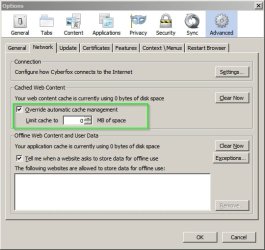
in the address bar. Maybe FF is the same. Perhaps you could post a screenshot. As for memory management I set mine like this:

Options.jpg

Also after browsing for a while type:

about:cache

into the address bar and inspect the results.
 

My Computer

Computer type
Laptop
Computer Manufacturer/Model Number
ASUS
OS
Microsoft Windows 7 Home Premium 64-bit 7601 Multiprocessor Free Service Pack 1
CPU
AMD C-60 APU with Radeon(tm) HD Graphics
Motherboard
ASUSTeK COMPUTER INC. X501U
Memory
4.00 GB
Graphics Card(s)
AMD Radeon HD 6290 Graphics
Sound Card
(1) AMD High Definition Audio Device (2) Realtek High Defi
Screen Resolution
1366 x 768 x 32 bits (4294967296 colors) @ 60 Hz
Hard Drives
Hitachi HTS545050A7E380 SATA Disk Device
Antivirus
Comodo CIS & FW, SecureAplus App Whitelisting, Threatfire
Browser
Cyberfox 64bit, Opera 64bit, Airfox
Other Info
Spy-The-Spy, HitmanPro.Alert, Norton Connect Safe, MJRegWatcher, BitDefender TrafficLight, Voodoo Shield, Zemana AntiMalware
Back
Top