firefox memory usage - 1GB!

My Computer

Computer type
Laptop
Computer Manufacturer/Model Number
ASUS
OS
Microsoft Windows 7 Home Premium 64-bit 7601 Multiprocessor Free Service Pack 1
CPU
AMD C-60 APU with Radeon(tm) HD Graphics
Motherboard
ASUSTeK COMPUTER INC. X501U
Memory
4.00 GB
Graphics Card(s)
AMD Radeon HD 6290 Graphics
Sound Card
(1) AMD High Definition Audio Device (2) Realtek High Defi
Screen Resolution
1366 x 768 x 32 bits (4294967296 colors) @ 60 Hz
Hard Drives
Hitachi HTS545050A7E380 SATA Disk Device
Antivirus
Comodo CIS & FW, SecureAplus App Whitelisting, Threatfire
Browser
Cyberfox 64bit, Opera 64bit, Airfox
Other Info
Spy-The-Spy, HitmanPro.Alert, Norton Connect Safe, MJRegWatcher, BitDefender TrafficLight, Voodoo Shield, Zemana AntiMalware
it is good possibility that the corruption does lie within the extensions though ? ... hence my reasoning behind saying just export your bookmarks.

I would not use anything other than FF itself to export the bookmarks with to be on the safe side, as for remembering what extensions you do have you could use the Windows snipping tool to take a screenshot of the list to look at when you come to download them again.

I would even go as far as just running the clean FF with nothing installed for the few hours to see if it remains stable or not this time round... You did download FF from the official Mozilla site I take it ?
 

My Computer

Computer type
Laptop
Computer Manufacturer/Model Number
Sony
OS
Windows 7 x64 SP1
CPU
Intel
Motherboard
Sony
Memory
4gb
Graphics Card(s)
Nvidia
Hard Drives
WD
Internet Speed
Dial up wasn't as bad as this !
Antivirus
Avast
Browser
Firefox
Okay, so I had a major crash in Firefox a couple hours ago. It crashed, but I couldn't restart it. It told me my profile could be corrupted. I have gotten that message several times in the past but then after killing the process in task manager it would always start back up again okay. This time, I couldn't kill the process in task manager. I tried several times and Firefox wouldn't terminate.

So I rebooted my system. Now, Firefox is running again, and I disabled all addons. Memory usage is lower as expected. I'm now going to surf for a while, and keep an eye on memory and about:cache. I also set my cache settings to Callender's recommendation to match his screenshot. If all is okay I'll start enabling add-ons one-at-a-time and surf for a while in-between each add-on, to see how it goes. I'll report back later.
 

My Computer

Computer type
PC/Desktop
Computer Manufacturer/Model Number
custom build
OS
Windows 7 32bit Home Premium
CPU
Intel Core I7 920 Bloomfield
Motherboard
Asus P6T Deluxe v1
Memory
3 GB Corsair DDR3 (3x1GB)
Graphics Card(s)
NVidia GTX 570 (1 GB RAM)
Sound Card
on board
Monitor(s) Displays
Dell P2314H
Screen Resolution
1920x1080
Hard Drives
Western Digital Black 1TB (main OS)
PSU
XION Supernova XON-800R14N 800W
Case
Antec 1200
Cooling
Arctic Freezer 7 Pro Rev. 2
Keyboard
AZIO Prism
Mouse
Logitech G700S
Internet Speed
Verizon FiOS 85/85
Antivirus
Avast
Browser
Firefox/Chrome
Other Info
SansDigital rr622 RocketRaid (with non-raid Driver)
Renesas USB 3.0 card
After a couple hours of surfing Amazon and Newegg, my memory consumption for Firefox with 1 tab currently open is 284,048 k. Is that where it should be? Seems a bit high for just 1 tab but it's a lot lower than it has been. And no crashes. This is with 0 addons enabled. I'll try enabling them 1 at a time and see how things go.

Also not sure what happened to reader mode. It was there yesterday, but now I can't seem to find it.
 
Last edited:

My Computer

Computer type
PC/Desktop
Computer Manufacturer/Model Number
custom build
OS
Windows 7 32bit Home Premium
CPU
Intel Core I7 920 Bloomfield
Motherboard
Asus P6T Deluxe v1
Memory
3 GB Corsair DDR3 (3x1GB)
Graphics Card(s)
NVidia GTX 570 (1 GB RAM)
Sound Card
on board
Monitor(s) Displays
Dell P2314H
Screen Resolution
1920x1080
Hard Drives
Western Digital Black 1TB (main OS)
PSU
XION Supernova XON-800R14N 800W
Case
Antec 1200
Cooling
Arctic Freezer 7 Pro Rev. 2
Keyboard
AZIO Prism
Mouse
Logitech G700S
Internet Speed
Verizon FiOS 85/85
Antivirus
Avast
Browser
Firefox/Chrome
Other Info
SansDigital rr622 RocketRaid (with non-raid Driver)
Renesas USB 3.0 card
That seems about right mine is 290,xxx with 2 tabs open at the moment this is after 4 hours.
 

My Computer

Computer type
Laptop
Computer Manufacturer/Model Number
Sony
OS
Windows 7 x64 SP1
CPU
Intel
Motherboard
Sony
Memory
4gb
Graphics Card(s)
Nvidia
Hard Drives
WD
Internet Speed
Dial up wasn't as bad as this !
Antivirus
Avast
Browser
Firefox
Yes that doesn't seem too bad. The reason I wanted to see your list of extensions - is are any of them on this list? You can check the list yourself.

Problematic extensions - MozillaZine Knowledge Base

Adobe Reader plugin: Should be disabled if you have it.

Java Quick Starter: Same applies.
 

My Computer

Computer type
Laptop
Computer Manufacturer/Model Number
ASUS
OS
Microsoft Windows 7 Home Premium 64-bit 7601 Multiprocessor Free Service Pack 1
CPU
AMD C-60 APU with Radeon(tm) HD Graphics
Motherboard
ASUSTeK COMPUTER INC. X501U
Memory
4.00 GB
Graphics Card(s)
AMD Radeon HD 6290 Graphics
Sound Card
(1) AMD High Definition Audio Device (2) Realtek High Defi
Screen Resolution
1366 x 768 x 32 bits (4294967296 colors) @ 60 Hz
Hard Drives
Hitachi HTS545050A7E380 SATA Disk Device
Antivirus
Comodo CIS & FW, SecureAplus App Whitelisting, Threatfire
Browser
Cyberfox 64bit, Opera 64bit, Airfox
Other Info
Spy-The-Spy, HitmanPro.Alert, Norton Connect Safe, MJRegWatcher, BitDefender TrafficLight, Voodoo Shield, Zemana AntiMalware
The only addon I have in that list is DownThemAll, which I find quite useful. I have the latest version installed, and according to the notes, it looks like I can reset some about:config settings. I don't know if resetting those fixes the issues with that addon.

Right now the only add-on I have enabled is Dashlane, my password manager. After several hours tonight of browsing Amazon, Youtube a little bit and Newegg some more, my current memory usage with just this tab open is 704,380.

EDIT:

A couple hours later now: I disabled Dashlane and have been surfing with "Turn Off The Lights" enabled - all other add-ons are disabled now. After 2 hours of surfing (including youtube), my memory usage is 306,168. Less than half of what it was with Dashlane enabled. I wonder if Dashlane is chewing up my memory?
 
Last edited:

My Computer

Computer type
PC/Desktop
Computer Manufacturer/Model Number
custom build
OS
Windows 7 32bit Home Premium
CPU
Intel Core I7 920 Bloomfield
Motherboard
Asus P6T Deluxe v1
Memory
3 GB Corsair DDR3 (3x1GB)
Graphics Card(s)
NVidia GTX 570 (1 GB RAM)
Sound Card
on board
Monitor(s) Displays
Dell P2314H
Screen Resolution
1920x1080
Hard Drives
Western Digital Black 1TB (main OS)
PSU
XION Supernova XON-800R14N 800W
Case
Antec 1200
Cooling
Arctic Freezer 7 Pro Rev. 2
Keyboard
AZIO Prism
Mouse
Logitech G700S
Internet Speed
Verizon FiOS 85/85
Antivirus
Avast
Browser
Firefox/Chrome
Other Info
SansDigital rr622 RocketRaid (with non-raid Driver)
Renesas USB 3.0 card
Re: Dashlane. I used it myself for a while but removed it. I can't remember why. What do you use it for? If it's just for passwords and auto login to websites then LastPass might be a better option. Like you said it could be the problem or part of it.

Re: Down Them All. What types of files do you want to download? We are not allowed to talk about anything under Item #4 of the Forum Rules but in my opinion you don't actually need an add on for downloading any types of files.

Also I started having thoughts about your page file settings. Can you post a screenshot?

Start > Run then type:

sysdm.cpl

Press Enter. On the "Advanced" tab click Performance "Settings" > "Advanced" > "Virtual Memory" > "Change"

Make a note of your current settings. Then try setting Page File to a custom size of whatevert the recommended size (shown in the window) is - and add 200 Mb.

Also worth a mention but probably won't help with memory issues - do you use and run SpeedyFox at all? Basically if you run it at least every few days it helps speed things up.

Download SpeedyFox - MajorGeeks
 
Last edited:

My Computer

Computer type
Laptop
Computer Manufacturer/Model Number
ASUS
OS
Microsoft Windows 7 Home Premium 64-bit 7601 Multiprocessor Free Service Pack 1
CPU
AMD C-60 APU with Radeon(tm) HD Graphics
Motherboard
ASUSTeK COMPUTER INC. X501U
Memory
4.00 GB
Graphics Card(s)
AMD Radeon HD 6290 Graphics
Sound Card
(1) AMD High Definition Audio Device (2) Realtek High Defi
Screen Resolution
1366 x 768 x 32 bits (4294967296 colors) @ 60 Hz
Hard Drives
Hitachi HTS545050A7E380 SATA Disk Device
Antivirus
Comodo CIS & FW, SecureAplus App Whitelisting, Threatfire
Browser
Cyberfox 64bit, Opera 64bit, Airfox
Other Info
Spy-The-Spy, HitmanPro.Alert, Norton Connect Safe, MJRegWatcher, BitDefender TrafficLight, Voodoo Shield, Zemana AntiMalware
I checked my pagefile settings. I had it set to manual, 4608MB. The recommended size it lists is 4594. I added 200MB to that, so now I've got 4794MB. I wasn't too far off from that.

I've only had Dashlane for a couple months, but I really love it. I use it to manage my passwords, and also auto-login to websites. I also love how it automatically saves my receipts when I make purchases. Just an extra, but it's a nice useful addition. I also love that I can keep my passwords stored locally, and I can always make a backup of the passwords file. I know there are other options, but when comparing the password managers, I liked Dashlane's options and interface the best.

I never heard of Speedyfox, but I just downloaded it. It seems it just compacts Firefox databases. I run ccleaner regularly as part of maintenance, and under Firefox cleaning options it lists "compact databases" - so is that doing the same thing Speedyfox does? If so I guess there's no need to run speedyfox.

I find DownThemAll very useful for some purposes, depending on what I'm downloading. Generally, I use Internet Download Manager for most files, but DownThemAll is useful for some of my needs. I haven't enabled that one yet so I'll see how that affects things once I get to it. Right now it looks like Dashlane was using up a lot of memory. Right now, I've got Firegestures, TurnOffTheLights, and ublock enabled, and current memory is at 284,032 after several hours of usage. So far so good, and no crashes. I think the crashes were related to having my Firefox cache set to auto - I haven't had a crash since I set it to manual.
 

My Computer

Computer type
PC/Desktop
Computer Manufacturer/Model Number
custom build
OS
Windows 7 32bit Home Premium
CPU
Intel Core I7 920 Bloomfield
Motherboard
Asus P6T Deluxe v1
Memory
3 GB Corsair DDR3 (3x1GB)
Graphics Card(s)
NVidia GTX 570 (1 GB RAM)
Sound Card
on board
Monitor(s) Displays
Dell P2314H
Screen Resolution
1920x1080
Hard Drives
Western Digital Black 1TB (main OS)
PSU
XION Supernova XON-800R14N 800W
Case
Antec 1200
Cooling
Arctic Freezer 7 Pro Rev. 2
Keyboard
AZIO Prism
Mouse
Logitech G700S
Internet Speed
Verizon FiOS 85/85
Antivirus
Avast
Browser
Firefox/Chrome
Other Info
SansDigital rr622 RocketRaid (with non-raid Driver)
Renesas USB 3.0 card
Okay so it seems better. Skip Speedyfox then if Ccleaner does the same.

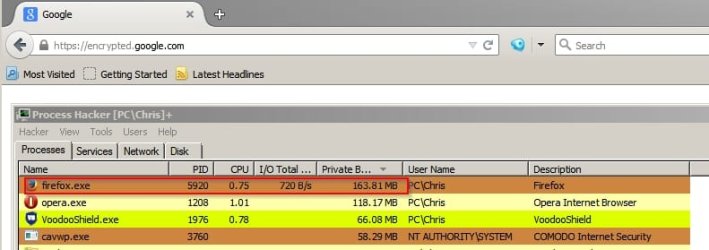
I've looked at Firefox on my machine at work and have a portable version installed at home. I've noticed that if you type

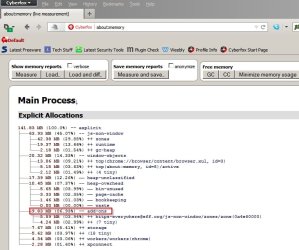
about:memory

into the address bar you get a fairly detailed report if you click on the first "measure" button (top left)

about_memory (live measurement) - Cyberfox.jpg

If you expand / collapse the headings you can see the top memory consuming add on and also memory usage of other add ons and pretty much everyting else.

about_memory (live measurement) 2 - Cyberfox.jpg

Here's my FF Portable (untweaked) standard install with one tab memory usage:

FF Portable.jpg

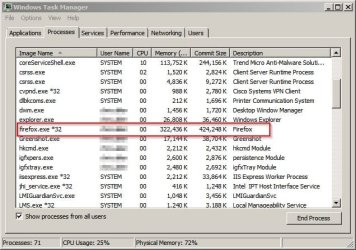
This screenshot is my work machine's Firefox memory usage.

FF Work.jpg

That would appear to be normal.

Also noticed that if you type

about:crashes

into the address bar you might be able to view crash reports. I've never looked at them before. Personally I have telemetry and health reporting disabled anyway.
 

My Computer

Computer type
Laptop
Computer Manufacturer/Model Number
ASUS
OS
Microsoft Windows 7 Home Premium 64-bit 7601 Multiprocessor Free Service Pack 1
CPU
AMD C-60 APU with Radeon(tm) HD Graphics
Motherboard
ASUSTeK COMPUTER INC. X501U
Memory
4.00 GB
Graphics Card(s)
AMD Radeon HD 6290 Graphics
Sound Card
(1) AMD High Definition Audio Device (2) Realtek High Defi
Screen Resolution
1366 x 768 x 32 bits (4294967296 colors) @ 60 Hz
Hard Drives
Hitachi HTS545050A7E380 SATA Disk Device
Antivirus
Comodo CIS & FW, SecureAplus App Whitelisting, Threatfire
Browser
Cyberfox 64bit, Opera 64bit, Airfox
Other Info
Spy-The-Spy, HitmanPro.Alert, Norton Connect Safe, MJRegWatcher, BitDefender TrafficLight, Voodoo Shield, Zemana AntiMalware

The slowdown on Amazon.com in Firefox is not only something you notice...its something many have seen. For some reason Firefox does not handle the JavaScript on Amazon very well. There is a Reddit thread about this and some solutions you may want to try.

The simplest and quickest for me was to install uBlock and add "images-amazon.com/*.js" to my filter. From there on Amazon loads lightning fast again. The downside is you can no longer flip through pictures of items on Amazon with multiple images.

The Reddit threads can be found here: https://www.reddit.com/r/firefox/comments/32cabx/firefox_3701_mac_amazoncom_insane_slowness_keeps/ and https://www.reddit.com/r/firefox/comments/363n3w/amazon_slowdown/crangwo
 

My Computer

Computer type
Laptop
Computer Manufacturer/Model Number
Asus
OS
Windows 7 Home Premium, ElementaryOS Dual Boot
CPU
Several i7 Laptops
Memory
8GB - 12GB
Graphics Card(s)
Nvidia GTX 560M & GTX 670M
The slowdown on Amazon.com in Firefox is not only something you notice...its something many have seen. For some reason Firefox does not handle the JavaScript on Amazon very well. There is a Reddit thread about this and some solutions you may want to try.

The simplest and quickest for me was to install uBlock and add "images-amazon.com/*.js" to my filter. From there on Amazon loads lightning fast again. The downside is you can no longer flip through pictures of items on Amazon with multiple images.

The Reddit threads can be found here: https://www.reddit.com/r/firefox/comments/32cabx/firefox_3701_mac_amazoncom_insane_slowness_keeps/ and https://www.reddit.com/r/firefox/comments/363n3w/amazon_slowdown/crangwo

Glad to hear it's not just me, but frustrating that this has to happen. So basically break the functionality of images on the site with a ublock filter or deal with Amazon's poor javascript. Thanks for that link though - I'll give it a read.
 

My Computer

Computer type
PC/Desktop
Computer Manufacturer/Model Number
custom build
OS
Windows 7 32bit Home Premium
CPU
Intel Core I7 920 Bloomfield
Motherboard
Asus P6T Deluxe v1
Memory
3 GB Corsair DDR3 (3x1GB)
Graphics Card(s)
NVidia GTX 570 (1 GB RAM)
Sound Card
on board
Monitor(s) Displays
Dell P2314H
Screen Resolution
1920x1080
Hard Drives
Western Digital Black 1TB (main OS)
PSU
XION Supernova XON-800R14N 800W
Case
Antec 1200
Cooling
Arctic Freezer 7 Pro Rev. 2
Keyboard
AZIO Prism
Mouse
Logitech G700S
Internet Speed
Verizon FiOS 85/85
Antivirus
Avast
Browser
Firefox/Chrome
Other Info
SansDigital rr622 RocketRaid (with non-raid Driver)
Renesas USB 3.0 card
Admittedly I use Cyberfox but just tested amazon and got 336MB usage with one tab (amazon)

With one tab (google) I got 276Mb usage so amazon shouldn't increase memory usage too much!
 

My Computer

Computer type
Laptop
Computer Manufacturer/Model Number
ASUS
OS
Microsoft Windows 7 Home Premium 64-bit 7601 Multiprocessor Free Service Pack 1
CPU
AMD C-60 APU with Radeon(tm) HD Graphics
Motherboard
ASUSTeK COMPUTER INC. X501U
Memory
4.00 GB
Graphics Card(s)
AMD Radeon HD 6290 Graphics
Sound Card
(1) AMD High Definition Audio Device (2) Realtek High Defi
Screen Resolution
1366 x 768 x 32 bits (4294967296 colors) @ 60 Hz
Hard Drives
Hitachi HTS545050A7E380 SATA Disk Device
Antivirus
Comodo CIS & FW, SecureAplus App Whitelisting, Threatfire
Browser
Cyberfox 64bit, Opera 64bit, Airfox
Other Info
Spy-The-Spy, HitmanPro.Alert, Norton Connect Safe, MJRegWatcher, BitDefender TrafficLight, Voodoo Shield, Zemana AntiMalware
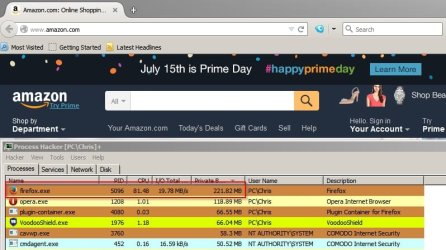
FF Portable with three add ons:

Amazon 222MB
FF Amazon.jpg

Google 164MB
FF Google.jpg
 

My Computer

Computer type
Laptop
Computer Manufacturer/Model Number
ASUS
OS
Microsoft Windows 7 Home Premium 64-bit 7601 Multiprocessor Free Service Pack 1
CPU
AMD C-60 APU with Radeon(tm) HD Graphics
Motherboard
ASUSTeK COMPUTER INC. X501U
Memory
4.00 GB
Graphics Card(s)
AMD Radeon HD 6290 Graphics
Sound Card
(1) AMD High Definition Audio Device (2) Realtek High Defi
Screen Resolution
1366 x 768 x 32 bits (4294967296 colors) @ 60 Hz
Hard Drives
Hitachi HTS545050A7E380 SATA Disk Device
Antivirus
Comodo CIS & FW, SecureAplus App Whitelisting, Threatfire
Browser
Cyberfox 64bit, Opera 64bit, Airfox
Other Info
Spy-The-Spy, HitmanPro.Alert, Norton Connect Safe, MJRegWatcher, BitDefender TrafficLight, Voodoo Shield, Zemana AntiMalware
@ tgfyhre I'm a simple computer person so I try to do things the simple way.

1. Websites change formats of pages often so things your ram is using at those pages will change often.

2. If one has to worry about a few MB of ram usage the simple cure is to add more ram to the computer and quiet worry about it.

3. One can chase MB's of ram usage on a computer forever and end up with a bunch of 3rd party programs looking for ram usage that use more ram than what you are looking for.

4. We buy and install ram for two main reasons.
1. A system will not work without it.
2. To use the ram.
 

My Computer

Computer type
PC/Desktop
Computer Manufacturer/Model Number
Home made Desktop
OS
Windows 10 Pro. 64/ version 1709 Windows 7 Pro/64
CPU
Intel i7-6800K @ 4.3
Motherboard
ASUS X-99 Deluxe II
Memory
Corsair Platinum 16 gig @2400
Graphics Card(s)
EVGA GTX 1070 OC
Monitor(s) Displays
Asus 27" LED LCD/VE278Q
Screen Resolution
1920-1080 or 1280-720 HDMI
Hard Drives
INTEL SSD 730-240 Gb Sata 3.0/
PSU
EVGA Platium 1200W
Case
Phanteks Luxe Tempered Glass 8 fans/ one radiator
Cooling
XSPC/ Water Cooled CPU
Keyboard
Das 4 Professional
Mouse
Logitech M705/MX Anywhere 2-S
Internet Speed
100 mbits
Antivirus
Microsoft Security Essentials/ Malwarebytes Premium 3.0/ SAS
Browser
I.E. 11 default/Firefox/ ISP Time Warner Cable/Spectrum
Other Info
LG BluRay Burner/
Sound system-KLipsch-THX/
Icy Dock ssd Hot Swap bays.
You'll notice by looking at my specs that I'm running 32bit so I can't add more RAM - I'm stuck at 3GB. If it was as easy as adding more RAM I would have done that already. I have a ton of stuff installed and configured the way I need and I'm hoping this fall or winter to get myself a new PC with Windows 10 64bit. That should solve my memory issues. For now though I was looking for ways to improve my situation since adding memory is not an option and I don't want to go through the hassle of re-installing Windows7 64bit and all my software just to do it all again this fall or winter.

Plus, regarding the Amazon issue with poor loading, I don't think that's a memory issue, so adding more memory won't improve that situation anyways.
 

My Computer

Computer type
PC/Desktop
Computer Manufacturer/Model Number
custom build
OS
Windows 7 32bit Home Premium
CPU
Intel Core I7 920 Bloomfield
Motherboard
Asus P6T Deluxe v1
Memory
3 GB Corsair DDR3 (3x1GB)
Graphics Card(s)
NVidia GTX 570 (1 GB RAM)
Sound Card
on board
Monitor(s) Displays
Dell P2314H
Screen Resolution
1920x1080
Hard Drives
Western Digital Black 1TB (main OS)
PSU
XION Supernova XON-800R14N 800W
Case
Antec 1200
Cooling
Arctic Freezer 7 Pro Rev. 2
Keyboard
AZIO Prism
Mouse
Logitech G700S
Internet Speed
Verizon FiOS 85/85
Antivirus
Avast
Browser
Firefox/Chrome
Other Info
SansDigital rr622 RocketRaid (with non-raid Driver)
Renesas USB 3.0 card
New Fix

I feel silly for not trying this sooner. I hopped around the Mozilla support forums a bit and found a suggestion that I disable the option to "Use Hardware Acceleration when available" under Preferences->Advanced and that completely removed the problem for me. Amazon loads as quickly as any other browser and it just took the tick of a single setting to get me back in top shape. Hope this works for you too!
 

My Computer

Computer type
Laptop
Computer Manufacturer/Model Number
Asus
OS
Windows 7 Home Premium, ElementaryOS Dual Boot
CPU
Several i7 Laptops
Memory
8GB - 12GB
Graphics Card(s)
Nvidia GTX 560M & GTX 670M
tgfyhre I never stated you have a memory problem. Your entire thread is about you thinking your system is using to much memory mainly Firefox.

I just suggest two methods of helping.
 

My Computer

Computer type
PC/Desktop
Computer Manufacturer/Model Number
Home made Desktop
OS
Windows 10 Pro. 64/ version 1709 Windows 7 Pro/64
CPU
Intel i7-6800K @ 4.3
Motherboard
ASUS X-99 Deluxe II
Memory
Corsair Platinum 16 gig @2400
Graphics Card(s)
EVGA GTX 1070 OC
Monitor(s) Displays
Asus 27" LED LCD/VE278Q
Screen Resolution
1920-1080 or 1280-720 HDMI
Hard Drives
INTEL SSD 730-240 Gb Sata 3.0/
PSU
EVGA Platium 1200W
Case
Phanteks Luxe Tempered Glass 8 fans/ one radiator
Cooling
XSPC/ Water Cooled CPU
Keyboard
Das 4 Professional
Mouse
Logitech M705/MX Anywhere 2-S
Internet Speed
100 mbits
Antivirus
Microsoft Security Essentials/ Malwarebytes Premium 3.0/ SAS
Browser
I.E. 11 default/Firefox/ ISP Time Warner Cable/Spectrum
Other Info
LG BluRay Burner/
Sound system-KLipsch-THX/
Icy Dock ssd Hot Swap bays.
Back
Top