Solved Firefox needs a profile transfer from PC to PC usually donew Mozbackup

loninappleton

New member
Member
VIP
Local time
12:02 PM
Messages
892
Mozbackup a Firefox specialy program was always my prefered way of getting a Firefox Profile transfered from on PC to another forgetting bookmark the same for multiple machines. Sometimes things I forgot could be retrieved. It has worked over many years but now fails in latest Firefox update versions.


MozBackup - Backup tool for Firefox and Thunderbird


Mozilla help will say Mozbackup has not been updated since 2012. Then they give instructions on how to
transfer a profile which I can never understand. Is there any advice here to clarify that procedure? The directory trees and such to navigate in Firefox is confusing. No youtubes please. I do not care to follow the bouncing cursor around one of those.


A series of steps is what I need and written out to follow.


Also, if the sevenforms can find a current Mozbackup tool I have missed that would be best.
Any profile transfer technique will not include the features that Mozbackup had for selective editing
of features.
 

My Computer My Computer

At a glance

Windows 7 x64 UltimateAMD Athlon II x3 4502 GB
Computer type
PC/Desktop
Computer Manufacturer/Model Number
custom
OS
Windows 7 x64 Ultimate
CPU
AMD Athlon II x3 450
Motherboard
MSI 880GM
Memory
2 GB
Hard Drives
various
Browser
Firefox, Opera
Why not just copy %appdata%\mozilla to your new pc.

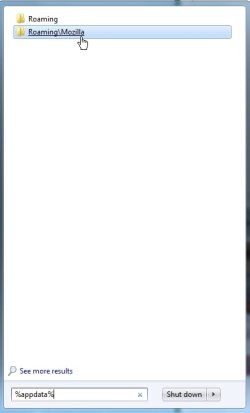
type\paste %appdata%\mozilla into start search box. rt click mozilla folder when it pops up . copy >paste it somewhere safe e.g. a usb stick.

On new pc after installing firefox - type %appdata% in start serach, then paste in the mozilla folder you saved.

%appdata% = %systemdrive%\users\username\appdata\roaming

mozilla.jpg


You might need to have Hidden Files showing, like this:

folder-options.jpg
 

My Computers My Computers

  • At a glance

    7 X64i5 84002x8gb 3200mhz
    Computer type
    PC/Desktop
    OS
    7 X64
    CPU
    i5 8400
    Motherboard
    gigabyte b365m ds3h
    Memory
    2x8gb 3200mhz
    Hard Drives
    various
    PSU
    pure power 11 400w cm
    Case
    Coolermaster
    Cooling
    cryorig m9i
  • At a glance

    7x64g54008gb ddr4 2400
    Computer type
    PC/Desktop
    OS
    7x64
    CPU
    g5400
    Motherboard
    ga b365m ds3h
    Memory
    8gb ddr4 2400
    PSU
    xfx pro 450w
Copy the entire folder: Appata > Roaming > "Mozilla" to a flash drive then copy to the new computer in the same place.

C:\Users\YOUR NAME\AppData\Roaming\Mozilla
 

My Computer My Computer

At a glance

Windows 10 22H2 ProIntel(R) Xeon W-10885M2x 32 GB DDR4 ECC memory (128 GB max)Intel onboard GPU 1080p - Quadro RTX 5000 Max...
Computer type
Laptop
Computer Manufacturer/Model Number
Dell Precision 15 7550 Workstation
OS
Windows 10 22H2 Pro
CPU
Intel(R) Xeon W-10885M
Motherboard
Dell
Memory
2x 32 GB DDR4 ECC memory (128 GB max)
Graphics Card(s)
Intel onboard GPU 1080p - Quadro RTX 5000 Max-Q GPU 4K
Hard Drives
1TB Samsung 9100 Pro main M2 SSD
2x 2TB Samsung 9100 Pro temp storage M2 SSD (6 TB max)
Mouse
Logitech MX-25 Bluetooth
Internet Speed
slow
Antivirus
MS
Browser
Pale Moon 34.x.x - x64 AVX2 build
I have a flash drive. I'll try it.
 

My Computer My Computer

At a glance

Windows 7 x64 UltimateAMD Athlon II x3 4502 GB
Computer type
PC/Desktop
Computer Manufacturer/Model Number
custom
OS
Windows 7 x64 Ultimate
CPU
AMD Athlon II x3 450
Motherboard
MSI 880GM
Memory
2 GB
Hard Drives
various
Browser
Firefox, Opera
Simple Firefox Backup seems to work a treat. But I'm going to try the manual procedure as well.
and

Mozbackup could do Thunberbird as well....
Anything on that?


My vote is for someone to develope a new Mozbackup that gives all the

options to delete the extras that Mozilla collects under the Mozbackup advanced tab.
 

My Computer My Computer

At a glance

Windows 7 x64 UltimateAMD Athlon II x3 4502 GB
Computer type
PC/Desktop
Computer Manufacturer/Model Number
custom
OS
Windows 7 x64 Ultimate
CPU
AMD Athlon II x3 450
Motherboard
MSI 880GM
Memory
2 GB
Hard Drives
various
Browser
Firefox, Opera
I have used the path given above opened in the Everything program (the only way I can find anything)


I selected copy everything showing which is a lot. The small thumb drive has not finished or loaded past
capacity yet. It's over a 1Gb of material.


Is there a way to delete any old material in the Profile-- that stuff that Mozilla collects to slim down
the Profile to what is needed?


Using that Fbackup program was super quick. I don't understand the difference but I sure could use
getting some disk space back.


onward
 

My Computer My Computer

At a glance

Windows 7 x64 UltimateAMD Athlon II x3 4502 GB
Computer type
PC/Desktop
Computer Manufacturer/Model Number
custom
OS
Windows 7 x64 Ultimate
CPU
AMD Athlon II x3 450
Motherboard
MSI 880GM
Memory
2 GB
Hard Drives
various
Browser
Firefox, Opera
My dump to the thumb drive failed when I tried to reopen and try to do something else. So a complete shutdown is needed. That backup hung up at a program called parental lock-- something I had never seen at age 73. Ok for that.


But there seems to be a lot of tracking content in the profile called JSONLZ4. I don't know if that is from each time a bookmark is opened or what. Is that just History to go and lookup a past search?
 

My Computer My Computer

At a glance

Windows 7 x64 UltimateAMD Athlon II x3 4502 GB
Computer type
PC/Desktop
Computer Manufacturer/Model Number
custom
OS
Windows 7 x64 Ultimate
CPU
AMD Athlon II x3 450
Motherboard
MSI 880GM
Memory
2 GB
Hard Drives
various
Browser
Firefox, Opera
I will be able to mark solved. I am a fool. Mozbackup still works on Firefox 80.0. I think I looked for the pcv file in the wrong directory. I'm still going to try to move the pcv file around to another PC.


But these alternatives are good to explore.


I still want to know how clean Firefox.
 

My Computer My Computer

At a glance

Windows 7 x64 UltimateAMD Athlon II x3 4502 GB
Computer type
PC/Desktop
Computer Manufacturer/Model Number
custom
OS
Windows 7 x64 Ultimate
CPU
AMD Athlon II x3 450
Motherboard
MSI 880GM
Memory
2 GB
Hard Drives
various
Browser
Firefox, Opera
I think I spoke too soon on a solution. Mozbackup runs but I don't see the bookmarks moved to the target PC.


more to do.
 

My Computer My Computer

At a glance

Windows 7 x64 UltimateAMD Athlon II x3 4502 GB
Computer type
PC/Desktop
Computer Manufacturer/Model Number
custom
OS
Windows 7 x64 Ultimate
CPU
AMD Athlon II x3 450
Motherboard
MSI 880GM
Memory
2 GB
Hard Drives
various
Browser
Firefox, Opera
Why not just create a Firefox account and then 'Tools / Sync Now' to copy your full Firefox config to the new system?
 

My Computer My Computer

At a glance

Windows 7 Ultimate x64 SP116GB
Computer type
Laptop
Computer Manufacturer/Model Number
Lenovo T530
OS
Windows 7 Ultimate x64 SP1
Memory
16GB
Hard Drives
1TB SSD
AK6DN


I don't know the answer to that. Never considered it. Syncing thigs souns like it has something to do
with mobile devices.


One goal I have now that the topic is made is to eliminate bloat, not just copy over.


thanks for answering and keeping this going.
 

My Computer My Computer

At a glance

Windows 7 x64 UltimateAMD Athlon II x3 4502 GB
Computer type
PC/Desktop
Computer Manufacturer/Model Number
custom
OS
Windows 7 x64 Ultimate
CPU
AMD Athlon II x3 450
Motherboard
MSI 880GM
Memory
2 GB
Hard Drives
various
Browser
Firefox, Opera
I re-ran Fbackup and it could be working. I was concerned it would just transfer bookmarks and not history. But it seemed to transfer the current history from PC1 to PC2.


Still twiddling with Mozbackup since it has all those options plus it works (worked) with Thunderbird.
It may still function with Thunderbird.


In the transfer App/Data manaul style what is that doing that a program is not?
 

My Computer My Computer

At a glance

Windows 7 x64 UltimateAMD Athlon II x3 4502 GB
Computer type
PC/Desktop
Computer Manufacturer/Model Number
custom
OS
Windows 7 x64 Ultimate
CPU
AMD Athlon II x3 450
Motherboard
MSI 880GM
Memory
2 GB
Hard Drives
various
Browser
Firefox, Opera
In the transfer App/Data manaul style what is that doing that a program is not?


Doing the backup manually by copying the entire profile folder is simply copying the whole lot. Bookmarks, history, extensions, settings, you name it, it's all there even passwords if you use the Firefox built-in password manager.

As to that JSON file. How are you determining that it's tracking content or something? Did an antivirus or Adware program tell you that?

You can clean up Firefox a little. By far the biggest would be to just dump the cache and history. If you have the toolbar shown above in Firefox, just go to History and you can clear out everything by a time or just Everything. Or press and hold the keyboard keys, control + shift + delete to open this History menu.

What is the name of your username on your computer? I can see about creating a batch script or a Freefilesync backup file or show you how to do it with Freefilesync and that would be a sure fire way of backing up everything from the Firefox and Thunderbird profiles. Then I can tell you how to restore it.
 

My Computer My Computer

At a glance

Windows 7 Ultimate x64
Computer type
PC/Desktop
OS
Windows 7 Ultimate x64
As to the parental control program. I'm not sure if that's Windows 7 related or not. I don't think it is, and it sounds like a running process in the background from a parental control program. You may have this program installed and/or there's an extension or plugin installed in Firefox that somehow got in there for parental control.

What I would do first is use Revouninstaller and go through all installed programs looking for a parental control program of some sorts. If you don't know what a program is in the list then I'd Google it and see what it is.

Revo Uninstaller Free - Remove unwanted programs easily
 

My Computer My Computer

At a glance

Windows 7 Ultimate x64
Computer type
PC/Desktop
OS
Windows 7 Ultimate x64
Apologies for the delay in reply. I did not get an email notification. Just checked in and saw new messages.


FBackup may be enough.


My user name on system is lon(lower case 'el'.) It's just my computer on a small home net
similarly named. No idea of the parental control but the suggestion for Revo is a good one. I use it
all the time be usually as a need arises.
 

My Computer My Computer

At a glance

Windows 7 x64 UltimateAMD Athlon II x3 4502 GB
Computer type
PC/Desktop
Computer Manufacturer/Model Number
custom
OS
Windows 7 x64 Ultimate
CPU
AMD Athlon II x3 450
Motherboard
MSI 880GM
Memory
2 GB
Hard Drives
various
Browser
Firefox, Opera
Services - Parental Controls service


Parental controls is a windows function. I have no clue how it got turned on or what it's doing.
I just made a quick search using windows 7 services + parental.

 

My Computer My Computer

At a glance

Windows 7 x64 UltimateAMD Athlon II x3 4502 GB
Computer type
PC/Desktop
Computer Manufacturer/Model Number
custom
OS
Windows 7 x64 Ultimate
CPU
AMD Athlon II x3 450
Motherboard
MSI 880GM
Memory
2 GB
Hard Drives
various
Browser
Firefox, Opera
So your username is lonel?
 

My Computer My Computer

At a glance

Windows 7 Ultimate x64
Computer type
PC/Desktop
OS
Windows 7 Ultimate x64
Apologies. I was not clear. username is lon


(with lower case "L" which is often seen as a capital "I")
 

My Computer My Computer

At a glance

Windows 7 x64 UltimateAMD Athlon II x3 4502 GB
Computer type
PC/Desktop
Computer Manufacturer/Model Number
custom
OS
Windows 7 x64 Ultimate
CPU
AMD Athlon II x3 450
Motherboard
MSI 880GM
Memory
2 GB
Hard Drives
various
Browser
Firefox, Opera
firefox sync is so simple and works across all platforms windows will sync with the phone android etc
 

My Computer My Computer

At a glance

win 8 32 bit
Computer type
PC/Desktop
OS
win 8 32 bit
Back
Top