Firefox page visuals "move"

Messerschmitt

New member
Member
Local time
2:07 AM
Messages
45
I have an old 4870 ATI card. Obviously I don't use it primarely anymore and it's in my secondary desktop, and I made this video like 5 years ago, but never got around to post it.

Hovering over the moving texture "fixes it". It's also not just that one webpage. It happens on many.

Anyway, what the heck causes this. Anyone saw this?

VID 20130410 162324 - YouTube
 

My Computer

OS
windows 7
Weird. :confused:

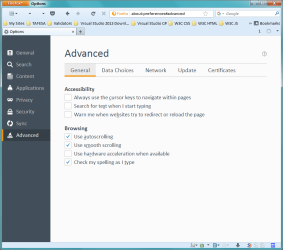
Do you have "Use hardware acceleration when available" turned on?
 

My Computer

Computer type
PC/Desktop
Computer Manufacturer/Model Number
n/a
OS
W7 Ultimate SP1, LM19.2 MATE, W10 Home 1703, W10 Pro 1703 VM, #All 64 bit
CPU
AMD Phenom II x6 1100T, 3.3 GHz
Motherboard
ASUS M4A88T-M/USB3 (AM3)
Memory
12GB DDR3 1333 G-Skill (4GB x 2), G-Skill (2GB x 2)
Graphics Card(s)
NVIDIA GeForce GTX 660
Sound Card
Realtek?
Monitor(s) Displays
Samsung S23B350
Screen Resolution
1920x1080
Hard Drives
WD Green 2TB (SATA), WD Green 3TB (SATA), WD Blue 4TB (SATA), WD Blue 6TB (SATA)
PSU
Cooler Master
Case
Antec GX300 Tower
Cooling
3x Antec TRICOOL 120mm Fans
Mouse
Wired Optical
Internet Speed
DSL
Antivirus
Avast
Browser
Pale Moon (64 bit)
Other Info
2018-12-27 Upgraded HDDs
2015-12-10 Upgraded case, graphics card, storage
2015-08-15 Upgraded motherboard & RAM
2015-07-15 Upgraded LM17.1 to LM17.2
Try disabling that option.

Hardware Acceleration used to cause so many Firefox/Pale Moon problems.
I haven't used it for several years.

Occasionally I turn it on to see if it has improved and if it makes any beneficial difference to my setup.
I've found that it hasn't changed and there are still no noticeable benefits.

Note:
Maybe Hardware Acceleration only works on Intel machines.

I have discovered that some software expects you to be using Intel hardware (e.g. Android Studio).
My desktop machines use AMD hardware.
 
Last edited:

My Computer

Computer type
PC/Desktop
Computer Manufacturer/Model Number
n/a
OS
W7 Ultimate SP1, LM19.2 MATE, W10 Home 1703, W10 Pro 1703 VM, #All 64 bit
CPU
AMD Phenom II x6 1100T, 3.3 GHz
Motherboard
ASUS M4A88T-M/USB3 (AM3)
Memory
12GB DDR3 1333 G-Skill (4GB x 2), G-Skill (2GB x 2)
Graphics Card(s)
NVIDIA GeForce GTX 660
Sound Card
Realtek?
Monitor(s) Displays
Samsung S23B350
Screen Resolution
1920x1080
Hard Drives
WD Green 2TB (SATA), WD Green 3TB (SATA), WD Blue 4TB (SATA), WD Blue 6TB (SATA)
PSU
Cooler Master
Case
Antec GX300 Tower
Cooling
3x Antec TRICOOL 120mm Fans
Mouse
Wired Optical
Internet Speed
DSL
Antivirus
Avast
Browser
Pale Moon (64 bit)
Other Info
2018-12-27 Upgraded HDDs
2015-12-10 Upgraded case, graphics card, storage
2015-08-15 Upgraded motherboard & RAM
2015-07-15 Upgraded LM17.1 to LM17.2
Wow!!! I never have seen something like that before...

Are your VGA drivers up to date? Latest drivers tend to have less problems with hardware acceleration.

Depending if you feel that things go faster or not, you can always disable hardware acceleration and rely on your CPU entirely, that fixes many problems...

Note:
Maybe Hardware Acceleration only works on Intel machines.

I have discovered that some software expects you to be using Intel hardware (e.g. Android Studio).
My desktop machines use AMD hardware.

In the case of Firefox, they are supposed to be working with a lot of setups, this includes nVidia, ATI or even Intel HD graphics.

The problem is that, they insist on relying on the DirectX API to use hardware acceleration, which has been proven to be faulty, buggy and in general, quite unstable. OpenGL by the other hand, is a much better option (I've tested it when Firefox was in works of Hardware Accel, it was quite good) and it's way faster than DirectX when handled right.

Now, is this fault of DirectX? Nope, Why? Because Chrome and IE can use hardware acceleration in a really neat way, and neither of them crash or exhibit bugs... The problem is that Mozilla team seem clueless using this API (remember Firefox garbled text problems when the platform update for IE10-11 came out? Neither IE nor Chrome had this problems...)

Not being able to fully handle an API can lead to nasty bugs... OpenGL seems like abetter solution for me and Firefox... but let's see what Mozilla thinks about it...

 

My Computer

Computer type
PC/Desktop
Computer Manufacturer/Model Number
Assembled Desktop PC
OS
Microsoft Windows 7 Home Premium SP1 64-bit Build 7600
CPU
AMD Athlon 64 X2 5200+ Dual Core CPU @ 2.7 Ghz (Brisbane)
Motherboard
PCChips A13G+ v3.0
Memory
2x2 GB DDR2 PC-5300 (667 Mhz) Kingston ValueRAM
Graphics Card(s)
XFX ATI Radeon HD 4350 GPU (512 MB + 512 MB HM)
Sound Card
Realtek High Definition Audio Driver ALC660 @ MCP61S
Monitor(s) Displays
HP S2031 20" LED HD Widescreen Display Monitor
Screen Resolution
1600 x 900 px
Hard Drives
Maxtor Diamond Max 10 (160 GB, 7200 RPM, SATA-II Hard Disk)
Western Digital Scorpion Blue (250 GB, 5400 RPM, SATA-II External Hard Disk - Personal Data)
Toshiba MQ01ABD050 (500 GB, 5400 RPM, SATA-II External Hard Disk - Software & ISOs)
PSU
Pixxo Transformer 850W 80+ Certification PSU
Case
Compaq 5BW353 Case
Cooling
Many solutions, see other info...
Keyboard
Green Leaf (Mitzu) Standard Keyboard
Mouse
Microsoft USB Lasser Pointing Device
Internet Speed
10 MB
Antivirus
Avast Antivirus Free
Browser
Firefox, Chrome, Internet Explorer
Other Info
Windows Experience Index Result: 3.8 of 7.9.

Cooling solutions:
- AVC @ 2000/5000 RPM Copper Heatpipes (For Athlon 64 X2 6000+ CPU used in an Athlon 64 X2 5200+)
- Rear Fan 80 mm @ 2700 RPM for heat extraction
- Manhatan Chipset Cooler @ 4700/7200 RPM (For nVidia Chipset in MoBo)
- Foxconn @ 2500 RPM (Old Pentium III heatsink fan) in XFX ATI Radeon HD 4350
Honestly it never bothered me TOO much, but all in all it's pretty cool eh? Some of the weirdest thing. I'll see if hardware acceleration does anything. I don't have ATI CC installed (as I never install it), so not sure where I can disable the hardware acceleration. Also, I rarely use my old computer so it might take a bit of time to look it up.
As for the newest drivers, honestly I have some drivers that I know my computer worked good from the time I used it frequently. Usually the newest drivers start screwing up the older the video card gets as it introduces bugs while they work improving the newest released cards.
 

My Computer

OS
windows 7
I don't have ATI CC installed (as I never install it), so not sure where I can disable the hardware acceleration. Also, I rarely use my old computer so it might take a bit of time to look it up.
I meant the setting in Firefox.
Options Advanced (General).png
 

My Computer

Computer type
PC/Desktop
Computer Manufacturer/Model Number
n/a
OS
W7 Ultimate SP1, LM19.2 MATE, W10 Home 1703, W10 Pro 1703 VM, #All 64 bit
CPU
AMD Phenom II x6 1100T, 3.3 GHz
Motherboard
ASUS M4A88T-M/USB3 (AM3)
Memory
12GB DDR3 1333 G-Skill (4GB x 2), G-Skill (2GB x 2)
Graphics Card(s)
NVIDIA GeForce GTX 660
Sound Card
Realtek?
Monitor(s) Displays
Samsung S23B350
Screen Resolution
1920x1080
Hard Drives
WD Green 2TB (SATA), WD Green 3TB (SATA), WD Blue 4TB (SATA), WD Blue 6TB (SATA)
PSU
Cooler Master
Case
Antec GX300 Tower
Cooling
3x Antec TRICOOL 120mm Fans
Mouse
Wired Optical
Internet Speed
DSL
Antivirus
Avast
Browser
Pale Moon (64 bit)
Other Info
2018-12-27 Upgraded HDDs
2015-12-10 Upgraded case, graphics card, storage
2015-08-15 Upgraded motherboard & RAM
2015-07-15 Upgraded LM17.1 to LM17.2
Back
Top