Firefox "popunders"

UsernameIssues

a.k.a. UNI
Guru
Gold Member
Local time
8:30 AM
Messages
8,138
Not an advert, just a new page that automatically goes to the background.


You can see the new page show briefly and then all you can see of the new page is the scroll bar off to the right in the video. The post shown in the video is this one, but the problem is not specific to any one post. Any post that has a link designed to open a new tab/page may cause this issue.

This is a fresh Firefox profile using Firefox 21 and no add-ons, but these "popunders" started around version 17.

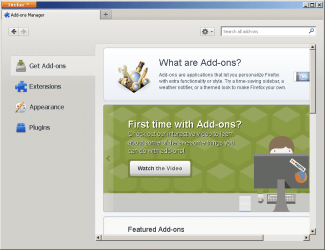
Firefox1.png

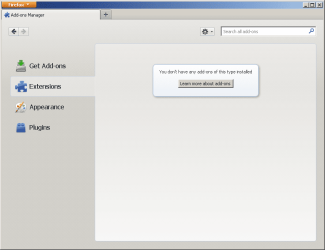
Firefox2.png

If I attempt to see how repeatable the problem is by:
...clicking on the link
...closing the new window (or just leave it in the background)
...clicking on the link again
The new window will most likely stay on top.

If I:
...click on the link
...close the new window (or just leave it in the background)
...wait a minute or two
...click on the link again
The new window will most likely "popunder".

I'm looking in Process Explorer for some event that happens after the wait. Maybe some clearing of some cache files - I don't know. I'm not finding any rhyme or reason to this "popunder" thing.

Does anyone else see it? Maybe it is the Intel video drivers. Don't those drivers manage windows Z order?
 

My Computer

Computer type
Laptop
Computer Manufacturer/Model Number
Employer provided Dell Latitude
OS
W7 Pro SP1 64bit
CPU
i7
Memory
8GB
Graphics Card(s)
Intel HD Graphics
Hard Drives
crappy SSD
Antivirus
Employer mandated Symantec Endpoint Protection
Browser
Pale Moon 64bit, IE11 64bit & Chrome 64bit
Not so much a popunder as the original window stealing focus so to speak. You say no add-ons, but how about the flash plugin? This has been a problem going back to FF15 from what I can see. Disabling the flash plugin seems to stop it. I have also seen where disabling the flash protected mode seems to work for some

To disable Protected Mode, add the following line to your mms.cfg file located in:


Windows 32bit: C:\windows\system32\macromed\flash

Windows 64bit: C:\windows\syswow64\macromed\flash


ProtectedMode=0


If the mms.cfg file does not exist, create one using any standard text editor (e.g.. notepad)


Depending on your operating system, you might need to first save the mms.cfg file to a writable location (such as your documents or desktop folder) and then copy the file into the destination folder using Windows Explorer.

To re-enable Protected Mode, simply remove the line from the mms.cfg file.

Adobe Community: How do I troubleshoot Flash Player's protected mode for Firefox?

Not a fix, but if it works, at least you know the cause. A Guy
 

My Computer

Computer type
PC/Desktop
OS
Windows 10 Home x64
CPU
INTEL Core i5-750 Quad-Core 3.37GHz
Motherboard
ASUS P7P55D
Memory
HyperX Fury Black Series 8GB (2 x 4GB) 1866Mhz
Graphics Card(s)
EVGA GeForce GTX 750 Superclocked 1GB 128-Bit GDDR5
Monitor(s) Displays
LG 32MA68HY 32" IPS
Screen Resolution
1920 x 1080
Hard Drives
Samsung 840 Evo 120GB, SEAGATE 500GB Barracuda® 7200.12, SATA 3 Gb/s, 7200 RPM, 16MB cache
PSU
ANTEC TruePower New TP-550, 80 PLUS, 550W
Case
ANTEC Three Hundred Illusion
Cooling
COOLER MASTER Hyper 212 Plus, 4 x 120mm 1 x 140mm Noctua's
Internet Speed
85 + Mbps
Antivirus
Avast
Browser
Vivaldi
NoScript

I run the NoScript add-on, which blocks Flash by default, so I haven't noticed this issue.

Thanks for that info A Guy. :)
 
Last edited:

My Computer

Computer type
PC/Desktop
Computer Manufacturer/Model Number
n/a
OS
W7 Ultimate SP1, LM19.2 MATE, W10 Home 1703, W10 Pro 1703 VM, #All 64 bit
CPU
AMD Phenom II x6 1100T, 3.3 GHz
Motherboard
ASUS M4A88T-M/USB3 (AM3)
Memory
12GB DDR3 1333 G-Skill (4GB x 2), G-Skill (2GB x 2)
Graphics Card(s)
NVIDIA GeForce GTX 660
Sound Card
Realtek?
Monitor(s) Displays
Samsung S23B350
Screen Resolution
1920x1080
Hard Drives
WD Green 2TB (SATA), WD Green 3TB (SATA), WD Blue 4TB (SATA), WD Blue 6TB (SATA)
PSU
Cooler Master
Case
Antec GX300 Tower
Cooling
3x Antec TRICOOL 120mm Fans
Mouse
Wired Optical
Internet Speed
DSL
Antivirus
Avast
Browser
Pale Moon (64 bit)
Other Info
2018-12-27 Upgraded HDDs
2015-12-10 Upgraded case, graphics card, storage
2015-08-15 Upgraded motherboard & RAM
2015-07-15 Upgraded LM17.1 to LM17.2
why dont you have new windows open in a new tab checked. that way you wont have this issue.
 

My Computer

Computer Manufacturer/Model Number
Hewlett packard/p6512uk
OS
Microsoft Windows 7 Home Premium 64-bit 7600
CPU
IIx4 amd athelon 635 processor
Motherboard
FOXCONN 2AA9
Memory
2x2gb
Graphics Card(s)
ati radeon HD 5450
Sound Card
(1) Realtek High Definition Audio (2) AMD High Definition
Monitor(s) Displays
samsung lcd tv 32"
Screen Resolution
1360x 768
Hard Drives
(1) WDC WD10 01FAES-60Z2A0 SATA Disk Device (2) Maxtor OneTouch USB Device (3) ST310003 33AS USB Device (4) WD My Book 1111 USB Device
PSU
?
Cooling
air!
Keyboard
wireless hp
Mouse
wireless Hp,optical
Internet Speed
1.10mb/s
Antivirus
MSE
Browser
Firefox
why dont you have new windows open in a new tab checked. that way you wont have this issue.
Now that would be too easy of a fix :-)

It has to do with the way that I organize my tabs and windows. Generally, one window (and its tabs) are all related. e.g. all the tabs in one window are Seven Forum threads - if I leave the forums, I want a new window. I usually right click links and select what I want to happen - so that setting does not really matter.

It does seem to be Flash related as the new window shown in the video does load the flash plug-in. But I cannot replicate the issue in a VM - with the same version of flash, same version of Firefox, same classic theme.

....now to figure out why....

Thanks A Guy for the flash lead.
 

My Computer

Computer type
Laptop
Computer Manufacturer/Model Number
Employer provided Dell Latitude
OS
W7 Pro SP1 64bit
CPU
i7
Memory
8GB
Graphics Card(s)
Intel HD Graphics
Hard Drives
crappy SSD
Antivirus
Employer mandated Symantec Endpoint Protection
Browser
Pale Moon 64bit, IE11 64bit & Chrome 64bit
:D ah well, i tried.
 

My Computer

Computer Manufacturer/Model Number
Hewlett packard/p6512uk
OS
Microsoft Windows 7 Home Premium 64-bit 7600
CPU
IIx4 amd athelon 635 processor
Motherboard
FOXCONN 2AA9
Memory
2x2gb
Graphics Card(s)
ati radeon HD 5450
Sound Card
(1) Realtek High Definition Audio (2) AMD High Definition
Monitor(s) Displays
samsung lcd tv 32"
Screen Resolution
1360x 768
Hard Drives
(1) WDC WD10 01FAES-60Z2A0 SATA Disk Device (2) Maxtor OneTouch USB Device (3) ST310003 33AS USB Device (4) WD My Book 1111 USB Device
PSU
?
Cooling
air!
Keyboard
wireless hp
Mouse
wireless Hp,optical
Internet Speed
1.10mb/s
Antivirus
MSE
Browser
Firefox
:D ah well, i tried.
And I thank you for doing so.

One work around is to set a home page that causes the flash plug in to load. Once flash has loaded, the issue seems to go away.

I was able to get the VM to do this popunder or steal focus thing too.

I had forgotten about logging in to prevent adverts from Seven Forums. After enough tests, I happened to get a Seven Forums page without flash related adverts and the popunder showed only after clicking to open a new window that did load flash. Now that I've logged into the forum in the VM, the popunder is consistent.

And Firefox has crashed more than once on the host computer and in the VM.

IE10 is looking pretty good right now :-)
 

My Computer

Computer type
Laptop
Computer Manufacturer/Model Number
Employer provided Dell Latitude
OS
W7 Pro SP1 64bit
CPU
i7
Memory
8GB
Graphics Card(s)
Intel HD Graphics
Hard Drives
crappy SSD
Antivirus
Employer mandated Symantec Endpoint Protection
Browser
Pale Moon 64bit, IE11 64bit & Chrome 64bit
seems a strsnge issue, ive used firefox for years with no real issues. having said that i always have had new windows open in a new tab, so its not something ive ever experienced.
have you tried comodo ice dragon, its the same as firefox ,in that you can use your firefox profile, add ons etc and so may be worth a try.

Comodo IceDragon Internet Browser, Secure Internet Browser
 

My Computer

Computer Manufacturer/Model Number
Hewlett packard/p6512uk
OS
Microsoft Windows 7 Home Premium 64-bit 7600
CPU
IIx4 amd athelon 635 processor
Motherboard
FOXCONN 2AA9
Memory
2x2gb
Graphics Card(s)
ati radeon HD 5450
Sound Card
(1) Realtek High Definition Audio (2) AMD High Definition
Monitor(s) Displays
samsung lcd tv 32"
Screen Resolution
1360x 768
Hard Drives
(1) WDC WD10 01FAES-60Z2A0 SATA Disk Device (2) Maxtor OneTouch USB Device (3) ST310003 33AS USB Device (4) WD My Book 1111 USB Device
PSU
?
Cooling
air!
Keyboard
wireless hp
Mouse
wireless Hp,optical
Internet Speed
1.10mb/s
Antivirus
MSE
Browser
Firefox
Pale Moon

Pale Moon is another alternative.
It is based on Firefox, but it is allegedly optimised for Windows.
The Pale Moon Project homepage

This reminds me of the problem I had with FF (6-16) on my physical XP install.
I'd start FF and it would close almost immediately.
However, if I then started it again, it would run properly. :confused:

The problem never occurred with my XP VMs.

You mentioned in our private discussions that you had Java installed.
Maybe Flash, Firefox and Java are refusing to "play nice" together.

Does running FF in:

  • "FF Safe Mode" make a difference?
  • Windows Safe Mode make a difference?
  • Both "Safe Modes" make a difference?
 
Last edited:

My Computer

Computer type
PC/Desktop
Computer Manufacturer/Model Number
n/a
OS
W7 Ultimate SP1, LM19.2 MATE, W10 Home 1703, W10 Pro 1703 VM, #All 64 bit
CPU
AMD Phenom II x6 1100T, 3.3 GHz
Motherboard
ASUS M4A88T-M/USB3 (AM3)
Memory
12GB DDR3 1333 G-Skill (4GB x 2), G-Skill (2GB x 2)
Graphics Card(s)
NVIDIA GeForce GTX 660
Sound Card
Realtek?
Monitor(s) Displays
Samsung S23B350
Screen Resolution
1920x1080
Hard Drives
WD Green 2TB (SATA), WD Green 3TB (SATA), WD Blue 4TB (SATA), WD Blue 6TB (SATA)
PSU
Cooler Master
Case
Antec GX300 Tower
Cooling
3x Antec TRICOOL 120mm Fans
Mouse
Wired Optical
Internet Speed
DSL
Antivirus
Avast
Browser
Pale Moon (64 bit)
Other Info
2018-12-27 Upgraded HDDs
2015-12-10 Upgraded case, graphics card, storage
2015-08-15 Upgraded motherboard & RAM
2015-07-15 Upgraded LM17.1 to LM17.2
Testing in the VM now:
Firefox, Icedragon and Palemoon all have this "popunder" problem.
Firefox safe mode has the problem.
Windows safe mode & Firefox normal mode has the problem.
Windows safe mode & Firefox safe mode has the problem.

Java is not installed in the VM.

Firefox-VM1.png

Firefox-VM2.png

Firefox-VM3.png

Firefox-VM4.png


I don't need to solve the problem per se, I'm just curious if others see it and why it happens.

The link that A Guy posted...
Adobe Community: How do I troubleshoot Flash Player's protected mode for Firefox?
...mentioned disabling Flash's protected mode via a mms.cfg file.
That article above also had a link...
Inside Flash Player Protected Mode for Firefox
...that explained the protected mode. It shows Process Explorer with Flash running in the low integrity mode. I see the same thing with or without the protected mode disabled. Perhaps the protected mode cannot be turned off in newer versions of Flash - or I did something wrong.


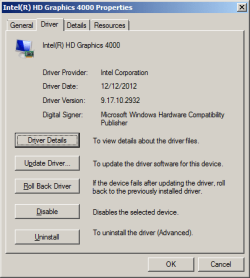
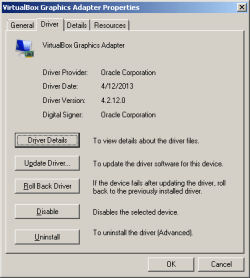
It does not seem to be tied to the video drivers:

host:
host.png

vm:
vm.png
 

My Computer

Computer type
Laptop
Computer Manufacturer/Model Number
Employer provided Dell Latitude
OS
W7 Pro SP1 64bit
CPU
i7
Memory
8GB
Graphics Card(s)
Intel HD Graphics
Hard Drives
crappy SSD
Antivirus
Employer mandated Symantec Endpoint Protection
Browser
Pale Moon 64bit, IE11 64bit & Chrome 64bit
Palemoon64 and Waterfox64 do not have this popunder issue because neither loads the Flash app. Both just use the Flash DLL via the plugin-container app. The plugin-container app is running at the medium integrity level just like the user. I wonder what the security implications are. Is this as safe as the sand boxing of the Flash app?

Edit: so far, I'm liking Pale Moon's traditional (default) status bar... even if you do lose a bit of browser viewing area.
 

My Computer

Computer type
Laptop
Computer Manufacturer/Model Number
Employer provided Dell Latitude
OS
W7 Pro SP1 64bit
CPU
i7
Memory
8GB
Graphics Card(s)
Intel HD Graphics
Hard Drives
crappy SSD
Antivirus
Employer mandated Symantec Endpoint Protection
Browser
Pale Moon 64bit, IE11 64bit & Chrome 64bit
This issue's been bugging me since Firefox 18. I'm just glad that I'm not alone!
 

My Computer

Computer type
PC/Desktop
Computer Manufacturer/Model Number
Self-Built
OS
Win10 Pro 64-bit
CPU
AMD Ryzen 7 3800X
Motherboard
Gigabyte X570 UD
Memory
32 GB Kingston DDR4-2666
Graphics Card(s)
MSI nVidia GT 710 (2GB)
Sound Card
Creative Audigy FX 5.1
Monitor(s) Displays
ViewSonic VG2439Smh 24"
Screen Resolution
1920x1080
Hard Drives
3xWD1TB; 1xSeagate 1TB... all spinning rust
PSU
EVGA 100-W1-0500-KR (500w)
Case
SilverStone PS10 (modified)
Cooling
CPU:AMD Wraith Prism. Case:3x Noctua 120mm
Keyboard
Compaq Professional PS/2
Mouse
Microsoft Basic Optical Mouse 2.0
Internet Speed
Fiber 1Gbit/sec down/up
Antivirus
Avast Free
Browser
FF, Chrome
Other Info
2x LG GH24NSC0 DVD burners, Mackie CR3 monitor speakers
This issue's been bugging me since Firefox 18. I'm just glad that I'm not alone!
I never could locate the exact reason - other than:
loading the flash plug-in into a new window = "popunder".
It is quite repeatable once you know how to set up the conditions.

Anyway, I'm lucky in that:
1) Firefox is not my main browser (IE is)
2) I only need Java and Flash to work in Firefox (no add-ons)
3) lehnerus2000 suggested Pale Moon

I had played with Pale Moon before I had 64bit OS to work with... but now I've replaced the traditional Firefox with the Pale Moon 64 build (heed the warnings in the link before making the leap).

In theory, Pale Moon 64bit should consume less RAM and CPU power when streaming flash based video (which I do a lot). The 64bit plug-in app uses the Flash DLL directly. This is not true for the 32bit plug-in app (even Pale Moon's 32bit build).

I'm not going to mark this thread as solved since moving to Pale Moon 64bit is not going to work for most. And such a move does not solve the "popunders" within the Firefox 32bit or Pale Moon 32bit.
 

My Computer

Computer type
Laptop
Computer Manufacturer/Model Number
Employer provided Dell Latitude
OS
W7 Pro SP1 64bit
CPU
i7
Memory
8GB
Graphics Card(s)
Intel HD Graphics
Hard Drives
crappy SSD
Antivirus
Employer mandated Symantec Endpoint Protection
Browser
Pale Moon 64bit, IE11 64bit & Chrome 64bit
Back
Top