
You are using an out of date browser. It may not display this or other websites correctly.
You should upgrade or use an alternative browser.
You should upgrade or use an alternative browser.
Firefox tabs ?
- Thread starter brightsun
- Start date

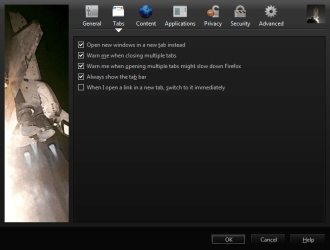
hi bright sun in browser go to tools/options/tab(tab) and check open in new window(so there is a tick in the box)
My Computer
- Computer Manufacturer/Model Number
- Hewlett packard/p6512uk
- OS
- Microsoft Windows 7 Home Premium 64-bit 7600
- CPU
- IIx4 amd athelon 635 processor
- Motherboard
- FOXCONN 2AA9
- Memory
- 2x2gb
- Graphics Card(s)
- ati radeon HD 5450
- Sound Card
- (1) Realtek High Definition Audio (2) AMD High Definition
- Monitor(s) Displays
- samsung lcd tv 32"
- Screen Resolution
- 1360x 768
- Hard Drives
- (1) WDC WD10 01FAES-60Z2A0 SATA Disk Device (2) Maxtor OneTouch USB Device (3) ST310003 33AS USB Device (4) WD My Book 1111 USB Device
- PSU
- ?
- Cooling
- air!
- Keyboard
- wireless hp
- Mouse
- wireless Hp,optical
- Internet Speed
- 1.10mb/s
- Antivirus
- MSE
- Browser
- Firefox
My Computer
- Computer Manufacturer/Model Number
- Hewlett packard/p6512uk
- OS
- Microsoft Windows 7 Home Premium 64-bit 7600
- CPU
- IIx4 amd athelon 635 processor
- Motherboard
- FOXCONN 2AA9
- Memory
- 2x2gb
- Graphics Card(s)
- ati radeon HD 5450
- Sound Card
- (1) Realtek High Definition Audio (2) AMD High Definition
- Monitor(s) Displays
- samsung lcd tv 32"
- Screen Resolution
- 1360x 768
- Hard Drives
- (1) WDC WD10 01FAES-60Z2A0 SATA Disk Device (2) Maxtor OneTouch USB Device (3) ST310003 33AS USB Device (4) WD My Book 1111 USB Device
- PSU
- ?
- Cooling
- air!
- Keyboard
- wireless hp
- Mouse
- wireless Hp,optical
- Internet Speed
- 1.10mb/s
- Antivirus
- MSE
- Browser
- Firefox
also this addon could be helpful. i think.
https://addons.mozilla.org/en-US/firefox/addon/1122/
https://addons.mozilla.org/en-US/firefox/addon/1122/
My Computer
- Computer Manufacturer/Model Number
- Hewlett packard/p6512uk
- OS
- Microsoft Windows 7 Home Premium 64-bit 7600
- CPU
- IIx4 amd athelon 635 processor
- Motherboard
- FOXCONN 2AA9
- Memory
- 2x2gb
- Graphics Card(s)
- ati radeon HD 5450
- Sound Card
- (1) Realtek High Definition Audio (2) AMD High Definition
- Monitor(s) Displays
- samsung lcd tv 32"
- Screen Resolution
- 1360x 768
- Hard Drives
- (1) WDC WD10 01FAES-60Z2A0 SATA Disk Device (2) Maxtor OneTouch USB Device (3) ST310003 33AS USB Device (4) WD My Book 1111 USB Device
- PSU
- ?
- Cooling
- air!
- Keyboard
- wireless hp
- Mouse
- wireless Hp,optical
- Internet Speed
- 1.10mb/s
- Antivirus
- MSE
- Browser
- Firefox

Look at the screenshot he posted, that's the options selected by default.  If you see it is checked.
If you see it is checked.My Computer
- Computer type
- PC/Desktop
- OS
- Win7 Home Premium x64 SP1, Archlinux x86_64. Elementary Luna
addon I know I want open new window can you tell me a set up featuring open new window for addon or only firefox with out at addon
https://addons.mozilla.org/en-US/firefox/addon/1122/
https://addons.mozilla.org/en-US/firefox/addon/1122/
My Computer
- OS
- w7
I'm sorry i can't understand what you want exactly...do you want to have it checked so when you click on links it will open in a new tab instead of opening a new window, or...?
My Computer
- Computer type
- PC/Desktop
- OS
- Win7 Home Premium x64 SP1, Archlinux x86_64. Elementary Luna

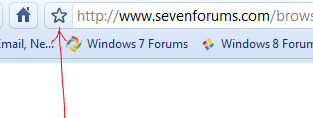
Are you taking about bookmarking different websites on FF?
My Computer
- Computer Manufacturer/Model Number
- HP M9077c
- OS
- Windows 7 Home Premium 64bit
- CPU
- Intel(R)Core(TM)2 quad [email protected] 2.39GHz
- Motherboard
- ASUSeK
- Memory
- 6GB DDR2 6400
- Graphics Card(s)
- GeForce 8500/512MB
- Sound Card
- Realtek High Def Audio
- Monitor(s) Displays
- HP w2408 LCD 24" widescreen
- Screen Resolution
- 1920x1200
- Cooling
- 6 pack of Bud
- Keyboard
- MS wireless Inteli
- Mouse
- MS wireless Inteli

Brightson, are you wanting links to open in a new window instead of in a new tab?
~Lordbob
~Lordbob
My Computer
- Computer Manufacturer/Model Number
- Hera
- OS
- Windows 7 Ultimate x64, Mint 9
- CPU
- Intel i5-2500k
- Motherboard
- ASUS P8P67 Pro
- Memory
- 2x 4Gb Corsair VENGEANCE DDR3-1600
- Graphics Card(s)
- NVidia GeForce N260GTX Twin Frozr
- Sound Card
- Realtek HD OnBoard Audio
- Monitor(s) Displays
- ASUS 24" Monitor
- Screen Resolution
- 1920x1080
- Hard Drives
- G.SKILL Phoenix Series 60GB SATA II MLC Internal Solid State Drive (SSD)
SAMSUNG Spinpoint F3R 1TB 7200 RPM 32MB Cache SATA II
- PSU
- Cooler Master Real Power Pro 750W
- Case
- Cooler Master Haf 932
- Cooling
- Fans
- Keyboard
- Razer Tarantula
- Mouse
- Razer Lachesis
- Internet Speed
- not fast enough
Go to the website you want/highlight it/ and drag it down to your FF taskbar.
My Computer
- Computer Manufacturer/Model Number
- HP M9077c
- OS
- Windows 7 Home Premium 64bit
- CPU
- Intel(R)Core(TM)2 quad [email protected] 2.39GHz
- Motherboard
- ASUSeK
- Memory
- 6GB DDR2 6400
- Graphics Card(s)
- GeForce 8500/512MB
- Sound Card
- Realtek High Def Audio
- Monitor(s) Displays
- HP w2408 LCD 24" widescreen
- Screen Resolution
- 1920x1200
- Cooling
- 6 pack of Bud
- Keyboard
- MS wireless Inteli
- Mouse
- MS wireless Inteli

billynomates
New member
- Local time
- 11:04 PM
- Messages
- 97
If you set FF to open a new tab in a new window, well, I don't think you will get multiple tabs. You will get multiple windows though. Please understand, we may be facing a slight language barrier here. Could you post a picture of what you have, and one of what you want? A picture, as they say, is worth a thousand words.
My Computer
- OS
- Win7 HP 64bit
Ok, so I think you are talking about the bookmarks menu. Like this?I want to open in a new window instead of in a new tab and always show toolbar and can I have multiple sites show up in different tabs in my toolbar on firefox ?
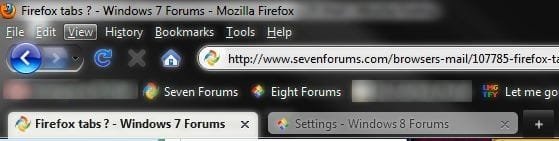
If so, just drag your bookmarks to the bookmarks toolbar folder. Then go to view and make sure it is checked.
As for opening in a new window, go to Tools > Options > Tabs. Then UNCHECK "Open New Window in a New Tab instead"
~Lordbob
My Computer
- Computer Manufacturer/Model Number
- Hera
- OS
- Windows 7 Ultimate x64, Mint 9
- CPU
- Intel i5-2500k
- Motherboard
- ASUS P8P67 Pro
- Memory
- 2x 4Gb Corsair VENGEANCE DDR3-1600
- Graphics Card(s)
- NVidia GeForce N260GTX Twin Frozr
- Sound Card
- Realtek HD OnBoard Audio
- Monitor(s) Displays
- ASUS 24" Monitor
- Screen Resolution
- 1920x1080
- Hard Drives
- G.SKILL Phoenix Series 60GB SATA II MLC Internal Solid State Drive (SSD)
SAMSUNG Spinpoint F3R 1TB 7200 RPM 32MB Cache SATA II
- PSU
- Cooler Master Real Power Pro 750W
- Case
- Cooler Master Haf 932
- Cooling
- Fans
- Keyboard
- Razer Tarantula
- Mouse
- Razer Lachesis
- Internet Speed
- not fast enough
I want a tab to open in multiple sites it is going to the same tab for different sites can I get it to go in different tabs in my toolbar on firefox ? example google one tab then I go to yahoo it goes to the google tab want it in two different tabs
My Computer
- OS
- w7
Oh...I want a tab to open in multiple sites it is going to the same tab for different sites can I get it to go in different tabs in my toolbar on firefox ? example google one tab then I go to yahoo it goes to the google tab want it in two different tabs
Press control + t to open a new tab, or the + sign you see at the far right of your tab bar.
~Lordbob
My Computer
- Computer Manufacturer/Model Number
- Hera
- OS
- Windows 7 Ultimate x64, Mint 9
- CPU
- Intel i5-2500k
- Motherboard
- ASUS P8P67 Pro
- Memory
- 2x 4Gb Corsair VENGEANCE DDR3-1600
- Graphics Card(s)
- NVidia GeForce N260GTX Twin Frozr
- Sound Card
- Realtek HD OnBoard Audio
- Monitor(s) Displays
- ASUS 24" Monitor
- Screen Resolution
- 1920x1080
- Hard Drives
- G.SKILL Phoenix Series 60GB SATA II MLC Internal Solid State Drive (SSD)
SAMSUNG Spinpoint F3R 1TB 7200 RPM 32MB Cache SATA II
- PSU
- Cooler Master Real Power Pro 750W
- Case
- Cooler Master Haf 932
- Cooling
- Fans
- Keyboard
- Razer Tarantula
- Mouse
- Razer Lachesis
- Internet Speed
- not fast enough
billynomates
New member
- Local time
- 11:04 PM
- Messages
- 97
For that one you need to click on or open an empty tab, then choose yahoo as your search engine when you type your search.I want a tab to open in multiple sites it is going to the same tab for different sites can I get it to go in different tabs in my toolbar on firefox ? example google one tab then I go to yahoo it goes to the google tab want it in two different tabs
My Computer
- OS
- Win7 HP 64bit