FireFox taking too much time to launch first time after start pc.

IamLEGEND

New member
Member
VIP
Local time
2:15 PM
Messages
138
Hi to all.
I m here again with a problem which I facing since long. when I start computer and launch FF. it takes too much time. no more then at least 50 sec to 1 minute. after start first time, if I close FF and start it again its its launch quickly. and the most funny thing is which is wonder me alot that FF itself know that and often after start FF, its says in status bar of FF that "FF taking too much time to start, to solve this problem follow the steps" (or something like that)
and FF suggest Reset firefox from FF button->Help->troubleshoot problem->reset firefox.
but this method did not solve the problem. FF updated regularly when new update available and the current version is,,,,,, 27.01.
my pc specs is in this forum.
 

My Computer My Computer

At a glance

Windows 7 SP1 Ultimate x64Intel(R) Core(TM) 2 Due cpu E8400 @ 3.0ghz3x2gb DDR3 PC3-10600NVIDIA GeForce 9800 GT
Computer type
PC/Desktop
Computer Manufacturer/Model Number
Acer Veriton S670/G M670/G
OS
Windows 7 SP1 Ultimate x64
CPU
Intel(R) Core(TM) 2 Due cpu E8400 @ 3.0ghz
Motherboard
Acer EQ45M
Memory
3x2gb DDR3 PC3-10600
Graphics Card(s)
NVIDIA GeForce 9800 GT
Sound Card
Digital Audio (S/PDIF) (High Definition Audio Device)
Monitor(s) Displays
Asus VK222H 22" lcd HDMI wide.
Screen Resolution
1680x1050 @ 60 Hz
Hard Drives
2x1TB WD 10EAR
Internet Speed
4mbps
Browser
FireFox v27.01
Troubleshooting Firefox

Hi,

Have a look here:

https://support.mozilla.org/en-US/kb/troubleshoot-and-diagnose-firefox-problems

Try disabling all plugins on a temporary basis and see if Firefox starts faster.

Before trying to reinstall Firefox - backup your Firefox profile using:

MozBackup - Backup tool for Firefox and Thunderbird

Run the program and backup your current profile and save it as a .pcv file somewhere handy.

Then fully remove Firefox and either reboot or run a system cleaning product.

Reinstall Firefox and see if it boots faster. If it doesn't - it's not a problem with Firefox.

If it's okay - run MozBackup again and use it to restore the profile that you saved earlier.

Start Firefox.
 

My Computer My Computer

At a glance

Microsoft Windows 7 Home Premium 64-bit 7601 ...AMD C-60 APU with Radeon(tm) HD Graphics4.00 GBAMD Radeon HD 6290 Graphics
Computer type
Laptop
Computer Manufacturer/Model Number
ASUS
OS
Microsoft Windows 7 Home Premium 64-bit 7601 Multiprocessor Free Service Pack 1
CPU
AMD C-60 APU with Radeon(tm) HD Graphics
Motherboard
ASUSTeK COMPUTER INC. X501U
Memory
4.00 GB
Graphics Card(s)
AMD Radeon HD 6290 Graphics
Sound Card
(1) AMD High Definition Audio Device (2) Realtek High Defi
Screen Resolution
1366 x 768 x 32 bits (4294967296 colors) @ 60 Hz
Hard Drives
Hitachi HTS545050A7E380 SATA Disk Device
Antivirus
Comodo CIS & FW, SecureAplus App Whitelisting, Threatfire
Browser
Cyberfox 64bit, Opera 64bit, Airfox
Other Info
Spy-The-Spy, HitmanPro.Alert, Norton Connect Safe, MJRegWatcher, BitDefender TrafficLight, Voodoo Shield, Zemana AntiMalware

My Computer My Computer

At a glance

Win-7-Pro64bit 7-H-Prem-64biti7-5930K 2nd i9-9940x both water blocked VRM'...Trident-z 3200C14 2nd Trident-z 3600C16EVGA 1080ti ftw3 2nd Titan Xp both water blocked
Computer type
PC/Desktop
Computer Manufacturer/Model Number
Custom assembled by me :}
OS
Win-7-Pro64bit 7-H-Prem-64bit
CPU
i7-5930K 2nd i9-9940x both water blocked VRM's too
Motherboard
ASUS SABERTOOTH X99 2nd ASUS x299 Apex
Memory
Trident-z 3200C14 2nd Trident-z 3600C16
Graphics Card(s)
EVGA 1080ti ftw3 2nd Titan Xp both water blocked
Sound Card
Built-in Realtek
Monitor(s) Displays
1-AOC G2460PG 24"G-Sync 144Hz/ 2nd 1-ASUS VG248QE 24" 144Hz
Screen Resolution
1920 x 1080 144Hz
Hard Drives
2-Samsung M.2 Evo & Evo Plus
2-Samsung 850 EVO 500GB SSD's/ 3-2.5 W.D. Black 1tb-&3-1tb/3-3.5 WD Black 1tb hdd's
PSU
EVGA SuperNOVA 1000-P2 2nd 1200-P2
Case
2-Corsair Obsidian Series 450D Black ATX Mid Tower
Cooling
Custom water loops
Keyboard
Logitech G710+/ 2nd Logitech G910
Mouse
2-RedDragon M901 Perdition 16400 dpi Gaming mouse = wired
Internet Speed
Comcast Ping 19ms 89.31mbps download speed 6.12mbps upload
Antivirus
Malwarebytes Pro/ Superantispyware Pro
Browser
FireFox & Pale moon
Other Info
2nd ASUS X299 Apex/Intel i9-9940x with Custom water loop/7H-Prem-x64/Corsair 450D case/Ram Trident-z 3600C16 4x8gb / Samsung970Evo plus 500gb SSD/Dual ssd EZ swap evo/PSU EVGA SuperNova 1200w-P2 80+Platinum/GPU Titan Xp /8-ML-140 on push-pull on 2-280GTX rads
you shouldn't try to boot up any browser right away when your computer starts up and you may have other things trying to start at startup you should wait a few minutes I even try to avoid firefox at all possible and use internet explorer
 

My Computer My Computer

At a glance

Windows 7 Pro 64bitIntel(R) Core(TM) i3-2350M CPU @ 2.30 GHZ4.00 GBIntel HD Graphiics
Computer type
Laptop
Computer Manufacturer/Model Number
Toshiba Satellite C655-S5547
OS
Windows 7 Pro 64bit
CPU
Intel(R) Core(TM) i3-2350M CPU @ 2.30 GHZ
Memory
4.00 GB
Graphics Card(s)
Intel HD Graphiics
Sound Card
Conexant HD Audio
Monitor(s) Displays
Generic PnP Monitor
Screen Resolution
1366 x 768 x 32 bits (4294967296 colors) @ 60 Hz
Hard Drives
TI106321W0B(C:) 450GB
Keyboard
Standard PS/2 Keyboard
Mouse
Synaptics Pointing Device
Internet Speed
51.68 mb/s download and 12.08 mb/s upload as of 6/24/15
Antivirus
Webroot Secure Anywhere
Browser
IE11, Mozilla Firefox 41.1.01, and Google Chrome if I must
Your disk is probably still busy with other tasks. The second time around it is loaded from RAM cache and that is, of course, very fast.

There is probably not much you can do short of getting a SSD for your OS.
 

My Computer My Computer

At a glance

Vista, Windows7, Mint Mate, Zorin, Windows 8from 1.6GHz Duo to i7
Computer Manufacturer/Model Number
HP, Dell, Gateway, Toshiba - 4 laptops and 2 desktops
OS
Vista, Windows7, Mint Mate, Zorin, Windows 8
CPU
from 1.6GHz Duo to i7
Monitor(s) Displays
2x HP w2207
Hard Drives
5x HDD, 7x SSD, 12x Externals
Keyboard
with trackball - no mices
Mouse
Trackball mice
Internet Speed
DSL 6000
only 1 extension is install and active. which is idm cc.
I try IE (v8 win 7), right after start the pc, and its launch immediately.
hdd not bz when I starts FF. instead when I starts FF hdd led constantly on, not just blinks. like I transfer a huge amount of data to hdd. that kind of hdd led indication never blinks when I launch max payne 3 or any other 25/30gb game. don't know why its shows ON (heavily busy) when click FF. untill FF starts. although 1tb wd hdd speed is nice.
 

My Computer My Computer

At a glance

Windows 7 SP1 Ultimate x64Intel(R) Core(TM) 2 Due cpu E8400 @ 3.0ghz3x2gb DDR3 PC3-10600NVIDIA GeForce 9800 GT
Computer type
PC/Desktop
Computer Manufacturer/Model Number
Acer Veriton S670/G M670/G
OS
Windows 7 SP1 Ultimate x64
CPU
Intel(R) Core(TM) 2 Due cpu E8400 @ 3.0ghz
Motherboard
Acer EQ45M
Memory
3x2gb DDR3 PC3-10600
Graphics Card(s)
NVIDIA GeForce 9800 GT
Sound Card
Digital Audio (S/PDIF) (High Definition Audio Device)
Monitor(s) Displays
Asus VK222H 22" lcd HDMI wide.
Screen Resolution
1680x1050 @ 60 Hz
Hard Drives
2x1TB WD 10EAR
Internet Speed
4mbps
Browser
FireFox v27.01
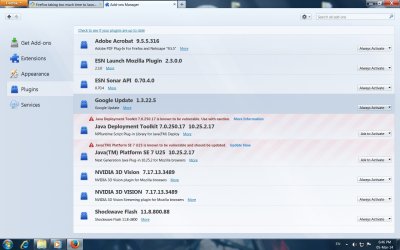
and I see this now. lets try OFF many of them.
Untitled.jpg
 

My Computer My Computer

At a glance

Windows 7 SP1 Ultimate x64Intel(R) Core(TM) 2 Due cpu E8400 @ 3.0ghz3x2gb DDR3 PC3-10600NVIDIA GeForce 9800 GT
Computer type
PC/Desktop
Computer Manufacturer/Model Number
Acer Veriton S670/G M670/G
OS
Windows 7 SP1 Ultimate x64
CPU
Intel(R) Core(TM) 2 Due cpu E8400 @ 3.0ghz
Motherboard
Acer EQ45M
Memory
3x2gb DDR3 PC3-10600
Graphics Card(s)
NVIDIA GeForce 9800 GT
Sound Card
Digital Audio (S/PDIF) (High Definition Audio Device)
Monitor(s) Displays
Asus VK222H 22" lcd HDMI wide.
Screen Resolution
1680x1050 @ 60 Hz
Hard Drives
2x1TB WD 10EAR
Internet Speed
4mbps
Browser
FireFox v27.01
One thing that can be causing it is the Nvidia 3D Vision plugin, as it likely has to wait till the driver for it is fully started. If you don't have the Nvidia 3D Vision kit (3D glasses), you can safely uninstall it through Programs and Features.

P.S. Next time you update.install the Nvidia drivers, make sure to select the custom install option and don't even bother installing the 3D Vision driver.
 

My Computer My Computer

At a glance

Win 7 Ultimate x64FX-8350 @ 4.6 GHz so farADATA XPG V1 Series Black 8GB DDR3 1600Sapphire R9 270x Dual-X
Computer type
PC/Desktop
Computer Manufacturer/Model Number
Me
OS
Win 7 Ultimate x64
CPU
FX-8350 @ 4.6 GHz so far
Motherboard
Asus M5A97 EVO
Memory
ADATA XPG V1 Series Black 8GB DDR3 1600
Graphics Card(s)
Sapphire R9 270x Dual-X
Sound Card
Xonar DGX w/ Corsair Vengence 1300
Monitor(s) Displays
Acer S232HL Abid
Screen Resolution
1920x1080
Hard Drives
120 GB OCZ Vertex 3
500 GB Seagate 7200.12
PSU
Antec Earthwatts 650W Green
Case
Antec Three Hundred
Cooling
Cooler Master 212 EVO
Keyboard
Logitech G510
Mouse
Logitech G500s
Internet Speed
35000/3000
nice tip for nvidia. thanks. don't have 3D lcd or glasses.
but disabling all plugin don't solve the problem.
 

My Computer My Computer

At a glance

Windows 7 SP1 Ultimate x64Intel(R) Core(TM) 2 Due cpu E8400 @ 3.0ghz3x2gb DDR3 PC3-10600NVIDIA GeForce 9800 GT
Computer type
PC/Desktop
Computer Manufacturer/Model Number
Acer Veriton S670/G M670/G
OS
Windows 7 SP1 Ultimate x64
CPU
Intel(R) Core(TM) 2 Due cpu E8400 @ 3.0ghz
Motherboard
Acer EQ45M
Memory
3x2gb DDR3 PC3-10600
Graphics Card(s)
NVIDIA GeForce 9800 GT
Sound Card
Digital Audio (S/PDIF) (High Definition Audio Device)
Monitor(s) Displays
Asus VK222H 22" lcd HDMI wide.
Screen Resolution
1680x1050 @ 60 Hz
Hard Drives
2x1TB WD 10EAR
Internet Speed
4mbps
Browser
FireFox v27.01
Back
Top