Firefox-Thunderbird Questions

kleis

New member
Local time
2:22 AM
Messages
32
When downloading a new Thunderbird email from the link provided by MoxMom...
once installed and ready to start, do i create a new email handle/address such as [email protected]
or do i skip that procedure, but then again (common sense-wise-dah) is that there has to be email address created for an email service to work.
But this is really more for the test of it, as Callendar and MM are aware, in order to get through to Hotmail account in order to try to retrieve sent folder (saved/sent) emails. It's not really going to stick or that is, i doubt that i will resume keeping it as email as it may be a little resource-heavy for my computer from what i have read.
So, with that...
Oh, yes, and here's other issue, and i don't know if this is something that you guys ...
anyway, Microsoft has responded to my thread on their site with having detailed the same as this thread/topic and they advise to re-create or create an outlook.com profile and that would take over or be in place of the @hotmail.com email address.
So, in doing so, would that be like more against the hotmail to the point that there's not a chance of the sent folder files/emails being in there to try to pick up before it's completely wiped clean if it isn't already do you......think or if this question is clarity?


Thanks*
 

My Computer

Computer type
PC/Desktop
Computer Manufacturer/Model Number
Custom
OS
Win 7 Pro 64 bit Ultimate SP1 (2009)
CPU
ADM Phenom 9650 Quad core 2.30 Ghz
Motherboard
Biostar
Memory
6 GB
Graphics Card(s)
Integrated
Monitor(s) Displays
Dell
Antivirus
Microsoft Essentials
Browser
IE11
Well the aim was just to test to see if your sent emails get downloaded. You just use your existing email address and password in Thunderbird but configure it to use IMAP.

Did you try logging via your browser as suggested? Try the blue "sign in link" below.

I would login to the outlook web mail site and see if your missing emails are still available:
Sign In

From my experience i can login to the web site with a hotmail or outlook email account.
From what i know any MS email account should be able to login to this web mail site.

When i'm logged in i can make changes for POP3/IMAP access etc. for my email client programs.
 

My Computer

Computer type
Laptop
Computer Manufacturer/Model Number
ASUS
OS
Microsoft Windows 7 Home Premium 64-bit 7601 Multiprocessor Free Service Pack 1
CPU
AMD C-60 APU with Radeon(tm) HD Graphics
Motherboard
ASUSTeK COMPUTER INC. X501U
Memory
4.00 GB
Graphics Card(s)
AMD Radeon HD 6290 Graphics
Sound Card
(1) AMD High Definition Audio Device (2) Realtek High Defi
Screen Resolution
1366 x 768 x 32 bits (4294967296 colors) @ 60 Hz
Hard Drives
Hitachi HTS545050A7E380 SATA Disk Device
Antivirus
Comodo CIS & FW, SecureAplus App Whitelisting, Threatfire
Browser
Cyberfox 64bit, Opera 64bit, Airfox
Other Info
Spy-The-Spy, HitmanPro.Alert, Norton Connect Safe, MJRegWatcher, BitDefender TrafficLight, Voodoo Shield, Zemana AntiMalware
Hi::)

Alas, I don't have time at the moment to script a long tutorial about Thunderbird installation and configuration. The setup wizard is actually pretty good, if you take your time at each step.
@Callender is very good at that sort of thing.
And here are some links to tutorials:

Thunderbird Help
Install, Migrate and Update | Thunderbird Help
Emails | Thunderbird Help

The short answer to your question is that you can skip the part about creating a new email account in the TB setup wizard IF you already have existing ISP or webmail or other accounts.
If you do create a new account, I suggest making it something OTHER THAN "[email protected]", as you have just posted in a public forum -- susceptible to email-harvesting spam bots -- your new email address. It will be a good way to gain 10,000 instant new "friends".

The TB setup wizard can either automatically configure your existing accounts, or you can configure them manually, if you know the settings to do so.

However, just to be clear, Thunderbird is just an email client.
It will be no more capable of retrieving lost/purged/missing/deleted emails from your WLM account than will Outlook or any another email client.
In other words, if your messages are gone from the MS servers, then they are likely gone (unless one of the solutions suggested at the MS forum might help to recover them).
We suggested switching to Thunderbird as a replacement because WLM is no longer supported.

But Thunderbird is only one of many, available email clients, free and paid.
There are other options if Thunderbird does not suit you.

HTH for now,

MM

P.S. I'm not quite clear -- what issue do you have with Firefox, the browser? It is a separate program from Thunderbird. You do not need Firefox to have Thunderbird. (If you do have issues with Firefox, I might suggest keeping that discussion separate, to minimize confusion.)
 
Last edited:

My Computer

Computer type
PC/Desktop
Computer Manufacturer/Model Number
Dell Studio XPS 8500
OS
OEM Windows 7 Ult (x64) SP1
CPU
Intel Core-i7 3770 @ 3.4 GHz
Motherboard
"Dell" branded
Memory
16 GB DDR3 SDRAM @ 1333 MHz
Graphics Card(s)
NVidia GeForce GT620 1 GB
Sound Card
THX TruStudio PC
Monitor(s) Displays
Dell U2410 Full HD
Hard Drives
2.0 TB SATA2 @ 7200 RPM
PSU
350W
Keyboard
MS 4000 Ergon - Wired
Mouse
Logitech Anywhere MX
Internet Speed
Cable HSI w/Turbo (router)
Antivirus
KIS-MBAM Premium-MBAE Premium
Browser
Fx (current version); IE
Other Info
And a Win7/64 Pro laptop; And a Win10/64 Pro desktop.

My Computer

Computer type
Laptop
Computer Manufacturer/Model Number
ASUS
OS
Microsoft Windows 7 Home Premium 64-bit 7601 Multiprocessor Free Service Pack 1
CPU
AMD C-60 APU with Radeon(tm) HD Graphics
Motherboard
ASUSTeK COMPUTER INC. X501U
Memory
4.00 GB
Graphics Card(s)
AMD Radeon HD 6290 Graphics
Sound Card
(1) AMD High Definition Audio Device (2) Realtek High Defi
Screen Resolution
1366 x 768 x 32 bits (4294967296 colors) @ 60 Hz
Hard Drives
Hitachi HTS545050A7E380 SATA Disk Device
Antivirus
Comodo CIS & FW, SecureAplus App Whitelisting, Threatfire
Browser
Cyberfox 64bit, Opera 64bit, Airfox
Other Info
Spy-The-Spy, HitmanPro.Alert, Norton Connect Safe, MJRegWatcher, BitDefender TrafficLight, Voodoo Shield, Zemana AntiMalware
^^ ^^

OOPS!

My bad.
I did not notice Callender posting while I was typing.
Agree with the suggestions and those by DavidE.

I would also look into the advice provided at the MS forum to see if your messages can be found.
(And I might do that first, before going too far down the TB rabbit hole, just to reduce confusion.)

Good luck,
MM
 

My Computer

Computer type
PC/Desktop
Computer Manufacturer/Model Number
Dell Studio XPS 8500
OS
OEM Windows 7 Ult (x64) SP1
CPU
Intel Core-i7 3770 @ 3.4 GHz
Motherboard
"Dell" branded
Memory
16 GB DDR3 SDRAM @ 1333 MHz
Graphics Card(s)
NVidia GeForce GT620 1 GB
Sound Card
THX TruStudio PC
Monitor(s) Displays
Dell U2410 Full HD
Hard Drives
2.0 TB SATA2 @ 7200 RPM
PSU
350W
Keyboard
MS 4000 Ergon - Wired
Mouse
Logitech Anywhere MX
Internet Speed
Cable HSI w/Turbo (router)
Antivirus
KIS-MBAM Premium-MBAE Premium
Browser
Fx (current version); IE
Other Info
And a Win7/64 Pro laptop; And a Win10/64 Pro desktop.
MM,
Thanks very much and to Callendar too.
You highlight to the point indeed answers to quests that I thank you a LOT! You're so right as i read your suggests of first keep checking with microsoft before ... i was thinking that last night when i saw the reply from them that fast (seemingly) and hoping that all this other T Bird set up might be fruitless. But...as of the second, nada or nothing's changed there. #2 on FFox and Thunderbird, they're not same family or more like inlaws since Mozilla....ha that's my way of putting it and now i have better grasp i think, that just because FFox doesn't have anything and visa versa to do w/TB.
The other link you provided in other thread i mean, is the one i will download the TB and cleared out of registry the one i uninstalled as from our prior...
I want to ask you as an aside if you might be able to from a snap shot pic/snippit of my installed programs in personal email, for quick assessment of if and what i have in programs?

Thanks a lot
kleis
 

My Computer

Computer type
PC/Desktop
Computer Manufacturer/Model Number
Custom
OS
Win 7 Pro 64 bit Ultimate SP1 (2009)
CPU
ADM Phenom 9650 Quad core 2.30 Ghz
Motherboard
Biostar
Memory
6 GB
Graphics Card(s)
Integrated
Monitor(s) Displays
Dell
Antivirus
Microsoft Essentials
Browser
IE11
Well I have not logged into my hotmail com/ outlook com account (it's the same thing) for at least a year. I just logged in via:

Outlook.com - Microsoft free personal email using Internet Explorer

Guess what? There are no sent emails in my sent folder either. So if they are not there then Thunderbird won't download them anyway. You will still need to ditch WLM and use another email client (software) or else just log in via your browser.
 

My Computer

Computer type
Laptop
Computer Manufacturer/Model Number
ASUS
OS
Microsoft Windows 7 Home Premium 64-bit 7601 Multiprocessor Free Service Pack 1
CPU
AMD C-60 APU with Radeon(tm) HD Graphics
Motherboard
ASUSTeK COMPUTER INC. X501U
Memory
4.00 GB
Graphics Card(s)
AMD Radeon HD 6290 Graphics
Sound Card
(1) AMD High Definition Audio Device (2) Realtek High Defi
Screen Resolution
1366 x 768 x 32 bits (4294967296 colors) @ 60 Hz
Hard Drives
Hitachi HTS545050A7E380 SATA Disk Device
Antivirus
Comodo CIS & FW, SecureAplus App Whitelisting, Threatfire
Browser
Cyberfox 64bit, Opera 64bit, Airfox
Other Info
Spy-The-Spy, HitmanPro.Alert, Norton Connect Safe, MJRegWatcher, BitDefender TrafficLight, Voodoo Shield, Zemana AntiMalware
I want to ask you as an aside if you might be able to from a snap shot pic/snippit of my installed programs in personal email, for quick assessment of if and what i have in programs?

Well you can get a list of installed programs like this:

Run a copy of free Portable Geek Uninstaller

Save a list of programs to file and zip the file and attach it when you post here.

394196-explorer-crashes-geek-uninstaller.jpg
 

My Computer

Computer type
Laptop
Computer Manufacturer/Model Number
ASUS
OS
Microsoft Windows 7 Home Premium 64-bit 7601 Multiprocessor Free Service Pack 1
CPU
AMD C-60 APU with Radeon(tm) HD Graphics
Motherboard
ASUSTeK COMPUTER INC. X501U
Memory
4.00 GB
Graphics Card(s)
AMD Radeon HD 6290 Graphics
Sound Card
(1) AMD High Definition Audio Device (2) Realtek High Defi
Screen Resolution
1366 x 768 x 32 bits (4294967296 colors) @ 60 Hz
Hard Drives
Hitachi HTS545050A7E380 SATA Disk Device
Antivirus
Comodo CIS & FW, SecureAplus App Whitelisting, Threatfire
Browser
Cyberfox 64bit, Opera 64bit, Airfox
Other Info
Spy-The-Spy, HitmanPro.Alert, Norton Connect Safe, MJRegWatcher, BitDefender TrafficLight, Voodoo Shield, Zemana AntiMalware
Yes to clicking into the Outlook account via the blue link and it logs in just the same as when i type in outlook.com. No sent files/folder changes just as of 12/23. Microsoft replied as to status but was to answer other question i had on opening or changing to outlook.mail email from the hotmail.com in order to be or use new outlook as i have been anyway.
Only problem is, when i go into the Control Panel... type Mail from search box it shows Windows Live and that's the only Mail there is on my computer. It says in Win 7 anyway, you should just see Mail...
So the confusion as to that one little quirk, or rather, i asked about that to the microsoft contact but she overlooked or didn't answer that part of my question in order to 'create a new outlook' profile...would i do it through the Windows live if they're going to end WL since i guess they are that's why i asked, do i omit the Windows Essential program in computer first to get back to nitty gritty "mail" i know i'm making confusion and apologize.
I was afraid though if the @hotmail.com i swap or create (as microsoft advises to do so...) a new Outlook profile that replaces the @hotmail i was going to for sure have no trace of finding sent mail which is why i need to get going and re download thunderbird from MM's lead link and go from there :)


Thanks for your help and linkage about it and i appreciate your time in this regard, really!!!
 

My Computer

Computer type
PC/Desktop
Computer Manufacturer/Model Number
Custom
OS
Win 7 Pro 64 bit Ultimate SP1 (2009)
CPU
ADM Phenom 9650 Quad core 2.30 Ghz
Motherboard
Biostar
Memory
6 GB
Graphics Card(s)
Integrated
Monitor(s) Displays
Dell
Antivirus
Microsoft Essentials
Browser
IE11
Well I have not logged into my hotmail com/ outlook com account (it's the same thing) for at least a year. I just logged in via:

Outlook.com - Microsoft free personal email using Internet Explorer

Guess what? There are no sent emails in my sent folder either. So if they are not there then Thunderbird won't download them anyway. You will still need to ditch WLM and use another email client (software) or else just log in via your browser.

i just logged into an outlook.com email address using PaleMoon browser.
I see sent items dating back to 2014 available in the web outlook email window.
:p
 

My Computer

Computer type
PC/Desktop
Computer Manufacturer/Model Number
home built
OS
Multi-Boot W7_Pro_x64 W8.1_Pro_x64 W10_Pro_x64 +Linux_VMs +Chromium_VM
CPU
AMD Athlon II x4 620
Motherboard
Gigabyte GA-MA785G-UD3H
Memory
6GB GSkill DDR2 800
Graphics Card(s)
AMD 4670 GPU + AMD 4200 IGP
Sound Card
on board Realtek ALC889A
Monitor(s) Displays
RCA 40" LCD TV, Insignia 32" LCD TV, HP 15" LCD monitor
Screen Resolution
1680 x 1050
Hard Drives
OCZ Vertex 3 120GB,
Samsung F3 1TB (3),
Several others - WD, Seagate, Hitachi, ...
PSU
Corsair 500 W
Case
Rosewill mid tower
Cooling
CM 90mm rifle
Keyboard
Gyration wireless, Logitech wireless, Dell USB wired
Mouse
Gyration wireless, Logitech wireless, V7 USB wired
Internet Speed
Spectrum - 100Mbps D / 10Mbps U
Antivirus
Avast, MBAM3, EMET, WinPatrol
Browser
Pale Moon, Firefox, IE
Other Info
2 multi-boot PC's
Mainly HTPC/Office/Gen purpose (no gaming).
Trendnet USB KVM.
LG DVD burner/Blue Ray Player.
Tray system for removable SATA backup drives.

Not currently OCd, under-volted.
I use Hybrid sleep, rarely re-boot or shutdown.

Hauppauge HD-PVR, Avermedia PCIe TV Tuner, Hauppauge PCI TV Tuner.
I downloaded Tbird and am involved in setting it up. I did associate my hotmail.com information and it seemed to set it up automatically and then the next step is where i stopped the continuation as this is where it wants me to "get a new account" set manually or third choice cancel
If i get
new account, that is where i will create a TBird email address correct(?)

part 2 to all this is tomorrow when i return to work, i can go into the hotmail account since that will be a different computer/device, is that or will that be the same as what I've been trying to accomplish here with this attempt in getting Thunderbird to do that or to see if it pick up any files that at this point...(?) that might be just as easy if i can wait another not 24 hours or less....
 

My Computer

Computer type
PC/Desktop
Computer Manufacturer/Model Number
Custom
OS
Win 7 Pro 64 bit Ultimate SP1 (2009)
CPU
ADM Phenom 9650 Quad core 2.30 Ghz
Motherboard
Biostar
Memory
6 GB
Graphics Card(s)
Integrated
Monitor(s) Displays
Dell
Antivirus
Microsoft Essentials
Browser
IE11
Okay you need to ditch WLM which is part of Windows Live Essentials and decide how you are going to access your outlook com / hotmail account which is the same thing. If via your browser then fine. If sent mails do not show up when you login via your browser then they will not show up in Thunderbird either.

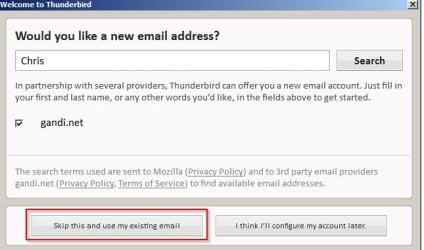
RE: Thunderbird. Some confusion here. You do not need a new "Thunderbird email address" you just use your existing outlook.com email address.

Mozilla Thunderbird Setup 05.jpg

Use these settings:

Your current email address: *********@outlook.com
use your current password

IMAP Setting
Server name: imap-mail.outlook.com
Port: 993
Encryption method: TLS


Server:
Server name: smtp-mail.outlook.com
Port: 587
Encryption method: STARTTLS

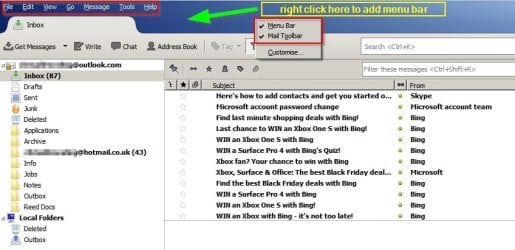
Once you've added your account enable the "Menu Bar" for easy access to settings. Right click the blue area near the top of the window to get the option to add the menu bar.

Mozilla Thunderbird Setup 08.jpg
 

My Computer

Computer type
Laptop
Computer Manufacturer/Model Number
ASUS
OS
Microsoft Windows 7 Home Premium 64-bit 7601 Multiprocessor Free Service Pack 1
CPU
AMD C-60 APU with Radeon(tm) HD Graphics
Motherboard
ASUSTeK COMPUTER INC. X501U
Memory
4.00 GB
Graphics Card(s)
AMD Radeon HD 6290 Graphics
Sound Card
(1) AMD High Definition Audio Device (2) Realtek High Defi
Screen Resolution
1366 x 768 x 32 bits (4294967296 colors) @ 60 Hz
Hard Drives
Hitachi HTS545050A7E380 SATA Disk Device
Antivirus
Comodo CIS & FW, SecureAplus App Whitelisting, Threatfire
Browser
Cyberfox 64bit, Opera 64bit, Airfox
Other Info
Spy-The-Spy, HitmanPro.Alert, Norton Connect Safe, MJRegWatcher, BitDefender TrafficLight, Voodoo Shield, Zemana AntiMalware
Got it! T h a n k s

I see what you're saying (and already repeated) and thanks for not flipping my thread way off.
That's the part of the fear that won't be finding any of the deleted folder now for the most part. But i will simply go in, uninstall the windows essential or live windows as part of it, but as outlook suggests, create the bloody replacement or new acct.

i can't believe they'd lose that much (for one person-me out of how many others) over the switch to newer email service and one of the come backs to reason for the loss was they were balancing their weight and someone asked why would they be doing that over a busy high traffic NYear's weekend. But 21 questions still equate to the same outcome.
Ok thanks a lot again Callendar & take it easy (care).
 

My Computer

Computer type
PC/Desktop
Computer Manufacturer/Model Number
Custom
OS
Win 7 Pro 64 bit Ultimate SP1 (2009)
CPU
ADM Phenom 9650 Quad core 2.30 Ghz
Motherboard
Biostar
Memory
6 GB
Graphics Card(s)
Integrated
Monitor(s) Displays
Dell
Antivirus
Microsoft Essentials
Browser
IE11
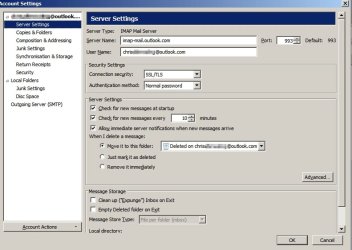
No worries. Anyway if you decide to stick with thunderbird and enable the menu bar - head for "Tools" > "Account Settings"

Then check these. For now you can use the same settings. I've part obscured my email address.

Thunderbird Settings 01.jpg

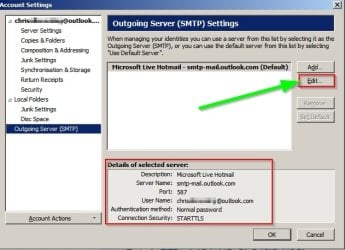
If the settings in the section shown below look different on your machine you can click "Edit" to change them.

Thunderbird Settings 02.jpg

Other members will be able to help but I will check back tomorrow anyway. There are a few other settings to get it to work better.
 
Last edited:

My Computer

Computer type
Laptop
Computer Manufacturer/Model Number
ASUS
OS
Microsoft Windows 7 Home Premium 64-bit 7601 Multiprocessor Free Service Pack 1
CPU
AMD C-60 APU with Radeon(tm) HD Graphics
Motherboard
ASUSTeK COMPUTER INC. X501U
Memory
4.00 GB
Graphics Card(s)
AMD Radeon HD 6290 Graphics
Sound Card
(1) AMD High Definition Audio Device (2) Realtek High Defi
Screen Resolution
1366 x 768 x 32 bits (4294967296 colors) @ 60 Hz
Hard Drives
Hitachi HTS545050A7E380 SATA Disk Device
Antivirus
Comodo CIS & FW, SecureAplus App Whitelisting, Threatfire
Browser
Cyberfox 64bit, Opera 64bit, Airfox
Other Info
Spy-The-Spy, HitmanPro.Alert, Norton Connect Safe, MJRegWatcher, BitDefender TrafficLight, Voodoo Shield, Zemana AntiMalware
Thanks. I'll keep the thread info. (here).
I was able to go into the windows live and attempted to set up the synch process through Imap and it failed indicating that an authorization with a code attached failed and that it was not supported on my computer (the error code failure, that is).
The deal is to all this too, as i understand i think a little better...I've already been switched over all the time running now to the Outlook.mail and that nothing's changed by using the same handle [email protected], and if it's WL that's tanking, sobeit. Just that by creating new outlook.com email would be just that and there's nothing to synch to a new account/email address. Right.

ALSO on my computer!! I saw whatever is online hotmail is sitting on my hard drive. The help notes said that i'd see big EML files but didn't, i saw XML, and i think the eml would be where any of the 'messages' are and one thing on all the folders, they're dated 1/2/17 or 1/1 there are none dated before this year...so that alone almost confirms there's nothing that is going to be in any hidden folders. I was going to delete the WL altogether but when i took closer look that is when i wanted to explore more and see the contents of everything i could.
 

My Computer

Computer type
PC/Desktop
Computer Manufacturer/Model Number
Custom
OS
Win 7 Pro 64 bit Ultimate SP1 (2009)
CPU
ADM Phenom 9650 Quad core 2.30 Ghz
Motherboard
Biostar
Memory
6 GB
Graphics Card(s)
Integrated
Monitor(s) Displays
Dell
Antivirus
Microsoft Essentials
Browser
IE11
Thanks. I'll keep the thread info. (here).
I was able to go into the windows live and attempted to set up the synch process through Imap and it failed indicating that an authorization with a code attached failed and that it was not supported on my computer (the error code failure, that is).

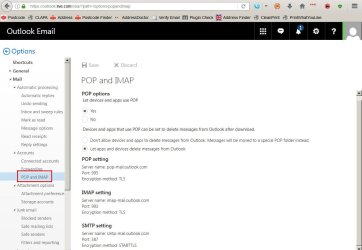
There's no need to do anything in WLM. Just log into your email account via your browser and click the gear symbol then "options" - you should see this:

Mail -Outlook.jpg

The configuration all needs to be done in Thunderbird.


Thanks
The deal is to all this too, as i understand i think a little better...I've already been switched over all the time running now to the Outlook.mail and that nothing's changed by using the same handle [email protected], and if it's WL that's tanking, sobeit. Just that by creating new outlook.com email would be just that and there's nothing to synch to a new account/email address. Right.

Your hotmail and outlook accounts should be the same thing. If you log in to your existing email account using @hotmail (dot whatever) or outlook (dot com) then it's the same email account.

Thanks
ALSO on my computer!! I saw whatever is online hotmail is sitting on my hard drive. The help notes said that i'd see big EML files but didn't, i saw XML, and i think the eml would be where any of the 'messages' are and one thing on all the folders, they're dated 1/2/17 or 1/1 there are none dated before this year...so that alone almost confirms there's nothing that is going to be in any hidden folders. I was going to delete the WL altogether but when i took closer look that is when i wanted to explore more and see the contents of everything i could.

Because I don't actually use WLM I can't post screenshots.

In Windows 7 the path to the WLM storeis probably C:\Users\yourlogon\AppData\Local\Microsoft\Windows Live Mail, where yourlogon is the name you use to log onto Windows. Note that the AppData folder is hidden; you won't see it in Windows Explorer, although you can still get to it by typing the path.

Or by copying this into Explorer address bar or Start> Run dialog box.

%USERPROFILE%\Local Settings\Application Data\Microsoft\Windows Live Mail\

I didn't want to get into this next part just yet. Anyway since you are asking about your messages in WLM - take a look at this post:

Problem importing emails into WLM

It should be possible to open each folder in WLM Mail Store and export all messages and save them with the .eml extension which can then be easily imported into Thunderbird or any other mail client. Additionally you should be able to open them with your default email application just by clicking individual messages in a backup folder.

Currently I'm a little busy at work.
 

My Computer

Computer type
Laptop
Computer Manufacturer/Model Number
ASUS
OS
Microsoft Windows 7 Home Premium 64-bit 7601 Multiprocessor Free Service Pack 1
CPU
AMD C-60 APU with Radeon(tm) HD Graphics
Motherboard
ASUSTeK COMPUTER INC. X501U
Memory
4.00 GB
Graphics Card(s)
AMD Radeon HD 6290 Graphics
Sound Card
(1) AMD High Definition Audio Device (2) Realtek High Defi
Screen Resolution
1366 x 768 x 32 bits (4294967296 colors) @ 60 Hz
Hard Drives
Hitachi HTS545050A7E380 SATA Disk Device
Antivirus
Comodo CIS & FW, SecureAplus App Whitelisting, Threatfire
Browser
Cyberfox 64bit, Opera 64bit, Airfox
Other Info
Spy-The-Spy, HitmanPro.Alert, Norton Connect Safe, MJRegWatcher, BitDefender TrafficLight, Voodoo Shield, Zemana AntiMalware
Back
Top