Firefox update notifications and Win 7 services

loninappleton

New member
Member
VIP
Local time
9:43 AM
Messages
892
I've turned off everything called update in the Firefox about:config. The browser pop up is not yet turned off. And yes I've looked at everything in Preferences.

Is there any of the many Win7 Services that might be flipping updates on or is there
any knowledge from users here about solving the problem?

As I recall, the last time I reinstalled the browser and use the 'foreign language version
just selecting British English, the Mozilla ask about Maintenance Service I turned off as well.
 

My Computer

Computer type
PC/Desktop
Computer Manufacturer/Model Number
custom
OS
Windows 7 x64 Ultimate
CPU
AMD Athlon II x3 450
Motherboard
MSI 880GM
Memory
2 GB
Hard Drives
various
Browser
Firefox, Opera
It's a real PITA to disable that. I tried though the hosts file and I still get a pop up, but no automatic download.

If you want to try this do the following:


Use Everything.exe and search for hosts. It will be in the etc folder.


In Everything right click hosts and rename to hosts.txt or right click open with Notepad ++.

Add the following:

Code:
127.0.0.1 mozilla.org 
127.0.0.1 download.cdn.mozilla.net 
127.0.0.1 aus5.mozilla.org 
127.0.0.1 download.mozilla.org
Now note that the top line means you have to commit out Mozilla.org if you want to visit that site. To commit out an entry simply add a # in front of it like this: #127.0.0.1 download.mozilla.org


Downloads - voidtools

Notepad++ Home

Note that if you just rename the hosts file to a .txt without using Notepad ++, make sure after you edit the file you remove the .txt. You should also change its properties to read only as a security thing. Opening the file with Notepad ++ doesn't require you to rename the file with a .txt.
 

My Computer

Computer type
PC/Desktop
OS
Windows 7 Ultimate x64
Hello again,


I have added Everything.exe to scratch install of Win7 on pretty much a bare disk except
for Firefox and a few essentials. I've already seen a pop up notification.


But I don't know how to effectively navigate Everything.exe. It opens to the Windows directory. How do I get back to the full tree of folders to find the Etc directory? Unfortunately I usually need step by step assistance.


What we know now is that there's an active update hanging out there.


So far I've installed Everything.exe and also added Notebook++ which I have used sparsely
before.
 

My Computer

Computer type
PC/Desktop
Computer Manufacturer/Model Number
custom
OS
Windows 7 x64 Ultimate
CPU
AMD Athlon II x3 450
Motherboard
MSI 880GM
Memory
2 GB
Hard Drives
various
Browser
Firefox, Opera
Renamed Hosts to Hosts.text


What if I just want to reverse and change it back? I already forgot what the file extension was.


Continuing as far as I can.....
 

My Computer

Computer type
PC/Desktop
Computer Manufacturer/Model Number
custom
OS
Windows 7 x64 Ultimate
CPU
AMD Athlon II x3 450
Motherboard
MSI 880GM
Memory
2 GB
Hard Drives
various
Browser
Firefox, Opera
A couple problems.


I didn't get very far. An access denied problem was from not properly installing
those new IPs to Hosts.


And I found that renaming Hosts back to it's extension .File failed. I tracked a bit of this down from
one of my other setups.


Here is your quote which I'm not understanding about leave the .txt off:


'Note that if you just rename the hosts file to a .txt without using Notepad ++, make sure after you edit the file you remove the .txt. You should also change its properties to read only as a security thing. Opening the file with Notepad ++ doesn't require you to rename the file with a .txt.'


Nothing is broken yet anyway. :/
 

My Computer

Computer type
PC/Desktop
Computer Manufacturer/Model Number
custom
OS
Windows 7 x64 Ultimate
CPU
AMD Athlon II x3 450
Motherboard
MSI 880GM
Memory
2 GB
Hard Drives
various
Browser
Firefox, Opera
I now see how to straighten out the Properties of host when needed. Much of this I have not done in a long time.


But I don't see how to rename host with no file extension.


Will watch for replies t all this. Maybe you can just give a series of steps from the beginning.
 

My Computer

Computer type
PC/Desktop
Computer Manufacturer/Model Number
custom
OS
Windows 7 x64 Ultimate
CPU
AMD Athlon II x3 450
Motherboard
MSI 880GM
Memory
2 GB
Hard Drives
various
Browser
Firefox, Opera
1) Make sure you can see file extensions. Go to the control panel | Folder options | View tab | uncheck "hide extensions for known file types."

2) Rename hosts file to hosts.txt so that you can add those entries I pointed out.

3) Rename hosts.txt back to just hosts without the .txt at the end.
 

My Computer

Computer type
PC/Desktop
OS
Windows 7 Ultimate x64
Ok.


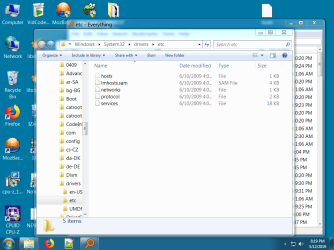
I will make a screen shot of what is visible inside the etc folder after I check the files view tab.
 

My Computer

Computer type
PC/Desktop
Computer Manufacturer/Model Number
custom
OS
Windows 7 x64 Ultimate
CPU
AMD Athlon II x3 450
Motherboard
MSI 880GM
Memory
2 GB
Hard Drives
various
Browser
Firefox, Opera
This is turning into a lot to go through for a simple cut and paste. After changing the View to

read all files you can see the greyed out area for file types in the screenshot attached.


Some permission is not being granted. This my sole machine not aty some business.
I don't know how to open up any permissions needed and I've never seen a problem like this.


Does this technique even work? Do you use this yourself?
 

Attachments

  • permissions.png
    permissions.png
    208 KB · Views: 0

My Computer

Computer type
PC/Desktop
Computer Manufacturer/Model Number
custom
OS
Windows 7 x64 Ultimate
CPU
AMD Athlon II x3 450
Motherboard
MSI 880GM
Memory
2 GB
Hard Drives
various
Browser
Firefox, Opera
Can you not right click hosts and rename it hosts.txt?
 

My Computer

Computer type
PC/Desktop
OS
Windows 7 Ultimate x64
I'm not proceding with this.
They can close the thread.
 

My Computer

Computer type
PC/Desktop
Computer Manufacturer/Model Number
custom
OS
Windows 7 x64 Ultimate
CPU
AMD Athlon II x3 450
Motherboard
MSI 880GM
Memory
2 GB
Hard Drives
various
Browser
Firefox, Opera
Back
Top