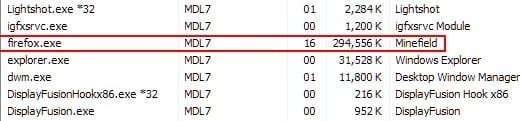
Firefox?

BraveAirmen

New member
Local time
1:59 AM
Messages
7
Im running Windows 7 Ultimate x64 and I have firefox 3.6 installed and whenever its running theres always 2 processes. One is usually around 300MB and that one was the plug in container, then there is another one thats firefox.exe and is at about 15MB. Why is there always 2 processes for firefox running? Thanks.
 

My Computer

OS
Windows 7 Ultimate x64
You should only have one process running. If you have two, it may be that one didn't terminate from the previous time. If you reboot and start ff, do you see two or one?
 

My Computer

Computer Manufacturer/Model Number
Dell and Custom
OS
Systems 1 and 2: Windows 7 Enterprise x64, Win 8 Developer
CPU
System 1: i7 [email protected], System 2: AMD FX-4100 Zambezi 3.6G
Motherboard
System 1:Dell 06NWYK System 2: ASUS M5A97 AM3+
Memory
System 1: 8GB System 2: 8GB
Graphics Card(s)
System 1: ATI FirePro V4800 System 2: Radeon HD 6850
Sound Card
System 1: onboard System 2: onboard
Monitor(s) Displays
System1: Viewsonic HDMI 24"
Screen Resolution
System 1: 1920x1080 System 2: 1920x1080
Hard Drives
System 1: Mirrored .5B drives System 2: Seagate Barracuda ST1000DM003 1TB 7200 RPM 64MB Cache SATA 6.0Gb/s
Case
System 1: Dell System 2: Cooler Master
Internet Speed
10 MBPS

My Computer

Computer type
PC/Desktop
Computer Manufacturer/Model Number
Dell XPS 420
OS
Windows 10, Home Clean Install
CPU
Intel Core2 processsor Q8200(2.33Ghz 1333FSB) Quad Core Tech
Motherboard
Dell
Memory
6 gb
Graphics Card(s)
ATI Radeon 256MB HD3650
Sound Card
Intergrated 7.1 Channel Audio
Monitor(s) Displays
Dell SP2009W 20"
Hard Drives
640 GB Serial ATA Hard drive
Cooling
Fan
Keyboard
Dell USB Keyboard
Mouse
Dell Premium Optical USB
Internet Speed
DSL 2.85
Im running Windows 7 Ultimate x64 and I have firefox 3.6 installed and whenever its running theres always 2 processes. One is usually around 300MB and that one was the plug in container, then there is another one thats firefox.exe and is at about 15MB. Why is there always 2 processes for firefox running? Thanks.

This is normal. Firefox has two processes, plugin container handles external plugins such as flash, the main process firefox.exe is the main application.

What is plugin-container
 

My Computer

Computer type
PC/Desktop
Computer Manufacturer/Model Number
Custom Build
OS
Windows 10 Pro x64, Arch Linux
CPU
Intel Core 2 Quad Q8200 OC'd 3.08GHz
Motherboard
Asus Rampage formula LGA775
Memory
8GB DDR2 900Mhz
Graphics Card(s)
MSI GT730 2GB GDDR5 (Kepler)
Sound Card
Supreme FX2
Monitor(s) Displays
Samsung LS22F350 LED
Screen Resolution
1080P
Hard Drives
Kingston SSDNow UV400 120GB, 500GB Hitachi, 2TB Samsung, 500GB Seagate FreeAgent, 640GB Samsung, 160GB Toshiba (Arch)
PSU
AeroCool 500W Bronze
Cooling
Cooler Master V6 + 3X fans
Keyboard
Prolink keyboard
Mouse
Logitech M705
Internet Speed
1MiB/s
Browser
Chrome Beta
What is plugin-container

Basically it is so that plugins like Flash can't (or at least shouldn't be able too) crash Firefox.
 

My Computer

Computer type
PC/Desktop
Computer Manufacturer/Model Number
Me
OS
Win 7 Ultimate x64
CPU
FX-8350 @ 4.6 GHz so far
Motherboard
Asus M5A97 EVO
Memory
ADATA XPG V1 Series Black 8GB DDR3 1600
Graphics Card(s)
Sapphire R9 270x Dual-X
Sound Card
Xonar DGX w/ Corsair Vengence 1300
Monitor(s) Displays
Acer S232HL Abid
Screen Resolution
1920x1080
Hard Drives
120 GB OCZ Vertex 3
500 GB Seagate 7200.12
PSU
Antec Earthwatts 650W Green
Case
Antec Three Hundred
Cooling
Cooler Master 212 EVO
Keyboard
Logitech G510
Mouse
Logitech G500s
Internet Speed
35000/3000
TY
Atlanta GA zoo
last year.
 

My Computer

Computer type
PC/Desktop
Computer Manufacturer/Model Number
Dell XPS 420
OS
Windows 10, Home Clean Install
CPU
Intel Core2 processsor Q8200(2.33Ghz 1333FSB) Quad Core Tech
Motherboard
Dell
Memory
6 gb
Graphics Card(s)
ATI Radeon 256MB HD3650
Sound Card
Intergrated 7.1 Channel Audio
Monitor(s) Displays
Dell SP2009W 20"
Hard Drives
640 GB Serial ATA Hard drive
Cooling
Fan
Keyboard
Dell USB Keyboard
Mouse
Dell Premium Optical USB
Internet Speed
DSL 2.85
Yeah I know that firefox uses 2 processes one for the window and one for plug-in but using process explorer I see the firefox main one with the plug-in container as a sub process and then another firefox.exe running separately.
 

My Computer

OS
Windows 7 Ultimate x64
Im running Windows 7 Ultimate x64 and I have firefox 3.6 installed and whenever its running theres always 2 processes. One is usually around 300MB and that one was the plug in container, then there is another one thats firefox.exe and is at about 15MB. Why is there always 2 processes for firefox running? Thanks.

I was told (In this Forum) way back, that each process is for each Tab. One process runs your main Home Page Tab and the other process runs the standby Tab next to it.
 

My Computer

Computer type
PC/Desktop
Computer Manufacturer/Model Number
DIY Re-built.
OS
Windows 7 Home Premium 64Bits SP1
CPU
Intel i7-920
Motherboard
ASUS P6TD Deluxe
Memory
12 Gb (6x2GB Corsair XMS TR3X3G1600C9 G) Tri Channels
Graphics Card(s)
ASUS GTX-970 Turbo
Sound Card
ASUS On Board SoundMax
Monitor(s) Displays
Samsung UN46D6500 46" TV
Screen Resolution
1920x1080
Hard Drives
1 OCZ SSD Agility Sata III 120Gb
1 Samsung 1Tb
1 Samsung 750Gb
1 Western Digital 500Gb(Mounted in ext eSata case)
PSU
Enermax CUG-950W
Case
Full ATX (Generic)
Cooling
Fans (6) 80mm
Keyboard
Saitek Eclipse II
Mouse
Cyborg R.A.T-5
Internet Speed
Comcast 105.0 MBPS
Antivirus
AVG
Browser
Waterfox v40.02(x64)
Other Info
- Logitech X-530 5.1 Sound speakers.
- APC ES-1300.
- Arris TG862G/CT Modem/Router.
- Samsung BD-083A Blue Ray Player
- Lite On iHBS212 Blue Ray Burner
- Nippon Labs All-In-One Card Reader/Writer W/USB & eSata
Actually I misread the original post. I did have two processes running of Firefox.exe a while back. But if this is the plug-in, then it's normal as mentioned above. Mea culpa.
 

My Computer

Computer Manufacturer/Model Number
Dell and Custom
OS
Systems 1 and 2: Windows 7 Enterprise x64, Win 8 Developer
CPU
System 1: i7 [email protected], System 2: AMD FX-4100 Zambezi 3.6G
Motherboard
System 1:Dell 06NWYK System 2: ASUS M5A97 AM3+
Memory
System 1: 8GB System 2: 8GB
Graphics Card(s)
System 1: ATI FirePro V4800 System 2: Radeon HD 6850
Sound Card
System 1: onboard System 2: onboard
Monitor(s) Displays
System1: Viewsonic HDMI 24"
Screen Resolution
System 1: 1920x1080 System 2: 1920x1080
Hard Drives
System 1: Mirrored .5B drives System 2: Seagate Barracuda ST1000DM003 1TB 7200 RPM 64MB Cache SATA 6.0Gb/s
Case
System 1: Dell System 2: Cooler Master
Internet Speed
10 MBPS
In task manager, I show one instance of Firefox even though I have 6 tabs open:
Screenshot_1.jpg

In Resource Monitor, I also show only one instance of Firefox:
Screenshot_2.jpg

The only other associated process I see related to Firefox is the plugin-container.


Even with 4 Firefox windows opened for a total of 9 tabs and 3 Flash videos running simultaneously, there is still only one instance of Firefox and one instance of plugin-container:
Screenshot_3.jpg

Note: the above results are relevant to FF 4.07bpre x64.
 

My Computer

Computer Manufacturer/Model Number
Toshiba L355D
OS
Windows 7 Ultimate x64 SP1
CPU
Core2 Duo
Motherboard
Intel
Memory
4 GB
Graphics Card(s)
GM965 on-board
Sound Card
RealTek on-board
Monitor(s) Displays
19"+17"(laptop)
Screen Resolution
1440x900 (x 2)
Hard Drives
500GB Ext. 200GB Internal
PSU
N/A
Case
N/A
Cooling
N/A
I only had firefox show up with 2 tasks (plus plugin container) when I was testing the Firefox preloader (to cut down on the start up delay due to all my plugins).

-DG
 

My Computer

Computer Manufacturer/Model Number
HP m8000n
OS
Windows 7 Ultimate x86
CPU
DualCore AMD Athlon 64 X2, 2600 MHz 5200+
Motherboard
Asus M2N68-LA (Narra)
Memory
Samsung 2GB DDR2
Graphics Card(s)
Onboard NVIDIA GeForce 6150SE nForce 430
Sound Card
Onboard nVIDIA nForce 6100-430 (MCP61P)
Monitor(s) Displays
Westinghouse 19" LED
Screen Resolution
1280x1024
Hard Drives
SATA II Seagate Barracuda 500GB
USB II WD Elements 500GB
USB II WD My Book 1TB
USB II WD My Book 2TB
PSU
Stock (HP)
Case
Stock (HP)
Cooling
Stock
Keyboard
Logitech Classic KB 200
Mouse
Standard HP opticle USB mouse
The last version of 32 bit Firefox I ran was 3.6.3 and it ran for about 50 MB of RAM it looks like it takes quite a bit more RAM to run the 64 bit version!

~Maxx~
.
da59fa57.png
 

My Computer

Computer Manufacturer/Model Number
HP HPE 270f
OS
Windows 7 x64 Home Premium
CPU
Intel Core i7 930 @ 2.8 Ghz Socket 1366 LGA
Motherboard
Pegatron Truckee v1.04E41
Memory
8 GB 1366 Mhz DDR3 (PC3-10700) RAM
Graphics Card(s)
ATI Radeon 5770 1 GB DDR5 RAM
Sound Card
Realtech High Definition
Monitor(s) Displays
32" Sony Bravia
Screen Resolution
1366 X 768
Hard Drives
Intel 25nm 120 GB Series 320 SSD HD Tune- 265 MBps Read/ 130 MBps Write

LaCie 1TB + 1TB RAID 0 eSATA Drive HD Tune- 160 MBps Read/ 90 MBps Write
Keyboard
Logitech Illuminated
Mouse
Logitech MX Revolution
Internet Speed
36.4 Mbps Maximum on a 37 Mbps Motorola SB501 Modem
Back
Top