Solved firefox

keviny6

New member
Member
Local time
2:23 AM
Messages
54
tried to download fire fox and cant get past where it says open , so I saved it --no problems saving but when I go to install it asks for what program I want to use
fire fox was on this laptop before.:cry:
 

My Computer

Computer type
PC/Desktop
Computer Manufacturer/Model Number
hp
OS
64 bit

My Computer

Computer type
Laptop
Computer Manufacturer/Model Number
Employer provided Dell Latitude
OS
W7 Pro SP1 64bit
CPU
i7
Memory
8GB
Graphics Card(s)
Intel HD Graphics
Hard Drives
crappy SSD
Antivirus
Employer mandated Symantec Endpoint Protection
Browser
Pale Moon 64bit, IE11 64bit & Chrome 64bit
fire fox

it says vista ---will it work on windows 7
 

My Computer

Computer type
PC/Desktop
Computer Manufacturer/Model Number
hp
OS
64 bit
You have a file named something.vista?

Shouldn't the file be named something.exe?
 

My Computer

Computer type
Laptop
Computer Manufacturer/Model Number
Employer provided Dell Latitude
OS
W7 Pro SP1 64bit
CPU
i7
Memory
8GB
Graphics Card(s)
Intel HD Graphics
Hard Drives
crappy SSD
Antivirus
Employer mandated Symantec Endpoint Protection
Browser
Pale Moon 64bit, IE11 64bit & Chrome 64bit
Hi keviny6, if you open FF, click 'Help' then About firefox, it will get updated.
 

My Computer

Computer Manufacturer/Model Number
Look in my Signature.
OS
Win7 H.Prem. 32bit+SP1
just go the download page and click on the download button. You'll get a .exe file, double click on the file and follow the on screen instructions
 

My Computer

Computer type
Laptop
Computer Manufacturer/Model Number
Acer 5733Z
OS
Windows 7 Professional 32bit
CPU
P6200 @ 2.13GHz
Memory
2043 MB
Graphics Card(s)
Intel HD graphics
Hard Drives
C: Total - 49899 MB; D: Total - 149999; E: Total - 149999 MB; F: Total - 123107 MB;
Antivirus
Microsoft Security Essentials, ESET NOD 32
Browser
Mozilla
tried to download fire fox and cant get past where it says open , so I saved it --no problems saving but when I go to install it asks for what program I want to use
fire fox was on this laptop before.

Hi keviny6, if you open FF, click 'Help' then About firefox, it will get updated.

I took that to mean that Firefox is no longer on the laptop...
...that Firefox had been uninstalled.
Let's hope...
...that it is still there
...that the OP can find/start it
...and that it will update as you indicated.


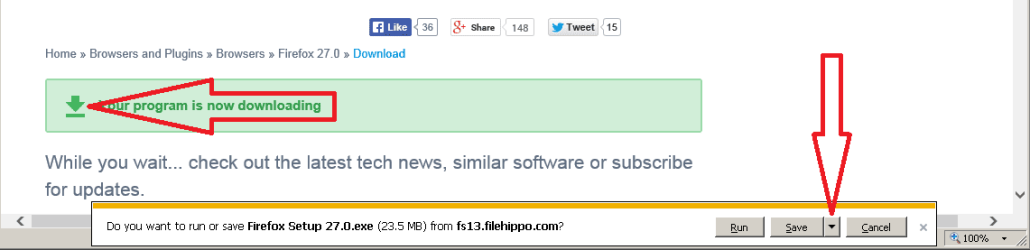
If not, then I suggest that the OP get Firefox from here:
Download Firefox 27.0 - FileHippo.com
FF1.png

If the download does not start...
...click on the download arrow.
FF2.png

If you do see the Run/Save/Cancel box...
...then click on the triangle beside the Save option
...select Save as
306172d1392317990-java-7-51-install-problems-j3.png

...and save the file to your desktop.

Try running the installation from there.
 

My Computer

Computer type
Laptop
Computer Manufacturer/Model Number
Employer provided Dell Latitude
OS
W7 Pro SP1 64bit
CPU
i7
Memory
8GB
Graphics Card(s)
Intel HD Graphics
Hard Drives
crappy SSD
Antivirus
Employer mandated Symantec Endpoint Protection
Browser
Pale Moon 64bit, IE11 64bit & Chrome 64bit
thank you
 

My Computer

Computer type
PC/Desktop
Computer Manufacturer/Model Number
hp
OS
64 bit

My Computer

Computer type
Laptop
Computer Manufacturer/Model Number
Employer provided Dell Latitude
OS
W7 Pro SP1 64bit
CPU
i7
Memory
8GB
Graphics Card(s)
Intel HD Graphics
Hard Drives
crappy SSD
Antivirus
Employer mandated Symantec Endpoint Protection
Browser
Pale Moon 64bit, IE11 64bit & Chrome 64bit
if it was only fire fox !!!- but its all programs , just can't get any.
tried system restore--twice --failed to improve. then I tried a free one and all I got was the add on that came with it , even though it said download successful
 

My Computer

Computer type
PC/Desktop
Computer Manufacturer/Model Number
hp
OS
64 bit
if it was only fire fox !!!- but its all programs , just can't get any.
tried system restore--twice --failed to improve. then I tried a free one and all I got was the add on that came with it , even though it said download successful

If I had an issue like this, I'd be concerned with malware as the cause.
You might want to ask for help in System Security - Windows 7 Help Forums , and include a link to this thread.
 

My Computer

Computer type
PC/Desktop
Computer Manufacturer/Model Number
home built
OS
Multi-Boot W7_Pro_x64 W8.1_Pro_x64 W10_Pro_x64 +Linux_VMs +Chromium_VM
CPU
AMD Athlon II x4 620
Motherboard
Gigabyte GA-MA785G-UD3H
Memory
6GB GSkill DDR2 800
Graphics Card(s)
AMD 4670 GPU + AMD 4200 IGP
Sound Card
on board Realtek ALC889A
Monitor(s) Displays
RCA 40" LCD TV, Insignia 32" LCD TV, HP 15" LCD monitor
Screen Resolution
1680 x 1050
Hard Drives
OCZ Vertex 3 120GB,
Samsung F3 1TB (3),
Several others - WD, Seagate, Hitachi, ...
PSU
Corsair 500 W
Case
Rosewill mid tower
Cooling
CM 90mm rifle
Keyboard
Gyration wireless, Logitech wireless, Dell USB wired
Mouse
Gyration wireless, Logitech wireless, V7 USB wired
Internet Speed
Spectrum - 100Mbps D / 10Mbps U
Antivirus
Avast, MBAM3, EMET, WinPatrol
Browser
Pale Moon, Firefox, IE
Other Info
2 multi-boot PC's
Mainly HTPC/Office/Gen purpose (no gaming).
Trendnet USB KVM.
LG DVD burner/Blue Ray Player.
Tray system for removable SATA backup drives.

Not currently OCd, under-volted.
I use Hybrid sleep, rarely re-boot or shutdown.

Hauppauge HD-PVR, Avermedia PCIe TV Tuner, Hauppauge PCI TV Tuner.
problem solved by doing a series of system restore, eventualy I found one that worked - thanks all for suggestions
 

My Computer

Computer type
PC/Desktop
Computer Manufacturer/Model Number
hp
OS
64 bit
Back
Top