
Firefox32 has removed the Bookmark this Page Editor from Context Menu.

Anak

New member
Guru
Gold Member
VIP
Local time
3:33 AM
Messages
5,599
Just noticed Firefox's (FF) new change.

The "Bookmark this Page" Editor has been removed from the "New and Improved" :( right click Context Menu. It can still be reached and will popup by clicking on the star to the far right.
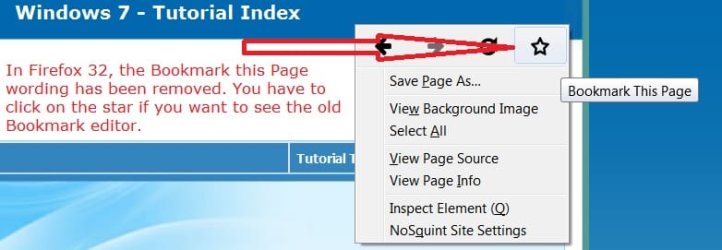
FF321.jpg

Do not click on the star located on the bookmarks tool bar as this will only save your intended page in unsorted bookmarks. Unsorted bookmarks can be found either in:

  • Menu bar >Bookmarks >At the bottom, this will open a new browser window (The Library). Or

  • The "Show your bookmarks" clipboard located on the bookmarks toolbar, if you've ever customized these later versions of FF it is attached to the star mentioned at the beginning of this paragraph.

  • Unsorted bookmarks in the clipboard are drag-able to either the bookmarks toolbar or within the clipboard to the bookmarks toolbar menu item.

An excerpt from this thread by dickvl:
Note that there are plans to extend this to more context menu items.
Bug 1000513 - Combined navigation items in the context menu

Source: Right-Click Menu Change ? mozillaZine Forums
The main thread contains a script to add to the userChrome.css file to fix this, but there maybe other options as in add-ons, the reviews of first one indicate that it works better with FF32:
https://addons.mozilla.org/s3menu-wizard
https://addons.mozilla.org/menu-editor


https://www.mozilla.org/en-US/firefox/32.0/releasenotes/

A link from the release notes:
New in Firefox Nightly: Experimenting with context menus | JAWS
 

My Computer My Computer

At a glance

Originally Win 7 Hm Prem x64 Ver 6.1.7600 Bui...Intel i3 530 2.93GHz, 2933MHz 2 Cores 4 Logic...6GB of 1,333MHz DDR3 SDRAM32MB Intel Graphics Media Accelerator HD IGChip
Computer type
PC/Desktop
Computer Manufacturer/Model Number
Gateway DX4831-01e (Mid-Tower Desktop)
OS
Originally Win 7 Hm Prem x64 Ver 6.1.7600 Build 7601-SP1 | Upgraded to Windows 10 December 14, 2019
CPU
Intel i3 530 2.93GHz, 2933MHz 2 Cores 4 Logical Processors
Motherboard
Gateway H57M01 133 megahertz
Memory
6GB of 1,333MHz DDR3 SDRAM
Graphics Card(s)
32MB Intel Graphics Media Accelerator HD IGChip
Sound Card
Realtek High Definition Audio
Monitor(s) Displays
Gateway HX2000 20inch TFT active matrix TN
Screen Resolution
1600 x 900 x 59 hertz
Hard Drives
WDC WD10EADS-00M2B0 [HDD] (1000.20 GB) -- drive 0,
HL-DT-ST DVDRAM GH41N [CD-ROM dr]
Four card readers, and Four USB 2.0
PSU
300watts.
Case
Mid-Tower Desktop
Cooling
Stock from Gateway
Keyboard
Natural Ergonomic Keyboard 4000, see Other Info
Mouse
Orig. Gateway wore out now using Insignia USB wired optical
Internet Speed
Vz FIOS 10ms png 57.64Mbps down 65.53Mbps up Speedtest.org
Antivirus
Zamana Anti-logger with Anti-malware, MSE, Windows Firewall,
Browser
IE11.0.9600.19399-Upd ver11.0.135, Firefox 68.0.1 x64
Other Info
System Specs by Belarc.

BIOS: American Megatrends Inc. P01-A0 11/17/2009

Replaced the MS 'Natural' Standard PS/2 Enhanced 101-102 Keyboard with a new Natural Ergonomic Keyboard 4000 on August 1st 2014.

Canon Pixma MG3222 Printer.

Updated to IE11 on 12102015 | Fios Quantum Router g1100

Additional AV: SpywareBlaster, manual Mbam, SAS
Using FF 32 I've found that right-clicking on the star in the first right-click context menu offers the "old" ability to place the bookmark wherever you want. An additional step, however.
 

My Computer My Computer

At a glance

Windows 7 Home Premium SP1i36 GBATI Radeon
Computer Manufacturer/Model Number
Dell Inspiron 580s
OS
Windows 7 Home Premium SP1
CPU
i3
Memory
6 GB
Graphics Card(s)
ATI Radeon
Indeed; i too noticed this anak; At first i did not like the fact they did that with ff. But; then upon doing some searching on the ff support page; I did find that you can change it/get it back the way you want. Just like the add on bar at the bottom. At first i could not figure out how to re-enable that because it defaults to it not being there; but I wanted it back because I have some add-ons that use the additional add on bar. So much for keeping things simple lol
 

My Computer My Computer

At a glance

Windows 7 ultimate 64-bitIntel I7 2600K 3.4ghzCorsair 16gb ddr3 1600mhzNvidia Geforce gt 430
Computer type
PC/Desktop
Computer Manufacturer/Model Number
custom built
OS
Windows 7 ultimate 64-bit
CPU
Intel I7 2600K 3.4ghz
Motherboard
Asus Evo P8P67
Memory
Corsair 16gb ddr3 1600mhz
Graphics Card(s)
Nvidia Geforce gt 430
Sound Card
Sound Blaster Titanium x-fi pci express
Monitor(s) Displays
Dell E198WFP
Hard Drives
1 western digital 2TB drive.
PSU
Antec 1200 watt
Case
Inwin Dragon Rider
Cooling
6 case supplied cooling fans
Keyboard
logitech mk700
Mouse
logitech m705
Internet Speed
25-50mbps download; 10mbps upload(i think)
Antivirus
avg free 2014
Browser
mozilla firefox
Other Info
Also have a pretty bad speaker setup which is a klipsch promedia 5.1 surround speaker setup with huge subwoofer and lg blu ray player/writer. Also a hp officejet pro 8600 plus wireless all in one and a logitech s7500 webcam.
Using FF 32 I've found that right-clicking on the star in the first right-click context menu offers the "old" ability to place the bookmark wherever you want. An additional step, however.
Definitely, a more succinct way to describe the work around I provided.

Indeed; i too noticed this anak; At first i did not like the fact they did that with ff. But; then upon doing some searching on the ff support page; I did find that you can change it/get it back the way you want. Just like the add on bar at the bottom. At first i could not figure out how to re-enable that because it defaults to it not being there; but I wanted it back because I have some add-ons that use the additional add on bar. So much for keeping things simple lol

Simple? Ha!

These changes are coming because the Mozilla team is trying to follow the satus quo. Whose. I don't know. Not my quo. Must be big $$$$ to follow the trail.. Maybe gini will have an idea on how things can be kept simple.

I believe the development team at: https://addons.mozilla.org/en-US/firefox/addon/classicthemerestorer/ will be very busy in the weeks ahead.

Curious...... As I was developing my post I received an update to FF32 (32.0.1)...... The Brigands!
 

My Computer My Computer

At a glance

Originally Win 7 Hm Prem x64 Ver 6.1.7600 Bui...Intel i3 530 2.93GHz, 2933MHz 2 Cores 4 Logic...6GB of 1,333MHz DDR3 SDRAM32MB Intel Graphics Media Accelerator HD IGChip
Computer type
PC/Desktop
Computer Manufacturer/Model Number
Gateway DX4831-01e (Mid-Tower Desktop)
OS
Originally Win 7 Hm Prem x64 Ver 6.1.7600 Build 7601-SP1 | Upgraded to Windows 10 December 14, 2019
CPU
Intel i3 530 2.93GHz, 2933MHz 2 Cores 4 Logical Processors
Motherboard
Gateway H57M01 133 megahertz
Memory
6GB of 1,333MHz DDR3 SDRAM
Graphics Card(s)
32MB Intel Graphics Media Accelerator HD IGChip
Sound Card
Realtek High Definition Audio
Monitor(s) Displays
Gateway HX2000 20inch TFT active matrix TN
Screen Resolution
1600 x 900 x 59 hertz
Hard Drives
WDC WD10EADS-00M2B0 [HDD] (1000.20 GB) -- drive 0,
HL-DT-ST DVDRAM GH41N [CD-ROM dr]
Four card readers, and Four USB 2.0
PSU
300watts.
Case
Mid-Tower Desktop
Cooling
Stock from Gateway
Keyboard
Natural Ergonomic Keyboard 4000, see Other Info
Mouse
Orig. Gateway wore out now using Insignia USB wired optical
Internet Speed
Vz FIOS 10ms png 57.64Mbps down 65.53Mbps up Speedtest.org
Antivirus
Zamana Anti-logger with Anti-malware, MSE, Windows Firewall,
Browser
IE11.0.9600.19399-Upd ver11.0.135, Firefox 68.0.1 x64
Other Info
System Specs by Belarc.

BIOS: American Megatrends Inc. P01-A0 11/17/2009

Replaced the MS 'Natural' Standard PS/2 Enhanced 101-102 Keyboard with a new Natural Ergonomic Keyboard 4000 on August 1st 2014.

Canon Pixma MG3222 Printer.

Updated to IE11 on 12102015 | Fios Quantum Router g1100

Additional AV: SpywareBlaster, manual Mbam, SAS
Back
Top