
Firewall issue

Hyperion 1

New member
Member
Local time
5:10 PM
Messages
47
Location
Serbia
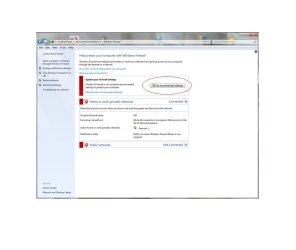
Can somebody tell me how to keep my Firewall turned on once and for all times!??

Whenever I turn on my machine and go "just to check" my firewall....he's turned off. This has been always, I don't know why. Windows issue???

Then I turn it on by pressing " use recommended settings" button, then ok. But
he always shuts himself when I start computer again. Help please...any advice would be appreciated!
 

Attachments
  • firewall.jpg
    firewall.jpg
    82.1 KB · Views: 19

My Computer

Computer type
PC/Desktop
OS
Win 7 Ultimate, x64-bit
CPU
AMD FX-4100 3.6Ghz
Motherboard
Asus M5A97
Memory
12 GB DDR3 Kingston 1333 Mhz
Graphics Card(s)
Nvidia GeForce GTX 760 2GB DDR5, Hawk Edition
Monitor(s) Displays
LG Flatron L222WS
Screen Resolution
MAX is 1680x1050, 60Hz
Hard Drives
Seagate 1.5 TB
PSU
Thermaltake 600 W, Peak power - 750W
Case
Thermaltake element T black
Cooling
Stock
Keyboard
A4 Tech Wireless
Mouse
A4 Tech X6-80D
Internet Speed
6 Mb/s
Antivirus
BitDefender
Browser
Torch
What do you use for system security?
Do you have any other firewalls running on a third-party program?

Which leads to, Some third-party programs will prevent Windows Firewall from starting.

Check your event viewer:
To view the security auditing events


  1. Click Start, and in the Start Search box, start typing Event Viewer. Double-click Event Viewer when it appears in the Programs list.
  2. If the User Account Control dialog box appears, confirm that the action it displays is what you want, and then click Continue.
  3. In the navigation page, expand Windows Logs, and then click Security.
  4. Look for events with numbers in the range of 4900 to the low 5000s that indicate that the firewall service (MpsSvc) was stopped. Open the event, and then click the Event Log Online Help link to determine why the service stopped, and how to get it started again.
Source:Windows Firewall Is Turned off Every Time I Start My Computer

Something else to consider if you have ever had Live Onecare installed: After installing MSE, Windows Firewall turns off after computer is reactivated from sleep mode.
 

My Computer

Computer type
PC/Desktop
Computer Manufacturer/Model Number
Gateway DX4831-01e (Mid-Tower Desktop)
OS
Originally Win 7 Hm Prem x64 Ver 6.1.7600 Build 7601-SP1 | Upgraded to Windows 10 December 14, 2019
CPU
Intel i3 530 2.93GHz, 2933MHz 2 Cores 4 Logical Processors
Motherboard
Gateway H57M01 133 megahertz
Memory
6GB of 1,333MHz DDR3 SDRAM
Graphics Card(s)
32MB Intel Graphics Media Accelerator HD IGChip
Sound Card
Realtek High Definition Audio
Monitor(s) Displays
Gateway HX2000 20inch TFT active matrix TN
Screen Resolution
1600 x 900 x 59 hertz
Hard Drives
WDC WD10EADS-00M2B0 [HDD] (1000.20 GB) -- drive 0,
HL-DT-ST DVDRAM GH41N [CD-ROM dr]
Four card readers, and Four USB 2.0
PSU
300watts.
Case
Mid-Tower Desktop
Cooling
Stock from Gateway
Keyboard
Natural Ergonomic Keyboard 4000, see Other Info
Mouse
Orig. Gateway wore out now using Insignia USB wired optical
Internet Speed
Vz FIOS 10ms png 57.64Mbps down 65.53Mbps up Speedtest.org
Antivirus
Zamana Anti-logger with Anti-malware, MSE, Windows Firewall,
Browser
IE11.0.9600.19399-Upd ver11.0.135, Firefox 68.0.1 x64
Other Info
System Specs by Belarc.

BIOS: American Megatrends Inc. P01-A0 11/17/2009

Replaced the MS 'Natural' Standard PS/2 Enhanced 101-102 Keyboard with a new Natural Ergonomic Keyboard 4000 on August 1st 2014.

Canon Pixma MG3222 Printer.

Updated to IE11 on 12102015 | Fios Quantum Router g1100

Additional AV: SpywareBlaster, manual Mbam, SAS
I don't know I've looked into Event Viewer but there is nothing about security-related problems. I have AVG 2011 Internet security. Maybe he's stopping my firewall to work. AVG's firewall is always enabled so....he might be the potencial cause to all of this. What u think?
 

My Computer

Computer type
PC/Desktop
OS
Win 7 Ultimate, x64-bit
CPU
AMD FX-4100 3.6Ghz
Motherboard
Asus M5A97
Memory
12 GB DDR3 Kingston 1333 Mhz
Graphics Card(s)
Nvidia GeForce GTX 760 2GB DDR5, Hawk Edition
Monitor(s) Displays
LG Flatron L222WS
Screen Resolution
MAX is 1680x1050, 60Hz
Hard Drives
Seagate 1.5 TB
PSU
Thermaltake 600 W, Peak power - 750W
Case
Thermaltake element T black
Cooling
Stock
Keyboard
A4 Tech Wireless
Mouse
A4 Tech X6-80D
Internet Speed
6 Mb/s
Antivirus
BitDefender
Browser
Torch
That is the problem.

AVG's firewall is over-riding the Windows firewall. You can not have two firewalls running at the same time.
Just as you can not have two anti-virus programs running at the same time.

If you are comfortable with AVG's security, and firewall performance, I would say let sleeping dogs lie.
If not, you will have to go into AVG and shut its firewall down. Then go to Windows firewall and start it up. That is a decision only you can make.

For the sake of argument you could shutdown AVG's firewall, and start up Windows firewall, just to see if Windows firewall will work the way you think it should. but I think it will.
 

My Computer

Computer type
PC/Desktop
Computer Manufacturer/Model Number
Gateway DX4831-01e (Mid-Tower Desktop)
OS
Originally Win 7 Hm Prem x64 Ver 6.1.7600 Build 7601-SP1 | Upgraded to Windows 10 December 14, 2019
CPU
Intel i3 530 2.93GHz, 2933MHz 2 Cores 4 Logical Processors
Motherboard
Gateway H57M01 133 megahertz
Memory
6GB of 1,333MHz DDR3 SDRAM
Graphics Card(s)
32MB Intel Graphics Media Accelerator HD IGChip
Sound Card
Realtek High Definition Audio
Monitor(s) Displays
Gateway HX2000 20inch TFT active matrix TN
Screen Resolution
1600 x 900 x 59 hertz
Hard Drives
WDC WD10EADS-00M2B0 [HDD] (1000.20 GB) -- drive 0,
HL-DT-ST DVDRAM GH41N [CD-ROM dr]
Four card readers, and Four USB 2.0
PSU
300watts.
Case
Mid-Tower Desktop
Cooling
Stock from Gateway
Keyboard
Natural Ergonomic Keyboard 4000, see Other Info
Mouse
Orig. Gateway wore out now using Insignia USB wired optical
Internet Speed
Vz FIOS 10ms png 57.64Mbps down 65.53Mbps up Speedtest.org
Antivirus
Zamana Anti-logger with Anti-malware, MSE, Windows Firewall,
Browser
IE11.0.9600.19399-Upd ver11.0.135, Firefox 68.0.1 x64
Other Info
System Specs by Belarc.

BIOS: American Megatrends Inc. P01-A0 11/17/2009

Replaced the MS 'Natural' Standard PS/2 Enhanced 101-102 Keyboard with a new Natural Ergonomic Keyboard 4000 on August 1st 2014.

Canon Pixma MG3222 Printer.

Updated to IE11 on 12102015 | Fios Quantum Router g1100

Additional AV: SpywareBlaster, manual Mbam, SAS
I've had problems with some of the third party firewalls. Now I'm just using the built in firewall in Windows 7. It seems to be doing the job. But it is true as stated above that you can't have 2 firewalls running at the same time.
 

My Computer

Computer type
Laptop
Computer Manufacturer/Model Number
HP Pavilion g7-1260us Notebook
OS
Desk Top with Win 7 Home Premium 64 bit and Lap Top with Windows 8.1 Pro 64 bit
Memory
8Gig
Screen Resolution
1600x900
That is the problem.

AVG's firewall is over-riding the Windows firewall. You can not have two firewalls running at the same time.
Just as you can not have two anti-virus programs running at the same time.

If you are comfortable with AVG's security, and firewall performance, I would say let sleeping dogs lie.
If not, you will have to go into AVG and shut its firewall down. Then go to Windows firewall and start it up. That is a decision only you can make.

For the sake of argument you could shutdown AVG's firewall, and start up Windows firewall, just to see if Windows firewall will work the way you think it should. but I think it will.

You can have two Anti Virus programs running but it is seriously not recommended and will cause Major performance issues

Josh
 

My Computer

Computer type
PC/Desktop
Computer Manufacturer/Model Number
Custom Built
OS
Windows 7 Professional x64 SP1 ; Windows Server 2012 R2 Standard
CPU
Intel Core i5 2400 @ 3.10GHz
Motherboard
Foxconn H67MP-S/-V/H67MP
Memory
8.0GB DDR3 @ 665MHz (2GBx4)
Graphics Card(s)
AMD Radeon HD 6870
Sound Card
Realtek High Definition Audio
Monitor(s) Displays
AOC 2243W & SMB1930NW
Screen Resolution
1440x900 & 1920x1080
Hard Drives
977GB Seagate ST31000524AS ATA Drive (SATA)
250GB WD iSCSI attached Drive
PSU
750W Gaming PSU
Case
Novatech Night
Cooling
Fan
Keyboard
Dell Standard PS/2 Keyboard
Mouse
R.A.T 07 Gaming Mouse
Internet Speed
Download: 10 Mbps Ping: 30ms Upload: 0.81 Mbps
Browser
Google Chrome
Other Info
Optiarc DVD RW AD-5260S ATA Device
You can have two Anti Virus programs running but it is seriously not recommended and will cause Major performance issues

Josh
I saw that after I read what I posted, and thought:

"My, what a generalized statement"

But I did not have the time to correct it or elaborate.

One of the better explanations I have read:
Anti-Malware software question | BleepingComputer

A quick search on MS TechNet:
two Anti Virus programs running - Microsoft TechNet Search


So Josh, keep checking up on me, I do not mind a bit!


Anak
 

My Computer

Computer type
PC/Desktop
Computer Manufacturer/Model Number
Gateway DX4831-01e (Mid-Tower Desktop)
OS
Originally Win 7 Hm Prem x64 Ver 6.1.7600 Build 7601-SP1 | Upgraded to Windows 10 December 14, 2019
CPU
Intel i3 530 2.93GHz, 2933MHz 2 Cores 4 Logical Processors
Motherboard
Gateway H57M01 133 megahertz
Memory
6GB of 1,333MHz DDR3 SDRAM
Graphics Card(s)
32MB Intel Graphics Media Accelerator HD IGChip
Sound Card
Realtek High Definition Audio
Monitor(s) Displays
Gateway HX2000 20inch TFT active matrix TN
Screen Resolution
1600 x 900 x 59 hertz
Hard Drives
WDC WD10EADS-00M2B0 [HDD] (1000.20 GB) -- drive 0,
HL-DT-ST DVDRAM GH41N [CD-ROM dr]
Four card readers, and Four USB 2.0
PSU
300watts.
Case
Mid-Tower Desktop
Cooling
Stock from Gateway
Keyboard
Natural Ergonomic Keyboard 4000, see Other Info
Mouse
Orig. Gateway wore out now using Insignia USB wired optical
Internet Speed
Vz FIOS 10ms png 57.64Mbps down 65.53Mbps up Speedtest.org
Antivirus
Zamana Anti-logger with Anti-malware, MSE, Windows Firewall,
Browser
IE11.0.9600.19399-Upd ver11.0.135, Firefox 68.0.1 x64
Other Info
System Specs by Belarc.

BIOS: American Megatrends Inc. P01-A0 11/17/2009

Replaced the MS 'Natural' Standard PS/2 Enhanced 101-102 Keyboard with a new Natural Ergonomic Keyboard 4000 on August 1st 2014.

Canon Pixma MG3222 Printer.

Updated to IE11 on 12102015 | Fios Quantum Router g1100

Additional AV: SpywareBlaster, manual Mbam, SAS

My Computer

Computer type
PC/Desktop
OS
Windows 10 Home x64
CPU
INTEL Core i5-750 Quad-Core 3.37GHz
Motherboard
ASUS P7P55D
Memory
HyperX Fury Black Series 8GB (2 x 4GB) 1866Mhz
Graphics Card(s)
EVGA GeForce GTX 750 Superclocked 1GB 128-Bit GDDR5
Monitor(s) Displays
LG 32MA68HY 32" IPS
Screen Resolution
1920 x 1080
Hard Drives
Samsung 840 Evo 120GB, SEAGATE 500GB Barracuda® 7200.12, SATA 3 Gb/s, 7200 RPM, 16MB cache
PSU
ANTEC TruePower New TP-550, 80 PLUS, 550W
Case
ANTEC Three Hundred Illusion
Cooling
COOLER MASTER Hyper 212 Plus, 4 x 120mm 1 x 140mm Noctua's
Internet Speed
85 + Mbps
Antivirus
Avast
Browser
Vivaldi
Back
Top