First boot wont boot

Skvarnsk

New member
Local time
1:11 AM
Messages
6
Location
Stockholm
Hi, Im new to this forum but from what i've read it seems to be a nice one!

My problem is that after the installation of win7 "7100.0.090421-1700_x86" is finished and it does a first reboot everything goes fine until after the
"press any key to boot from cd/dvd" message. I do not press anything and after this message it is totally stuck. Ctrl+alt+del will restart it but nothing helps..

Im installing on a clean partition on the same hdd as my xp pro

Any tips would be greatly appreciated!

//Patrik
 

My Computer

OS
windows xp pro
CPU
Inte Core 2 Duo E8200
Motherboard
Gigabyte GA-P35
Memory
Corsair xms2 PC6400 2GB
Graphics Card(s)
Geforce 8800gt 512mb
Sound Card
Creative Audigy Soundblaster 2ZS
Monitor(s) Displays
Samsung SyncMaster 2343BW
Screen Resolution
2048*1152
Hard Drives
Samsung SP2504C
Western Digital WD2500PD (System disk)
PSU
FSP-group ATX-400PNF
Case
Antec nsk4800
Cooling
Zalman
Try taking the dvd out of the dvd player:)

Ken
 

My Computer

Computer Manufacturer/Model Number
HP Pavillion dv-7 1005 Tx
OS
Win 8 Release candidate 8400
CPU
[email protected]
Memory
4 gigs
Graphics Card(s)
Nvidia 9600M
Sound Card
HD built-in
Monitor(s) Displays
17" Wxga
Screen Resolution
1440x900
Cooling
none
Internet Speed
45Mb down 5Mb up
Oh My bad welcome to SF and dont hesitate to ask. We all are in learning mode and I cant begin to tell you how many times I have asked.

Ken
 

My Computer

Computer Manufacturer/Model Number
HP Pavillion dv-7 1005 Tx
OS
Win 8 Release candidate 8400
CPU
[email protected]
Memory
4 gigs
Graphics Card(s)
Nvidia 9600M
Sound Card
HD built-in
Monitor(s) Displays
17" Wxga
Screen Resolution
1440x900
Cooling
none
Internet Speed
45Mb down 5Mb up
Thanks!
Its not that easy though. I get stuck at the same place even if I dont have a dvd in. Or even if I remove the optical choice from my boot order.
 

My Computer

OS
windows xp pro
CPU
Inte Core 2 Duo E8200
Motherboard
Gigabyte GA-P35
Memory
Corsair xms2 PC6400 2GB
Graphics Card(s)
Geforce 8800gt 512mb
Sound Card
Creative Audigy Soundblaster 2ZS
Monitor(s) Displays
Samsung SyncMaster 2343BW
Screen Resolution
2048*1152
Hard Drives
Samsung SP2504C
Western Digital WD2500PD (System disk)
PSU
FSP-group ATX-400PNF
Case
Antec nsk4800
Cooling
Zalman
Hi,

Not sure what you mean.

You should only get press any key to boot from cdrom once.

Then it will do windows loading files and continue with install.

You shouldn't get it again.

Do you get after that , when 7 is trying to complete the installation.?

If so, it must mean Bios is trying to boot from cdrom drive at that point.

Might be worth resetting Bios to default - see if that helps.
 

My Computers

System One System Two

  • Computer type
    PC/Desktop
    OS
    7 X64
    CPU
    i5 8400
    Motherboard
    gigabyte b365m ds3h
    Memory
    2x8gb 3200mhz
    Hard Drives
    various
    PSU
    pure power 11 400w cm
    Case
    Coolermaster
    Cooling
    cryorig m9i
  • Computer type
    PC/Desktop
    OS
    7x64
    CPU
    g5400
    Motherboard
    ga b365m ds3h
    Memory
    8gb ddr4 2400
    PSU
    xfx pro 450w
If I remove the disc I dont get it again.. But it still stops at the same place, just where that question usually comes
 

My Computer

OS
windows xp pro
CPU
Inte Core 2 Duo E8200
Motherboard
Gigabyte GA-P35
Memory
Corsair xms2 PC6400 2GB
Graphics Card(s)
Geforce 8800gt 512mb
Sound Card
Creative Audigy Soundblaster 2ZS
Monitor(s) Displays
Samsung SyncMaster 2343BW
Screen Resolution
2048*1152
Hard Drives
Samsung SP2504C
Western Digital WD2500PD (System disk)
PSU
FSP-group ATX-400PNF
Case
Antec nsk4800
Cooling
Zalman
It can't find anything bootable.

The hd is listed 2nd in boot order at that point?

I assume the XP partition is still set as active?

You might need to use a bootable partition manager to make sure it is, or even the 7 dvd - go to system recovery options and use Diskpart commands to do it.
 

My Computers

System One System Two

  • Computer type
    PC/Desktop
    OS
    7 X64
    CPU
    i5 8400
    Motherboard
    gigabyte b365m ds3h
    Memory
    2x8gb 3200mhz
    Hard Drives
    various
    PSU
    pure power 11 400w cm
    Case
    Coolermaster
    Cooling
    cryorig m9i
  • Computer type
    PC/Desktop
    OS
    7x64
    CPU
    g5400
    Motherboard
    ga b365m ds3h
    Memory
    8gb ddr4 2400
    PSU
    xfx pro 450w
Just looked at your system specs - you have 2 hd's attached, it seems .

Which is first in the boot order, and have you changed it.
 

My Computers

System One System Two

  • Computer type
    PC/Desktop
    OS
    7 X64
    CPU
    i5 8400
    Motherboard
    gigabyte b365m ds3h
    Memory
    2x8gb 3200mhz
    Hard Drives
    various
    PSU
    pure power 11 400w cm
    Case
    Coolermaster
    Cooling
    cryorig m9i
  • Computer type
    PC/Desktop
    OS
    7x64
    CPU
    g5400
    Motherboard
    ga b365m ds3h
    Memory
    8gb ddr4 2400
    PSU
    xfx pro 450w
All right, that sounded like a smart move.
Any tips for a bootable partition manager?
And how do I do this: "go to system recovery options and use Diskpart commands to do it. " ?

ans: Im not sure what it was by default, but ive tried both ways. I believe my system disk is ch1 and the other one ch0, if that matters.
 

My Computer

OS
windows xp pro
CPU
Inte Core 2 Duo E8200
Motherboard
Gigabyte GA-P35
Memory
Corsair xms2 PC6400 2GB
Graphics Card(s)
Geforce 8800gt 512mb
Sound Card
Creative Audigy Soundblaster 2ZS
Monitor(s) Displays
Samsung SyncMaster 2343BW
Screen Resolution
2048*1152
Hard Drives
Samsung SP2504C
Western Digital WD2500PD (System disk)
PSU
FSP-group ATX-400PNF
Case
Antec nsk4800
Cooling
Zalman
Hi ,

Probably easier to use Gparted ( free) unless you are familiar with Diskpart commands.

d/l from here:

SourceForge.net: GParted: Downloading ...

SourceForge.net: GParted: Files

burn the iso to a cd , boot the cd - it shows your hd - a bit like Disk Management , it will say "boot" next to the active partition.

If you need to mark a partition active, rt click it and select "Flag On".

If I remember correctly, you then have to click the "Apply" button to get it to actually do the change.

Might help if you can get into XP and post a screenshot of Disk Management window, a bit like this:

DISKMANAGEMENT2009-02-04_031947.jpg
 

My Computers

System One System Two

  • Computer type
    PC/Desktop
    OS
    7 X64
    CPU
    i5 8400
    Motherboard
    gigabyte b365m ds3h
    Memory
    2x8gb 3200mhz
    Hard Drives
    various
    PSU
    pure power 11 400w cm
    Case
    Coolermaster
    Cooling
    cryorig m9i
  • Computer type
    PC/Desktop
    OS
    7x64
    CPU
    g5400
    Motherboard
    ga b365m ds3h
    Memory
    8gb ddr4 2400
    PSU
    xfx pro 450w
Hi,

I've tried installing again and I still get the same issue. After the "Boot from cd/dvd" promt it drops a line and then nothing happens.

I then tried, using cute-partition, to flag the win 7 partition as the boot partition. from the default as win xp.

I also tried swiching my hdd's master and slave config, as well as their boot order in my bios. (when I chose the wrong hdd it gives me: ntldr missing instead of the usual nothing..)

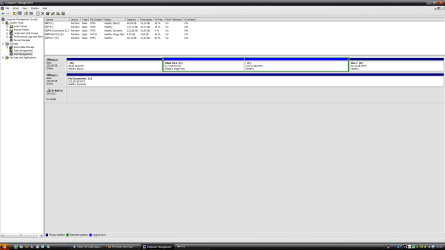
Here is also a screenshot of Disk Management:
 

Attachments

  • partitions.png
    partitions.png
    38.2 KB · Views: 15

My Computer

OS
windows xp pro
CPU
Inte Core 2 Duo E8200
Motherboard
Gigabyte GA-P35
Memory
Corsair xms2 PC6400 2GB
Graphics Card(s)
Geforce 8800gt 512mb
Sound Card
Creative Audigy Soundblaster 2ZS
Monitor(s) Displays
Samsung SyncMaster 2343BW
Screen Resolution
2048*1152
Hard Drives
Samsung SP2504C
Western Digital WD2500PD (System disk)
PSU
FSP-group ATX-400PNF
Case
Antec nsk4800
Cooling
Zalman
First boot will not boot

just noticed that you boot from 1 part and have your system located in your My docs folder. where are you trying to install to boot or system?

Ken
 

My Computer

Computer Manufacturer/Model Number
HP Pavillion dv-7 1005 Tx
OS
Win 8 Release candidate 8400
CPU
[email protected]
Memory
4 gigs
Graphics Card(s)
Nvidia 9600M
Sound Card
HD built-in
Monitor(s) Displays
17" Wxga
Screen Resolution
1440x900
Cooling
none
Internet Speed
45Mb down 5Mb up
I'm trying to install to the P: partition. And after install changing the boot flag from D: to P:

I dont know why my C: partition says it is the system. Does it matter? how do I change it?
 

My Computer

OS
windows xp pro
CPU
Inte Core 2 Duo E8200
Motherboard
Gigabyte GA-P35
Memory
Corsair xms2 PC6400 2GB
Graphics Card(s)
Geforce 8800gt 512mb
Sound Card
Creative Audigy Soundblaster 2ZS
Monitor(s) Displays
Samsung SyncMaster 2343BW
Screen Resolution
2048*1152
Hard Drives
Samsung SP2504C
Western Digital WD2500PD (System disk)
PSU
FSP-group ATX-400PNF
Case
Antec nsk4800
Cooling
Zalman
Is the png below current? It says C: is boot and system is on the second drive. You can tell by looking in c: (root) you should see several file (see png pic). While not critical having you comp have to look for bootmgr, and autexec, etc on c: then the rest of the system on the second drive has to slow down the boot somewhat.

Ken
 
Last edited:

My Computer

Computer Manufacturer/Model Number
HP Pavillion dv-7 1005 Tx
OS
Win 8 Release candidate 8400
CPU
[email protected]
Memory
4 gigs
Graphics Card(s)
Nvidia 9600M
Sound Card
HD built-in
Monitor(s) Displays
17" Wxga
Screen Resolution
1440x900
Cooling
none
Internet Speed
45Mb down 5Mb up
Back
Top