First problem with IE9 - no search provider

whs

New member
Guru
Gold Member
VIP
Local time
3:31 PM
Messages
26,200
Location
Florida in winter, Black Forest/Germany
I seem to have no search provider in my brand new IE9. So I consult the help page on how to get one, and it says that:


Click the Show Address bar Autocomplete button, and then click Add in the lower right corner for the Address bar.

In the Add-ons Gallery, choose a search provider, and then click Add to Internet Explorer.

In the Add Search Provider dialog box, you can do one or more of the following .... etc.
Unfortunately there is absolutely no Show Address bar Autocomplete button to be seen anywhere. So I am already stuck at the first step. Any ideas?
 

My Computer My Computer

At a glance

Vista, Windows7, Mint Mate, Zorin, Windows 8from 1.6GHz Duo to i7
Computer Manufacturer/Model Number
HP, Dell, Gateway, Toshiba - 4 laptops and 2 desktops
OS
Vista, Windows7, Mint Mate, Zorin, Windows 8
CPU
from 1.6GHz Duo to i7
Monitor(s) Displays
2x HP w2207
Hard Drives
5x HDD, 7x SSD, 12x Externals
Keyboard
with trackball - no mices
Mouse
Trackball mice
Internet Speed
DSL 6000
After opening a new tab go to the address bar and type in a partial word, or full word and the window will open that allows you to "Add." In my case, Google and Bing's icons are already there.

Maybe I'll get used to it, but so far I liked the Search in IE8 better.
 

My Computer My Computer

At a glance

Windows 10 HomeIntel Core i5 3550Corsair Vengeance DDR3 16GBNvidia GEForce GTX 970 SSC
Computer type
PC/Desktop
Computer Manufacturer/Model Number
Self build
OS
Windows 10 Home
CPU
Intel Core i5 3550
Motherboard
ASUS P8Z77-V LX (LGA1155)
Memory
Corsair Vengeance DDR3 16GB
Graphics Card(s)
Nvidia GEForce GTX 970 SSC
Monitor(s) Displays
Hanns-G 23.6", Acer 17"
Screen Resolution
1920x1080, 1440x900
Hard Drives
Sandisk SSD 256 GB
WD500GB
WD640GB
Seagage Ultra + 1TB ext.
BWD 800GB
WD 1TB ext
PSU
Antec 650w
Case
Cooler Master Centurion 534
Cooling
COOLER MASTER GeminII S524, 3 120 mm case fans.
Keyboard
Logitech MK300
Mouse
Logitech MK300
Internet Speed
Cable
Antivirus
MSSE, Malwarebytes
Browser
IE 10, Chrome
After opening a new tab go to the address bar and type in a partial word, or full word and the window will open that allows you to "Add." In my case, Google and Bing's icons are already there.

Maybe I'll get used to it, but so far I liked the Search in IE8 better.
Unfortunately this does not work. All I get is "History" and "Favorites" opening up.
 

My Computer My Computer

At a glance

Vista, Windows7, Mint Mate, Zorin, Windows 8from 1.6GHz Duo to i7
Computer Manufacturer/Model Number
HP, Dell, Gateway, Toshiba - 4 laptops and 2 desktops
OS
Vista, Windows7, Mint Mate, Zorin, Windows 8
CPU
from 1.6GHz Duo to i7
Monitor(s) Displays
2x HP w2207
Hard Drives
5x HDD, 7x SSD, 12x Externals
Keyboard
with trackball - no mices
Mouse
Trackball mice
Internet Speed
DSL 6000
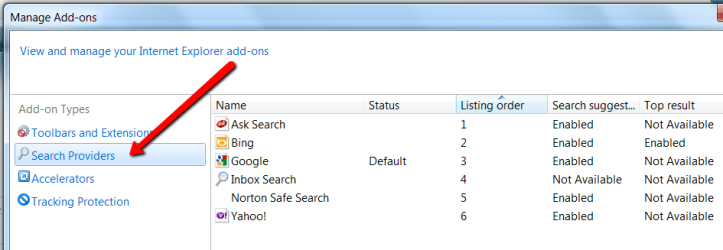
I just figured it out. There were some bum settings in "Manage add ons". After I cleared those, things worked.
Cato, thanks again for your suggestion - now it works as you suggested.
 

My Computer My Computer

At a glance

Vista, Windows7, Mint Mate, Zorin, Windows 8from 1.6GHz Duo to i7
Computer Manufacturer/Model Number
HP, Dell, Gateway, Toshiba - 4 laptops and 2 desktops
OS
Vista, Windows7, Mint Mate, Zorin, Windows 8
CPU
from 1.6GHz Duo to i7
Monitor(s) Displays
2x HP w2207
Hard Drives
5x HDD, 7x SSD, 12x Externals
Keyboard
with trackball - no mices
Mouse
Trackball mice
Internet Speed
DSL 6000
Great. Now it's time for me to get familiar with the rest of it. New things/Old minds. :)
 

My Computer My Computer

At a glance

Windows 10 HomeIntel Core i5 3550Corsair Vengeance DDR3 16GBNvidia GEForce GTX 970 SSC
Computer type
PC/Desktop
Computer Manufacturer/Model Number
Self build
OS
Windows 10 Home
CPU
Intel Core i5 3550
Motherboard
ASUS P8Z77-V LX (LGA1155)
Memory
Corsair Vengeance DDR3 16GB
Graphics Card(s)
Nvidia GEForce GTX 970 SSC
Monitor(s) Displays
Hanns-G 23.6", Acer 17"
Screen Resolution
1920x1080, 1440x900
Hard Drives
Sandisk SSD 256 GB
WD500GB
WD640GB
Seagage Ultra + 1TB ext.
BWD 800GB
WD 1TB ext
PSU
Antec 650w
Case
Cooler Master Centurion 534
Cooling
COOLER MASTER GeminII S524, 3 120 mm case fans.
Keyboard
Logitech MK300
Mouse
Logitech MK300
Internet Speed
Cable
Antivirus
MSSE, Malwarebytes
Browser
IE 10, Chrome
Have a look at those dumb settings. I wonder whether that is the default setting at installation time or whether they took that from my IE8. I did not even have Bing - no search engine at all.
 

Attachments

  • 2011-03-15_2108.png
    2011-03-15_2108.png
    41.9 KB · Views: 137

My Computer My Computer

At a glance

Vista, Windows7, Mint Mate, Zorin, Windows 8from 1.6GHz Duo to i7
Computer Manufacturer/Model Number
HP, Dell, Gateway, Toshiba - 4 laptops and 2 desktops
OS
Vista, Windows7, Mint Mate, Zorin, Windows 8
CPU
from 1.6GHz Duo to i7
Monitor(s) Displays
2x HP w2207
Hard Drives
5x HDD, 7x SSD, 12x Externals
Keyboard
with trackball - no mices
Mouse
Trackball mice
Internet Speed
DSL 6000
Apparently it comes from the IE8 settings. Mine only had Google and Bing and the two items were checked correctly.

I tried a couple of Beta versions of IE9 but didn't ever keep one over a couple of days and would go back to 8. So far, everything seems to be okay. I always have the "just never know" feelings when something new arrives.
 

My Computer My Computer

At a glance

Windows 10 HomeIntel Core i5 3550Corsair Vengeance DDR3 16GBNvidia GEForce GTX 970 SSC
Computer type
PC/Desktop
Computer Manufacturer/Model Number
Self build
OS
Windows 10 Home
CPU
Intel Core i5 3550
Motherboard
ASUS P8Z77-V LX (LGA1155)
Memory
Corsair Vengeance DDR3 16GB
Graphics Card(s)
Nvidia GEForce GTX 970 SSC
Monitor(s) Displays
Hanns-G 23.6", Acer 17"
Screen Resolution
1920x1080, 1440x900
Hard Drives
Sandisk SSD 256 GB
WD500GB
WD640GB
Seagage Ultra + 1TB ext.
BWD 800GB
WD 1TB ext
PSU
Antec 650w
Case
Cooler Master Centurion 534
Cooling
COOLER MASTER GeminII S524, 3 120 mm case fans.
Keyboard
Logitech MK300
Mouse
Logitech MK300
Internet Speed
Cable
Antivirus
MSSE, Malwarebytes
Browser
IE 10, Chrome

My Computer My Computer

At a glance

Vista 64 bit and 32 bit (SP2)Intel(R) Core(TM)2 Duo Processor T9400 (2.53 GHz4GB DDR2 System Memory (2 Dimm)512 MB NVIDIA GeForce 9600M GT
Computer Manufacturer/Model Number
HP Pavillion dv5t (generation 1)
OS
Vista 64 bit and 32 bit (SP2)
CPU
Intel(R) Core(TM)2 Duo Processor T9400 (2.53 GHz
Memory
4GB DDR2 System Memory (2 Dimm)
Graphics Card(s)
512 MB NVIDIA GeForce 9600M GT
Monitor(s) Displays
15.4" diagonal WSXGA+ High-Definition HP BrightView Widescre
Screen Resolution
1680 x 1050
Hard Drives
320GB 5400RPM SATA Hard Drive with HP ProtectSmart Hard Drive Protection
Keyboard
Built-in HP
Mouse
Built in - Synaptics TouchPad V6.5 on PS/2 Port
Internet Speed
Max
Other Info
~ Intel Next-Gen Wireless-N Mini-card w/Bluetooth ~ Blu-Ray ROM DVD+/-R/RW ~ Integ. HDTV Hybrid Tuner ~ 12 Cell Battery ~ MS Office (Home Premium) 2007 ~

My Computer My Computer

At a glance

Vista, Windows7, Mint Mate, Zorin, Windows 8from 1.6GHz Duo to i7
Computer Manufacturer/Model Number
HP, Dell, Gateway, Toshiba - 4 laptops and 2 desktops
OS
Vista, Windows7, Mint Mate, Zorin, Windows 8
CPU
from 1.6GHz Duo to i7
Monitor(s) Displays
2x HP w2207
Hard Drives
5x HDD, 7x SSD, 12x Externals
Keyboard
with trackball - no mices
Mouse
Trackball mice
Internet Speed
DSL 6000
Maybe I'll get used to it, but so far I liked the Search in IE8 better.

Is there a way to add it separatly from the URL bar as it was in IE8?
 

My Computer My Computer

At a glance

Windows 7 Ultimate x64
OS
Windows 7 Ultimate x64
Last edited:

My Computer My Computer

At a glance

Windows 10 HomeIntel Core i5 3550Corsair Vengeance DDR3 16GBNvidia GEForce GTX 970 SSC
Computer type
PC/Desktop
Computer Manufacturer/Model Number
Self build
OS
Windows 10 Home
CPU
Intel Core i5 3550
Motherboard
ASUS P8Z77-V LX (LGA1155)
Memory
Corsair Vengeance DDR3 16GB
Graphics Card(s)
Nvidia GEForce GTX 970 SSC
Monitor(s) Displays
Hanns-G 23.6", Acer 17"
Screen Resolution
1920x1080, 1440x900
Hard Drives
Sandisk SSD 256 GB
WD500GB
WD640GB
Seagage Ultra + 1TB ext.
BWD 800GB
WD 1TB ext
PSU
Antec 650w
Case
Cooler Master Centurion 534
Cooling
COOLER MASTER GeminII S524, 3 120 mm case fans.
Keyboard
Logitech MK300
Mouse
Logitech MK300
Internet Speed
Cable
Antivirus
MSSE, Malwarebytes
Browser
IE 10, Chrome
My problem with search providers looks even more dramatic(:
The IE9 does not contain any search providers at all and all my attemps to add one of them failed. Not to mention that the address bar does not show previous searching results...:cry:
 

My Computer My Computer

At a glance

Windows Vista Business 32bit
OS
Windows Vista Business 32bit
My problem with search providers looks even more dramatic(:
The IE9 does not contain any search providers at all and all my attemps to add one of them failed. Not to mention that the address bar does not show previous searching results...:cry:
Did you try under "Manage Add-ons" - see picture
 

Attachments

  • 2011-08-21_1445.png
    2011-08-21_1445.png
    20 KB · Views: 3

My Computer My Computer

At a glance

Vista, Windows7, Mint Mate, Zorin, Windows 8from 1.6GHz Duo to i7
Computer Manufacturer/Model Number
HP, Dell, Gateway, Toshiba - 4 laptops and 2 desktops
OS
Vista, Windows7, Mint Mate, Zorin, Windows 8
CPU
from 1.6GHz Duo to i7
Monitor(s) Displays
2x HP w2207
Hard Drives
5x HDD, 7x SSD, 12x Externals
Keyboard
with trackball - no mices
Mouse
Trackball mice
Internet Speed
DSL 6000
My problem with search providers looks even more dramatic(:
The IE9 does not contain any search providers at all and all my attemps to add one of them failed. Not to mention that the address bar does not show previous searching results...:cry:
Did you try under "Manage Add-ons" - see picture

Yes, I tried all the above but unfortunately without results. My list of providers continues to be blank.
 

My Computer My Computer

At a glance

Windows Vista Business 32bit
OS
Windows Vista Business 32bit

My Computer My Computer

At a glance

Vista, Windows7, Mint Mate, Zorin, Windows 8from 1.6GHz Duo to i7
Computer Manufacturer/Model Number
HP, Dell, Gateway, Toshiba - 4 laptops and 2 desktops
OS
Vista, Windows7, Mint Mate, Zorin, Windows 8
CPU
from 1.6GHz Duo to i7
Monitor(s) Displays
2x HP w2207
Hard Drives
5x HDD, 7x SSD, 12x Externals
Keyboard
with trackball - no mices
Mouse
Trackball mice
Internet Speed
DSL 6000
Does not work (:
 

My Computer My Computer

At a glance

Windows Vista Business 32bit
OS
Windows Vista Business 32bit
Just downloaded Google toolbar which contains its own searching bar.
 

My Computer My Computer

At a glance

Windows Vista Business 32bit
OS
Windows Vista Business 32bit
Strange, it worked here. But the toolbar is a good option.
 

My Computer My Computer

At a glance

Vista, Windows7, Mint Mate, Zorin, Windows 8from 1.6GHz Duo to i7
Computer Manufacturer/Model Number
HP, Dell, Gateway, Toshiba - 4 laptops and 2 desktops
OS
Vista, Windows7, Mint Mate, Zorin, Windows 8
CPU
from 1.6GHz Duo to i7
Monitor(s) Displays
2x HP w2207
Hard Drives
5x HDD, 7x SSD, 12x Externals
Keyboard
with trackball - no mices
Mouse
Trackball mice
Internet Speed
DSL 6000
Agreed, the situation is very strange - some forum members say their IE9 initially contains one or more search providers preloaded. In my case the same browser is empty despite it was downloaded from an official source...
 

My Computer My Computer

At a glance

Windows Vista Business 32bit
OS
Windows Vista Business 32bit
Back
Top