Folders looks weird after using star Dock Icon Packager 5.0 5.0 Trial....
I uninstall the program after setting the skins to Windows default which is built in program...seem ok until i reboot and now this folders looks like one of the skins...and some files also that are associated with VLC...!
anyways i have tried rebuilding cache but that didn't help! matter fact it made it worst...
so what's the next Step! I need help badly...
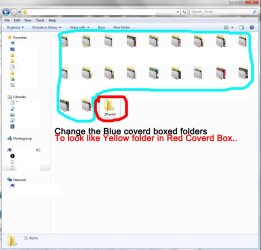
this is what my folders look likes like i want them to be either normal when i installed windows...yellow

Thanks for any helps and tips in advance....also I noticed this only happens if there is files in the folder or sub folders in main folder....otherwise if folder is empty then this dose not happen :/
I uninstall the program after setting the skins to Windows default which is built in program...seem ok until i reboot and now this folders looks like one of the skins...and some files also that are associated with VLC...!
anyways i have tried rebuilding cache but that didn't help! matter fact it made it worst...
so what's the next Step! I need help badly...
this is what my folders look likes like i want them to be either normal when i installed windows...yellow
Thanks for any helps and tips in advance....also I noticed this only happens if there is files in the folder or sub folders in main folder....otherwise if folder is empty then this dose not happen :/
My Computer
- Computer Manufacturer/Model Number
- AlienWare GodFatheriZed!
- OS
- WIN 7 x64
- CPU
- I7 550
- Memory
- 8 GB DDR3
- Graphics Card(s)
- 9800 GTX Turbo Dual
- Monitor(s) Displays
- 21" Samsung True Colors HD + 25 SYNC Master
- Screen Resolution
- 1680*1050
- Hard Drives
- Total 1.5 TB