My Windows 7 Professional was working fine until I tried to dual boot the machine with the original Windows 8.1 HDD the machine came with. After muddling through that (and even with much support from the kind people on this forum), I've given up on it because of my own shortcomings.
I have unplugged the SSD Windows 7 was installed on. My machine is back to running reliably booting from Windows 8.1 HDD. Now I would like to unplug the Windows 8.1 HDD (so I can preserve it in good shape to boot from it later) and boot from Windows 7 SSD.
The DVD with Windows 7 ISO is corrupted and won't boot even though it worked fine during original installation. I do not have a repair disk for Windows 7 Professional X64 but have one for Windows 7 X86 which allows me to get to command prompt.
Is there any way I can repair this installation without losing its applications?
My Computer
Computer type
PC/Desktop
Computer Manufacturer/Model Number
Dell Inspiron I3847-3850BK
OS
Microsoft Windows 7 Professional 64-bit 7601 Multiprocessor Free Service Pack 1
CPU
Intel(R) Core(TM) i3-4150 CPU @ 3.50GHz
Motherboard
Dell Inc. 088DT1
Memory
8.00 GB
Graphics Card(s)
Intel(R) HD Graphics 4400
Sound Card
(1) Realtek High Definition Audio (2) Intel(R) Display Aud
Monitor(s) Displays
Samsung LCD TV, 3 HDMI ports
Screen Resolution
1920 x 1080 x 32 bits (4294967296 colors) @ 60 Hz
Hard Drives
C300-CTF C300-CTFDDAC128M SCSI Disk Device
PSU
220W
Case
Dell
Keyboard
Basic
Mouse
Basic
Internet Speed
Ethernet, 802.11b/g/n wireless LAN (Dell Wireless 1705)
Antivirus
Microsoft Security Essentials
Browser
Chrome Version 38.0.2125.101 m, IE 10.0.92
Other Info
Intel H81 Express chipset, in 1 card reader, DVD/CD burner, 1 PCI Express x16 & 2 PCI Express x1, HDMI output for HDTV. VGA. 8 USB ports (2 USB3, 6 USB2), Audio in/out jacks. 3-stack audio jacks supporting 5.1 surround sound. Windows Media Center.
Is your Windows 7 an OEM version or a Retail version? If retail, you can use the key and download a fresh copy of the ISO from Microsoft then burn it to a DVD. If it's an OEM version, you might be able to borrow a DVD from a friend. Microsoft no longer provides the ISOs for OEM versions.
Just so you're clear on terminology, you cannot boot from a disk image (ISO) file. The ISO must first be burned to a DVD and the DVD is no longer an ISO file. You cannot simply copy the ISO file to a DVD and boot from it.
My Computer
Computer type
PC/Desktop
Computer Manufacturer/Model Number
Built 2/11/2011
OS
Windows 7 Pro-x64
CPU
i7-2600 3.4GHz - 3.8GHz Turbo
Motherboard
Intel DH67BL-B3
Memory
8Gb - 2x4GB, Muskin 991770 PC3-1333
Graphics Card(s)
Integrated Intel HD 2000
Sound Card
Integrated Intel 10.1 HD, RealTek ALC892
Monitor(s) Displays
Asus LCD VH222H, Haier HL24XSL2a
Screen Resolution
1920x1080, 1920x1080
Hard Drives
Crucial SSD C300-128Gb,
Western Digital WD5002AALX - 500Gb,
Western Digital WD7501AALS - 750Gb
PSU
Seasonic 650W 80+ Gold Modular
Case
Rosewill Defender
Cooling
Stock CPU, Four 120mm case fans, PCH fan added
Keyboard
Logitech EX100 Y-RBH94 Wireless
Mouse
Logitech EX100 M-RCE95 Wireless
Internet Speed
3.0/1.5 Mbs
Antivirus
Microsoft Security Essentials
Browser
Microsoft Internet Explorer 11
Other Info
Antec Veris Premier-Multimedia IR Station,
Cyber Accoustics-3602 Speakers,
AFT XM-5U Card Reader,
Hauppauge TV-HVR-2250,
Sony LX300 USB Turntable
Is your Windows 7 an OEM version or a Retail version? If retail, you can use the key and download a fresh copy of the ISO from Microsoft then burn it to a DVD. If it's an OEM version, you might be able to borrow a DVD from a friend. Microsoft no longer provides the ISOs for OEM versions.
It's retail but I have misplaced the key. I could use some utility to extract it from the SSD once it boots but until then I don't have the key. Downloading a fresh copy from Microsoft requires providing the key upfront. I wish they would allow the download and control piracy by not allowing activation without a valid key. Borrowing could have been a possibility but none of my friends has a Windows 7 Professional X64 DVD.
Just so you're clear on terminology, you cannot boot from a disk image (ISO) file. The ISO must first be burned to a DVD and the DVD is no longer an ISO file. You cannot simply copy the ISO file to a DVD and boot from it.
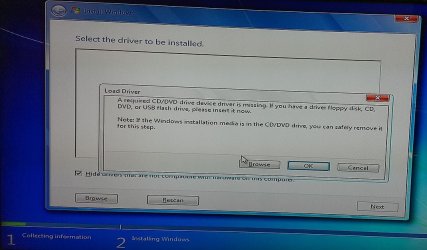
I misspoke. The ISO file is probably corrupt because an install disk burned from it gives this attached error at install time. No sure which specific drivers it needs and where can I find them.
Attachments
Driver error.jpg
100.9 KB
· Views: 3
My Computer
Computer type
PC/Desktop
Computer Manufacturer/Model Number
Dell Inspiron I3847-3850BK
OS
Microsoft Windows 7 Professional 64-bit 7601 Multiprocessor Free Service Pack 1
CPU
Intel(R) Core(TM) i3-4150 CPU @ 3.50GHz
Motherboard
Dell Inc. 088DT1
Memory
8.00 GB
Graphics Card(s)
Intel(R) HD Graphics 4400
Sound Card
(1) Realtek High Definition Audio (2) Intel(R) Display Aud
Monitor(s) Displays
Samsung LCD TV, 3 HDMI ports
Screen Resolution
1920 x 1080 x 32 bits (4294967296 colors) @ 60 Hz
Hard Drives
C300-CTF C300-CTFDDAC128M SCSI Disk Device
PSU
220W
Case
Dell
Keyboard
Basic
Mouse
Basic
Internet Speed
Ethernet, 802.11b/g/n wireless LAN (Dell Wireless 1705)
Antivirus
Microsoft Security Essentials
Browser
Chrome Version 38.0.2125.101 m, IE 10.0.92
Other Info
Intel H81 Express chipset, in 1 card reader, DVD/CD burner, 1 PCI Express x16 & 2 PCI Express x1, HDMI output for HDTV. VGA. 8 USB ports (2 USB3, 6 USB2), Audio in/out jacks. 3-stack audio jacks supporting 5.1 surround sound. Windows Media Center.
It appears to be a missing or corrupt CD/DVD driver. You'll need a good Windows DVD or ISO file to create a DVD.
I have not seen that message on a valid install disc; However, I'm not one of the installer gurus. I'll ask for help and see if someone can give a hand.
My Computer
Computer type
PC/Desktop
Computer Manufacturer/Model Number
Built 2/11/2011
OS
Windows 7 Pro-x64
CPU
i7-2600 3.4GHz - 3.8GHz Turbo
Motherboard
Intel DH67BL-B3
Memory
8Gb - 2x4GB, Muskin 991770 PC3-1333
Graphics Card(s)
Integrated Intel HD 2000
Sound Card
Integrated Intel 10.1 HD, RealTek ALC892
Monitor(s) Displays
Asus LCD VH222H, Haier HL24XSL2a
Screen Resolution
1920x1080, 1920x1080
Hard Drives
Crucial SSD C300-128Gb,
Western Digital WD5002AALX - 500Gb,
Western Digital WD7501AALS - 750Gb
PSU
Seasonic 650W 80+ Gold Modular
Case
Rosewill Defender
Cooling
Stock CPU, Four 120mm case fans, PCH fan added
Keyboard
Logitech EX100 Y-RBH94 Wireless
Mouse
Logitech EX100 M-RCE95 Wireless
Internet Speed
3.0/1.5 Mbs
Antivirus
Microsoft Security Essentials
Browser
Microsoft Internet Explorer 11
Other Info
Antec Veris Premier-Multimedia IR Station,
Cyber Accoustics-3602 Speakers,
AFT XM-5U Card Reader,
Hauppauge TV-HVR-2250,
Sony LX300 USB Turntable