Fixing non-writable NTFS-Folder Mounted Partition?

ThelastCanadian

New member
Local time
2:59 PM
Messages
29
I had a drive partition on my hard disk that was NTFS-folder mounted so that I could have a HDD area for game resources like minecraft mods and whatnot without filling up my SSD on content it wouldn't really help with.
Anyhow, for whatever reason it has suddenly stopped accepting any copying to the partition and any new-->file I create there immediately shows with a lock icon and the "archived" attribute set.
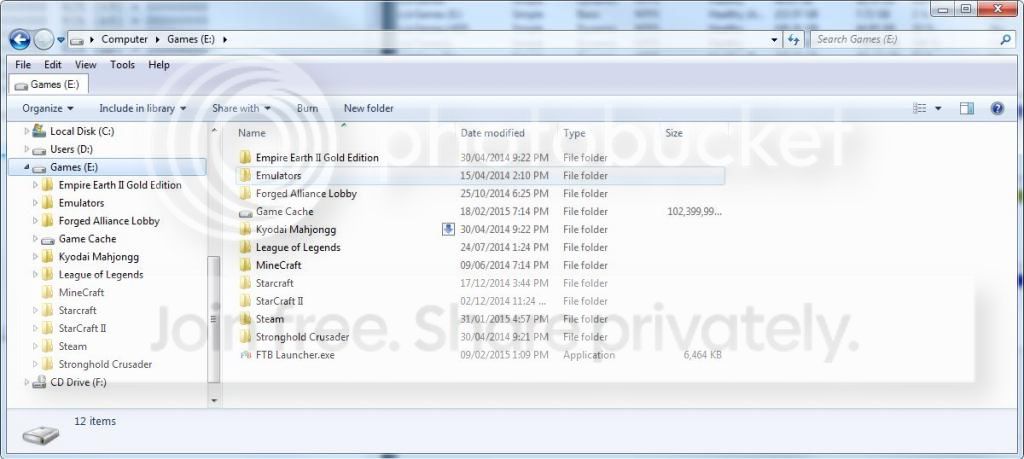
Can somebody help me get this working properly? I just want to mount the folder as it shows in this image, but so it works:
Win7 64x Home Premium

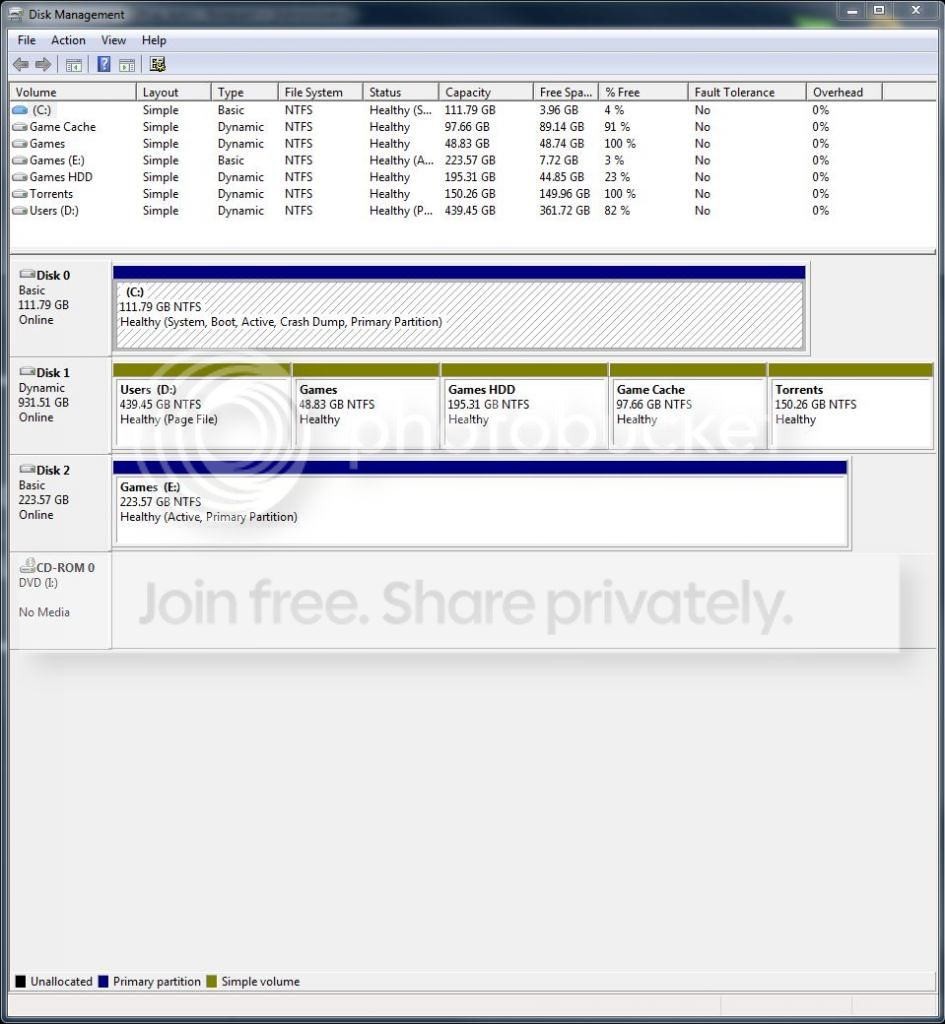
The partition table.... [Games Cache is the relevant partition, on Disk 1]
Capture.jpg


How this normally displays:
cap2.jpg


So people know what I'm talking about ....
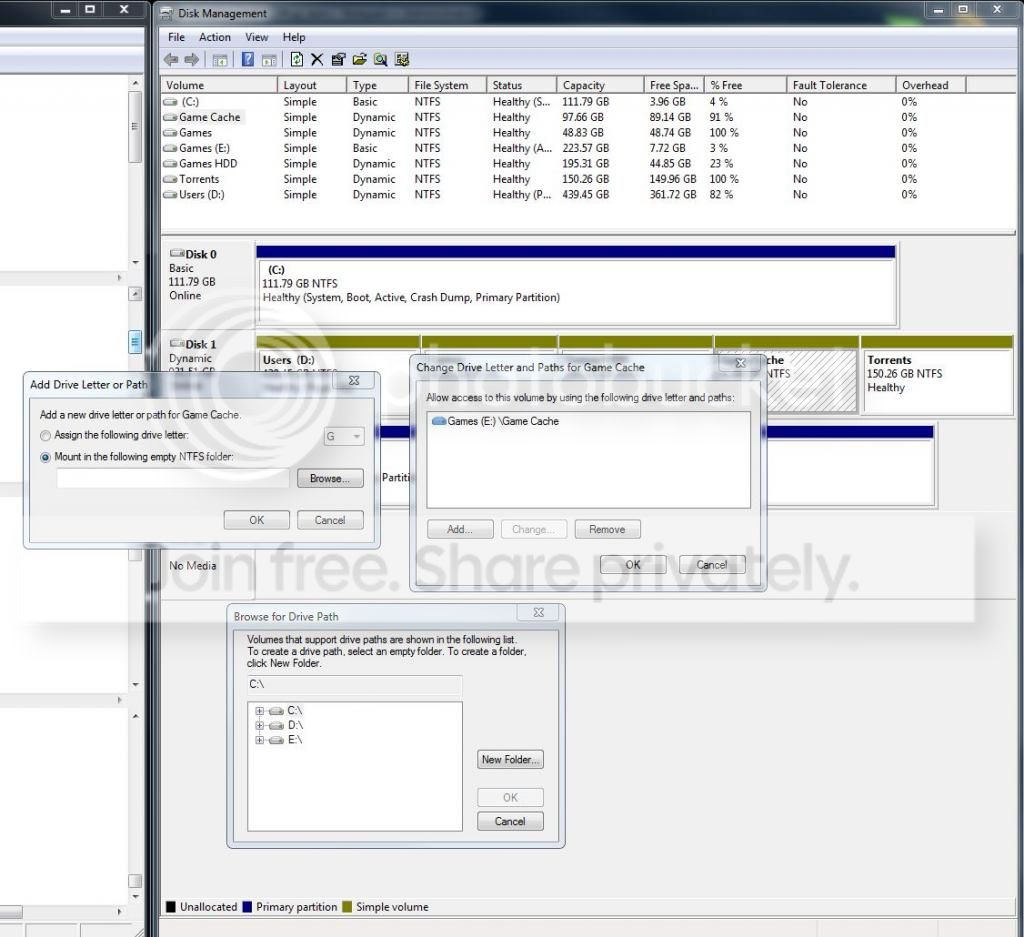
cap3.jpg
 

My Computer

OS
Win7 Home Premium 64x
You've allowed your disk to convert to Dynamic which is only meant to span a single partition across multiple hard drives.

You must have missed the warning normally given when trying to create in excess of Four Primary Partitions. At that point you could convert one to Logical which would allow as many adjacent Logical sub-partitions as there are letters.

To convert back to Basic non-destructively use Option One in Convert a Dynamic Disk to a Basic Disk.

In this case you'll need to delete all but four, then after conversion you can convert one Primary to Logical which will allow you to add as many adjacent Logical sub-partitions as you wish. How to set partition as Primary or Logical with Partition Wizard

To access/copy files on any partition it would also need a drive letter. Partitions that are already nearly full may not accept copy operations.
 
Last edited:
No, user profile is kill :(

Oh well, thank you for your help. I'll have to get backed up and give this a go I guess.
 

My Computer

OS
Win7 Home Premium 64x
Yes, I should have mentioned to back up any data you need from any partition in excess of four, which must be deleted before it will convert to Basic.

However if you use Option 1 to convert non-destructively using Partition Wizard v.4.2 or Easeus Home edition, you only need to delete one partition to force conversion.
 
Last edited:
I also notice that your (C) partition only has 4% free space.

Window 7 will not work properly with less than 10 % free space.

I'm back to watching.
 

My Computer

Computer type
PC/Desktop
Computer Manufacturer/Model Number
Home made Desktop
OS
Windows 10 Pro. 64/ version 1709 Windows 7 Pro/64
CPU
Intel i7-6800K @ 4.3
Motherboard
ASUS X-99 Deluxe II
Memory
Corsair Platinum 16 gig @2400
Graphics Card(s)
EVGA GTX 1070 OC
Monitor(s) Displays
Asus 27" LED LCD/VE278Q
Screen Resolution
1920-1080 or 1280-720 HDMI
Hard Drives
INTEL SSD 730-240 Gb Sata 3.0/
PSU
EVGA Platium 1200W
Case
Phanteks Luxe Tempered Glass 8 fans/ one radiator
Cooling
XSPC/ Water Cooled CPU
Keyboard
Das 4 Professional
Mouse
Logitech M705/MX Anywhere 2-S
Internet Speed
100 mbits
Antivirus
Microsoft Security Essentials/ Malwarebytes Premium 3.0/ SAS
Browser
I.E. 11 default/Firefox/ ISP Time Warner Cable/Spectrum
Other Info
LG BluRay Burner/
Sound system-KLipsch-THX/
Icy Dock ssd Hot Swap bays.
I also notice that your (C) partition only has 4% free space.

Window 7 will not work properly with less than 10 % free space.

I'm back to watching.

Strange. It's been below 10% for a while and this is only a recent problem. Perhaps I should try and free it up a bit though - it is an SSD....
 

My Computer

OS
Win7 Home Premium 64x
Sorry if I just necro'd this, but I thought I'd leave this for posterity:
TeraCopy version 2.8 has major issues with its file operations over NTFS mounted folders. This was likely the issue. Using explorer.exe's default copier seems to resolve this issue.
 

My Computer

OS
Win7 Home Premium 64x
Back
Top