fixmbr - system repair disk

kenobi

New member
Member
Local time
7:10 PM
Messages
42
Hello,

I have a question related to the windows 7 bootloader.

I had some problems with the windows 7 bootloader after installing a linux os. Practically I couldn't boot into windows 7. I used a linux tool to repair the mbr. This installed a so called "generic compatible mbr", but not the original that windows came. Windows 7 works now properly...
Now, I wan't to delete linux, leaving windows 7 the only operating system.

What should I do in order to that. If I have no problems, it is recommended to replace the bootloader with the original one or leave it as it is?

Thanks in advance.
 

My Computer

OS
windows 7

My Computer

Computer type
PC/Desktop
Computer Manufacturer/Model Number
Golden Mk. I.4
OS
Windows 10 Pro x64 ; Xubuntu x64
CPU
Intel i7 860 @ 2.80 GHz O/C'ed to 4.0GHz
Motherboard
Gigabyte P55A-UD3R Rev.1. Award BIOS F13
Memory
16GB Corsair Vengance DDR3 @ 661 MHz Dual Channel (9-9-9-24)
Graphics Card(s)
EVGA NVidia GTX 560 1024MB
Sound Card
Realtek Integrated
Monitor(s) Displays
Dual Samsung SyncMaster 2494HS
Screen Resolution
1920*1080 and 1920*1080
Hard Drives
1*Samsung 840 EVO 120GB SSD;
1*OCZ Vertex 2 60GB SSD;
2*Samsung F3 SpinPoint 1TB in RAID0;
1*Samsung F1 SpinPoint 1TB;
2*Western Digital 1TB External USB 3.0
1*Western Digital 500GB External USB 3.0
1*Seagate 500GB External USB 2.0
PSU
Thermaltake ToughPower QFan 750W
Case
Thermaltake Element S VK60001W2Z
Cooling
Corsair H60 Water Cooling, 2*230mm and 2*80mm case fans
Keyboard
Logitech G110
Mouse
Logitech MX518
O2ZOevY.jpg
 

My Computer

OS
windows 7
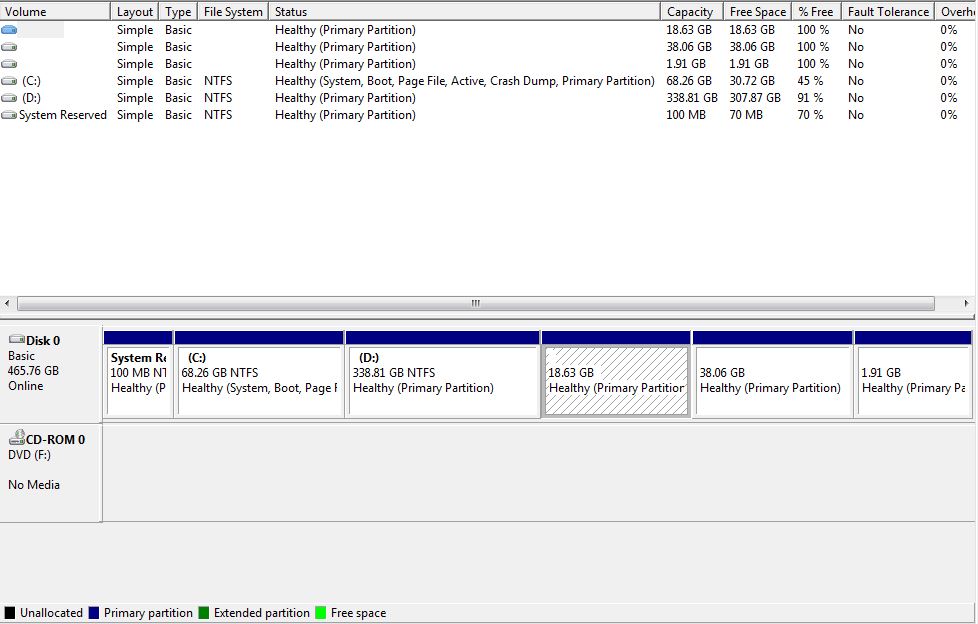
System Reserved partition has been cut out of booting Win7, it is now configured for C to boot (System) itself.

However I'm not sure why you have so many Primary partitions as you should be limited to 4 on an MBR disk. Perhaps Disk Mgmt is misreading the hidden Linux partitions.

To Dual BOot Linux easiest I'd follow the steps in these links: Dual boot Ubuntu-Win7
Dual Boot - Windows 7 and Linux - Windows 7 Forums

The tutorial's author Colin should be back to look it over for you, too.
 
@gregrocker: Thanks for reply. Those three partitions are actually linux logical partitions.
I thought of the same thing, but I wasn't sure...
Code:
System Reserved partition has been cut out of booting Windows 7, it is now configured for C to boot (System) itself.

I will read the tutorial.
 

My Computer

OS
windows 7
There are two actually. The first is a link to a post by Barman58 which has helped many set up their Dual Boot perfectly over the years. The other is Colin's newer tutorial which also has good results.
 
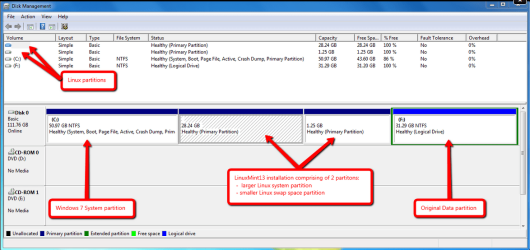
Thats correct - Linux partitions show up as Primary Partitions when viewed in Windows Disk Management (example shown below):

Capture.PNG

Since the system files are on C: (meaning that Windows boots from C: and not System Reserved), the easiest method to remove Linux is simply to remove:

1. The System Reserved partition (it holds the Linux GRUB bootloader);
2. The Linux data EXT4 partition; and then
3. The Linux SWAP partition

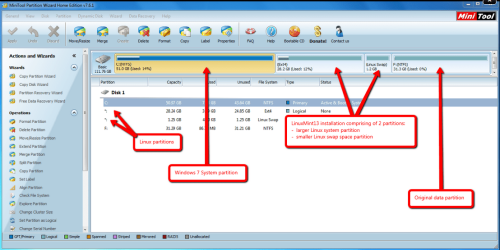
I strongly recommend using the bootable version of Partition Wizard to do this, since the EXT4 and SWAP partitions are easily identifiable, minimizing the chance of deleting the incorrect partition (see Partition Wizard example below).

Capture1.PNG

Once those partitions are removed, you can resize the remaining partition/s into the available free space.

Useful Partition Wizard tutorial:
http://www.sevenforums.com/tutorials/93322-partition-wizard-use-bootable-cd.html
 

My Computer

Computer type
PC/Desktop
Computer Manufacturer/Model Number
Golden Mk. I.4
OS
Windows 10 Pro x64 ; Xubuntu x64
CPU
Intel i7 860 @ 2.80 GHz O/C'ed to 4.0GHz
Motherboard
Gigabyte P55A-UD3R Rev.1. Award BIOS F13
Memory
16GB Corsair Vengance DDR3 @ 661 MHz Dual Channel (9-9-9-24)
Graphics Card(s)
EVGA NVidia GTX 560 1024MB
Sound Card
Realtek Integrated
Monitor(s) Displays
Dual Samsung SyncMaster 2494HS
Screen Resolution
1920*1080 and 1920*1080
Hard Drives
1*Samsung 840 EVO 120GB SSD;
1*OCZ Vertex 2 60GB SSD;
2*Samsung F3 SpinPoint 1TB in RAID0;
1*Samsung F1 SpinPoint 1TB;
2*Western Digital 1TB External USB 3.0
1*Western Digital 500GB External USB 3.0
1*Seagate 500GB External USB 2.0
PSU
Thermaltake ToughPower QFan 750W
Case
Thermaltake Element S VK60001W2Z
Cooling
Corsair H60 Water Cooling, 2*230mm and 2*80mm case fans
Keyboard
Logitech G110
Mouse
Logitech MX518
Back
Top