Flac files incorrectly displayed as mp3 file type in explorer

That thing I installed from xiph.org is simply a codec for flac playback with WMP. Nothing more. Nothing less. No flac codec. No flac playback. But you already know that. Here's the website:

Xiph.org

Here's where I got the codec download:

Directshow Filters for Ogg Vorbis, Speex, Theora and FLAC: Home

Yeah, I'm interested in something new and if you've got the time (and a little bit of patience) I'm willing too.
 

My Computer My Computer

At a glance

Windows 7 64 bit
OS
Windows 7 64 bit
"And yet you say WMP can play FLAC files. But do you have to open WMP and then navigate to FLAC files, and select them and open them... from within WMP? Or does WMP get launched automatically when you double-click a FLAC file in Explorer? This latter action seems impossible now that you've shown the "default programs" list with nothing associated with FLAC."

Well, to be completely honest with you, I haven't the foggiest notion as to how it works but it just works. It really is the bees knees. I can click on ANY file in the WMP library or within the explorer itself and it will have instant playback. WMP will launch and there you go. It's pretty straightforward. MP3 files have the mp3 Windows logo and flac files have the xiph logo. There really isn't a deep end of the pool to drown in. Especially since I'm currently only using the two aforementioned file formats. People seem to disparage on WMP a lot around here but when it works it works just fine. Yeah, I know some people hate the fact that it doesn't work "out of the box" from the get go but a few plugins and a basic codec package and you're set. However, like I mentioned earlier, I'm willing to see what its looks like on the other side of the fence.
 

My Computer My Computer

At a glance

Windows 7 64 bit
OS
Windows 7 64 bit
Also, how do you select and divide up all my previous remarks into quotes like you do? Very noobish question I know. Never could get that one straight...
 

My Computer My Computer

At a glance

Windows 7 64 bit
OS
Windows 7 64 bit
Also, how do you select and divide up all my previous remarks into quotes like you do?
its easy just copy the txt you want to quote and in the message box click the speech bubble tab and insert the tx between the two sets of brackets ie.
insert txt here
2011-12-14_2121.png

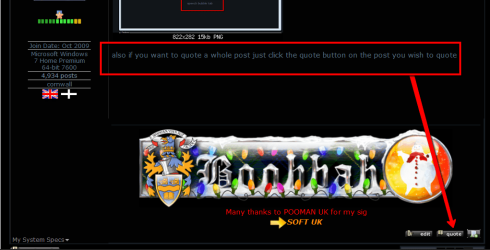
also if you want to quote a whole post just click the quote button on the post you wish to quote

2011-12-14_2124.png
 

My Computer My Computer

At a glance

Microsoft Windows 7 Home Premium 64-bit 7600IIx4 amd athelon 635 processor2x2gbati radeon HD 5450
Computer Manufacturer/Model Number
Hewlett packard/p6512uk
OS
Microsoft Windows 7 Home Premium 64-bit 7600
CPU
IIx4 amd athelon 635 processor
Motherboard
FOXCONN 2AA9
Memory
2x2gb
Graphics Card(s)
ati radeon HD 5450
Sound Card
(1) Realtek High Definition Audio (2) AMD High Definition
Monitor(s) Displays
samsung lcd tv 32"
Screen Resolution
1360x 768
Hard Drives
(1) WDC WD10 01FAES-60Z2A0 SATA Disk Device (2) Maxtor OneTouch USB Device (3) ST310003 33AS USB Device (4) WD My Book 1111 USB Device
PSU
?
Cooling
air!
Keyboard
wireless hp
Mouse
wireless Hp,optical
Internet Speed
1.10mb/s
Antivirus
MSE
Browser
Firefox
also if you want to quote a whole post just click the quote button on the post you wish to quote

You mean, like this? Shame I can't preview the quick reply.
 

My Computer My Computer

At a glance

Windows 7 64 bit
OS
Windows 7 64 bit
looks fine from here. :D
 

My Computer My Computer

At a glance

Microsoft Windows 7 Home Premium 64-bit 7600IIx4 amd athelon 635 processor2x2gbati radeon HD 5450
Computer Manufacturer/Model Number
Hewlett packard/p6512uk
OS
Microsoft Windows 7 Home Premium 64-bit 7600
CPU
IIx4 amd athelon 635 processor
Motherboard
FOXCONN 2AA9
Memory
2x2gb
Graphics Card(s)
ati radeon HD 5450
Sound Card
(1) Realtek High Definition Audio (2) AMD High Definition
Monitor(s) Displays
samsung lcd tv 32"
Screen Resolution
1360x 768
Hard Drives
(1) WDC WD10 01FAES-60Z2A0 SATA Disk Device (2) Maxtor OneTouch USB Device (3) ST310003 33AS USB Device (4) WD My Book 1111 USB Device
PSU
?
Cooling
air!
Keyboard
wireless hp
Mouse
wireless Hp,optical
Internet Speed
1.10mb/s
Antivirus
MSE
Browser
Firefox
I was going to Select the "Post Reply" but it was full of previous posts and quotes. Why? Can't seem to dump them.
 

My Computer My Computer

At a glance

Windows 7 64 bit
OS
Windows 7 64 bit
not sure i follow you ,the post quick reply is just the button to post your message . if there are quotes etc in the message window then just delete them ,though im not sure how they are getting there, post a snip
 

My Computer My Computer

At a glance

Microsoft Windows 7 Home Premium 64-bit 7600IIx4 amd athelon 635 processor2x2gbati radeon HD 5450
Computer Manufacturer/Model Number
Hewlett packard/p6512uk
OS
Microsoft Windows 7 Home Premium 64-bit 7600
CPU
IIx4 amd athelon 635 processor
Motherboard
FOXCONN 2AA9
Memory
2x2gb
Graphics Card(s)
ati radeon HD 5450
Sound Card
(1) Realtek High Definition Audio (2) AMD High Definition
Monitor(s) Displays
samsung lcd tv 32"
Screen Resolution
1360x 768
Hard Drives
(1) WDC WD10 01FAES-60Z2A0 SATA Disk Device (2) Maxtor OneTouch USB Device (3) ST310003 33AS USB Device (4) WD My Book 1111 USB Device
PSU
?
Cooling
air!
Keyboard
wireless hp
Mouse
wireless Hp,optical
Internet Speed
1.10mb/s
Antivirus
MSE
Browser
Firefox
Pretty much WMP 12 all the way.
Well... I'm stumped. You have no default program associated with file type FLAC. There's no entry in that list for FLAC, so I don't understand why/how Windows would launch any program at all when you double-click a FLAC file in Explorer.

This is NOT how things would look if you'd installed Winamp and kept it. You'd see a FLAC entry in that list and Winamp would be the named program, as was shown in my own screenshots.

And yet you say WMP can play FLAC files. But do you have to open WMP and then navigate to FLAC files, and select them and open them... from within WMP? Or does WMP get launched automatically when you double-click a FLAC file in Explorer? This latter action seems impossible now that you've shown the "default programs" list with nothing associated with FLAC.


From my experience, Winamp was constantly freezing up on me. For instance, click "Audio" and nothing would happen.
I have no idea what you're talking about here.

Where is "audio" to click on???

That's not how I play music with Winamp, i.e. within Winamp once it's opened as a "media player" (forgetting about it getting auto-launched automatically when I double-click on a music file in Explorer or any other Explorer-like program).

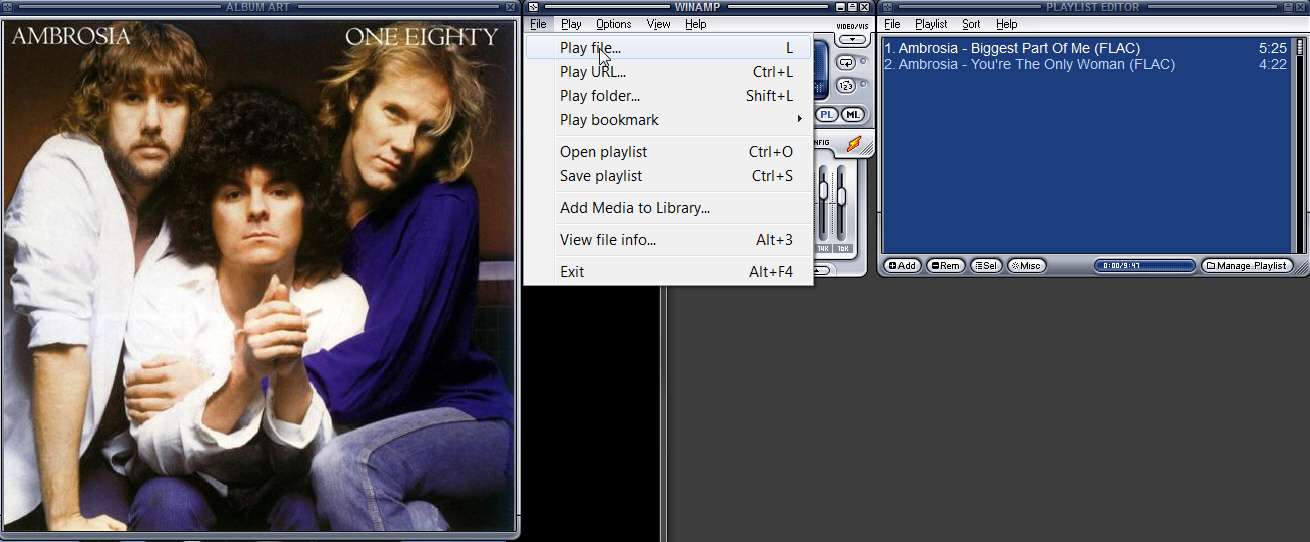
Assuming the program is open, you can initiate music playing by selecting one or more files using the main interface File -> Play file or Play folder or etc. The file(s) you select will be placed into the "Playlist editor" window and playing will be initiated in the main window.

winampfileplay.jpg


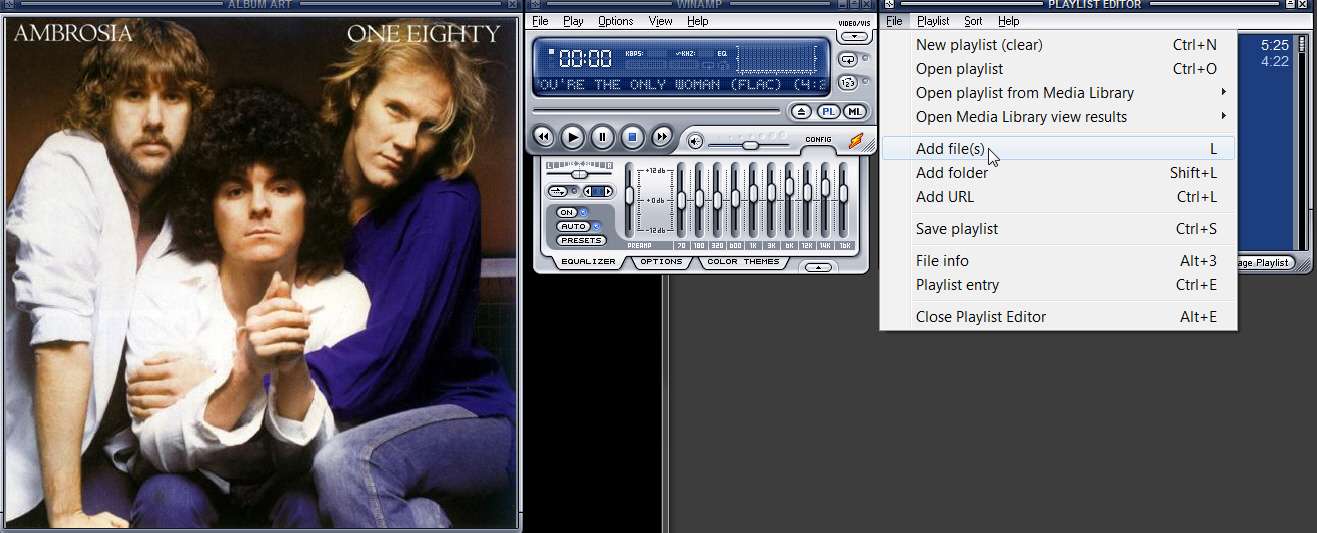
Alternatively, you can select music through the Playlist Editor window itself, replacing what's there right now or adding (i.e. "enqueing") additional music files to the ones already there.

winampplaylist.jpg


Well, I'm sure it's just that you're not familiar with it. It's actually a wonderful program as I'm sure many millions of users would attest to.


Not at all.

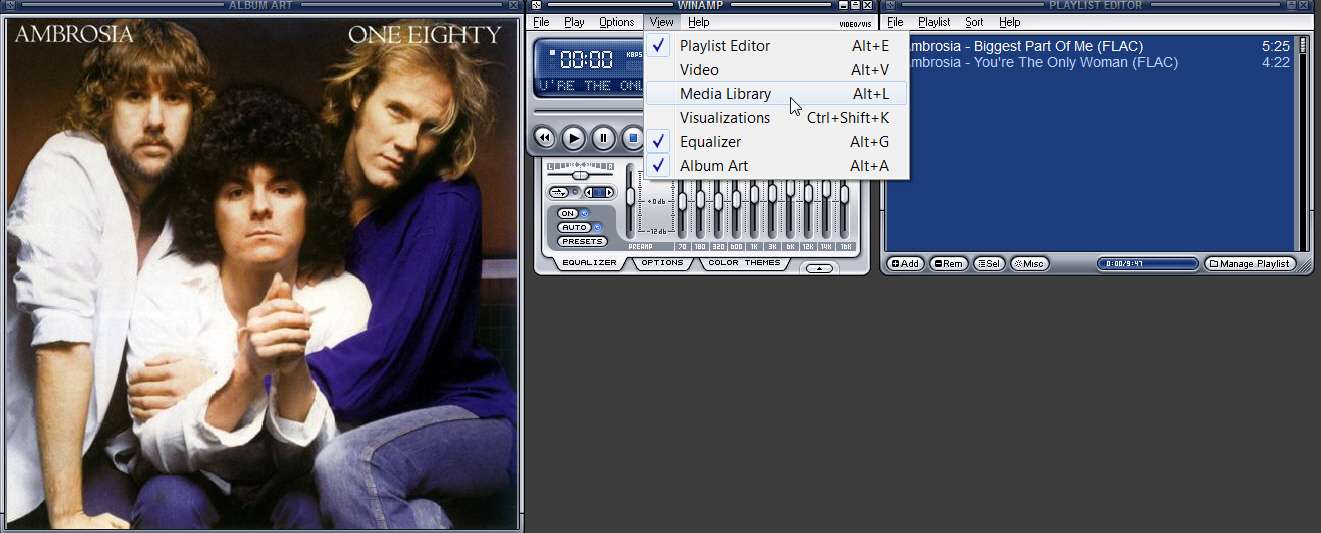
For me it's got three separate windows: (a) Main player, with EQ dropped down, (b) Playlist editor window, showing current playlist and supporting related playlist functions, and (c) Album Art window to display my 500x500 "cover.jpg" album art.


I would recommend a program named Jaangle, which is the music "organizer/player" that I use... in addition to Winamp which is my "external player".

jaangle.jpg


I do NOT use WMP for anything audio. I only use it to play assorted video.


I do NOT use VLC for anything audio. I only use it to play assorted video.

I use Winamp to play all my music. And I use Jaangle as my general collection software for music files, playing music either (a) within Jaangle using its built-in player... including for FLAC (and without any external codec installed), or (b) launching Winamp through playlist music files selected through Jaangle if I feel like it.


Might give MediaMonkey a try next.
I've tried and discarded this program. I do NOT like its "intrusiveness". I use Jaangle for all of the functions that MediaMonkey promises.


Looking for the right player/library combo...
Jaangle is what you should explore. I'll be glad to help you get started.

This is from the Orange/Yellow "Post Reply" option located just above the "Quick Reply" option. Everything you see above this was already "loaded" into the reply. Sorry for the mess.
 

My Computer My Computer

At a glance

Windows 7 64 bit
OS
Windows 7 64 bit
Now it's empty. Huh, go figure. Rhetorical question time, "Why me?"
 

My Computer My Computer

At a glance

Windows 7 64 bit
OS
Windows 7 64 bit
not to worry ,personally i never use the post reply button ,which is why i was confused. i always just use the quick reply message box and hit the post quick reply button below it.
i usually have to go back and edit something little like add commas and what not . anyhow its movie time now bye for now.
 

My Computer My Computer

At a glance

Microsoft Windows 7 Home Premium 64-bit 7600IIx4 amd athelon 635 processor2x2gbati radeon HD 5450
Computer Manufacturer/Model Number
Hewlett packard/p6512uk
OS
Microsoft Windows 7 Home Premium 64-bit 7600
CPU
IIx4 amd athelon 635 processor
Motherboard
FOXCONN 2AA9
Memory
2x2gb
Graphics Card(s)
ati radeon HD 5450
Sound Card
(1) Realtek High Definition Audio (2) AMD High Definition
Monitor(s) Displays
samsung lcd tv 32"
Screen Resolution
1360x 768
Hard Drives
(1) WDC WD10 01FAES-60Z2A0 SATA Disk Device (2) Maxtor OneTouch USB Device (3) ST310003 33AS USB Device (4) WD My Book 1111 USB Device
PSU
?
Cooling
air!
Keyboard
wireless hp
Mouse
wireless Hp,optical
Internet Speed
1.10mb/s
Antivirus
MSE
Browser
Firefox
Where is "audio" to click on???

That's not how I play music with Winamp, i.e. within Winamp once it's opened as a "media player" (forgetting about it getting auto-launched automatically when I double-click on a music file in Explorer or any other Explorer-like program).

Assuming the program is open, you can initiate music playing by selecting one or more files using the main interface File -> Play file or Play folder or etc. The file(s) you select will be placed into the "Playlist editor" window and playing will be initiated in the main window.
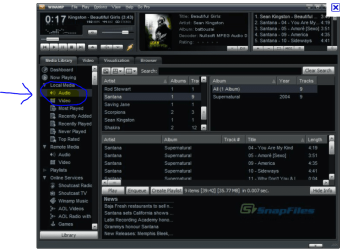
I dunno. Nothing seemed to work quite the way that I had anticipated. Kind of "clunky" and as I said before, "frozen". I really need a tutorial. Also, here is the "Audio" of which I speak:

Winamp#1.PNG

Take note of how "busy" that UI is. Look at everything that's "going on". Does one really need ALL THAT?

I'm 45 years old. That means old as in "old school". Got about close to 4,000 albums on vinyl. Most of which are pretty mint. Outer sleeve protectors. Cleaned 'em with Discwasher, the whole bit. Never play 'em anymore. Stored away for lack of usable living space. Shame too. Really appreciated the "warmth" of analog. That's why I prefer my tubular Ampeg bass amp over Mos-Fet. Anyway, getting off topic. I'm from the era when one listened to an album one side at a time. Start to finish. No skipping tracks. No 99 cent singles from iTunes. Buying a "record" was an event that cost you all of 6 or 7 dollars. You get the idea. The only playback options were which side of the record you played first. Side one? Or side two? Well, side one IS first. People really miss out on a good concept album by leap frogging all about the place.

Just thought I'd let you in on a little bit of "media playing" from my perspective.
 

My Computer My Computer

At a glance

Windows 7 64 bit
OS
Windows 7 64 bit
Also, how do you select and divide up all my previous remarks into quotes like you do?
I push the QUOTE button to start. This presents all of your text in the composition window, bounded by a "leading quote-identifier" and a "trailing quote-identifier".

Much like with XML syntax, the "leading quote-identifier" is "[.q.u.o.t.e.]" and the "trailing quote-identifier" is "[./.q.u.o.t.e.]", without those separating "." characters of course. The very first leading quote-identifier is formatted specially to also include your name, but otherwise it doesn't really require that.

Anyway, that's how it looks to start. All your text is bounded by one pair of leading and trailing quoted text identifiers.

Then, I simply put the cursor after the last character of the first sentence or paragraph or phrase that I wish to reply to, and press the ENTER key a few times (to insert a NEW-LINE and give me a few blank lines, just so I can compose my reply... although I'm going to clean it up anyway and probably make some more edits before I'm done and "submit reply").

So now I have your first sentence, beginning with the leading quoted text identifier, some blank space, and then the rest of your quoted text at the bottom (which I will again edit and reply to when I'm finished replying to this first sentence). I then manually type a trailing quoted text identifier "[./.q.u.o.t.e.]" so that I've manually created my own ending-boundary for that first sentence of quoted text from you.

Then following that manually entered trailing quoted text identifier I type my reply.

When I'm finished, I scroll down a bit and clean up the extraneous blank lines I inserted originally, leaving TWO blank lines between the end of my reply text and the beginning of the next section of your quoted text. That's just my style, to leave TWO blank lines between each piece of "quoted text" and associated replies. That way you can clearly see each quote/reply section.

Then, at the start of the next section of your quoted text I manually type a new leading text identifier, to begin the quoted text sequence. And, if I again want to mark the end of some sub-set of the remaining text as my second piece of your text to which I want to reply, I will again position the cursor there, press ENTER again a few times, manually type the trailing quoted text identifier at the end of your text, and then type my reply.

Etc., etc.

The very last remaining snippet of your original quoted text will of course still have its final trailing quoted text identifier, so I don't need to manually type that one.

Note that this is really exactly how one could/should reply to an email, again responding to individual subsets of quoted text as individual "thoughts", deleting other sections of text that you don't need/want to reply to, etc.. It allows the recipient to whom you're responding to know exactly what he said that you're now responding to... in clearly visible units of thought.


Very noobish question I know. Never could get that one straight...
This is now the remaining piece of your original text, which I've replied to as two separate quoted text pieces.

Note that the leading/trailing identifier format also works for imbedding screenshots in-stream, so that they appear WITHIN the composition text rather than at the very end as "attachments" do.

If you upload your images to some web-based hosting site (e.g. Imageshack), you will get a "direct URL link" from that site for your uploaded image. You then insert that HTTP link in your composition text here, but bounded by a "leading image identifier" and a "trailing image identifier". These are "[.i.m.g.]" and "[./.i.m.g.]", respectively. So if I want to insert a screenshot in-stream, I will manually type that leading image identifier on a new line, then CTRL+V (to paste) that "direct URL link" I got from the image hosting web site from my upload (copied using CTRL+C), and then I will manually type the trailing image identifier right after it and press ENTER twice to generate some blank lines after the image.

You'll get used to it very quickly, once you try it a few times and then look at your post to see how it turned out. You can push the "preview post" button before permanently submitting it, if you just want to see what it looks like. And you can always go back and EDIT your own post if you see you've made a syntactical error (so that the quote/reply sequence is broken) or a spelling error or whatever.
 

My Computer My Computer

At a glance

Windows 7 Pro x64 (1), Win7 Pro X64 (2)i5-3350p 3.1Ghz/6MB-cache (1); E8400 3.0Ghz/6...8GB PC3-12800 DDR3 (1); 4GB PC3-10600 DDR3 (2)ATI HD7750 (1), (see TV cards); ATI R7 250 (2)
Computer type
PC/Desktop
Computer Manufacturer/Model Number
Home-built, two systems (1) and (2)
OS
Windows 7 Pro x64 (1), Win7 Pro X64 (2)
CPU
i5-3350p 3.1Ghz/6MB-cache (1); E8400 3.0Ghz/6MB-cache (2)
Motherboard
ASUS P8Z77-V Pro (1); ASUS P5Q3 (2)
Memory
8GB PC3-12800 DDR3 (1); 4GB PC3-10600 DDR3 (2)
Graphics Card(s)
ATI HD7750 (1), (see TV cards); ATI R7 250 (2)
Sound Card
Realtek ALC892 HD Audio (1); Realtek ALC1200 HD Audio (2)
Monitor(s) Displays
Eizo HD2441W LCD, Eizo S2433W (1); Eizo 24" S2433W (2)
Screen Resolution
1920x1200, 1920x1200 (1); 1920x1200 (2)
Hard Drives
(1) 1TB SATA-II (7200RPM), 2x2TB SATA-III (7200RPM), 250GB SATA-III (10000RPM) for OS; 2x2TB external USB 3.0

(2) 320GB SATA-II (7200RPM), 750GB SATA-II (7200RPM), 150GB SATA-II (10000RPM) for OS; 2TB external USB 3.0
PSU
Nesteq ECS-6001 600W (1); Nesteq ECS-5001 500W (2)
Case
Acousti-Case 360 (1) and (2)
Cooling
Noctua NH-U12P SE2 for CPU, 2x120mm case fans (1) and (2)
Keyboard
IBM PS/2 (1) and (2)
Mouse
Logitech MX Revolution wireless (1); Microsoft wired (2)
Internet Speed
100mbps down / 10mbps up
Antivirus
Microsoft Security Essentials; Malwarebyte Anti-Malware Pro
Browser
Firefox
Other Info
Ceton InfiniTV 4-tuner cablecard-enabled TV card as well as Hauppauge HVR-2250 OTA/ATSC 2-tuner TV card in (1), running under Win7 WMC
Take note of how "busy" that UI is. Look at everything that's "going on". Does one really need ALL THAT?
AHA!!! Now I see your basic "mistake"... you are using Winamp's "Media Library" presentation, which is totally confusing (to me, anyway).

And the answer is NO... you do NOT need all of that!!!

On the main Winmp window, select View from the Menu bar. Then UN-CHECK the "Media Library" item, and all of that craziness in the lower part of your screen will disappear.

Also, I don't recognize that "skin" you're using. Perhaps you didn't specify anything at installation time, and what you see is the default skin. I myself don't like that one, and have long-preferred the "Winamp Modern" skin.

winampview.jpg


You can easily change "skin" from the Menu bar. Options -> skins, and then select one of the skins shown, in which "Winamp Modern" will be one installed with the package (or downloaded by you from the Winamp site).

Note that with "Winamp Modern" the "Album Art" window (if you've checked it on the View) is separate and can be re-sized and re-located by itself. Initially it may open right behind the main Winamp player window so you may not see it. If you drag the Winamp main player window away a bit, you'll now see the small Album Art where it's been crazily placed for that first use. You can now make it larger and re-locate it as well, and then put all the windows back where you want. You can see I've made my Album Art window 500x500 and right next to the main Winamp player window.


Just thought I'd let you in on a little bit of "media playing" from my perspective.
Honestly, you should investigate Jaangle if you've got much of your 4000 albums now digitized on your PC.

Once you start collecting high-quality cover art, so that you can be visually entertained while playing music from that album (much as you used to do when reading the liner notes on album covers "in the old days", when you also instantly recognized every album cover in your collection), you will appreciate what a digital music organizer/player like Jaangle can do for you.

Also, I have a Winamp "visualization" plug-in installed named G-Force Platinum. This is a 3rd-party product that opens yet one more window while Winamp is playing music, in which a presentation much like a "musical kaleidoscope" appears, with patterns that are mathematically tied to the rhythm and mood of the music being played. It's hugely entertaining (think psychedelic images from the 60's).
 

My Computer My Computer

At a glance

Windows 7 Pro x64 (1), Win7 Pro X64 (2)i5-3350p 3.1Ghz/6MB-cache (1); E8400 3.0Ghz/6...8GB PC3-12800 DDR3 (1); 4GB PC3-10600 DDR3 (2)ATI HD7750 (1), (see TV cards); ATI R7 250 (2)
Computer type
PC/Desktop
Computer Manufacturer/Model Number
Home-built, two systems (1) and (2)
OS
Windows 7 Pro x64 (1), Win7 Pro X64 (2)
CPU
i5-3350p 3.1Ghz/6MB-cache (1); E8400 3.0Ghz/6MB-cache (2)
Motherboard
ASUS P8Z77-V Pro (1); ASUS P5Q3 (2)
Memory
8GB PC3-12800 DDR3 (1); 4GB PC3-10600 DDR3 (2)
Graphics Card(s)
ATI HD7750 (1), (see TV cards); ATI R7 250 (2)
Sound Card
Realtek ALC892 HD Audio (1); Realtek ALC1200 HD Audio (2)
Monitor(s) Displays
Eizo HD2441W LCD, Eizo S2433W (1); Eizo 24" S2433W (2)
Screen Resolution
1920x1200, 1920x1200 (1); 1920x1200 (2)
Hard Drives
(1) 1TB SATA-II (7200RPM), 2x2TB SATA-III (7200RPM), 250GB SATA-III (10000RPM) for OS; 2x2TB external USB 3.0

(2) 320GB SATA-II (7200RPM), 750GB SATA-II (7200RPM), 150GB SATA-II (10000RPM) for OS; 2TB external USB 3.0
PSU
Nesteq ECS-6001 600W (1); Nesteq ECS-5001 500W (2)
Case
Acousti-Case 360 (1) and (2)
Cooling
Noctua NH-U12P SE2 for CPU, 2x120mm case fans (1) and (2)
Keyboard
IBM PS/2 (1) and (2)
Mouse
Logitech MX Revolution wireless (1); Microsoft wired (2)
Internet Speed
100mbps down / 10mbps up
Antivirus
Microsoft Security Essentials; Malwarebyte Anti-Malware Pro
Browser
Firefox
Other Info
Ceton InfiniTV 4-tuner cablecard-enabled TV card as well as Hauppauge HVR-2250 OTA/ATSC 2-tuner TV card in (1), running under Win7 WMC
Thanks dsperber. With this current deluge of information that I'm digesting and processing lately, it feels as if my brain is ready to pop like a festering boil. I don't get enough opportunities to develop my chops, as I'd call it, during the working season. I'm laid off between December and March. So down time is often spent on line. Pre-stressed concrete construction by trade. Specifically, we fabricate concrete bridge beams/girders. Building the nation's infrastructure. Been doing it for ten years now. The bridges being built today should have a life expectancy of 80 to 100 years. They'll be around long after I'm gone. Now that's a legacy!
 

My Computer My Computer

At a glance

Windows 7 64 bit
OS
Windows 7 64 bit
Well, to be completely honest with you, I haven't the foggiest notion as to how it works but it just works. It really is the bees knees. I can click on ANY file in the WMP library or within the explorer itself and it will have instant playback. WMP will launch and there you go. It's pretty straightforward. MP3 files have the mp3 Windows logo and flac files have the xiph logo.
My confusion stemmed from the screenshot you posted, which was NOT what I was looking for. The first list didn't show FLAC (or OGG, etc.) but your second list did.

Anyway, it's now apparent that FLAC is associated with WMP.

And now you've forced the XIPH icon to FLAC (so it looks correct to you in Explorer), whereas previously it was the MP3 icon (and also probably why the lower-description falsely described it as MP3). Again, I've never used XIPH because I don't use WMP for music and therefore don't need to support FLAC in WMP, but I'm reasonably certain that all of your confusion and "false indication that FLAC is MP3" even though WMP plays FLAC perfectly is the result of installing XIPH and whatever it did at installation time.

I myself am perfectly happy using Winamp as my universal music player, with no external codecs or tools like XIPH being installed. I'm perfectly happy with the Winamp icon showing up for all music files, specifically MP3 and FLAC which is really all I have. And I have Jaangle as my music organizer/player as well. Again, no WMP for any music functions... but that's just my taste.
 

My Computer My Computer

At a glance

Windows 7 Pro x64 (1), Win7 Pro X64 (2)i5-3350p 3.1Ghz/6MB-cache (1); E8400 3.0Ghz/6...8GB PC3-12800 DDR3 (1); 4GB PC3-10600 DDR3 (2)ATI HD7750 (1), (see TV cards); ATI R7 250 (2)
Computer type
PC/Desktop
Computer Manufacturer/Model Number
Home-built, two systems (1) and (2)
OS
Windows 7 Pro x64 (1), Win7 Pro X64 (2)
CPU
i5-3350p 3.1Ghz/6MB-cache (1); E8400 3.0Ghz/6MB-cache (2)
Motherboard
ASUS P8Z77-V Pro (1); ASUS P5Q3 (2)
Memory
8GB PC3-12800 DDR3 (1); 4GB PC3-10600 DDR3 (2)
Graphics Card(s)
ATI HD7750 (1), (see TV cards); ATI R7 250 (2)
Sound Card
Realtek ALC892 HD Audio (1); Realtek ALC1200 HD Audio (2)
Monitor(s) Displays
Eizo HD2441W LCD, Eizo S2433W (1); Eizo 24" S2433W (2)
Screen Resolution
1920x1200, 1920x1200 (1); 1920x1200 (2)
Hard Drives
(1) 1TB SATA-II (7200RPM), 2x2TB SATA-III (7200RPM), 250GB SATA-III (10000RPM) for OS; 2x2TB external USB 3.0

(2) 320GB SATA-II (7200RPM), 750GB SATA-II (7200RPM), 150GB SATA-II (10000RPM) for OS; 2TB external USB 3.0
PSU
Nesteq ECS-6001 600W (1); Nesteq ECS-5001 500W (2)
Case
Acousti-Case 360 (1) and (2)
Cooling
Noctua NH-U12P SE2 for CPU, 2x120mm case fans (1) and (2)
Keyboard
IBM PS/2 (1) and (2)
Mouse
Logitech MX Revolution wireless (1); Microsoft wired (2)
Internet Speed
100mbps down / 10mbps up
Antivirus
Microsoft Security Essentials; Malwarebyte Anti-Malware Pro
Browser
Firefox
Other Info
Ceton InfiniTV 4-tuner cablecard-enabled TV card as well as Hauppauge HVR-2250 OTA/ATSC 2-tuner TV card in (1), running under Win7 WMC
Think I might give Jaangle a try. I also like the fact that there's a "trimmed down" version of Winamp as well. I'm happy to know that you and I are on the same page regarding the "Winamp Media Library" presentation. Glad I'm not alone. It really is overkill and literally gives me a headache trying to navigate my way through all that UI. Isn't that referred to as "feature creep"? In the construction and engineering world its called "design creep." See it all the time. The only thing about Winamp that I'm not too fond of is that it commandeers ones music files and calls them their own. I want them to keep their original identity should I ever change my mind. (Could always create a restore point for a system restore, I guess.) I've been tinkering around with foobar2000 this evening and I don't care for how labor intensive it is. It's very austere to begin with and one must really build their own media player from the ground up. A person likes to have options, features and components to choose from but I just don't have the time nor the tech savvy to involve myself at that level. Like I said, I'll give Jaangle a try. Keep in touch. I'll keep you posted. Thanks again. You're a real tribute to the forum and a top shelf person.
 

My Computer My Computer

At a glance

Windows 7 64 bit
OS
Windows 7 64 bit
Think I might give Jaangle a try.
It was surprisingly sophisticated as I got more into its customization, options, and features. And yet, it was surprisingly intuitive and well designed.


I also like the fact that there's a "trimmed down" version of Winamp as well. I'm happy to know that you and I are on the same page regarding the "Winamp Media Library" presentation. Glad I'm not alone. It really is overkill and literally gives me a headache trying to navigate my way through all that UI.
I don't do 95% of what that program probably can do... as I have no use for streaming, libraries, playing video with it, etc. I only want to be able to play music files that I point to.

And that's exactly how I have it configured: main player window, playlist editor window, and album art window.

I've also activated it's "smart EQ" feature because I like "tone controls" to compensate for crap sounding recorded music. Winamp has the ability to set up a default EQ, but also to use individual EQ configurations (set up by the user) which are saved by the name of the music file. Then, anytime you play back that music file the previously saved EQ preset by that track's name is loaded and used. If there is no specific named preset saved, then the default EQ is used. This allows you to have individually named and saved/re-loaded EQ setups for each and every one of your music files... if you wanted to. You'd always get just exactly the individual tone control you worked on previously for a specific music file, whenever you play that music file in the future.

Anyway, it's a wonderful player in its minimalist configuration as I use it.


The only thing about Winamp that I'm not too fond of is that it commandeers ones music files and calls them their own. I want them to keep their original identity should I ever change my mind. (Could always create a restore point for a system restore, I guess.)
I don't know what you're talking about here.

As I said, Winamp is simply a music player when used as a music player. You simply use its File -> Play dialog to navigate to your music files and select them (with that selected reference being added to the Playlist Editor window), and play of that music file starts. It's a player, and it plays music.

So what are you describing by "it commandeers one's music files..."?? It does NOTHING to your music files except play them. What are you thinking of?


I'll give Jaangle a try. Keep in touch. I'll keep you posted. Thanks again.
For example, Jaangle offers 10 easy to select different sort sequences, to present your music collection in any one of the various ways one might want to browse through thousands of artist, albums, song titles, genres, release years, etc. depending on the particular situation and need.

It plays all music file formats with its built-in player, or it can be asked to launch an external music player (e.g. Winamp) passing the "playlist" it's constructed based on your control and browse through your collection.

It has simple and advanced search, popping up a "dynamically evolving hit list" as you type characters into the search window.

It presents album cover art, artist bio art, album reviews, album track lists, etc. This information can be derived from your own album art collection and/or freely available source of art and information on the Internet. It's all automatically retrieved.

It can also play video, but I only use it for audio music.

It's default presentation is relatively stark but you can adjust "skin color combination", font style and size, horizontal/vertical "pane separators", etc. You can run it in "basic list" mode, or set various presentation themes which include varying combinations of text and art.

Etc., etc.
 

My Computer My Computer

At a glance

Windows 7 Pro x64 (1), Win7 Pro X64 (2)i5-3350p 3.1Ghz/6MB-cache (1); E8400 3.0Ghz/6...8GB PC3-12800 DDR3 (1); 4GB PC3-10600 DDR3 (2)ATI HD7750 (1), (see TV cards); ATI R7 250 (2)
Computer type
PC/Desktop
Computer Manufacturer/Model Number
Home-built, two systems (1) and (2)
OS
Windows 7 Pro x64 (1), Win7 Pro X64 (2)
CPU
i5-3350p 3.1Ghz/6MB-cache (1); E8400 3.0Ghz/6MB-cache (2)
Motherboard
ASUS P8Z77-V Pro (1); ASUS P5Q3 (2)
Memory
8GB PC3-12800 DDR3 (1); 4GB PC3-10600 DDR3 (2)
Graphics Card(s)
ATI HD7750 (1), (see TV cards); ATI R7 250 (2)
Sound Card
Realtek ALC892 HD Audio (1); Realtek ALC1200 HD Audio (2)
Monitor(s) Displays
Eizo HD2441W LCD, Eizo S2433W (1); Eizo 24" S2433W (2)
Screen Resolution
1920x1200, 1920x1200 (1); 1920x1200 (2)
Hard Drives
(1) 1TB SATA-II (7200RPM), 2x2TB SATA-III (7200RPM), 250GB SATA-III (10000RPM) for OS; 2x2TB external USB 3.0

(2) 320GB SATA-II (7200RPM), 750GB SATA-II (7200RPM), 150GB SATA-II (10000RPM) for OS; 2TB external USB 3.0
PSU
Nesteq ECS-6001 600W (1); Nesteq ECS-5001 500W (2)
Case
Acousti-Case 360 (1) and (2)
Cooling
Noctua NH-U12P SE2 for CPU, 2x120mm case fans (1) and (2)
Keyboard
IBM PS/2 (1) and (2)
Mouse
Logitech MX Revolution wireless (1); Microsoft wired (2)
Internet Speed
100mbps down / 10mbps up
Antivirus
Microsoft Security Essentials; Malwarebyte Anti-Malware Pro
Browser
Firefox
Other Info
Ceton InfiniTV 4-tuner cablecard-enabled TV card as well as Hauppauge HVR-2250 OTA/ATSC 2-tuner TV card in (1), running under Win7 WMC
By commandeering, I mean Winamp applies the Winamp lightning bolt to all my music files. I guess that's not a big deal if one only had one type of file. I have two. Anyway, that's what happened when in uninstalled Winamp. Windows applied the mp3 logo to every file by default and my flac codec logo was ignored. I guess I could reapply the FilesTypeMan application and revert the file extensions back to their original settings. Please understand, I'm NOT an anal retentive person. Little things don't bother me very often but LOTS of little things i.e. the Winamp Media Library do. I'm generally very satisfied most of the time.
 

My Computer My Computer

At a glance

Windows 7 64 bit
OS
Windows 7 64 bit
i personally dont use winamp library, in fact i have never set it up, my mp3's and flac files are set to open with winamp and i select my music from explorer,
there is a plugin for winamp which adds a new tab that allows you to flip through several images for that album so you can have front ,back other images and any booklets that come with an album. i dont use it much but its nice to have the option.
 

My Computer My Computer

At a glance

Microsoft Windows 7 Home Premium 64-bit 7600IIx4 amd athelon 635 processor2x2gbati radeon HD 5450
Computer Manufacturer/Model Number
Hewlett packard/p6512uk
OS
Microsoft Windows 7 Home Premium 64-bit 7600
CPU
IIx4 amd athelon 635 processor
Motherboard
FOXCONN 2AA9
Memory
2x2gb
Graphics Card(s)
ati radeon HD 5450
Sound Card
(1) Realtek High Definition Audio (2) AMD High Definition
Monitor(s) Displays
samsung lcd tv 32"
Screen Resolution
1360x 768
Hard Drives
(1) WDC WD10 01FAES-60Z2A0 SATA Disk Device (2) Maxtor OneTouch USB Device (3) ST310003 33AS USB Device (4) WD My Book 1111 USB Device
PSU
?
Cooling
air!
Keyboard
wireless hp
Mouse
wireless Hp,optical
Internet Speed
1.10mb/s
Antivirus
MSE
Browser
Firefox
Back
Top