Flac support fore explorer

Local time
2:56 AM
Messages
94
Ok i know i asked these questions before but due to the fact that i go no replys:cry: i will ask again :D

IS the Any way i can get windows explorer to recognize the flac file tags, please note that i use wmp tag plus to get them to work in WMP (Thank you to Tim De Baets for the help)
but how to get them to work with Explorer is beyond me. :cry:

Please help.

My specs are:
Windows Ultimate x64 (not N anymore :D)
Using 007 Shark codec pack
 

My Computer

Computer Manufacturer/Model Number
Dell Studio XPS 16
OS
Windows 7 Ultimate x64
CPU
Intel(R) Core(TM)2 Duo CPU T9600 @ 2.80 GHz 6MB cache
Memory
6 GB DDR3
Graphics Card(s)
ATI Mobility Radeon HD 4670
Monitor(s) Displays
1
Screen Resolution
1920x1080
Cooling
NZXT Cryo LX
Mouse
Logitech G9X
Internet Speed
512 Kbps
I'm not really understanding what you mean by getting them to work with explorer...
Could you like describe a scenario or something so I get a better picture here?
 

My Computer

Computer Manufacturer/Model Number
Insane hobo technologies. ;-)
OS
Windows 7 x64
CPU
Intel i7 2600k
Motherboard
Asrock z68 extreme 4 gen 3
Memory
G.skill Ripjaw 16gigs @ 1866
Graphics Card(s)
Nvidia gtx580 (evga)
Sound Card
Integrated HD audio + hdmi
Monitor(s) Displays
24" ASUS widescreen + 42" insignia
Screen Resolution
1080p (1920x1080)
Hard Drives
128 Samsung 830
256 Samsung 840
3 x 1tb storage drive (various)
1 western digital 1tb (eSATA)
1 Seagate 1tb (eSATA)
PSU
1 kilowatt SLI/Crossfire rated Silverstone modular
Case
NZXT Phantom + additional 220 fan
Cooling
Zalmann
Keyboard
Microsoft wireless 3000 (v2)
Mouse
MS - wireless 5000 (bluetrack)
Internet Speed
depends on if you ask me or my provider.
Other Info
The above information is provided as is, and the author assumes no responsibility for issues it may cause with your sanity or fanboyism.
Like This !

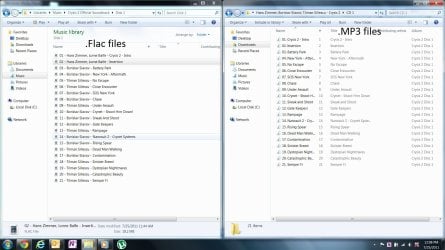
On the pictures you can see the flac files have no info showing while the .mp3 have the info, even though the flac files have been tagged by MP3tag and on another time WMP its self
 

Attachments

  • Explorer comparsion.jpg
    Explorer comparsion.jpg
    208.8 KB · Views: 367

My Computer

Computer Manufacturer/Model Number
Dell Studio XPS 16
OS
Windows 7 Ultimate x64
CPU
Intel(R) Core(TM)2 Duo CPU T9600 @ 2.80 GHz 6MB cache
Memory
6 GB DDR3
Graphics Card(s)
ATI Mobility Radeon HD 4670
Monitor(s) Displays
1
Screen Resolution
1920x1080
Cooling
NZXT Cryo LX
Mouse
Logitech G9X
Internet Speed
512 Kbps
The answer is no it won't because flac is a lossless format where the tags don't show in explorer because it's simply not supported I have thousands of flac files all properly tagged and none show in explorer but they will show up in supported media players that handle the flac format such as foobar and such.
 

My Computer

Computer Manufacturer/Model Number
Alienware
OS
Windows 7 Ultimate x64
CPU
I7
Motherboard
GA-X58-USB3
Memory
6 x 1.5V DDR3 DIMM sockets supporting up to 24 GB of system
Graphics Card(s)
GeForce GTX 580
Sound Card
Realtek ALC892 codec 2/4/5.1/7.1-channel
Monitor(s) Displays
NEC Display Solutions E321 Black 32"
Screen Resolution
1366 x 768
Hard Drives
OCZ Colossus LT Series OCZSSD2-1CLSLT1T 3.5" 1TB SATA II MLC Internal Solid State Drive
PSU
XFX Black Edition XPS-850W-BES 850W ATX12V
Case
Antec
Cooling
Zalman
Keyboard
Microsoft
Mouse
Microsoft
Duh, :D i know

That is why i am trying to find a plug-in/codec/something that will allow this.

:banghead::banghead::banghead::banghead::banghead::banghead::banghead::banghead::banghead::banghead::banghead::banghead::banghead::banghead:
 

My Computer

Computer Manufacturer/Model Number
Dell Studio XPS 16
OS
Windows 7 Ultimate x64
CPU
Intel(R) Core(TM)2 Duo CPU T9600 @ 2.80 GHz 6MB cache
Memory
6 GB DDR3
Graphics Card(s)
ATI Mobility Radeon HD 4670
Monitor(s) Displays
1
Screen Resolution
1920x1080
Cooling
NZXT Cryo LX
Mouse
Logitech G9X
Internet Speed
512 Kbps
You could try this registry hack to show the tags:

Code:
Windows Registry Editor Version 5.00

[HKEY_LOCAL_MACHINE\SOFTWARE\Classes\SystemFileAssociations\.flac]
"InfoTip"="prop:System.ItemType;System.Size;System.Music.Artist;System.Media.Duration;System.OfflineAvailability"
"ExtendedTileInfo"="prop:System.ItemType;System.Size;System.Music.Artist;System.Media.Duration;System.OfflineAvailability"
"FullDetails"="prop:System.PropGroup.Description;System.Title;System.Media.SubTitle;System.Rating;System.Comment;System.PropGroup.Media;System.Music.Artist;System.Music.AlbumArtist;System.Music.AlbumTitle;System.Media.Year;System.Music.TrackNumber;System.Music.Genre;System.Media.Duration;System.PropGroup.Audio;System.Audio.EncodingBitrate;System.PropGroup.Origin;System.Media.Publisher;System.Media.EncodedBy;System.Media.AuthorUrl;System.Copyright;System.PropGroup.Content;System.ParentalRatingReason;System.Music.Composer;System.Music.Conductor;System.Music.ContentGroupDescription;System.Music.Mood;System.Music.PartOfSet;System.Music.InitialKey;System.Music.BeatsPerMinute;System.DRM.IsProtected;System.Music.IsCompilation;System.PropGroup.FileSystem;System.ItemNameDisplay;System.ItemType;System.ItemFolderPathDisplay;System.DateCreated;System.DateModified;System.Size;System.FileAttributes;System.OfflineAvailability;System.OfflineStatus;System.SharedWith;System.FileOwner;System.ComputerName"
[LEFT]"PreviewDetails"="prop:System.Music.Artist;System.Music.AlbumTitle;System.Music.Genre;*System.Media.Duration;System.Rating;System.Media.Year;*System.Size;System.Music.TrackNumber;System.Music.AlbumArtist;System.Title;*System.Audio.EncodingBitrate;*System.DateModified;*System.OfflineAvailability;*System.OfflineStatus;*System.DateCreated;*System.SharedWith"[/LEFT]


simply copy and paste this code into a text file and rename the extension to .reg and run it. Hope it helps...

If this doesn't work then the only program I believe you could try is dbpoweramp. You'll have to go to their website and find out more about it..
 
Last edited:

My Computer

Computer Manufacturer/Model Number
Alienware
OS
Windows 7 Ultimate x64
CPU
I7
Motherboard
GA-X58-USB3
Memory
6 x 1.5V DDR3 DIMM sockets supporting up to 24 GB of system
Graphics Card(s)
GeForce GTX 580
Sound Card
Realtek ALC892 codec 2/4/5.1/7.1-channel
Monitor(s) Displays
NEC Display Solutions E321 Black 32"
Screen Resolution
1366 x 768
Hard Drives
OCZ Colossus LT Series OCZSSD2-1CLSLT1T 3.5" 1TB SATA II MLC Internal Solid State Drive
PSU
XFX Black Edition XPS-850W-BES 850W ATX12V
Case
Antec
Cooling
Zalman
Keyboard
Microsoft
Mouse
Microsoft
You could try this registry hack to show the tags:

Code:
Windows Registry Editor Version 5.00
 
[HKEY_LOCAL_MACHINE\SOFTWARE\Classes\SystemFileAssociations\.flac]
"InfoTip"="prop:System.ItemType;System.Size;System.Music.Artist;System.Media.Duration;System.OfflineAvailability"
"ExtendedTileInfo"="prop:System.ItemType;System.Size;System.Music.Artist;System.Media.Duration;System.OfflineAvailability"
"FullDetails"="prop:System.PropGroup.Description;System.Title;System.Media.SubTitle;System.Rating;System.Comment;System.PropGroup.Media;System.Music.Artist;System.Music.AlbumArtist;System.Music.AlbumTitle;System.Media.Year;System.Music.TrackNumber;System.Music.Genre;System.Media.Duration;System.PropGroup.Audio;System.Audio.EncodingBitrate;System.PropGroup.Origin;System.Media.Publisher;System.Media.EncodedBy;System.Media.AuthorUrl;System.Copyright;System.PropGroup.Content;System.ParentalRatingReason;System.Music.Composer;System.Music.Conductor;System.Music.ContentGroupDescription;System.Music.Mood;System.Music.PartOfSet;System.Music.InitialKey;System.Music.BeatsPerMinute;System.DRM.IsProtected;System.Music.IsCompilation;System.PropGroup.FileSystem;System.ItemNameDisplay;System.ItemType;System.ItemFolderPathDisplay;System.DateCreated;System.DateModified;System.Size;System.FileAttributes;System.OfflineAvailability;System.OfflineStatus;System.SharedWith;System.FileOwner;System.ComputerName"
[LEFT]"PreviewDetails"="prop:System.Music.Artist;System.Music.AlbumTitle;System.Music.Genre;*System.Media.Duration;System.Rating;System.Media.Year;*System.Size;System.Music.TrackNumber;System.Music.AlbumArtist;System.Title;*System.Audio.EncodingBitrate;*System.DateModified;*System.OfflineAvailability;*System.OfflineStatus;*System.DateCreated;*System.SharedWith"[/LEFT]

simply copy and paste this code into a text file and rename the extension to .reg and run it. Hope it helps...​

Woh wow, lets not get too exited on those reg hacks/ tweaks

No disrespect, but can you provide proof that it works, also i really appreciate your contribution and will be sure to try it on a VM machine soon, in the mean time is there any more solutions that will not potentially mess up my pc.

Again no disrespect ( i have no idea why i am writing like this its 1 am and i bored)
But Am uncomfortable with reg edits unless i have prof from more than 3 people along with official recognition. E.G the change you login background. with the change the value of OEMBackground from 0 to 1 that i can do but the above is you know (risky)
 

My Computer

Computer Manufacturer/Model Number
Dell Studio XPS 16
OS
Windows 7 Ultimate x64
CPU
Intel(R) Core(TM)2 Duo CPU T9600 @ 2.80 GHz 6MB cache
Memory
6 GB DDR3
Graphics Card(s)
ATI Mobility Radeon HD 4670
Monitor(s) Displays
1
Screen Resolution
1920x1080
Cooling
NZXT Cryo LX
Mouse
Logitech G9X
Internet Speed
512 Kbps
Reg hack does not work (it breaks) :P

honest i tried it on a spare laptop (due for format) 32 bit win 7 ultimate with 007 codecs and WMP tag plus, i applied reg file restarted and flac stopped working.

:banghead::banghead::banghead::banghead::banghead::banghead::banghead::banghead::banghead:

Seriously, nice effort for from your part providing the code but it does not work
 

My Computer

Computer Manufacturer/Model Number
Dell Studio XPS 16
OS
Windows 7 Ultimate x64
CPU
Intel(R) Core(TM)2 Duo CPU T9600 @ 2.80 GHz 6MB cache
Memory
6 GB DDR3
Graphics Card(s)
ATI Mobility Radeon HD 4670
Monitor(s) Displays
1
Screen Resolution
1920x1080
Cooling
NZXT Cryo LX
Mouse
Logitech G9X
Internet Speed
512 Kbps
Ok i mat have found a lead, there is this program called dBpoweramp Music converter, is boasts flac support for windows anyone tried it yet.
 

My Computer

Computer Manufacturer/Model Number
Dell Studio XPS 16
OS
Windows 7 Ultimate x64
CPU
Intel(R) Core(TM)2 Duo CPU T9600 @ 2.80 GHz 6MB cache
Memory
6 GB DDR3
Graphics Card(s)
ATI Mobility Radeon HD 4670
Monitor(s) Displays
1
Screen Resolution
1920x1080
Cooling
NZXT Cryo LX
Mouse
Logitech G9X
Internet Speed
512 Kbps
Ok i mat have found a lead, there is this program called dBpoweramp Music converter, is boasts flac support for windows anyone tried it yet.

It does work and Ive got the proof right here:


My Computer

Computer Manufacturer/Model Number
Alienware
OS
Windows 7 Ultimate x64
CPU
I7
Motherboard
GA-X58-USB3
Memory
6 x 1.5V DDR3 DIMM sockets supporting up to 24 GB of system
Graphics Card(s)
GeForce GTX 580
Sound Card
Realtek ALC892 codec 2/4/5.1/7.1-channel
Monitor(s) Displays
NEC Display Solutions E321 Black 32"
Screen Resolution
1366 x 768
Hard Drives
OCZ Colossus LT Series OCZSSD2-1CLSLT1T 3.5" 1TB SATA II MLC Internal Solid State Drive
PSU
XFX Black Edition XPS-850W-BES 850W ATX12V
Case
Antec
Cooling
Zalman
Keyboard
Microsoft
Mouse
Microsoft
Not in Explorer

I've tried the registry hacks and they show the space for the tags okay in Explorer Properties, and you can fill in the tag info, but when you try to save it tags you get an "error writing property" message. It seems what's needed is a property handler for .flac, .ogg, .ape, etc., but from what I can see as of now they don't exist.

If anybody knows of a way, please post.

PS it's also got nothing to do with tag compatibility.
 

My Computer

Computer Manufacturer/Model Number
Self-built
OS
Windows 7 Ultimate 64
CPU
Intel
Motherboard
Intel DG45ID
Memory
Corsair
Graphics Card(s)
-
Sound Card
-
Monitor(s) Displays
NEC
Hard Drives
2 HD
1 SSD
PSU
Antec
Case
Antec
Ok i mat have found a lead, there is this program called dBpoweramp Music converter, is boasts flac support for windows anyone tried it yet.
Just in passing, if you have an extensive music collection I would recommend using a true music player/organizer/playlister which of course would support FLAC as well as MP3 as well as numerous other common (and now standard) music file formats.

Your own music file acquisition/creation process would also involve tagging, and MP3Tag is I suppose now the reference standard for such a program even if your ripper/encoder/tagger program (e.g. EAC or Audiograbber plus LAME/FLAC) purports to do tagging. You still need MP3Tag or the like, for normal individual or mass maintenance functions.


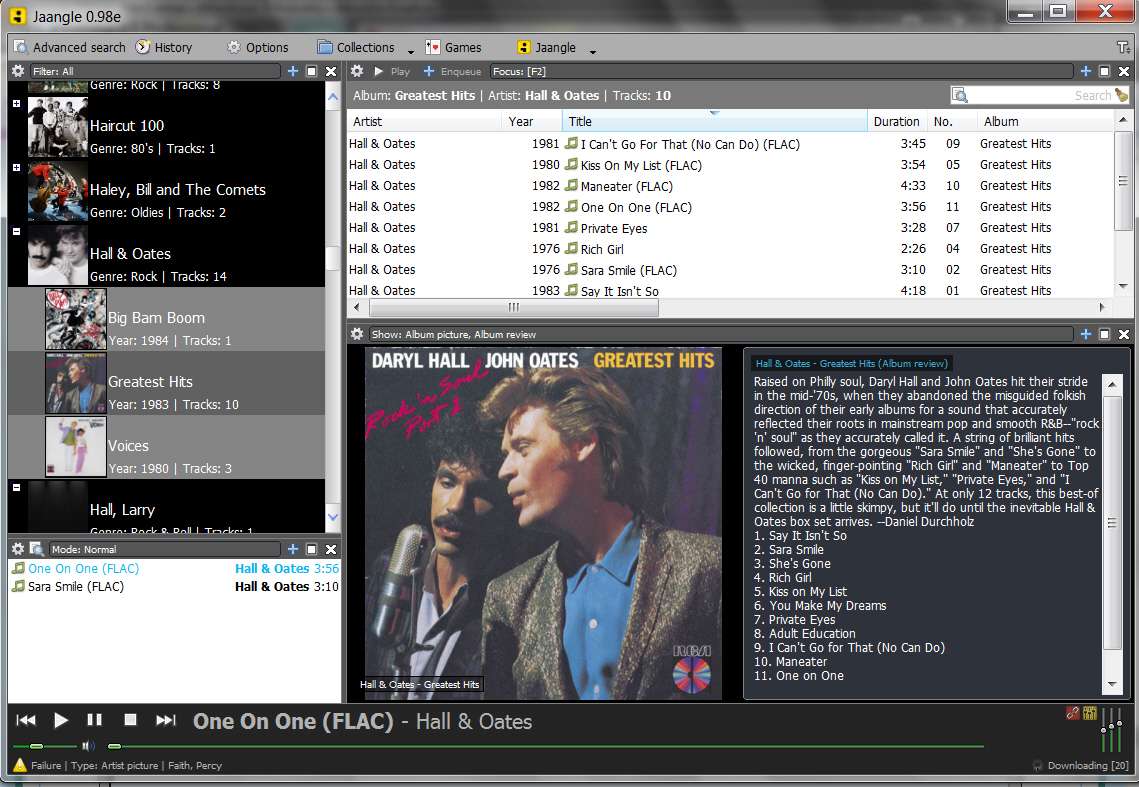
As far as player/organizer/playlister, in my own case I use a terrific program named Jaangle (sample screenshot follows):

jaangle4.jpg


Note that the track details info pane presents all the tag data from all music files (in my case, MP3 and FLAC). There's more to the right in that pane, via the scrollbar.

jaangle12.jpg


And of course the columns presented, as well as the sequence of the columns, is customizable. ALL tag fields are available for display.


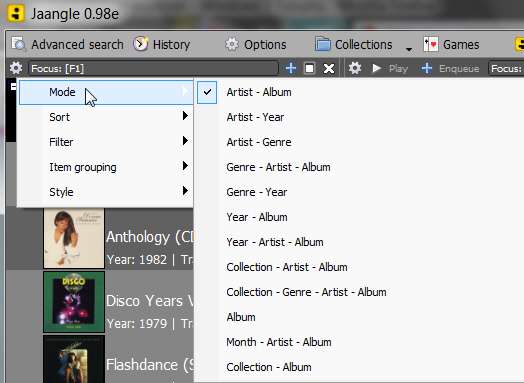
The program provides 12 different presentation organizations and sort sequences.

jaangle13.jpg


In my own case, I have selected "artist - album" sequence, with artists presented alphabetically and then for each artist the one or more albums for that artist arranged alphabetically and indented for eye appeal. Art for artist and albums is shown for each item (based on "style" setting, which if you want can also be as minimal as text-only... like Explorer).

The albums shown comes from the tags database, so that ANY album on which the artist has at least one track present will be shown underneath that artist. So this supports both single-artist albums as well as multiple-artist compilations... exactly as I want.

It also presents artist art and bio info as well as album art and review/tracklist. You can use your own "cover.jpg" or "folder.jpg", and Jaangle will automatically access LastFM for artist pictures/bio and Amazon for album pictures/review/tracklist (if it needs to, if you don't already have your own album art cover.jpg/folder.jpg present).

It also has its own built-in audio (and video!) player, along with a 3-band EQ to make music sound fantastic! Really, a great sounding player.


Why waste time or struggle to get Windows Media Player to kind of work, or Windows Explorer to kind of work. You need the right tool for the right job, and Jaangle is absolutely wonderful, in my opinion.

Try it. Jaangle, formerly known as "Teen Spirit".

If you want to see my "tutorial" to a new Jaangle user, look at this other thread in the Music sub-forum. An introduction to the proper use of the combination of MP3Tag and Jaangle was like a re-birth experience for her. A completely new world of music collection organization and enjoyment, outside of WMP and Windows Explorer.

Jaangle. And MP3Tag to be sure your music files all have proper tags. No need for imbedded album art, just use "cover.jpg" or "folder.jpg" in each album folder.

 

My Computer

Computer type
PC/Desktop
Computer Manufacturer/Model Number
Home-built, two systems (1) and (2)
OS
Windows 7 Pro x64 (1), Win7 Pro X64 (2)
CPU
i5-3350p 3.1Ghz/6MB-cache (1); E8400 3.0Ghz/6MB-cache (2)
Motherboard
ASUS P8Z77-V Pro (1); ASUS P5Q3 (2)
Memory
8GB PC3-12800 DDR3 (1); 4GB PC3-10600 DDR3 (2)
Graphics Card(s)
ATI HD7750 (1), (see TV cards); ATI R7 250 (2)
Sound Card
Realtek ALC892 HD Audio (1); Realtek ALC1200 HD Audio (2)
Monitor(s) Displays
Eizo HD2441W LCD, Eizo S2433W (1); Eizo 24" S2433W (2)
Screen Resolution
1920x1200, 1920x1200 (1); 1920x1200 (2)
Hard Drives
(1) 1TB SATA-II (7200RPM), 2x2TB SATA-III (7200RPM), 250GB SATA-III (10000RPM) for OS; 2x2TB external USB 3.0

(2) 320GB SATA-II (7200RPM), 750GB SATA-II (7200RPM), 150GB SATA-II (10000RPM) for OS; 2TB external USB 3.0
PSU
Nesteq ECS-6001 600W (1); Nesteq ECS-5001 500W (2)
Case
Acousti-Case 360 (1) and (2)
Cooling
Noctua NH-U12P SE2 for CPU, 2x120mm case fans (1) and (2)
Keyboard
IBM PS/2 (1) and (2)
Mouse
Logitech MX Revolution wireless (1); Microsoft wired (2)
Internet Speed
100mbps down / 10mbps up
Antivirus
Microsoft Security Essentials; Malwarebyte Anti-Malware Pro
Browser
Firefox
Other Info
Ceton InfiniTV 4-tuner cablecard-enabled TV card as well as Hauppauge HVR-2250 OTA/ATSC 2-tuner TV card in (1), running under Win7 WMC
Very interesting dsperber thanks I have a new system to install that on and will give it a try it looks very good and it's small. :D
 

My Computer

Computer Manufacturer/Model Number
Alienware
OS
Windows 7 Ultimate x64
CPU
I7
Motherboard
GA-X58-USB3
Memory
6 x 1.5V DDR3 DIMM sockets supporting up to 24 GB of system
Graphics Card(s)
GeForce GTX 580
Sound Card
Realtek ALC892 codec 2/4/5.1/7.1-channel
Monitor(s) Displays
NEC Display Solutions E321 Black 32"
Screen Resolution
1366 x 768
Hard Drives
OCZ Colossus LT Series OCZSSD2-1CLSLT1T 3.5" 1TB SATA II MLC Internal Solid State Drive
PSU
XFX Black Edition XPS-850W-BES 850W ATX12V
Case
Antec
Cooling
Zalman
Keyboard
Microsoft
Mouse
Microsoft
Very interesting dsperber thanks I have a new system to install that on and will give it a try it looks very good and it's small. :D
I think you will really like it.

Just one thing to say... the Forum that supports the product is currently closed to new registrations. I just yesterday received an email from the author explaining that this was done because of excessive spamming. He says he's re-opening new registration on 8/20, so I will join at that time to submit my comments, suggestions, and small bug reports.


Also, in my screenshots above, you can see "(FLAC)" in both the external file names as well as in the internal "title" tag field and "genre" values. This is not something presented or performed by Jaangle. Rather, it is how I build and maintain my music collection.

I want to be able to easily distinguish a FLAC version of a song from an MP3 version. So I, myself, name and tag things this way, which works beautifully for me.

Also, the use of "FLAC" as a genre is also from just how I do things when I make FLAC files. This stems from the fact that I transfer my music collection to my Cowon J3 portable music player, and want to be able to select only my "FLAC" files as if it were a playlist... think of it as a "genre-playlist".

About 85% of my music files are high-quality MP3, and 15% are FLAC... for my very favorites. So by selecting "FLAC" as a "genre" when playing music on my J3, I can limit my files to just my very very favorites if I want to, and have them play in lossless top-quality.

So putting FLAC in the "genre" tag field is just my own trick, to automatically facilitate a FLAC-only "genre-playlist" on my J3. Also, having "(FLAC)" in both internal "title" tag field as well as external file name shows up on the J3 in highly visible text as these tracks are played, which again is what I want to see (to know that I'm playing a FLAC file instead of an MP3 file).


Again, I think you'll really like Jaangle.
 

My Computer

Computer type
PC/Desktop
Computer Manufacturer/Model Number
Home-built, two systems (1) and (2)
OS
Windows 7 Pro x64 (1), Win7 Pro X64 (2)
CPU
i5-3350p 3.1Ghz/6MB-cache (1); E8400 3.0Ghz/6MB-cache (2)
Motherboard
ASUS P8Z77-V Pro (1); ASUS P5Q3 (2)
Memory
8GB PC3-12800 DDR3 (1); 4GB PC3-10600 DDR3 (2)
Graphics Card(s)
ATI HD7750 (1), (see TV cards); ATI R7 250 (2)
Sound Card
Realtek ALC892 HD Audio (1); Realtek ALC1200 HD Audio (2)
Monitor(s) Displays
Eizo HD2441W LCD, Eizo S2433W (1); Eizo 24" S2433W (2)
Screen Resolution
1920x1200, 1920x1200 (1); 1920x1200 (2)
Hard Drives
(1) 1TB SATA-II (7200RPM), 2x2TB SATA-III (7200RPM), 250GB SATA-III (10000RPM) for OS; 2x2TB external USB 3.0

(2) 320GB SATA-II (7200RPM), 750GB SATA-II (7200RPM), 150GB SATA-II (10000RPM) for OS; 2TB external USB 3.0
PSU
Nesteq ECS-6001 600W (1); Nesteq ECS-5001 500W (2)
Case
Acousti-Case 360 (1) and (2)
Cooling
Noctua NH-U12P SE2 for CPU, 2x120mm case fans (1) and (2)
Keyboard
IBM PS/2 (1) and (2)
Mouse
Logitech MX Revolution wireless (1); Microsoft wired (2)
Internet Speed
100mbps down / 10mbps up
Antivirus
Microsoft Security Essentials; Malwarebyte Anti-Malware Pro
Browser
Firefox
Other Info
Ceton InfiniTV 4-tuner cablecard-enabled TV card as well as Hauppauge HVR-2250 OTA/ATSC 2-tuner TV card in (1), running under Win7 WMC
Ya it's a really cool program and I do like it a lot I have 18,000 songs all at 320kbps mp3 all my flac recordings I have moved off of my hard drives and are stored on 300 DVD's all my music also is properly tagged with Tag&Rename, a program that I bought a while back that I really enjoy. I also rip with EAC and follow this guide for secure rips with that program jiGGafellz' Step-by-Step Guide to Secure CD Ripping w/Exact Audio Copy ..I also make my own minor adjustments for the newest versions of EAC and it works awesome always turns up perfect rips. :D

EDIT: Last.fm is hating me for all the downloading of album covers LOL!
 

My Computer

Computer Manufacturer/Model Number
Alienware
OS
Windows 7 Ultimate x64
CPU
I7
Motherboard
GA-X58-USB3
Memory
6 x 1.5V DDR3 DIMM sockets supporting up to 24 GB of system
Graphics Card(s)
GeForce GTX 580
Sound Card
Realtek ALC892 codec 2/4/5.1/7.1-channel
Monitor(s) Displays
NEC Display Solutions E321 Black 32"
Screen Resolution
1366 x 768
Hard Drives
OCZ Colossus LT Series OCZSSD2-1CLSLT1T 3.5" 1TB SATA II MLC Internal Solid State Drive
PSU
XFX Black Edition XPS-850W-BES 850W ATX12V
Case
Antec
Cooling
Zalman
Keyboard
Microsoft
Mouse
Microsoft
Download this FLAC Property Handler & it'll show the tags in Explorer

Ok i know i asked these questions before but due to the fact that i go no replys:cry: i will ask again :D

IS the Any way i can get windows explorer to recognize the flac file tags, please note that i use wmp tag plus to get them to work in WMP (Thank you to Tim De Baets for the help)
but how to get them to work with Explorer is beyond me. :cry:

Please help.

My specs are:
Windows Ultimate x64 (not N anymore :D)
Using 007 Shark codec pack

As advised in a post in the forum:
Download the Windows 7 FLAC Property Handler for 32 and 64 bit.rar
and unzip it (unrar it).
Then just run the msi file. It worked for me. As soon as I refreshed the directory where my FLAC songs were, windows explorer were able to display the various information of the songs (artist, album, title etc) in the correct columns, as it does with the MP3s.

Good luck! to you or anybody else dealing with that! :)
 

My Computer

Computer type
Laptop
Computer Manufacturer/Model Number
Asus N55SF
OS
Windows 7 Home Premium 64 bit
CPU
Intel Core i5 2410M @ 2.30GHz Sandy Bridge 32nm Technology
Motherboard
ASUSTeK Computer Inc. N55SF
Memory
8,00 GB Dual-Channel DDR3 @ 1333 MHz (PC3-10600)
Graphics Card(s)
NVIDIA GeForce GT 555M, Intel HD Graphics 3000
Sound Card
Realtek High Definition Audio
Screen Resolution
1600x900@60Hz
Hard Drives
699GB Seagate ST9750423AS (SATA) 5400rpm
Other Info
Optical drive: Slimtype DVD A DS8A5SH
Back
Top