Flash crashing/not working across multiple browsers

throwawayacc222

New member
Local time
1:08 AM
Messages
10
Fresh Windows Install on a 5 year old custom build. Previously never had this problem. If a site has flash this is what it looks like:

Imgur: The most awesome images on the Internet

Even after uploading these pictures to imgur I got a notification that flash had crashed.

I'm even having this problem on THIS site, luckily I'm able to post this though. http://i.imgur.com/xphpuCG.png

Running NoScript in Firefox fixes this problem.

I'm not discounting the possibility of a video card issue because I was having some problems earlier with installation, I've since got my Radeon HD 5770 working but this problem persists.

I have tried multiple reinstalls, different browsers, turning off adblock, safemode, turning off hardware acceleration. Any help would be greatly appreciated.
 

My Computer

Computer type
PC/Desktop
Computer Manufacturer/Model Number
custom build
OS
Windows 7 Home 64 Bit
CPU
amd phenom II x4 b44 3200mhz
Motherboard
asus ga-870a-ud3
Memory
8 gigs
Graphics Card(s)
radeon 5770
Hard Drives
wd
Antivirus
none
Browser
firefox
I didn't think there was any script in Flash,
Where did you download it from??

Roy
 

My Computer

Computer type
PC/Desktop
Computer Manufacturer/Model Number
medionl/Aspire 6930G/acer x55a
OS
W7 home premium 32bit/W7HP 64bit/w10 tp insider ring
CPU
E5300 dual core
Motherboard
medion MS7366
Memory
3gb
Graphics Card(s)
Nvidia Geforce 7100 Nforce 630i
Monitor(s) Displays
avixc
Internet Speed
n (isp resticted to 72)
Antivirus
mse/pands
Browser
palemoon
Other Info
Belkin Fd7050 n USB using Railink RT2870 drivers, more upto date

My Computer

Computer type
PC/Desktop
Computer Manufacturer/Model Number
custom build
OS
Windows 7 Home 64 Bit
CPU
amd phenom II x4 b44 3200mhz
Motherboard
asus ga-870a-ud3
Memory
8 gigs
Graphics Card(s)
radeon 5770
Hard Drives
wd
Antivirus
none
Browser
firefox
Unistall flash from your >> control panel << not programs.
Then go to addons in your browser download new version from there.

Roy
 

My Computer

Computer type
PC/Desktop
Computer Manufacturer/Model Number
medionl/Aspire 6930G/acer x55a
OS
W7 home premium 32bit/W7HP 64bit/w10 tp insider ring
CPU
E5300 dual core
Motherboard
medion MS7366
Memory
3gb
Graphics Card(s)
Nvidia Geforce 7100 Nforce 630i
Monitor(s) Displays
avixc
Internet Speed
n (isp resticted to 72)
Antivirus
mse/pands
Browser
palemoon
Other Info
Belkin Fd7050 n USB using Railink RT2870 drivers, more upto date
As far as I know you can't download an "addon" for Flash through your browser. At least not through Firefox. Adobe really wants you to go to their site and download from them.

But in any case as I've stated I've done numerous re-installs to no avail.
 

My Computer

Computer type
PC/Desktop
Computer Manufacturer/Model Number
custom build
OS
Windows 7 Home 64 Bit
CPU
amd phenom II x4 b44 3200mhz
Motherboard
asus ga-870a-ud3
Memory
8 gigs
Graphics Card(s)
radeon 5770
Hard Drives
wd
Antivirus
none
Browser
firefox
"Multiple Browsers" and multiple versions of flash player is probably the issue.

Suggest:

Run the dedicated Flash Player Removal Tool. Control Panel > Add/ Remove Programs will not do the job.

Flash Player Removal Tool instructions and download link:

https://helpx.adobe.com/flash-player/kb/uninstall-flash-player-windows.html

Most importantly include all steps including the following steps that most users skip:

   Note

3. Run the uninstaller

Double-click the icon of the uninstaller that downloaded to your computer.

Follow the prompts. Click Yes if you see the message "Do you want to allow the following program to make changes to this computer?"

Delete Flash Player files and folders.

a) Choose Start > Run.

b) Copy and paste the following and click OK. C:\Windows\system32\Macromed\Flash

delete_folder_open.PNG

c) Delete all the files in this folder.

Follow steps a, b, and c for the following:
C:\Windows\SysWOW64\Macromed\Flash
%appdata%\Adobe\Flash Player
%appdata%\Macromedia\Flash Player

4. Verify that uninstallation is complete

Important - Restart your computer.


NOTE: If you use Google Chrome and have applied updates - check that the old versions have been removed. Simply updating Chrome may not always remove the old versions (including old versions of flash player that are built into Chrome)

Once you have filly removed flash player and rebooted get these versions of flash player and install them.

Code:
For Internet Explorer: (Skip if you don't use flash player in IE)
http://fpdownload.macromedia.com/pub/flashplayer/latest/help/install_flash_player_ax.exe

For Mozilla Firefox & Chrome:
http://fpdownload.macromedia.com/pub/flashplayer/latest/help/install_flash_player.exe

Let us know if Firefox continues to crash after the clean install of Flash Player.

Suggest running AppCrashView to see if it offers any details:

Download AppCrashView - MajorGeeks

Also test if issues are resolved by disabling hardware acceleration:

https://forums.adobe.com/thread/891337

Consider a clean install of Firefox after backing up bookmarks and extensions.

Clean install means fully remove the old version(s) of Firefox including all remnants.
 

My Computer

Computer type
Laptop
Computer Manufacturer/Model Number
ASUS
OS
Microsoft Windows 7 Home Premium 64-bit 7601 Multiprocessor Free Service Pack 1
CPU
AMD C-60 APU with Radeon(tm) HD Graphics
Motherboard
ASUSTeK COMPUTER INC. X501U
Memory
4.00 GB
Graphics Card(s)
AMD Radeon HD 6290 Graphics
Sound Card
(1) AMD High Definition Audio Device (2) Realtek High Defi
Screen Resolution
1366 x 768 x 32 bits (4294967296 colors) @ 60 Hz
Hard Drives
Hitachi HTS545050A7E380 SATA Disk Device
Antivirus
Comodo CIS & FW, SecureAplus App Whitelisting, Threatfire
Browser
Cyberfox 64bit, Opera 64bit, Airfox
Other Info
Spy-The-Spy, HitmanPro.Alert, Norton Connect Safe, MJRegWatcher, BitDefender TrafficLight, Voodoo Shield, Zemana AntiMalware
Followed your directions and it didn't work.

I can't even visit the page for AppCrashView. This is all it says: The page cannot be displayed because an internal server error has occurred.

Lots of sites aren't loading and displaying a similar error. I literally cannot visit any page for any malware or anti-virus program. It does not load. AVG, Avast, Malwarebytes, Kaspersky, Norton, etc. Nothing. I ran Windows Defender and it came up clean but I just have a feeling I have malware.

Does anyone know what "bigamytensenhitchhike.com" or "bigamykanjorskihitchhike.com" is? Because I noticed this weird address trying to load on A LOT of pages. Even the AppCrashView site:

http://oi63.tinypic.com/t529ev.jpg
 

My Computer

Computer type
PC/Desktop
Computer Manufacturer/Model Number
custom build
OS
Windows 7 Home 64 Bit
CPU
amd phenom II x4 b44 3200mhz
Motherboard
asus ga-870a-ud3
Memory
8 gigs
Graphics Card(s)
radeon 5770
Hard Drives
wd
Antivirus
none
Browser
firefox
bigamykanjorskihitchhike or bigamytensenhitchhike returns zero search results.

I guess you have been hit by malware. It sounds like you need help from an expert in the System Security section of this forum.

In the meantime see if you can browse in "Safe Mode with Networking"

Restart your computer and press and hold the F8 key while your computer starts up. You must press F8 before Windows begins to load. You will see a black screen with several options. Use the arrow keys to select Safe Mode with Networking.

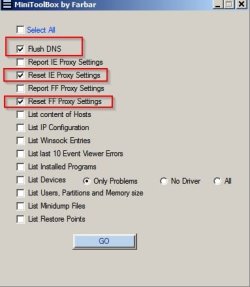
Try MiniToolBox:

MiniToolBox Download

Use the following settings:

MiniToolBox by Farbar.jpg

How did you download the flash player removal tool with a non working browser?
 

My Computer

Computer type
Laptop
Computer Manufacturer/Model Number
ASUS
OS
Microsoft Windows 7 Home Premium 64-bit 7601 Multiprocessor Free Service Pack 1
CPU
AMD C-60 APU with Radeon(tm) HD Graphics
Motherboard
ASUSTeK COMPUTER INC. X501U
Memory
4.00 GB
Graphics Card(s)
AMD Radeon HD 6290 Graphics
Sound Card
(1) AMD High Definition Audio Device (2) Realtek High Defi
Screen Resolution
1366 x 768 x 32 bits (4294967296 colors) @ 60 Hz
Hard Drives
Hitachi HTS545050A7E380 SATA Disk Device
Antivirus
Comodo CIS & FW, SecureAplus App Whitelisting, Threatfire
Browser
Cyberfox 64bit, Opera 64bit, Airfox
Other Info
Spy-The-Spy, HitmanPro.Alert, Norton Connect Safe, MJRegWatcher, BitDefender TrafficLight, Voodoo Shield, Zemana AntiMalware
When I boot into safemode with networking, my browsers keep telling me that I need to turn off my proxy settings or something. Basically I can't visit any sites except wikipedia or google. Also I can't download that tool, getting the same error as above.

I think I have a trojan by the name of msrtn32.exe. I keep getting an error popping up complaining that msrtn32.exe can't find some .dll. Gonna go research what this is and how to get rid of it.
 

My Computer

Computer type
PC/Desktop
Computer Manufacturer/Model Number
custom build
OS
Windows 7 Home 64 Bit
CPU
amd phenom II x4 b44 3200mhz
Motherboard
asus ga-870a-ud3
Memory
8 gigs
Graphics Card(s)
radeon 5770
Hard Drives
wd
Antivirus
none
Browser
firefox
Ok, so as previously stated I cannot download any antivirus anything on this computer. My browsers won't let me. So I transfer the malwarebytes installation onto my computer from my phone, and when I try and run it, it pretty much just instantly crashes. I'm only able to get through 1-5 prompts before it crashes.

Was able to run and install Malwarebytes in Safe Mode. This is the log: Malwarebytes Anti-Malware www.malwarebytes.org Scan Date: 4/22/2016 Scan Ti - Pastebin.com

248 Identified Threats all removed. Reboot into normal Windows and Malwarebytes is mysteriously removed, and all my problems remain.

Should I make a new thread in the Security forum or does a moderator want to move this?
 

My Computer

Computer type
PC/Desktop
Computer Manufacturer/Model Number
custom build
OS
Windows 7 Home 64 Bit
CPU
amd phenom II x4 b44 3200mhz
Motherboard
asus ga-870a-ud3
Memory
8 gigs
Graphics Card(s)
radeon 5770
Hard Drives
wd
Antivirus
none
Browser
firefox
I reckon you can just make a new thread and post a link to this thread. As for downloading MiniToolBox - you can use another machine and save it on a flash drive. Run it to clear proxy settings.
 

My Computer

Computer type
Laptop
Computer Manufacturer/Model Number
ASUS
OS
Microsoft Windows 7 Home Premium 64-bit 7601 Multiprocessor Free Service Pack 1
CPU
AMD C-60 APU with Radeon(tm) HD Graphics
Motherboard
ASUSTeK COMPUTER INC. X501U
Memory
4.00 GB
Graphics Card(s)
AMD Radeon HD 6290 Graphics
Sound Card
(1) AMD High Definition Audio Device (2) Realtek High Defi
Screen Resolution
1366 x 768 x 32 bits (4294967296 colors) @ 60 Hz
Hard Drives
Hitachi HTS545050A7E380 SATA Disk Device
Antivirus
Comodo CIS & FW, SecureAplus App Whitelisting, Threatfire
Browser
Cyberfox 64bit, Opera 64bit, Airfox
Other Info
Spy-The-Spy, HitmanPro.Alert, Norton Connect Safe, MJRegWatcher, BitDefender TrafficLight, Voodoo Shield, Zemana AntiMalware
Back
Top