
Solved Flash Drive Transfers Limitations

jim davis

New member
Member
VIP
Local time
11:45 PM
Messages
191
Location
Walking, Taking In The Sweet Air
I have started using a 64 Gb flash drive to store things.
is there a limitation in flash drive size that say if-I put a filled 64 GB in one input and a blank one in another

and right clicked "Copy the filled one, then pasted to the empty" is there a limit to how big a drive you can just copy and paste, like say a 200 plus GB full FD to another 200 GB plus empty FD.


ha ha ha I have fears I may blow something up
 

My Computer

Computer type
PC/Desktop
Computer Manufacturer/Model Number
dell optiplex 745
OS
7 Home Prem. 32 bit, c drive 74.4 space CPU 3.00 GHZ
CPU
?
Motherboard
?
Memory
64 ?
Hard Drives
1 TARA BITE WESTERN
Cooling
FAN IN FRONT AND a fan in back
Internet Speed
100 mbps
Antivirus
Avast and many others
Browser
firefox
Other Info
Patience Please, I know nothing, Zip, Zero about computers
I am not aware of any such drive size limitations. Of course the target drive must have sufficient space to accommodate the data. But be aware that if the cluster sizes of the drives are different the space required could be quite different. This is particularly significant when copying to an exFAT drive where default cluster sizes are very large.

Flash drives are among the least reliable of modern storage media. They should not be used to store the only copy of important files. All files of any importance on any media need at least 1 backup copy, 2 or more if they are of particular importance. Don't do what I saw on a forum somewhere. A number of individuals were storing their data on 1 flash drive over a period of some 6 months or more. It seems that in all that time nobody bothered to make a backup copy. The drive failed. In another case an IT student was keeping his work on a flash drive. The laptop in which the drive was inserted had a fall and the drive was damaged. At least he learned a valuable lesson.
 

My Computer

Computer type
PC/Desktop
Computer Manufacturer/Model Number
HP
OS
Windows 7 Pro 64 bit
CPU
Xeon W3520
Memory
8 GB
Graphics Card(s)
Nvidia Geforce 210
jim davis

Agree with LMiller7

External Hard Drive, backup and long term more secure storage than Flash Drives.

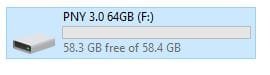
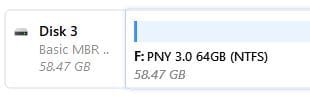
A Flash Drive, as your example 64 GB is not actually 64GB, it varies by manufacturer.
Some Flash Drives, my Sandisk for one, came with backup/restore software, unlocking the drive software, etc. Storing the firmware, formatting overheads, brings it down somewhat also.
If you have large files, over 4gb format to NTFS
Why your USB drive's file format matters: FAT32 vs. exFAT vs. NTFS

My 64 GB Flash Drive formatted to NTFS

Capture.JPG
1Capture.JPG
 

My Computer

Computer type
PC/Desktop
Computer Manufacturer/Model Number
HP Desktop & Compaq Laptop
OS
Win 10 x64, Linux Lite, Win 7 x64, BlackArch, & Kali
Hard Drives
Samsung 850 Pro 256Gb,
Hitachi HDD 1Tb,
Crucial MX SSD 250Gb
Segate 3Tb USB 3.0 Ext. Backup HDD
Internet Speed
150Mbps dn, 20Mbps up
Antivirus
Avast Free, Malwarebytes Anti-Exploit & Anti-Ransomware
Browser
Firefox, Chrome, Opera, & VPN
Flash drives are among the least reliable of modern storage media. They should not be used to store the only copy of important files. All files of any importance on any media need at least 1 backup copy, 2 or more if they are of particular importance. .


I think anything can happen, but mostly its how many times you erase and the power supply fluctuations.
I have never had a pny, san disk, fail, cause i never erase. but i did have one lite up in my hand when a power supply was burning up.
 

My Computer

Computer type
PC/Desktop
Computer Manufacturer/Model Number
dell optiplex 745
OS
7 Home Prem. 32 bit, c drive 74.4 space CPU 3.00 GHZ
CPU
?
Motherboard
?
Memory
64 ?
Hard Drives
1 TARA BITE WESTERN
Cooling
FAN IN FRONT AND a fan in back
Internet Speed
100 mbps
Antivirus
Avast and many others
Browser
firefox
Other Info
Patience Please, I know nothing, Zip, Zero about computers
[COLOR=YellowGreen said:
Snick;[/COLOR]3476788]
Agree with LMiller7

External Hard Drive, backup and long term more secure storage than Flash Drives.

A Flash Drive, as your example 64 GB is not actually 64GB, it varies by manufacturer.
Some Flash Drives, my San disk for one, came with backup/restore software, unlocking the drive software, etc.


Thank you snick, you have finally adjusted to how dumb I am about digital stuff, but i did note the actual storage space varies, so much so I have the store check them before i leave store.


For the record I asked this data exchange question cause W7, has a appearance of copying a drive before pasting it, i was not sure how that worked, I.E. left a ton of crap to defrag Etc.
 

My Computer

Computer type
PC/Desktop
Computer Manufacturer/Model Number
dell optiplex 745
OS
7 Home Prem. 32 bit, c drive 74.4 space CPU 3.00 GHZ
CPU
?
Motherboard
?
Memory
64 ?
Hard Drives
1 TARA BITE WESTERN
Cooling
FAN IN FRONT AND a fan in back
Internet Speed
100 mbps
Antivirus
Avast and many others
Browser
firefox
Other Info
Patience Please, I know nothing, Zip, Zero about computers
I have seen many fake or damaged USB flash drives. I bought a 64G USB flash drive that showed on Explorer as 64G but is only 4G. I bought a 16G USB flash drive that had many defects. Kingston replaced under warranty.

I suggest you test it with H2testw

It will fill the drive and then verify. On a 64G it can take more than a day.
 

My Computers

System One System Two

  • Computer type
    PC/Desktop
    Computer Manufacturer/Model Number
    custom build
    OS
    Windows 7 HP 64
    CPU
    i5 6600K - 800MHz to 4200MHz
    Motherboard
    GA-Z170-HD3P
    Memory
    4+4G GSkill DDR4 3000
    Graphics Card(s)
    IG - Intel 530
    Monitor(s) Displays
    Samsung 226BW
    Screen Resolution
    1680x1050
    Hard Drives
    (1) -1 SM951 – 128GB M.2 AHCI PCIe SSD drive for Windows 7 and Lubuntu
    (2) -1 WD SATA 3 - 1T for Data
    (3) -1 WD SATA 3 - 1T for backup
    PSU
    Thermaltake 450W TR2 gold
    Keyboard
    Old and good Chicony mechanical keyboard
    Mouse
    Logitech mX performance - 9 buttons (had to disable some)
    Internet Speed
    500Mb/s
    Browser
    Firefox 64
    Other Info
    TinyWall firewall
  • Computer type
    Laptop
    System Manufacturer/Model Number
    Asus Q550LF
    OS
    Windows 7 Pro
    CPU
    i7-4500U 800MHz to 3.0GHz
    Motherboard
    Asus Q550LF
    Memory
    (4+4)G DDR3 1600
    Graphics Card(s)
    IG intel 4400 + NVIDIA GeForce GT 745M
    Sound Card
    Realtek
    Monitor(s) Displays
    LG Display LP156WF4-SPH1
    Screen Resolution
    1920 x 1080
    Hard Drives
    BX500 120G SSD for Windows and programs +
    1T HDD for data
    Internet Speed
    500 Mb/s
    Browser
    Firefox
    Other Info
    TinyWall firewall

My Computer

Computer type
PC/Desktop
Computer Manufacturer/Model Number
HP Desktop & Compaq Laptop
OS
Win 10 x64, Linux Lite, Win 7 x64, BlackArch, & Kali
Hard Drives
Samsung 850 Pro 256Gb,
Hitachi HDD 1Tb,
Crucial MX SSD 250Gb
Segate 3Tb USB 3.0 Ext. Backup HDD
Internet Speed
150Mbps dn, 20Mbps up
Antivirus
Avast Free, Malwarebytes Anti-Exploit & Anti-Ransomware
Browser
Firefox, Chrome, Opera, & VPN
[COLOR=YellowGreen said:
Snick;[/COLOR]3476788]


Thank you snick, you have finally adjusted to how dumb I am about digital stuff, but i did note the actual storage space varies, so much so I have the store check them before i leave store.


For the record I asked this data exchange question cause W7, has a appearance of copying a drive before pasting it, i was not sure how that worked, I.E. left a ton of crap to defrag Etc.

Better quality flash media is more desirable in my opinion. Usually costs a bit more as well.

Defrag? You don't need to do that on Solid State Drives, nor is it recommended.

Here's a dissertation -> Should You Defrag an SSD? - Help Desk Geek

Never thought you were DUMB Jim, less knowledgeable than some possibly, but that is why we are here, to help less savvy individuals. Hopefully with all the excellent advice/responses provided on Sevenforums you are more enlightened. ;)

Google is a great educational tool. I am always Googling and reading on a plethora of subject-matter.
You can always find pros/cons, facts & falsehoods on the Net. :cool:
 

My Computer

Computer type
PC/Desktop
Computer Manufacturer/Model Number
HP Desktop & Compaq Laptop
OS
Win 10 x64, Linux Lite, Win 7 x64, BlackArch, & Kali
Hard Drives
Samsung 850 Pro 256Gb,
Hitachi HDD 1Tb,
Crucial MX SSD 250Gb
Segate 3Tb USB 3.0 Ext. Backup HDD
Internet Speed
150Mbps dn, 20Mbps up
Antivirus
Avast Free, Malwarebytes Anti-Exploit & Anti-Ransomware
Browser
Firefox, Chrome, Opera, & VPN
[B said:
Snick[/B];3476857]


Never thought you were DUMB Jim, less knowledgeable than some possibly, but that is why we are here, to help less savvy individuals. Hopefully with all the excellent advice/responses provided on Seven forums you are more enlightened. ;)---End Snick.


I am not dumb, I just understand specialist, being centered on their particular task with the world assume others centered on other tasks appear lost when queried.
Ha Ha Cats who love their masters dearly, think their masters can't hunt for food, cause Cats see us only sitting around reading books, Etc., so the cats go out and capture still alive birds, Etc. and bring them home to teach us how to hunt and feed our selves, for which we in return scream at them for bringing animals home, still breathing, when in fact cats are trying to save our lives.
Sometimes I see this same relationship between different people.
ha ha ha ha ha my dentist neighbor insists I dental floss twice aday or I may not even get to heaven from the way he speaks.
he told me I must stop brushing my teeth with baking soda ASAP or I would sand my teeth down to nothing, ha ha ha I told him he was 50 years too late, plus i have all my teeth with full enamel.

Thanks folks !!!! this subject is solved :thumbsup:
 
Last edited:

My Computer

Computer type
PC/Desktop
Computer Manufacturer/Model Number
dell optiplex 745
OS
7 Home Prem. 32 bit, c drive 74.4 space CPU 3.00 GHZ
CPU
?
Motherboard
?
Memory
64 ?
Hard Drives
1 TARA BITE WESTERN
Cooling
FAN IN FRONT AND a fan in back
Internet Speed
100 mbps
Antivirus
Avast and many others
Browser
firefox
Other Info
Patience Please, I know nothing, Zip, Zero about computers
Back
Top