Solved Flash files restored but with generic names. Partition not found.

Bongolia

New member
Local time
1:27 PM
Messages
15
Hi everyone,

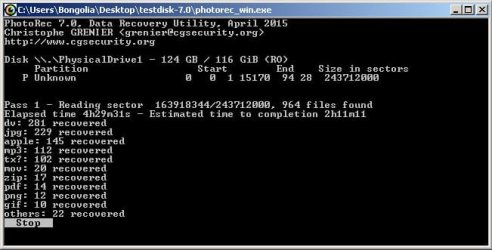
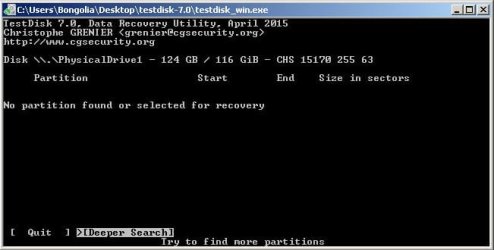
my 128 gig flash drive became unreadable. Probably, I suspect, as a result of me persistently using it on both PC and Mac. I followed Jumanji's breakdowns of TestDisk and Partition Wizard from Nov 2012 and both products recovered files. TestDisk found 964 files and I recovered 942 before I got tired of waiting for the estimated 3 more hours. The files are fine but have generic names and no directory structure. After reaching the Quick Search point my experience diverged from Jumanji's example in that TD couldn't find a partition.

attachment.php


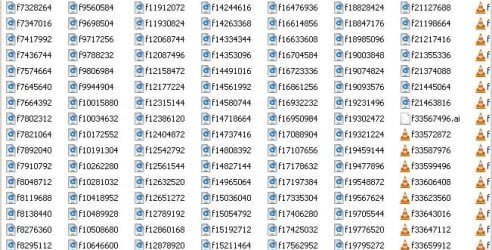
I could recover files though:

attachment.php


but this is how they're defined:

attachment.php


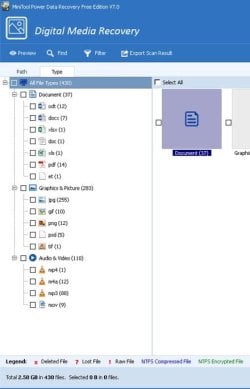
This is, of course, miles better than nothing but many of the files are used by editing projects which now can't locate them. I couldn't work out if TD could restore any more information so I tried the demo version of PW Minitool Power Data Recovery. I let this run it's full course and it found only 430 files. I can only restore 1gb of these and a couple of test files shows that they are still generically named without directories. I haven't bothered to complete this as TD has very probably already done it for me.

attachment.php


Is there any way I can restore the original filesystem and filenames?

Thanks in advance

Pete Johnson
 

Attachments
  • No partiton.jpg
    No partiton.jpg
    34.1 KB · Views: 70
  • TD recovered.jpg
    TD recovered.jpg
    45 KB · Views: 70
  • Filenames.jpg
    Filenames.jpg
    79.7 KB · Views: 70
  • PW results.jpg
    PW results.jpg
    39.5 KB · Views: 70

My Computer My Computer

At a glance

Windows 7 Ultimate x64Intel Core 2 Duo P8400 @ 2.26Ghz4Gb RAMATI Mobility Radeon HD 3400
Computer type
Laptop
Computer Manufacturer/Model Number
Sony Vaio VGN-FW21E
OS
Windows 7 Ultimate x64
CPU
Intel Core 2 Duo P8400 @ 2.26Ghz
Memory
4Gb RAM
Graphics Card(s)
ATI Mobility Radeon HD 3400
Hard Drives
Toshiba MK3252GSX ATA 300Gb
Browser
Chrome
Your problem seems need a recovery expert. Best solution is to try a specialist to fix this problem. Flash drive is very sensitive external hard drive.
 

My Computer My Computer

At a glance

Windows 74GB4GB1GB
Computer type
PC/Desktop
Computer Manufacturer/Model Number
SAMSUNG
OS
Windows 7
CPU
4GB
Motherboard
Intel
Memory
4GB
Graphics Card(s)
1GB
Monitor(s) Displays
17'
Hard Drives
500GB
Mouse
A4tech
Internet Speed
6Mbps
Antivirus
MSE
Browser
Firefox
The structure isn't worth the somewhat surprising cost of employing a recovery company. Also, the last time I did that I couldn't believe the amount of snide business practice I encountered at the prominent end of the UK data recovery profession.
 

My Computer My Computer

At a glance

Windows 7 Ultimate x64Intel Core 2 Duo P8400 @ 2.26Ghz4Gb RAMATI Mobility Radeon HD 3400
Computer type
Laptop
Computer Manufacturer/Model Number
Sony Vaio VGN-FW21E
OS
Windows 7 Ultimate x64
CPU
Intel Core 2 Duo P8400 @ 2.26Ghz
Memory
4Gb RAM
Graphics Card(s)
ATI Mobility Radeon HD 3400
Hard Drives
Toshiba MK3252GSX ATA 300Gb
Browser
Chrome
Hi Bongolia,

You would have been perhaps better off not following blindly what jumanji said in a specific thread/s. :D

I am not clear when you say " flash drive became unreadable". Whatever, running PhotoRec you can only recover files without the folder structure since it rebuilds the files ab-initio without reference to the filesystem.

Now do this and let us see whether there is any possibility of recovering the files complete with the original
structure and file names.

Download, install and run the free trial version of Getdataback simple here Data Recovery Software Products - Runtime Software Products (v3.00 English (8.80MB) Scan your 128GB pen drive. Check whether it shows the folders and files exactly as it was before. You can also rightclick on the folders and files and preview/play those.If this is successful then we shall run TestDisk to see whether the file system can be repaired. ( With the trial version of GetDataback, you can only see the folders and files but cannot copy those unless you buy a license. So we shall run the free TestDisk and try to recover the files if it could repair the filesystem. Sometimes even TestDisk could not repair the filesystem. In that event you will have no option but to buy a USD 80 License for Getdataback to copy all folders and files with complete folder structure and filenames.)

( After tom, I shall be out of station for the next two days and hopefully see your response on Friday 17th inst.)
 
Last edited:

My Computer My Computer

At a glance

Windows 7 Home Premium 32 bit
OS
Windows 7 Home Premium 32 bit
GetBackData tests

Hello Jumanji and thanks for getting back to me.

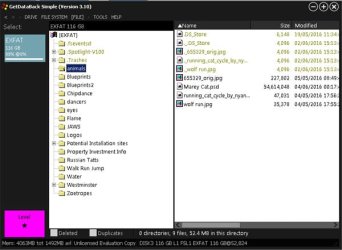
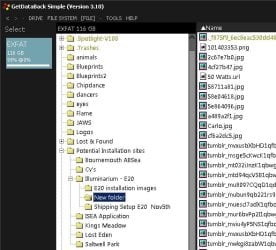
So, I ran the flash drive through GetDataBack Simple and a Level 1 scan quickly shows an Exfat system. It's the only filesystem listed and, when selected, it lists the directories and contents correctly but the contents are all from my Mac.


attachment.php


There's a lot of data missing which was loaded from my PC. I tried running Level 2 but it only listed a smaller selection of the Exfat stuff which appeared from the previous scan. I've just completed Level 3 which took a lot longer and it also listed some Lost & Found folders which included some video. No audio files have yet been listed. There are many on the drive and TestDisk found them.

attachment.php


I'm going to run Level 4 and go to bed as it's going to take quite a while to complete. I'll post results tomorrow. G'night!
 

Attachments

  • GDB one.jpg
    GDB one.jpg
    45.2 KB · Views: 49
  • GDB 2.jpg
    GDB 2.jpg
    46.3 KB · Views: 48

My Computer My Computer

At a glance

Windows 7 Ultimate x64Intel Core 2 Duo P8400 @ 2.26Ghz4Gb RAMATI Mobility Radeon HD 3400
Computer type
Laptop
Computer Manufacturer/Model Number
Sony Vaio VGN-FW21E
OS
Windows 7 Ultimate x64
CPU
Intel Core 2 Duo P8400 @ 2.26Ghz
Memory
4Gb RAM
Graphics Card(s)
ATI Mobility Radeon HD 3400
Hard Drives
Toshiba MK3252GSX ATA 300Gb
Browser
Chrome
OK. I do not have any rub with MAC. But still consider it as a data recovery problem and check on it.

1.) How was the 128GB formatted? On Windows or Mac? What file system?

2.) Getdata back read it as Ext3 and showed you quite a number of folders. Do any of these files in that folders are in the data recovered by PhotoRec? My intent is if files are common, then you may be able to rebuild the folder structure and assign the right file names with the help of folders and files shown by Getdataback. So explore that possibility - though it is a manual work.

3.) We will in any case go with TesttDisk and check what it shows.But that after my return from the two-day outstation trip.

4.) During my two days absence you may do the following:

a) Post a screenshot of Windows Disk Management with only the 128GB flash drive plugged in.( Unplug all other external/flash drives)

b) Post a screenshot of it in Minitools Partition Wizard Free Edition (30.49MB) Free download Magic Partition Manager Software, partition magic alternative, free partition magic, partition magic Windows 7 and server partition software - Partition Wizard Online - the very first screen that appears when you launch it.Then run Partition Recovery Wizard in it, Quick Scan and post a screenshot of the Partitions found Window. After taking the screenshot cancel and close PW ( Do not Apply and write anything to the flash drive)

c). Download GetDataback for NTFS, run it and check whether it shows any folders and files. ( Read the documentation/ help file on how to use that program. I had never run it.:).) Data Recovery Software Products and Downloads - Runtime Software Products Check whether it is any different from the Ext3 partition shown by Getdataback Simple

In all these things we are only scanning the drive taking care not to write anything on the Flash drive.So no harm to the data.
 

My Computer My Computer

At a glance

Windows 7 Home Premium 32 bit
OS
Windows 7 Home Premium 32 bit
Ok. Good Morning!

Now, Jumanji, I'll point out here that, at this point, I have everything I need to manually rebuild the directory structure from the GetBackData images and the TestDisk recovered files. If you're as busy as I think you are please feel free to apply your considerable knowledge to other projects and Thanks Very Much for the help thus far. If you'd like to do it just for the sport I'll happily be a lab monkey.

I'll outline the results of the last scan for informative purposes anyway.

The Level 4 scan produced pretty much the same list as the others but included a folder called 'New Folder' which contained jpg files. This was the only new found data. I know there are 100 -150 audio files stored as mp3, mp4 and flac which TestDisc has recovered. They have obscure filenames but they play and the id3tags are intact. GetBackData doesn't list these. One other weird thing is that TestDisk recovered a high number of obscurely named DVmovie files which are actually tiny (approx 1 second) chunks of longer video files. I'm guessing that they may be dissembowelled mpegs. I have back ups so it's not a critical issue. Here's a pic of the last scan anyway:

attachment.php
 

Attachments

  • GDB 3.jpg
    GDB 3.jpg
    69.3 KB · Views: 22

My Computer My Computer

At a glance

Windows 7 Ultimate x64Intel Core 2 Duo P8400 @ 2.26Ghz4Gb RAMATI Mobility Radeon HD 3400
Computer type
Laptop
Computer Manufacturer/Model Number
Sony Vaio VGN-FW21E
OS
Windows 7 Ultimate x64
CPU
Intel Core 2 Duo P8400 @ 2.26Ghz
Memory
4Gb RAM
Graphics Card(s)
ATI Mobility Radeon HD 3400
Hard Drives
Toshiba MK3252GSX ATA 300Gb
Browser
Chrome
Aha! I think we were typing replies at the same time. Thanks Jumanji, I'll run through your instructions and let you know what happens.
 

My Computer My Computer

At a glance

Windows 7 Ultimate x64Intel Core 2 Duo P8400 @ 2.26Ghz4Gb RAMATI Mobility Radeon HD 3400
Computer type
Laptop
Computer Manufacturer/Model Number
Sony Vaio VGN-FW21E
OS
Windows 7 Ultimate x64
CPU
Intel Core 2 Duo P8400 @ 2.26Ghz
Memory
4Gb RAM
Graphics Card(s)
ATI Mobility Radeon HD 3400
Hard Drives
Toshiba MK3252GSX ATA 300Gb
Browser
Chrome
Throughout the day starting from 10 AM when the Supreme court was scheduled to give a farreaching verdict on a corruption case, I was monitoring the political situation in Tamil Nadu where we will be traveling driving for the next three days - our main concern whether there will be a law and order problem

VK Sasikala convicted in DA case: Rise and fall of Jayalalithaa’s aide | india-news | Hindustan Times

Feb 14, 2017 7:48 pm (IST)
DGP and Chennai police commissioner S George are meeting Tamil Nadu Governor at Raj Bhavan to intimate him of law and order situation in the state.

Inbetween I peeped in into Seven Forums and saw you online and decided to make that post.:)

Sticking to our travel plan. My next log-in from this PC on Saturday the 18th.
 

My Computer My Computer

At a glance

Windows 7 Home Premium 32 bit
OS
Windows 7 Home Premium 32 bit
Hi Jumanji,
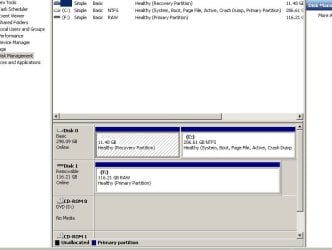
images of the 3 procedures are included below. The disk Management and Partition Wizard look equal enough and MiniTool NTFS didn't find any NTFS data. In response to an earlier question of yours I would have formatted this as ExFat because I thought it would manage both PC and Mac data sufficiently well. I probably formatted it on the Mac. Both systems now ask me to format the drive when I connect it.


attachment.php


attachment.php


attachment.php
 

Attachments

  • Disk Management Image.jpg
    Disk Management Image.jpg
    54.9 KB · Views: 13
  • MPW Image.jpg
    MPW Image.jpg
    85.6 KB · Views: 13
  • NTFS.jpg
    NTFS.jpg
    72.6 KB · Views: 13

My Computer My Computer

At a glance

Windows 7 Ultimate x64Intel Core 2 Duo P8400 @ 2.26Ghz4Gb RAMATI Mobility Radeon HD 3400
Computer type
Laptop
Computer Manufacturer/Model Number
Sony Vaio VGN-FW21E
OS
Windows 7 Ultimate x64
CPU
Intel Core 2 Duo P8400 @ 2.26Ghz
Memory
4Gb RAM
Graphics Card(s)
ATI Mobility Radeon HD 3400
Hard Drives
Toshiba MK3252GSX ATA 300Gb
Browser
Chrome
OK, your Flash drive was most probably formatted as exFat. GetDataback for NTFS also said it does not find any NTFS. It would be immaterial whether it was formatted as exFAT on the Mac or PC. It is still a PC file system compatible with Mac.

You still did not run the Quickscan with Partition Recovery Wizard. Anyway good. Instead of Quickscan run a Full Scan.Be patient and allow the full scan to complete. A full Scan can take a considerable time. Post the screenshot of Partitions found Window. Then cancel and quit PW. As I said earlier do not APPLY .. This is only expolaratory to find out whether it is able to find the backup of Volume Boot sector and from that it can rewrite the lost partition table. If this attempt does not look to do what we want to do, we shall go to Test Disk with which we will try to find out what exactly is wrong with the file system and try to repair it if possible. If it is NTFS - yes we had done it many times. Since it is exFat, I really do not know if it is going to successful but there is no harm in trying to restore the flash drive. If not successful you still have all the data already.
 

My Computer My Computer

At a glance

Windows 7 Home Premium 32 bit
OS
Windows 7 Home Premium 32 bit
Good day Jumanji,

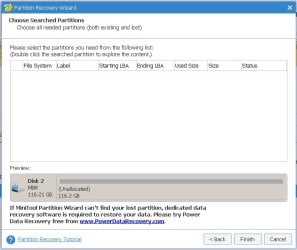
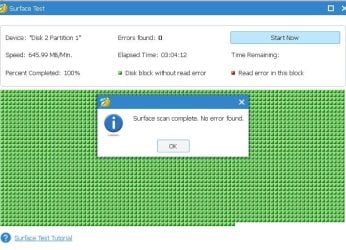
No luck on the Partition Wizard scan I'm afraid. For what it's worth, I also ran a surface check which didn't find any errors. Images below:

attachment.php


attachment.php
 

Attachments

  • PRW Partition search.jpg
    PRW Partition search.jpg
    54.4 KB · Views: 7
  • Surface PRW.jpg
    Surface PRW.jpg
    93.6 KB · Views: 14

My Computer My Computer

At a glance

Windows 7 Ultimate x64Intel Core 2 Duo P8400 @ 2.26Ghz4Gb RAMATI Mobility Radeon HD 3400
Computer type
Laptop
Computer Manufacturer/Model Number
Sony Vaio VGN-FW21E
OS
Windows 7 Ultimate x64
CPU
Intel Core 2 Duo P8400 @ 2.26Ghz
Memory
4Gb RAM
Graphics Card(s)
ATI Mobility Radeon HD 3400
Hard Drives
Toshiba MK3252GSX ATA 300Gb
Browser
Chrome
OK. Download TestDisk for Windows from here TestDisk Download - CGSecurity ( The second in the list.)( Do not download " Windows 64 bit" - that is not for you) Extract the testdisk-7.0.win.zip to the root of your system drive C:. You will run testdisk_win.exe in the extracted testdisk-7.0 folder.
That is a routine message. You shouldn't use the 64bit version.

That complied go to post#6 here WD Elements being read as RAW // Contents readable through app and follow the screenshots upto screen 5. Does screen 5 show your exFAT partition? If it shows up post the screendhot we shall decide what next to do for for exFAT may be different from that for NTFS.

In case no partition is found then

Run check disk from command prompt.

Open Command prompt. Start > All programs > Accessories > Command Prompt

Type
CHKDSK K: /f /v /r /x Press enter. Note: Replace K: with the actual drive letter of the flash drive

Allow check disk to complete. ( Do not lose patience and Do not abort check disk for any reason. Let it complete or abort itself. When checkdisk runs do not use your PC for any other task. No multitasking)

If it completes then reboot your PC and check the staus of your pendrive.

If it aborts itself note the error message. I would give up. Post the error message ( It is only for my further research)

And I have one question: Referring to your first screenshot using TestDisk, Did you run a Deeper Search?
 

My Computer My Computer

At a glance

Windows 7 Home Premium 32 bit
OS
Windows 7 Home Premium 32 bit
Firstly, two important points. I did not run a deeper scan and... I'm afraid my earlier tests were carried out on the 64 bit version :confused:.

I'm installing the correct one now.
 

My Computer My Computer

At a glance

Windows 7 Ultimate x64Intel Core 2 Duo P8400 @ 2.26Ghz4Gb RAMATI Mobility Radeon HD 3400
Computer type
Laptop
Computer Manufacturer/Model Number
Sony Vaio VGN-FW21E
OS
Windows 7 Ultimate x64
CPU
Intel Core 2 Duo P8400 @ 2.26Ghz
Memory
4Gb RAM
Graphics Card(s)
ATI Mobility Radeon HD 3400
Hard Drives
Toshiba MK3252GSX ATA 300Gb
Browser
Chrome
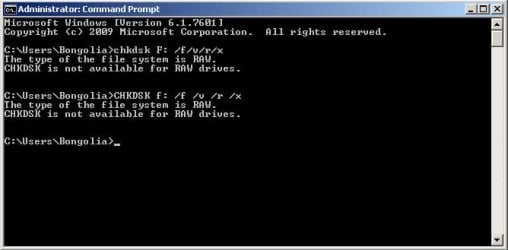
TestDisk reports no partition found and chkdsk doesn't work on RAW systems.

attachment.php
 

Attachments

  • chkdsk RAW error.jpg
    chkdsk RAW error.jpg
    33.1 KB · Views: 7

My Computer My Computer

At a glance

Windows 7 Ultimate x64Intel Core 2 Duo P8400 @ 2.26Ghz4Gb RAMATI Mobility Radeon HD 3400
Computer type
Laptop
Computer Manufacturer/Model Number
Sony Vaio VGN-FW21E
OS
Windows 7 Ultimate x64
CPU
Intel Core 2 Duo P8400 @ 2.26Ghz
Memory
4Gb RAM
Graphics Card(s)
ATI Mobility Radeon HD 3400
Hard Drives
Toshiba MK3252GSX ATA 300Gb
Browser
Chrome
OK, be happy with whatever you got with Getdataback Simple and from which you could rebuild your folder structure and file names for the files you recovered with PhotoRec. Or If you can spend USD80/- buy a Getdataback simple license to copy the files complete with the folder structure and filenames.. It is perhaps as you suspected the MAC /PC combination that spoilt your flash drive. Thanks for doing the experiments.
 

My Computer My Computer

At a glance

Windows 7 Home Premium 32 bit
OS
Windows 7 Home Premium 32 bit
Probably time to give up but I'm running a deeper search now just to see what happens.
 

My Computer My Computer

At a glance

Windows 7 Ultimate x64Intel Core 2 Duo P8400 @ 2.26Ghz4Gb RAMATI Mobility Radeon HD 3400
Computer type
Laptop
Computer Manufacturer/Model Number
Sony Vaio VGN-FW21E
OS
Windows 7 Ultimate x64
CPU
Intel Core 2 Duo P8400 @ 2.26Ghz
Memory
4Gb RAM
Graphics Card(s)
ATI Mobility Radeon HD 3400
Hard Drives
Toshiba MK3252GSX ATA 300Gb
Browser
Chrome
Yes, thanks very much for your time and expertise Jumanji. I'll have a little more scrabbling around for my own curiosity then I'll post as solved.

Cheers

Pete
 

My Computer My Computer

At a glance

Windows 7 Ultimate x64Intel Core 2 Duo P8400 @ 2.26Ghz4Gb RAMATI Mobility Radeon HD 3400
Computer type
Laptop
Computer Manufacturer/Model Number
Sony Vaio VGN-FW21E
OS
Windows 7 Ultimate x64
CPU
Intel Core 2 Duo P8400 @ 2.26Ghz
Memory
4Gb RAM
Graphics Card(s)
ATI Mobility Radeon HD 3400
Hard Drives
Toshiba MK3252GSX ATA 300Gb
Browser
Chrome
Yes, do experiment and try various recovery methods. You have nothing to lose and that is the best way to learn.
 

My Computer My Computer

At a glance

Windows 7 Home Premium 32 bit
OS
Windows 7 Home Premium 32 bit
Another idea I picked up from TestDisk forums.

When you ran TestDisk as per the procedure outlined in my post#6 here WD Elements being read as RAW // Contents readable through app you reported that TestDisk did not find any partition.We dropped it at that.

Now repeat the same process , but this time instead of selecting [Intel] Intel/PC partition, select [None] Non partitioned media. If it finds your partition as Unknown , Choose [Type] and tell it is exFAT and then try to
  • the files.
 

My Computer My Computer

At a glance

Windows 7 Home Premium 32 bit
OS
Windows 7 Home Premium 32 bit
Back
Top