JavaScript is disabled. For a better experience, please enable JavaScript in your browser before proceeding.
You are using an out of date browser. It may not display this or other websites correctly.
You should upgrade or use an
alternative browser .
Flash for FireFox is a Huge Messed up Bug
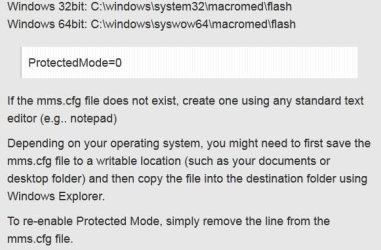
What is wrong with Adobe Flash for FireFox 17. I can't go to a site that has any flash content, without is locking up / crashing FireFox ? There is a solution to disable protected mode in FireFox by editing the mms.cfg file located in “%WINDIR%\System32\Macromed\Flash” after looking in that folder, I don't have a mms.cfg file to edit, how do I disable protected mode ?
The good news, rather the bad news, Adobe doesn't expect a fix for this anytime soon
Another reason to go IE or Chrome ? Expect I can't get most of my extensions I'm using for either browser
I need to prevent flash from crashing, now for firefox, regardless what the solution.
Computer type PC/Desktop Computer Manufacturer/Model Number Custom Built OS Windows 10 Pro CPU Core2Quad (2.6 Ghz) Motherboard nVidia 775 Memory 8 Gigs DDR2 Graphics Card(s) Geforce Titan Black Sound Card Motherboard Audio Monitor(s) Displays 25" Asus LCD Screen Resolution 1680x1050 Hard Drives 120 Gig SSD PSU 850 Watts Case Mid-Size Keyboard Logitech Mouse Logitech - I love logitech mouses Internet Speed DSL 25Mbps - Although extremely expensive Antivirus Microsoft Anti-Virus Browser FireFox 36.x
Have you considered using a Firefox variant? Such as PaleMoon.org?
OS Windows 7 Home Premium x64
Try an old version like 11.4 . I downgraded back to 11.4 from 11.5 in Internet explorer due to poor performance in many flash websites.
Computer type Laptop Computer Manufacturer/Model Number Dell Optiplex SX270, Lenovo Z470 OS Windows 7 Professional x64 SP1 CPU Intel® Pentium® 4 @ 2.26 GHz, Intel Core i7-2670QM @ 2.20 GH Motherboard Dell, Lenovo Memory 512MB Dual channel DDR SDRAM @ 400MHz 2.5-3-3-7, 8 GB DDR3 Graphics Card(s) Intel 82865G, Nvidia GeForce 520M Graphics Sound Card SoundMax Integrated Audio, Integrated HD Audio Monitor(s) Displays LG W1952 Screen Resolution 1440x900, 1366 x 768 Hard Drives 40 GB 2.5" IDE 4200 RPM HDD, 500 GB 5400 RPM Sata 1.5 + 32 GB SSD PSU Dell 145 Watt, Lenovo 120 Watt Power Adapter Case Optiplex SX270 Small Form Factor, Laptop Cooling Dell Proprietary Air Cooling, Stock laptop cooling Keyboard Dell SK-8125 USB Keyboard Mouse Dell PS/2 2 button ball mouse with wheel scroll Internet Speed 300 Mbit down / 20 Mbps up Time Warner Cable Antivirus MSE, Malwarebytes Scanner Browser Internet (Aizawa) Explorer 11 Other Info Running Windows Server 2012 Datacenter on a virtual machine to run Metro Apps.
New member
Member
VIP
Thread Starter
I seemed to have over come the problem, for now. I'll consider pale-moon if this issue re-surfaces.
Computer type PC/Desktop Computer Manufacturer/Model Number Custom Built OS Windows 10 Pro CPU Core2Quad (2.6 Ghz) Motherboard nVidia 775 Memory 8 Gigs DDR2 Graphics Card(s) Geforce Titan Black Sound Card Motherboard Audio Monitor(s) Displays 25" Asus LCD Screen Resolution 1680x1050 Hard Drives 120 Gig SSD PSU 850 Watts Case Mid-Size Keyboard Logitech Mouse Logitech - I love logitech mouses Internet Speed DSL 25Mbps - Although extremely expensive Antivirus Microsoft Anti-Virus Browser FireFox 36.x
New member
Guru
Gold Member
Computer Manufacturer/Model Number Hewlett packard/p6512uk OS Microsoft Windows 7 Home Premium 64-bit 7600 CPU IIx4 amd athelon 635 processor Motherboard FOXCONN 2AA9 Memory 2x2gb Graphics Card(s) ati radeon HD 5450 Sound Card (1) Realtek High Definition Audio (2) AMD High Definition Monitor(s) Displays samsung lcd tv 32" Screen Resolution 1360x 768 Hard Drives (1) WDC WD10 01FAES-60Z2A0 SATA Disk Device (2) Maxtor OneTouch USB Device (3) ST310003 33AS USB Device (4) WD My Book 1111 USB Device PSU ? Cooling air! Keyboard wireless hp Mouse wireless Hp,optical Internet Speed 1.10mb/s Antivirus MSE Browser Firefox
Jerry ☮ 1956-2019 R.I.P.
VIP
SF Team
I still need to disable the protective mode because of Dragon NaturallySpeaking will crash with Firefox if I don't, it is a known problem.
If the mms.cfg file does not exist you can create one with Notepad and using the All File to save it as a .cfg.
Jerry
Computer type Laptop Computer Manufacturer/Model Number Sager NP9170 OS Win 7 Pro x64 / Win 10 Pro CPU Intel(R) Core(TM) i7-3630QM CPU @ 2.40GHz Motherboard CLEVO P170EM Memory 12 GB Graphics Card(s) (1) Intel(R) HD Graphics 4000 (2) NVIDIA GeForce GTX 675M Sound Card (1) Realtek High Definition Audio (2) Intel(R) Display Aud Monitor(s) Displays 17.3 Screen Resolution 1920x1080 Hard Drives (1) Samsung 860 EVO 500GB(OS) (1) Samsung 860 EVO 500GB(Data) Keyboard Backlite Antivirus MSE, Malwarebytes Pro Browser Firefox Other Info DESKTOP: Custom-built.
New member
Member
VIP
Thread Starter
My Flash is up to date
I hope it doesn't resurface.
Computer type PC/Desktop Computer Manufacturer/Model Number Custom Built OS Windows 10 Pro CPU Core2Quad (2.6 Ghz) Motherboard nVidia 775 Memory 8 Gigs DDR2 Graphics Card(s) Geforce Titan Black Sound Card Motherboard Audio Monitor(s) Displays 25" Asus LCD Screen Resolution 1680x1050 Hard Drives 120 Gig SSD PSU 850 Watts Case Mid-Size Keyboard Logitech Mouse Logitech - I love logitech mouses Internet Speed DSL 25Mbps - Although extremely expensive Antivirus Microsoft Anti-Virus Browser FireFox 36.x


 Another reason to go IE or Chrome ? Expect I can't get most of my extensions I'm using for either browser

 I hope it doesn't resurface.