
"Flash not installed"

BAZ

New member
Member
Local time
7:27 AM
Messages
78
I am trying to run a software I installed recently. It's the Total Video Convertor. When I try to run it, I get the message:
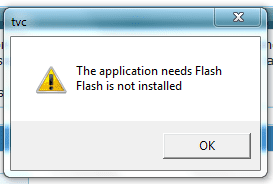
Capture.PNG

Adobe AIR and Adobe Flash Player 10 Plugin are installed. I have uninstalled and then reinstalled Flash Player twice. I don't seem to understand what really is the problem; and which application exactly it means by just 'Flash'.

Please advise me what should I do. Thanks.
 

My Computer

Computer Manufacturer/Model Number
TOSHIBA EQUIUM A200 (X86-based PC AT/AT COMPATIBLE)
OS
Windows 7 Ultimate x86
CPU
Intel(R) Pentium(R) Dual CPU T2310 @ 1.46GHz
Motherboard
Intel Corporation SANTA ROSA CRB
Memory
2GB
Graphics Card(s)
Mobile Intel(R) 965 Express Chipset Family
Screen Resolution
1280 * 800 Pixels
Hard Drives
ST9120822AS ATA Device (IDE)

My Computer

Computer type
PC/Desktop
Computer Manufacturer/Model Number
Self Built
OS
Win 10 Pro x64
CPU
Intel I5-2500K @3.3GHz
Motherboard
Asrock P67 Extreme4
Memory
16GB G.Skill Ripjaws X (4x4GB)
Graphics Card(s)
EVGA GeForce 750 Ti SC 2GB
Sound Card
ASUS Xonar DG 5.1 Channels 24-bit 96KHz PCI Interface Sound
Monitor(s) Displays
auria eq2367
Screen Resolution
1920 x 1080
Hard Drives
250GB Samsung 850 EVO SSD
1TB WD Blue
1TB Hitachi
PSU
SeaSonic X 650W 80 Plus Gold
Case
Corsair Obsidian 750D
Cooling
Corsair H60, Three 140mm case fans
Keyboard
Logitech Wireless Keyboard K520
Mouse
Logitech Wireless Mouse M310
Internet Speed
Wave Broadband ~ 100 dn 5 up
Antivirus
Windows Defender, Malwarebytes Premium
Browser
Edge, IE11, Chrome
Other Info
Laptop specs: HP g7-1365dx /
CPU: AMD A6-3420M APU with Radeon(tm) HD Graphics /
RAM: Crucial 8Gb (2x4Gb) /
SSD: Crucial M4-CT128M4SSD2 ATA Device/ FW 000F /
GFX: AMD Radeon HD 6520G /
OS: Windows 10 Pro x64

My Computer

Computer Manufacturer/Model Number
TOSHIBA EQUIUM A200 (X86-based PC AT/AT COMPATIBLE)
OS
Windows 7 Ultimate x86
CPU
Intel(R) Pentium(R) Dual CPU T2310 @ 1.46GHz
Motherboard
Intel Corporation SANTA ROSA CRB
Memory
2GB
Graphics Card(s)
Mobile Intel(R) 965 Express Chipset Family
Screen Resolution
1280 * 800 Pixels
Hard Drives
ST9120822AS ATA Device (IDE)
Needs Flash Total Video at Application Software Informer
I should download and install any of these programmes first and then my Total Video Convertor will work? :confused:

I think what they are suggesting is using another program.
When I Searched Google for a Fix for this, I found that several others are having the same problem. And it seems that all the solutions I could find seem to point to using a different program. You could keep searching Google for a fix, There might be one but I didn't find one. I was just sharing what I could find. Good luck.:)
 

My Computer

Computer type
PC/Desktop
Computer Manufacturer/Model Number
Self Built
OS
Win 10 Pro x64
CPU
Intel I5-2500K @3.3GHz
Motherboard
Asrock P67 Extreme4
Memory
16GB G.Skill Ripjaws X (4x4GB)
Graphics Card(s)
EVGA GeForce 750 Ti SC 2GB
Sound Card
ASUS Xonar DG 5.1 Channels 24-bit 96KHz PCI Interface Sound
Monitor(s) Displays
auria eq2367
Screen Resolution
1920 x 1080
Hard Drives
250GB Samsung 850 EVO SSD
1TB WD Blue
1TB Hitachi
PSU
SeaSonic X 650W 80 Plus Gold
Case
Corsair Obsidian 750D
Cooling
Corsair H60, Three 140mm case fans
Keyboard
Logitech Wireless Keyboard K520
Mouse
Logitech Wireless Mouse M310
Internet Speed
Wave Broadband ~ 100 dn 5 up
Antivirus
Windows Defender, Malwarebytes Premium
Browser
Edge, IE11, Chrome
Other Info
Laptop specs: HP g7-1365dx /
CPU: AMD A6-3420M APU with Radeon(tm) HD Graphics /
RAM: Crucial 8Gb (2x4Gb) /
SSD: Crucial M4-CT128M4SSD2 ATA Device/ FW 000F /
GFX: AMD Radeon HD 6520G /
OS: Windows 10 Pro x64
Thank you, derekimo. :)

May be someone else might know..
 

My Computer

Computer Manufacturer/Model Number
TOSHIBA EQUIUM A200 (X86-based PC AT/AT COMPATIBLE)
OS
Windows 7 Ultimate x86
CPU
Intel(R) Pentium(R) Dual CPU T2310 @ 1.46GHz
Motherboard
Intel Corporation SANTA ROSA CRB
Memory
2GB
Graphics Card(s)
Mobile Intel(R) 965 Express Chipset Family
Screen Resolution
1280 * 800 Pixels
Hard Drives
ST9120822AS ATA Device (IDE)
Thank you, derekimo. :)

May be someone else might know..


You're Welcome, Keep checking back, Someone else may have an answer for you.:)
 

My Computer

Computer type
PC/Desktop
Computer Manufacturer/Model Number
Self Built
OS
Win 10 Pro x64
CPU
Intel I5-2500K @3.3GHz
Motherboard
Asrock P67 Extreme4
Memory
16GB G.Skill Ripjaws X (4x4GB)
Graphics Card(s)
EVGA GeForce 750 Ti SC 2GB
Sound Card
ASUS Xonar DG 5.1 Channels 24-bit 96KHz PCI Interface Sound
Monitor(s) Displays
auria eq2367
Screen Resolution
1920 x 1080
Hard Drives
250GB Samsung 850 EVO SSD
1TB WD Blue
1TB Hitachi
PSU
SeaSonic X 650W 80 Plus Gold
Case
Corsair Obsidian 750D
Cooling
Corsair H60, Three 140mm case fans
Keyboard
Logitech Wireless Keyboard K520
Mouse
Logitech Wireless Mouse M310
Internet Speed
Wave Broadband ~ 100 dn 5 up
Antivirus
Windows Defender, Malwarebytes Premium
Browser
Edge, IE11, Chrome
Other Info
Laptop specs: HP g7-1365dx /
CPU: AMD A6-3420M APU with Radeon(tm) HD Graphics /
RAM: Crucial 8Gb (2x4Gb) /
SSD: Crucial M4-CT128M4SSD2 ATA Device/ FW 000F /
GFX: AMD Radeon HD 6520G /
OS: Windows 10 Pro x64
had the same problem. now solved.

encountered the exact same problem. searched and landed here.
here's how it got solved.
although your default browser must be chrome (or another non Internet Explorer) browser with flash automatically installed, Total Video converter for some reason uses the file linked with IE.

Go to Adobe's website through Internet Explorer.
Install flash from there.
Total Video Converter will work.

My bet is that this solution should work for other programs where the problem of 'flash.ocx' not found is encountered.
 

My Computer

OS
win 7 64 bit
Back
Top