Flash Player will not install

rerice

New member
Power User
Local time
7:01 PM
Messages
131
Hi All,

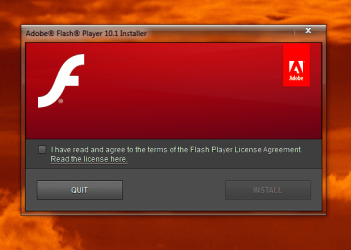
I am trying to install Adobe Flash Player on Firefox 4.0 Beta 7.

I have tried several downloads but all do the same thing. They have
the " Install " button inactive ( greyed out ? )

I am working from a clean install and may have configured something wrong,
but I cannot find it.

Thanks, Richard
 

Attachments
  • Capture.PNG
    Capture.PNG
    42.9 KB · Views: 8

My Computer

Computer Manufacturer/Model Number
Dell DXP061
OS
windows 7 RTM
CPU
Intel core 2 6400 @2.13GHz
Motherboard
Dell ??
Memory
2 Gig.
Graphics Card(s)
NVIDIA GeForce 7300 GT
Sound Card
High Definition Audio Device - Microsoft
Monitor(s) Displays
Dell LCD
Screen Resolution
1280 x 1024 75 hertz
Hard Drives
WDC WD2500JS-75NCB3 ATA Device

WDC WD5000AAKS-65YGA0 ATA Device
Keyboard
Logitech Cordless
Mouse
Logitech Cordless
Internet Speed
760k
Did you click the box to accept the license agreement? This will make the install button active :)

A Guy
 

My Computer

Computer type
PC/Desktop
OS
Windows 10 Home x64
CPU
INTEL Core i5-750 Quad-Core 3.37GHz
Motherboard
ASUS P7P55D
Memory
HyperX Fury Black Series 8GB (2 x 4GB) 1866Mhz
Graphics Card(s)
EVGA GeForce GTX 750 Superclocked 1GB 128-Bit GDDR5
Monitor(s) Displays
LG 32MA68HY 32" IPS
Screen Resolution
1920 x 1080
Hard Drives
Samsung 840 Evo 120GB, SEAGATE 500GB Barracuda® 7200.12, SATA 3 Gb/s, 7200 RPM, 16MB cache
PSU
ANTEC TruePower New TP-550, 80 PLUS, 550W
Case
ANTEC Three Hundred Illusion
Cooling
COOLER MASTER Hyper 212 Plus, 4 x 120mm 1 x 140mm Noctua's
Internet Speed
85 + Mbps
Antivirus
Avast
Browser
Vivaldi
Hi Guy,

Yes, I clicked it, I even read it. I also clicked where the install button should be, No luck.
 

My Computer

Computer Manufacturer/Model Number
Dell DXP061
OS
windows 7 RTM
CPU
Intel core 2 6400 @2.13GHz
Motherboard
Dell ??
Memory
2 Gig.
Graphics Card(s)
NVIDIA GeForce 7300 GT
Sound Card
High Definition Audio Device - Microsoft
Monitor(s) Displays
Dell LCD
Screen Resolution
1280 x 1024 75 hertz
Hard Drives
WDC WD2500JS-75NCB3 ATA Device

WDC WD5000AAKS-65YGA0 ATA Device
Keyboard
Logitech Cordless
Mouse
Logitech Cordless
Internet Speed
760k
OK, sorry, was the 1st try :) Try to download the installer from here:

Flash Non IE

Right click the installer and Run as administrator. If no help you can try it in safe mode. Download this small tool:

SafeMSI

Boot to safe mode, click on SafeMSI and it will enable the windows installer. Try to install the flash again. A Guy
 

My Computer

Computer type
PC/Desktop
OS
Windows 10 Home x64
CPU
INTEL Core i5-750 Quad-Core 3.37GHz
Motherboard
ASUS P7P55D
Memory
HyperX Fury Black Series 8GB (2 x 4GB) 1866Mhz
Graphics Card(s)
EVGA GeForce GTX 750 Superclocked 1GB 128-Bit GDDR5
Monitor(s) Displays
LG 32MA68HY 32" IPS
Screen Resolution
1920 x 1080
Hard Drives
Samsung 840 Evo 120GB, SEAGATE 500GB Barracuda® 7200.12, SATA 3 Gb/s, 7200 RPM, 16MB cache
PSU
ANTEC TruePower New TP-550, 80 PLUS, 550W
Case
ANTEC Three Hundred Illusion
Cooling
COOLER MASTER Hyper 212 Plus, 4 x 120mm 1 x 140mm Noctua's
Internet Speed
85 + Mbps
Antivirus
Avast
Browser
Vivaldi
I would try and uninstall it first with Adobe's tool here:

Adobe Flash Player - Downloads

and then try reinstalling. As an aside, if you use Google Chrome as your browser, you do not need Flash as it is built into Chrome.
 

My Computer

Computer Manufacturer/Model Number
Self-Built
OS
Windows 7 Ultimate x64
CPU
AMD Phenom 965 @ 3.4GHz w/ Thermaltake Contac 29 (updraft)
Motherboard
Gigabyte 790GPT-UD3H w/ F3 BIOS & IGP disabled
Memory
Kingston 8GB DDR3 1333MHz 9-9-9-24 (2 x 4GB kits)
Graphics Card(s)
Sapphire 6870 1GB GDDR5 (reference model)
Sound Card
Onboard Realtek 889A codec
Monitor(s) Displays
BenQ 22" M2200HD
Screen Resolution
1920x1080
Hard Drives
1 x Seagate Barracuda 7200.12 1TB 7200RPM w/32MB cache
PSU
Xigmatek NRP-MC651 650w 80+ bronze certified
Case
Antec Two Hundred
Cooling
1 x 140mm exhaust top, 1 x 120mm exhaust rear
Keyboard
Stock PS/2 model
Mouse
Razer Salmosa
Internet Speed
ADSL2+/ 2MB/s
Thanks for your good input.

I tried all that with no change. Even safe mode had the button greyed out.
I also tried an older version.

Something, no doubt something I did, has things fouled up.

Apparently I will have to start over again.

Thanks again,
Richard
 

My Computer

Computer Manufacturer/Model Number
Dell DXP061
OS
windows 7 RTM
CPU
Intel core 2 6400 @2.13GHz
Motherboard
Dell ??
Memory
2 Gig.
Graphics Card(s)
NVIDIA GeForce 7300 GT
Sound Card
High Definition Audio Device - Microsoft
Monitor(s) Displays
Dell LCD
Screen Resolution
1280 x 1024 75 hertz
Hard Drives
WDC WD2500JS-75NCB3 ATA Device

WDC WD5000AAKS-65YGA0 ATA Device
Keyboard
Logitech Cordless
Mouse
Logitech Cordless
Internet Speed
760k
Thanks for your good input.

I tried all that with no change. Even safe mode had the button greyed out.
I also tried an older version.

Something, no doubt something I did, has things fouled up.

Apparently I will have to start over again.

Thanks again,
Richard

The uninstaller didn't work?
 

My Computer

Computer Manufacturer/Model Number
Self-Built
OS
Windows 7 Ultimate x64
CPU
AMD Phenom 965 @ 3.4GHz w/ Thermaltake Contac 29 (updraft)
Motherboard
Gigabyte 790GPT-UD3H w/ F3 BIOS & IGP disabled
Memory
Kingston 8GB DDR3 1333MHz 9-9-9-24 (2 x 4GB kits)
Graphics Card(s)
Sapphire 6870 1GB GDDR5 (reference model)
Sound Card
Onboard Realtek 889A codec
Monitor(s) Displays
BenQ 22" M2200HD
Screen Resolution
1920x1080
Hard Drives
1 x Seagate Barracuda 7200.12 1TB 7200RPM w/32MB cache
PSU
Xigmatek NRP-MC651 650w 80+ bronze certified
Case
Antec Two Hundred
Cooling
1 x 140mm exhaust top, 1 x 120mm exhaust rear
Keyboard
Stock PS/2 model
Mouse
Razer Salmosa
Internet Speed
ADSL2+/ 2MB/s
Richard,
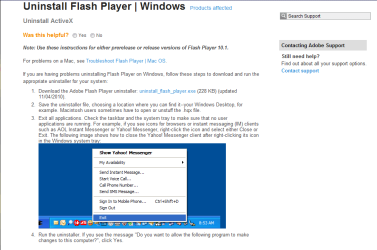
Make sure you have no windows open as you uninstall Flash.
Exit all applications: Check the task bar and the system tray to make sure no user applications are running. For example, if you see icons for browsers or instant messaging (IM) clients such as AOL Instant Messenger or Yahoo! Messenger, right-click the icon and select either Close or Exit.

Let us know if you require more help.
 

My Computer

Computer Manufacturer/Model Number
LAPTOP. HP Pavilion dv7-4010TX .
OS
Win 7 Ultimate 64-bit. SP1.
CPU
Intel i7 -720QM.[1.6GHz Turbo Boost 2.8GHz. 6MB Cache.]
Memory
8 DDR 3 RAM. 1066MHZ
Graphics Card(s)
ATI 1024 MB. DDR3. Radeon HD5650
Monitor(s) Displays
17.3" High Definition Brightview LCD. LED Backlit.
Screen Resolution
1600 x 900.
Hard Drives
640GB
Case
Laptop / notebook.
Mouse
Logitech Anywhere mouse. MX.
Internet Speed
ADSL [ but too slow ]
hi i have put the adobe uninstaller in the zip file attached to this post if it helps :)
 

Attachments

My Computer

Computer Manufacturer/Model Number
packard bell IXTREME M5722
OS
Operating System : Windows 7 Home Premium Edition 6.01.7600 SP1 (x64)
CPU
Processor : Intel Core 2 Quad Q8300 @ 2500 MHz
Motherboard
Mainboard : Packard Bell (Acer EG43M )
Memory
Physical Memory :8GB Corsair4x 2GB 800MHz C5 DDR2
Graphics Card(s)
Video Card : XFX 6700 AMD
Monitor(s) Displays
Maestro 234DL - BenQ V2220 - BenQ VW2420H
Screen Resolution
Current Display :1920x1080p pixels at 60 Hz in HD LED
Hard Drives
Hard Disks : WDC (1000 GB)
Drive C: (Hard Disk) : 428 GB available on 491 GB
Drive D: (Hard Disk) : 426 GB available on 492 GB
SAMSUNG spinpoint HD103SJ 1000.2 GB
(X 2) KINGSTON SSD NOW V 30GB
PSU
XFX ProSeries 550W PSU
Case
PACKARD BELL IXTREME
Cooling
System Blower Current: 150mA Air Flow16CFM ;Akasa 90mm rear
Keyboard
Gigabyte Aivia K8100
Mouse
TRUST-Wireless Laser Mouse - Carbon edition MI-7770C
Internet Speed
TP-LINK > TL-WN951N / AV500 Gigabit Powerline Adapters
Browser
chrome dev
Other Info
EXTRA COOLING>(FAN CONTROLLER) PC Bay Cooler 3 x 40mm fans; Akasa AK-HD-BL Blue hard drive cooler 2 x 40 mm fan 4500 rpm 29.7 dBA
Bios> American Megatrends Inc.
Version : P01-A1
Date : 08/31/2009
Back
Top