
Flashing artifacts

jkohn88

New member
Local time
4:34 PM
Messages
9
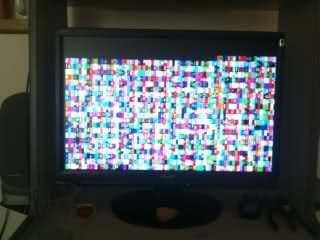
I currently installed windows 7 premium, switching from Windows xp. Everything seemed to be going on. went through install, did all the reboots. I am using 32 bit operating system as well. The bios screen loads upon start up, after that the screen switches to a bunch of colors with flashing symbols.. Symbols are smiley faces, pretty much random all over the place. I have tried reinstall many of times, and I am not able to run in safe mode at all. I was trying to cut my losses and switch back to xp but that is not able to happen either. I have the bios set to boot from cd. I am able to load the windows 7 disc, but when I put the xp disc in, it is not able to load. I verified xp disc does work, by putting it in another computer, and the disc loads just fine. Its an E Machines 3200+ T6212. Using a ATI Radeon Graphics card, with a AMD 64 Processor. Any help would be great.pic

PS: the picture attached is from another user I was able to find off the net. I was not able to get any help from that post, but I am seeing exactly as the picture indicates
 

Attachments
  • windows 7 error.jpg
    windows 7 error.jpg
    12.5 KB · Views: 404

My Computer

Computer Manufacturer/Model Number
E Machines T6212
OS
Windows 7 32 bit
CPU
AMD Athlon 64 3200+ 2.0 GHZ 512k L2 Cache 200 MHZ FSB
Motherboard
N/A
Memory
2GB DDR SDRAM
Graphics Card(s)
ATI Radeon 3200 HD
Sound Card
Turtle Beach Amigo II Dongle
Monitor(s) Displays
Optiquest
Screen Resolution
N/A
Hard Drives
N/A
PSU
N/A
Case
Custom N/A
Cooling
N/A
Keyboard
Dell
Mouse
Microsoft
Internet Speed
50GB
Other Info
I have very limited information on this cpu, I receiver it from my brother. If I was able to access my system I could get much more info on this
Please complete your system specifications in the user control panel area.

Without that information nobody will really be able to assist you.

Presumably you used the W7 Upgrade Advisor and didn't upgrade from within XP?
 

My Computer

Computer Manufacturer/Model Number
Custom built machine
OS
W7 x64
CPU
Intel Q9300 2.5Ghz Quad LGA775 (Would like Q9650)
Motherboard
Gigabyte GA-EP45T-UD3R (F6 Bios)
Memory
4Gb OCZ Gold 1,333Mhz
Graphics Card(s)
Palit HD4850 O/C Sonic 512Mb DDR3, Dual DViD's
Sound Card
Azalia to twin Samson 50w Studio Monitors
Monitor(s) Displays
Twin Dell (E-IPS) U2311H 23.6" Screens
Screen Resolution
1920 x 1080 @ 60Hz
Hard Drives
Crucial M4 SSD, archives on twin Western Digital Caviar Black WD2002FAEX, 2TB, 7200rpm HDD's, Samsung Ritemaster CD/DVD Burner...
PSU
OCZ 600w
Case
Lian-Li PC8 acoustifoamed' aluminium tower
Cooling
Scythe 140mm Zipang
Keyboard
Cherry PS/2 custom model
Mouse
Lenovo USB laser "Thinkpad" Mouse
Internet Speed
ADSL2+ @14Mbps downstream & Cat6 Gigabit Ethernet
Antivirus
NOD32
Browser
Opera
Other Info
Silicon Dust HD Homerun Dual FTA (Ethernet) TV Tuners, Dray Tek Vigor 2850Vn router and 8x HP Gigabit Switch. Lian-Li CR26 Card Reader, Canon MF4430 iSensys laser printer/scanner.
I updated what information I could. I basically put in the windows 7 disc, and I ran it as 32 bit custom, because from what I hear, you have to do it that way comeing from xp
 

My Computer

Computer Manufacturer/Model Number
E Machines T6212
OS
Windows 7 32 bit
CPU
AMD Athlon 64 3200+ 2.0 GHZ 512k L2 Cache 200 MHZ FSB
Motherboard
N/A
Memory
2GB DDR SDRAM
Graphics Card(s)
ATI Radeon 3200 HD
Sound Card
Turtle Beach Amigo II Dongle
Monitor(s) Displays
Optiquest
Screen Resolution
N/A
Hard Drives
N/A
PSU
N/A
Case
Custom N/A
Cooling
N/A
Keyboard
Dell
Mouse
Microsoft
Internet Speed
50GB
Other Info
I have very limited information on this cpu, I receiver it from my brother. If I was able to access my system I could get much more info on this
Did you change the boot order in your BIOS so its set to boot from the optical drive first? When you tested your XP CD in another system did you try to boot from it or just load it from an already running Windows OS. The reason I ask is that some people confuse auto-run with being bootable, they are not the same thing.
 

My Computer

Computer type
PC/Desktop
Computer Manufacturer/Model Number
Home Built
OS
Windows 10 Education 64 bit
CPU
AMD Phenom II X4 980 Black Edition Deneb 3.7GHz
Motherboard
Asus M4N68T-M V2 µATX Motherboard
Memory
8GB 4GBx2 Kingston PC10600 DDR3 1333 Memory
Graphics Card(s)
Zotac NVIDIA Geforce GT640 2 Gig DDR3 PCIe
Sound Card
VIA VT1708s High Definition Audio 8-channel Onboard
Monitor(s) Displays
22" LG E2242 1080p and 2 19" I-INC AG191D
Screen Resolution
1280x1024 - 1920x1080 - 1280x1024
Hard Drives
Crucial M100 256 GB SSD and 500 GB WD Blue SATA
PSU
Thermaltake TR 620
Case
Power Up Black ATX Mid-Tower Case
Cooling
Stock heatsink and fan
Keyboard
Logitech Wireless K350 Wave
Mouse
Logitech Wireless M570 Trackman Wheel
Internet Speed
80 Mbps Down 30 Mbps Up
Antivirus
Windows Defender
Browser
Internet Explorer 11
Other Info
HP DVD1040e Lightscribe - External USB2
I tried re writing the disk partition to all zero's and re installing 7. I noticed after everything is done, it has me name the pc and setup a password.. after that I select home network, and then it sets to restart again.. towards the end a screen flashes real quick with some text and almost like a button you can click... I cant verify because it switches so fast. I am still getting color blocks.
 

My Computer

Computer Manufacturer/Model Number
E Machines T6212
OS
Windows 7 32 bit
CPU
AMD Athlon 64 3200+ 2.0 GHZ 512k L2 Cache 200 MHZ FSB
Motherboard
N/A
Memory
2GB DDR SDRAM
Graphics Card(s)
ATI Radeon 3200 HD
Sound Card
Turtle Beach Amigo II Dongle
Monitor(s) Displays
Optiquest
Screen Resolution
N/A
Hard Drives
N/A
PSU
N/A
Case
Custom N/A
Cooling
N/A
Keyboard
Dell
Mouse
Microsoft
Internet Speed
50GB
Other Info
I have very limited information on this cpu, I receiver it from my brother. If I was able to access my system I could get much more info on this
Great point Alpha. I was already running an OS, and never tried booting from a restart. Ive tried HDD group, and CD rom in that order in BIOS. Ive tried every combo from cd rom, hdd group, to disabling everything but the cd rom and no luck the disc
 

My Computer

Computer Manufacturer/Model Number
E Machines T6212
OS
Windows 7 32 bit
CPU
AMD Athlon 64 3200+ 2.0 GHZ 512k L2 Cache 200 MHZ FSB
Motherboard
N/A
Memory
2GB DDR SDRAM
Graphics Card(s)
ATI Radeon 3200 HD
Sound Card
Turtle Beach Amigo II Dongle
Monitor(s) Displays
Optiquest
Screen Resolution
N/A
Hard Drives
N/A
PSU
N/A
Case
Custom N/A
Cooling
N/A
Keyboard
Dell
Mouse
Microsoft
Internet Speed
50GB
Other Info
I have very limited information on this cpu, I receiver it from my brother. If I was able to access my system I could get much more info on this
Sorry for all the forum spam. I noticed that I have an ATI Radeon HD series after market graphics card. But the PC also has an onboard ATI Radeon x200 IGP. Is there a chance the guy that built it did RAID on both and they are conflicting? I just took out the HD series and I am going to try and re install see if I have any luck
 

My Computer

Computer Manufacturer/Model Number
E Machines T6212
OS
Windows 7 32 bit
CPU
AMD Athlon 64 3200+ 2.0 GHZ 512k L2 Cache 200 MHZ FSB
Motherboard
N/A
Memory
2GB DDR SDRAM
Graphics Card(s)
ATI Radeon 3200 HD
Sound Card
Turtle Beach Amigo II Dongle
Monitor(s) Displays
Optiquest
Screen Resolution
N/A
Hard Drives
N/A
PSU
N/A
Case
Custom N/A
Cooling
N/A
Keyboard
Dell
Mouse
Microsoft
Internet Speed
50GB
Other Info
I have very limited information on this cpu, I receiver it from my brother. If I was able to access my system I could get much more info on this
Depending on the BIOS you may have a one time boot option. For example if I press F8 during the post I will get a boot menu that will let be select what device I want to boot from for that boot sequence. On the next boot up it goes back to what was originally set in the BIOS. The other way to do it is to set your DVD as first device and start your OS install. Then on the next boot up switch it back to the HDD. Just setting the DVD to first device may not be enough. You also may have to watch for a "Press any key to boot from CD-ROM" prompt and press a key on your keyboard. You only get a few seconds to do it and if you don't it will skip your DVD drive and move on to the next device set in the BIOS.

I'm not sure what you mean by RAID in reference to your Video cards. You don't raid videos cards, its either SLI for NVidia, or Crossefire for ATI. I do believe you would need hybrid Crossfire to link onboard with an add-in card. That would be a BIOS setting in any case.

I'm not sure about Windows 7 but XP had a VGA mode as one of the F8 options. If Windows 7 has the same option that will tell Windows to load the basic Video driver instead of any updated one it may have installed. If windows 7 has that option it might let get to your desktop and try and figure out what is happening..
 

My Computer

Computer type
PC/Desktop
Computer Manufacturer/Model Number
Home Built
OS
Windows 10 Education 64 bit
CPU
AMD Phenom II X4 980 Black Edition Deneb 3.7GHz
Motherboard
Asus M4N68T-M V2 µATX Motherboard
Memory
8GB 4GBx2 Kingston PC10600 DDR3 1333 Memory
Graphics Card(s)
Zotac NVIDIA Geforce GT640 2 Gig DDR3 PCIe
Sound Card
VIA VT1708s High Definition Audio 8-channel Onboard
Monitor(s) Displays
22" LG E2242 1080p and 2 19" I-INC AG191D
Screen Resolution
1280x1024 - 1920x1080 - 1280x1024
Hard Drives
Crucial M100 256 GB SSD and 500 GB WD Blue SATA
PSU
Thermaltake TR 620
Case
Power Up Black ATX Mid-Tower Case
Cooling
Stock heatsink and fan
Keyboard
Logitech Wireless K350 Wave
Mouse
Logitech Wireless M570 Trackman Wheel
Internet Speed
80 Mbps Down 30 Mbps Up
Antivirus
Windows Defender
Browser
Internet Explorer 11
Other Info
HP DVD1040e Lightscribe - External USB2
I was able to borrow a copy of windows xp black. Selected a fresh partition, with no trace of an old OS. reformatted drive, then did the install.. Upon restart went through bios made sure loading was in correct order. after saying press any key to boot from disc I get A disk read error occurred Press Ctrl-Alt-Delete to reboot im stumped. I am pretty sure my Western Digital 300gb HDD is fine, as well as no motherboard issues. Ive read many fixes with people already running a working windows OS. not sure what to do here since I have a new error in the start up
 

My Computer

Computer Manufacturer/Model Number
E Machines T6212
OS
Windows 7 32 bit
CPU
AMD Athlon 64 3200+ 2.0 GHZ 512k L2 Cache 200 MHZ FSB
Motherboard
N/A
Memory
2GB DDR SDRAM
Graphics Card(s)
ATI Radeon 3200 HD
Sound Card
Turtle Beach Amigo II Dongle
Monitor(s) Displays
Optiquest
Screen Resolution
N/A
Hard Drives
N/A
PSU
N/A
Case
Custom N/A
Cooling
N/A
Keyboard
Dell
Mouse
Microsoft
Internet Speed
50GB
Other Info
I have very limited information on this cpu, I receiver it from my brother. If I was able to access my system I could get much more info on this
I borrowed a copy of windows black. I am only trying to use it, So I can get a working windows. Once then I can use my xp disc, and product key to install my genuine copy. It will only run from a running OS via Autorun. Disc will not load in anyway from bootup
 

My Computer

Computer Manufacturer/Model Number
E Machines T6212
OS
Windows 7 32 bit
CPU
AMD Athlon 64 3200+ 2.0 GHZ 512k L2 Cache 200 MHZ FSB
Motherboard
N/A
Memory
2GB DDR SDRAM
Graphics Card(s)
ATI Radeon 3200 HD
Sound Card
Turtle Beach Amigo II Dongle
Monitor(s) Displays
Optiquest
Screen Resolution
N/A
Hard Drives
N/A
PSU
N/A
Case
Custom N/A
Cooling
N/A
Keyboard
Dell
Mouse
Microsoft
Internet Speed
50GB
Other Info
I have very limited information on this cpu, I receiver it from my brother. If I was able to access my system I could get much more info on this
Windows XP Black doesn't sound like an official release of windows XP. If its a pirated copy you have no way of knowing if its been altered and or modified and I wouldn't trust it. Is your other XP CD an original Microsoft CD or a copy of one? Is your windows 7 DVD an original Microsoft DVD or a copy?
 

My Computer

Computer type
PC/Desktop
Computer Manufacturer/Model Number
Home Built
OS
Windows 10 Education 64 bit
CPU
AMD Phenom II X4 980 Black Edition Deneb 3.7GHz
Motherboard
Asus M4N68T-M V2 µATX Motherboard
Memory
8GB 4GBx2 Kingston PC10600 DDR3 1333 Memory
Graphics Card(s)
Zotac NVIDIA Geforce GT640 2 Gig DDR3 PCIe
Sound Card
VIA VT1708s High Definition Audio 8-channel Onboard
Monitor(s) Displays
22" LG E2242 1080p and 2 19" I-INC AG191D
Screen Resolution
1280x1024 - 1920x1080 - 1280x1024
Hard Drives
Crucial M100 256 GB SSD and 500 GB WD Blue SATA
PSU
Thermaltake TR 620
Case
Power Up Black ATX Mid-Tower Case
Cooling
Stock heatsink and fan
Keyboard
Logitech Wireless K350 Wave
Mouse
Logitech Wireless M570 Trackman Wheel
Internet Speed
80 Mbps Down 30 Mbps Up
Antivirus
Windows Defender
Browser
Internet Explorer 11
Other Info
HP DVD1040e Lightscribe - External USB2
Yeah its not legit, and yeah I was just desperate to get a desktop. My windows 7 is a burned copy, lost original, and the actual xp is the hard copy. I was never able to get xp to boot from start up.. but I might beable to auto run it now but im not sure
 

My Computer

Computer Manufacturer/Model Number
E Machines T6212
OS
Windows 7 32 bit
CPU
AMD Athlon 64 3200+ 2.0 GHZ 512k L2 Cache 200 MHZ FSB
Motherboard
N/A
Memory
2GB DDR SDRAM
Graphics Card(s)
ATI Radeon 3200 HD
Sound Card
Turtle Beach Amigo II Dongle
Monitor(s) Displays
Optiquest
Screen Resolution
N/A
Hard Drives
N/A
PSU
N/A
Case
Custom N/A
Cooling
N/A
Keyboard
Dell
Mouse
Microsoft
Internet Speed
50GB
Other Info
I have very limited information on this cpu, I receiver it from my brother. If I was able to access my system I could get much more info on this
If that PC has a floppy drive you could give this a try.
How to obtain Windows XP Setup disks for a floppy boot installation
Is your XP CD an upgrade version? Some of those were not bootable and had to be launched from another MS OS.
EDIT: I had an older PC that wouldn't boot from a Windows 7 DVD, it was a BIOS limitation. Windows XP was fine but Windows 7 got me a "Cannot boot from CD code 5" message. I had to install XP and then run the Windows 7 setup from there. It might be worth updating your BIOS if it adds windows 7 support. You'd have to look at the change logs for the latter versions to see what is fixed or updated.
 

My Computer

Computer type
PC/Desktop
Computer Manufacturer/Model Number
Home Built
OS
Windows 10 Education 64 bit
CPU
AMD Phenom II X4 980 Black Edition Deneb 3.7GHz
Motherboard
Asus M4N68T-M V2 µATX Motherboard
Memory
8GB 4GBx2 Kingston PC10600 DDR3 1333 Memory
Graphics Card(s)
Zotac NVIDIA Geforce GT640 2 Gig DDR3 PCIe
Sound Card
VIA VT1708s High Definition Audio 8-channel Onboard
Monitor(s) Displays
22" LG E2242 1080p and 2 19" I-INC AG191D
Screen Resolution
1280x1024 - 1920x1080 - 1280x1024
Hard Drives
Crucial M100 256 GB SSD and 500 GB WD Blue SATA
PSU
Thermaltake TR 620
Case
Power Up Black ATX Mid-Tower Case
Cooling
Stock heatsink and fan
Keyboard
Logitech Wireless K350 Wave
Mouse
Logitech Wireless M570 Trackman Wheel
Internet Speed
80 Mbps Down 30 Mbps Up
Antivirus
Windows Defender
Browser
Internet Explorer 11
Other Info
HP DVD1040e Lightscribe - External USB2
Hmm, I will definately have to try that thank you. Eventually I would like to beable to run Windows 7, since that was my goal and what I was trying to do in the first place. The Cd is an actual base copy not an upgrade, but I actually have a hard copy of the upgrade as well, Speaking of Xp. And the Bios limitation sounds very reasonable, considering I do not have the most outdated PC. I really appreciate all the help
 

My Computer

Computer Manufacturer/Model Number
E Machines T6212
OS
Windows 7 32 bit
CPU
AMD Athlon 64 3200+ 2.0 GHZ 512k L2 Cache 200 MHZ FSB
Motherboard
N/A
Memory
2GB DDR SDRAM
Graphics Card(s)
ATI Radeon 3200 HD
Sound Card
Turtle Beach Amigo II Dongle
Monitor(s) Displays
Optiquest
Screen Resolution
N/A
Hard Drives
N/A
PSU
N/A
Case
Custom N/A
Cooling
N/A
Keyboard
Dell
Mouse
Microsoft
Internet Speed
50GB
Other Info
I have very limited information on this cpu, I receiver it from my brother. If I was able to access my system I could get much more info on this

My Computer

Computer type
PC/Desktop
Computer Manufacturer/Model Number
Home Built
OS
Windows 10 Education 64 bit
CPU
AMD Phenom II X4 980 Black Edition Deneb 3.7GHz
Motherboard
Asus M4N68T-M V2 µATX Motherboard
Memory
8GB 4GBx2 Kingston PC10600 DDR3 1333 Memory
Graphics Card(s)
Zotac NVIDIA Geforce GT640 2 Gig DDR3 PCIe
Sound Card
VIA VT1708s High Definition Audio 8-channel Onboard
Monitor(s) Displays
22" LG E2242 1080p and 2 19" I-INC AG191D
Screen Resolution
1280x1024 - 1920x1080 - 1280x1024
Hard Drives
Crucial M100 256 GB SSD and 500 GB WD Blue SATA
PSU
Thermaltake TR 620
Case
Power Up Black ATX Mid-Tower Case
Cooling
Stock heatsink and fan
Keyboard
Logitech Wireless K350 Wave
Mouse
Logitech Wireless M570 Trackman Wheel
Internet Speed
80 Mbps Down 30 Mbps Up
Antivirus
Windows Defender
Browser
Internet Explorer 11
Other Info
HP DVD1040e Lightscribe - External USB2
Back
Top