Flickering Green Pixel Issue = Monitor Or GPU

Deviancy

New member
Local time
3:35 PM
Messages
29
Back in October I started noticing flickering green pixels on dark backgrounds on my screen, the flickering green pixels, when they are present are always in the same place.

The first thing I did was buy a new DVI cable and then I ran it from the monitor to a different DVI port in back of the GPU. The issue seemed fixed but then a day later the intermittent green pixels came back, at that point I totally uninstalled the newer Nvidia drivers I had recently installed using DDU and installed the drivers I never had issues with which were from early 2014. After I did that the problem seemed gone and everything was fine until last month when I replaced my mouse. I noticed my mouse pointer had three black dots following behind it in a horizontal pattern. I then removed the Nvidia drivers from early 2014 and installed the most current Nvidia drivers, I believe they're from the 14th of December. After I did this the three black dots following behind the mouse pointer vanished but a week or two later, the intermittent green pixels came back.

1. The intermittent green pixels do not show up in screenshots, I've taken numerous screenshots of the screen when they are present but in the screenshots they are nowhere to be seen.

2. They're showing up more often lately.

3. They don't seem to show up when if I set the display to a lower resolution or when I'm in the bios screen.

4. The GPU is a Nvidia 450 GTS and it is not overclocked and is usually running at 29c, the fan is running smoothly

5. I'm seeing colored lines on the top edge and left edge hand of the screen in Transformers: Devastation at times but if I alt + tab out of the game and then re-enter the game the lines are no longer present until the next level loads.

When I take screenshots of the game when those colored lines are present, those colored lines, much like the green pixels on dark backgrounds, aren't present.

The only two games I'm noticing the "lines" on are both Platnium games (TMNT: MIM & Transformers Devastation, other games don't have any issues) so I think that's an entirely different issue, could be wrong.

I don't have an extra monitor or GPU to try out to test to see which one of the two is the issue so I'm hoping the screenshot thing answers the question?

For the record, the GPU is 5 years old and the LCD monitor is nearly 10 years old.
 

My Computer My Computer

At a glance

Windows 7 64bitI5 2300 Sandy Bridge 2.80ghz4gb DDR3 PatriotNvidia GTS 450
Computer type
PC/Desktop
Computer Manufacturer/Model Number
Custom Build
OS
Windows 7 64bit
CPU
I5 2300 Sandy Bridge 2.80ghz
Motherboard
Asus P8P67 LE
Memory
4gb DDR3 Patriot
Graphics Card(s)
Nvidia GTS 450
Sound Card
Realtek Integrated Audio
Screen Resolution
1920x1080
Hard Drives
C: Seagate 500GB (Primary
D: Western Digital Black (Secondary)
Case
Antec Two Hundred
Cooling
1 120MM rear case fan, 1 140mm top of the case fan
Antivirus
Eset 5
Browser
Chrome
Hello and welcome Deviancy now my first thought was the monitor may be going south but in view of the changes around you swapping cables and drivers and the fact that the card is five years old now makes me wonder if the card is going south.

Have you access to another monitor to see if the same thing happens?

Second it may as well to test that card with this FurMark: VGA Stress Test, Graphics Card and GPU Stability Test, Burn-in Test, OpenGL Benchmark and GPU Temperature | oZone3D.Net now this can put a fair bit of stress on the card so best run when you are nearby to check things like temps etc.

Edit: Now here is a site that has many tests for monitors just be aware that I have not tried any of them bar the second in line (Checkmon) and the one that I liked actually ran lines across the screen and check the pixels out but I cannot pin it down as yet.
BenchmarkHQ
 
Last edited:

My Computer My Computer

At a glance

Desk1 7 Home Prem / Desk2 10 Pro / Main lap A...Desk1 i5 3750K / Laptop i7 GTX 860M / Desk2 i...Desk1 8GB (1866) / Desk2 16GB (1333) / Laptop...Desk 1& 2NVidia GTX 650 & Laptops on board Intel
Computer type
PC/Desktop
Computer Manufacturer/Model Number
Own build (new) Desk1 / Asus ROG Win 7 / Desk2 1st build
OS
Desk1 7 Home Prem / Desk2 10 Pro / Main lap Asus ROG 10 Pro 2 laptop Toshiba 7 Pro Asus P2520 7 & 10
CPU
Desk1 i5 3750K / Laptop i7 GTX 860M / Desk2 i5 2500
Motherboard
Desk1 Asus P877-V / Desk2 Gigabyte H67 UD3H / Laptop ?
Memory
Desk1 8GB (1866) / Desk2 16GB (1333) / Laptop 8Gb DDR3
Graphics Card(s)
Desk 1& 2NVidia GTX 650 & Laptops on board Intel
Sound Card
Desk 1 & 2 -XONAR DG Realtek High Def audio Laptop
Monitor(s) Displays
Desk 1 Benq HD 2450 / Desk2 Philips 24" / Laptop 17.5"
Screen Resolution
1920x1080 D1 & D2 & Laptop 1
Hard Drives
Desk1 Samsung 120GB 830 SSD
Asus ROG 256GB 850 Pro SSD
Desk2 Samsung 840 256 SSD
Toshiba 120GB EVO
PSU
Desk 1 Corsair HX 1050/ Laptop ? / Desk 2 Corsair HX 650
Case
Desk 1 Cooler HAF XM ? Toshiba laptop / Desk2 Coolermaster
Cooling
Fans on all Desk1 -2 Desk2 - all Coolermasters 5 Laptop ?
Keyboard
Desk 1 MS Sidewinder X6 Desk 2 MS Sidewinder X 4
Mouse
Desk 1&2 - Gigabyte MS 900 gamer - laptop - Logitec wireless
Internet Speed
ADSL2+
Other Info
One other Desktop (tester) and spare Toshba laptop both with SSD's
Running Kaspersky 2016 ISS on all machines config'd identically
Logitec audio stereo systems on each machine (x3)
Canon MG5250MFC
Router/modem TP-Link running WPA2SK
Second it may as well to test that card with this FurMark: VGA Stress Test, Graphics Card and GPU Stability Test, Burn-in Test, OpenGL Benchmark and GPU Temperature | oZone3D.Net now this can put a fair bit of stress on the card so best run when you are nearby to check things like temps etc.

I ran Furmark for awhile and didn't notice any artifacts and it didn't go over 65c after 20-25 minutes.

I haven't noticed the green pixels in games but games are always "moving", these pixels seem to only show up on parts of the screen that are 'static'. For example, if I go to Vudu.com where the screen has a black background and is static, the green dots will pop on and off on the screen, or if I select an all black wallpaper, they'll come and go on that screen.

They're always in the exact same spot on the screen, they never are in other areas of the screen and the minute I scroll the window up or down, they go poof.
 

My Computer My Computer

At a glance

Windows 7 64bitI5 2300 Sandy Bridge 2.80ghz4gb DDR3 PatriotNvidia GTS 450
Computer type
PC/Desktop
Computer Manufacturer/Model Number
Custom Build
OS
Windows 7 64bit
CPU
I5 2300 Sandy Bridge 2.80ghz
Motherboard
Asus P8P67 LE
Memory
4gb DDR3 Patriot
Graphics Card(s)
Nvidia GTS 450
Sound Card
Realtek Integrated Audio
Screen Resolution
1920x1080
Hard Drives
C: Seagate 500GB (Primary
D: Western Digital Black (Secondary)
Case
Antec Two Hundred
Cooling
1 120MM rear case fan, 1 140mm top of the case fan
Antivirus
Eset 5
Browser
Chrome
Ok mate well it is pointing the finger at the monitor in my mind. As you say it would be hard to pick those pixels using a game - which leaves us with the pixels in the exact spot each time now suspect.

Now there are some programs that will test the monitor such as PassMark MonitorTest - Test monitors and LCD flat panel screens and some that will attempt to correct the problem but I shall ahve to go digging around for them as I have used some but quite a while ago and they were of soem help and did not really fix the issue.

Now I mentioned do you have another monitor to try because if the pixel issue is not there then it will mean the monitor you have is maybe going south.:(
 

My Computer My Computer

At a glance

Desk1 7 Home Prem / Desk2 10 Pro / Main lap A...Desk1 i5 3750K / Laptop i7 GTX 860M / Desk2 i...Desk1 8GB (1866) / Desk2 16GB (1333) / Laptop...Desk 1& 2NVidia GTX 650 & Laptops on board Intel
Computer type
PC/Desktop
Computer Manufacturer/Model Number
Own build (new) Desk1 / Asus ROG Win 7 / Desk2 1st build
OS
Desk1 7 Home Prem / Desk2 10 Pro / Main lap Asus ROG 10 Pro 2 laptop Toshiba 7 Pro Asus P2520 7 & 10
CPU
Desk1 i5 3750K / Laptop i7 GTX 860M / Desk2 i5 2500
Motherboard
Desk1 Asus P877-V / Desk2 Gigabyte H67 UD3H / Laptop ?
Memory
Desk1 8GB (1866) / Desk2 16GB (1333) / Laptop 8Gb DDR3
Graphics Card(s)
Desk 1& 2NVidia GTX 650 & Laptops on board Intel
Sound Card
Desk 1 & 2 -XONAR DG Realtek High Def audio Laptop
Monitor(s) Displays
Desk 1 Benq HD 2450 / Desk2 Philips 24" / Laptop 17.5"
Screen Resolution
1920x1080 D1 & D2 & Laptop 1
Hard Drives
Desk1 Samsung 120GB 830 SSD
Asus ROG 256GB 850 Pro SSD
Desk2 Samsung 840 256 SSD
Toshiba 120GB EVO
PSU
Desk 1 Corsair HX 1050/ Laptop ? / Desk 2 Corsair HX 650
Case
Desk 1 Cooler HAF XM ? Toshiba laptop / Desk2 Coolermaster
Cooling
Fans on all Desk1 -2 Desk2 - all Coolermasters 5 Laptop ?
Keyboard
Desk 1 MS Sidewinder X6 Desk 2 MS Sidewinder X 4
Mouse
Desk 1&2 - Gigabyte MS 900 gamer - laptop - Logitec wireless
Internet Speed
ADSL2+
Other Info
One other Desktop (tester) and spare Toshba laptop both with SSD's
Running Kaspersky 2016 ISS on all machines config'd identically
Logitec audio stereo systems on each machine (x3)
Canon MG5250MFC
Router/modem TP-Link running WPA2SK
Now I mentioned do you have another monitor to try because if the pixel issue is not there then it will mean the monitor you have is maybe going south.:(

Sadly, I only have an ancient 4:3 CRT monitor which of course doesn't go to 1920x1080, and I'm only noticing the issue at 1920x1080, doesn't seem to appear at lower resolutions, especially 4:3 resolutions. And yeah, the pixels, when they show up, they're always in the exact same area of the screen. One other thing I noticed, not sure if its my mind playing tricks on me, the refresh rate seems to be off a bit, like it'll flicker at times when loading a new page.

I did a little more testing and booted into safe mode and in safe mode, I waited 10-15 minutes and the flickering green pixels did not show up. So at this point I'm back to wondering if it is the GPU since under safe mode the Nvidia drivers aren't loaded, or so I assume since the Nvidia processes don't show up under Task Manager.

Not sure what to do next at this point. I've already removed the latest drivers with DDU and rolled back to the ones before the issue happened which just resulted in the black dots that trail the mouse pointer, and then I DDU'd those and went back to the latest Nvidia drivers. Then like I said, I replaced the DVI cable already with another one and I tried the secondary DVI port on the GPU to make sure it wasn't a port issue. I haven't re-installed Windows 7 since the 1st of 2014 but I don't think re-installing Windows 7 would do anything since I've only installed the latest version of Adobe Flash and Air since this started happening and neither of those two programs should be causing this. I considered inteferrence from the wireless router since its just a few inches from the monitor but the router has been in the exact same spot for nearly two years.

Hypothetically, if it is the GPU, and I'm an EVGA guy, what is the most affordable EVGA GPU on the market that is about the same as the GTS 450? I wouldn't need a 150-200 dollar GPU, I'd just need one that runs as well as the GTS 450 since I have no intention of buying any modern games. And if it is the monitor, who makes the best monitors these days? It used to be Samsung but I looked those over, they all seem to just have VGA and HDMI ports these days, I'd need a monitor with a DVI port.
 
Last edited:

My Computer My Computer

At a glance

Windows 7 64bitI5 2300 Sandy Bridge 2.80ghz4gb DDR3 PatriotNvidia GTS 450
Computer type
PC/Desktop
Computer Manufacturer/Model Number
Custom Build
OS
Windows 7 64bit
CPU
I5 2300 Sandy Bridge 2.80ghz
Motherboard
Asus P8P67 LE
Memory
4gb DDR3 Patriot
Graphics Card(s)
Nvidia GTS 450
Sound Card
Realtek Integrated Audio
Screen Resolution
1920x1080
Hard Drives
C: Seagate 500GB (Primary
D: Western Digital Black (Secondary)
Case
Antec Two Hundred
Cooling
1 120MM rear case fan, 1 140mm top of the case fan
Antivirus
Eset 5
Browser
Chrome
Please edit your profile with ALL hardware specs.
What MoBo you have?
Does it has on board video?
 

My Computers My Computers

  • At a glance

    Windows 7 HP 64i5 6600K - 800MHz to 4200MHz4+4G GSkill DDR4 3000IG - Intel 530
    Computer type
    PC/Desktop
    Computer Manufacturer/Model Number
    custom build
    OS
    Windows 7 HP 64
    CPU
    i5 6600K - 800MHz to 4200MHz
    Motherboard
    GA-Z170-HD3P
    Memory
    4+4G GSkill DDR4 3000
    Graphics Card(s)
    IG - Intel 530
    Monitor(s) Displays
    Samsung 226BW
    Screen Resolution
    1680x1050
    Hard Drives
    (1) -1 SM951 – 128GB M.2 AHCI PCIe SSD drive for Windows 7 and Lubuntu
    (2) -1 WD SATA 3 - 1T for Data
    (3) -1 WD SATA 3 - 1T for backup
    PSU
    Thermaltake 450W TR2 gold
    Keyboard
    Old and good Chicony mechanical keyboard
    Mouse
    Logitech mX performance - 9 buttons (had to disable some)
    Internet Speed
    500Mb/s
    Browser
    Firefox 64
    Other Info
    TinyWall firewall
  • At a glance

    Windows 7 Proi7-4500U 800MHz to 3.0GHz(4+4)G DDR3 1600IG intel 4400 + NVIDIA GeForce GT 745M
    Computer type
    Laptop
    System Manufacturer/Model Number
    Asus Q550LF
    OS
    Windows 7 Pro
    CPU
    i7-4500U 800MHz to 3.0GHz
    Motherboard
    Asus Q550LF
    Memory
    (4+4)G DDR3 1600
    Graphics Card(s)
    IG intel 4400 + NVIDIA GeForce GT 745M
    Sound Card
    Realtek
    Monitor(s) Displays
    LG Display LP156WF4-SPH1
    Screen Resolution
    1920 x 1080
    Hard Drives
    BX500 120G SSD for Windows and programs +
    1T HDD for data
    Internet Speed
    500 Mb/s
    Browser
    Firefox
    Other Info
    TinyWall firewall
Sadly, I only have an ancient 4:3 CRT monitor

Ok mate you have it right there a CRT monitor does not have pixels it runs on a different system (a cathode ray tube - CRT - as per the old TV systems had) to LCD / LED monitors which do have pixels.

Now this puts a slightly different angle on what the issue is and comes back to the machine and the card.

Now there are two things you can do and although it may ramp up the budget it may well cure the problem. Plus a LCD screen will cost less to run by a fair bit.
Now I know you like EVGA but I prefer Asus and this would be my choice - $169 out here Access Denied and I don't knoq quite where you are but if in the US you can get it for $104 from Newegg ASUS GeForce GTX 750 Ti STRIX-GTX750TI-OC-2GD5 2GB 128-Bit GDDR5 PCI Express 3.0 HDCP Ready Video Card - Newegg.com

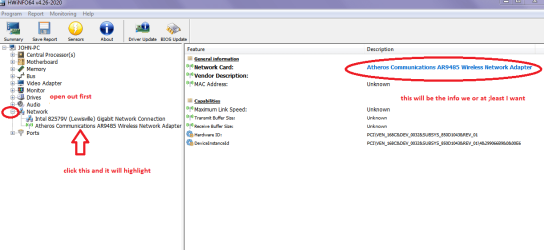
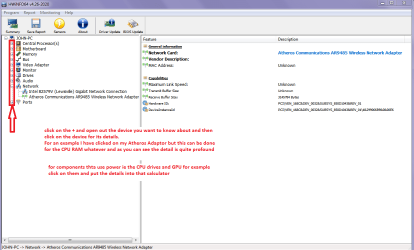
Now as Megahertz has asked mate can you update the system specs too if you are having difficulties in finding details just follow this and use PART B: yo see what is inside the system.

Using HW Info
PART A:
You can test the volts on the PSU with HW Info HWiNFO, HWiNFO32/64 - Download < download the right bit version and close the right hand window select Sensors and scroll down to the power section where you will see what the volts are doing see my pic. In my pic the section (Nuvoton) with VBATT as a dead give away you are in the section for the rail voltages. There are other section titles and one that pops up often is ITE (sometimes the usual one for Gigabyte boards)
Now the voltage on the different rails have to be within 5% =+/- of what is required or the machine will not work properly if at all.
Limits +/- (minimum - correct - maximum)
12v1 = 11.4 - 12 - 12.6v
12v2 = 11.4 - 12- 12.6v
5v = 4.75 – 5 - 5.25v
3.3v = 3.135 – 3 – 3.465v
-12v = -10.80 - -12 - -13.20v
+5VSB = 4.75 – 5 - 5.25v
The Power good signal voltage at pin 8 on the 24 pin plug (grey cable) should be the same as the 5v rail reading/s
See this for the rail voltage info
PSUs 101: A Detailed Look Into Power Supplies (Section 2.)
The original right hand window shows the machine running and is handy for that but for looking at the components in some detail close it and use the main left hand side panel
FOR OTHER COMPONENTS
PART B:
Open each small square with + in it on the section the components are in and then click on the individual component/s (it will highlight in blue) - in the right hand side will appear all sorts of details including brands speeds and other essential info that particular device. See pic for example.
 

Attachments

  • HW INFO NETWORK ADAPTOR.PNG
    HW INFO NETWORK ADAPTOR.PNG
    25.1 KB · Views: 1
  • HW INFO DEVICES.PNG
    HW INFO DEVICES.PNG
    32.3 KB · Views: 1

My Computer My Computer

At a glance

Desk1 7 Home Prem / Desk2 10 Pro / Main lap A...Desk1 i5 3750K / Laptop i7 GTX 860M / Desk2 i...Desk1 8GB (1866) / Desk2 16GB (1333) / Laptop...Desk 1& 2NVidia GTX 650 & Laptops on board Intel
Computer type
PC/Desktop
Computer Manufacturer/Model Number
Own build (new) Desk1 / Asus ROG Win 7 / Desk2 1st build
OS
Desk1 7 Home Prem / Desk2 10 Pro / Main lap Asus ROG 10 Pro 2 laptop Toshiba 7 Pro Asus P2520 7 & 10
CPU
Desk1 i5 3750K / Laptop i7 GTX 860M / Desk2 i5 2500
Motherboard
Desk1 Asus P877-V / Desk2 Gigabyte H67 UD3H / Laptop ?
Memory
Desk1 8GB (1866) / Desk2 16GB (1333) / Laptop 8Gb DDR3
Graphics Card(s)
Desk 1& 2NVidia GTX 650 & Laptops on board Intel
Sound Card
Desk 1 & 2 -XONAR DG Realtek High Def audio Laptop
Monitor(s) Displays
Desk 1 Benq HD 2450 / Desk2 Philips 24" / Laptop 17.5"
Screen Resolution
1920x1080 D1 & D2 & Laptop 1
Hard Drives
Desk1 Samsung 120GB 830 SSD
Asus ROG 256GB 850 Pro SSD
Desk2 Samsung 840 256 SSD
Toshiba 120GB EVO
PSU
Desk 1 Corsair HX 1050/ Laptop ? / Desk 2 Corsair HX 650
Case
Desk 1 Cooler HAF XM ? Toshiba laptop / Desk2 Coolermaster
Cooling
Fans on all Desk1 -2 Desk2 - all Coolermasters 5 Laptop ?
Keyboard
Desk 1 MS Sidewinder X6 Desk 2 MS Sidewinder X 4
Mouse
Desk 1&2 - Gigabyte MS 900 gamer - laptop - Logitec wireless
Internet Speed
ADSL2+
Other Info
One other Desktop (tester) and spare Toshba laptop both with SSD's
Running Kaspersky 2016 ISS on all machines config'd identically
Logitec audio stereo systems on each machine (x3)
Canon MG5250MFC
Router/modem TP-Link running WPA2SK
Ok Deviancy I have been thinking about the problem and having said what I did about the card I think it would be really good for you to try another monitor on that system first. If the problem goes away it then means just getting anew monitor - which in nay case you are going to have to mate because of the age of that device.

The fact is that CRT types devices (same principles of vacuum tubes) do wear out over time because of the physical nature of their operation. Cathode ray tube - Wikipedia

One word of warning do not tamper with the back of the tube ie taking the cover off - as there are some extremely high voltages generated at the rear of the tube for its operation.;)
 

My Computer My Computer

At a glance

Desk1 7 Home Prem / Desk2 10 Pro / Main lap A...Desk1 i5 3750K / Laptop i7 GTX 860M / Desk2 i...Desk1 8GB (1866) / Desk2 16GB (1333) / Laptop...Desk 1& 2NVidia GTX 650 & Laptops on board Intel
Computer type
PC/Desktop
Computer Manufacturer/Model Number
Own build (new) Desk1 / Asus ROG Win 7 / Desk2 1st build
OS
Desk1 7 Home Prem / Desk2 10 Pro / Main lap Asus ROG 10 Pro 2 laptop Toshiba 7 Pro Asus P2520 7 & 10
CPU
Desk1 i5 3750K / Laptop i7 GTX 860M / Desk2 i5 2500
Motherboard
Desk1 Asus P877-V / Desk2 Gigabyte H67 UD3H / Laptop ?
Memory
Desk1 8GB (1866) / Desk2 16GB (1333) / Laptop 8Gb DDR3
Graphics Card(s)
Desk 1& 2NVidia GTX 650 & Laptops on board Intel
Sound Card
Desk 1 & 2 -XONAR DG Realtek High Def audio Laptop
Monitor(s) Displays
Desk 1 Benq HD 2450 / Desk2 Philips 24" / Laptop 17.5"
Screen Resolution
1920x1080 D1 & D2 & Laptop 1
Hard Drives
Desk1 Samsung 120GB 830 SSD
Asus ROG 256GB 850 Pro SSD
Desk2 Samsung 840 256 SSD
Toshiba 120GB EVO
PSU
Desk 1 Corsair HX 1050/ Laptop ? / Desk 2 Corsair HX 650
Case
Desk 1 Cooler HAF XM ? Toshiba laptop / Desk2 Coolermaster
Cooling
Fans on all Desk1 -2 Desk2 - all Coolermasters 5 Laptop ?
Keyboard
Desk 1 MS Sidewinder X6 Desk 2 MS Sidewinder X 4
Mouse
Desk 1&2 - Gigabyte MS 900 gamer - laptop - Logitec wireless
Internet Speed
ADSL2+
Other Info
One other Desktop (tester) and spare Toshba laptop both with SSD's
Running Kaspersky 2016 ISS on all machines config'd identically
Logitec audio stereo systems on each machine (x3)
Canon MG5250MFC
Router/modem TP-Link running WPA2SK
Heres the PSU voltage info from HWinfo..

Untitled_zps3wfn2phu.jpg


I believe its a 600 watt cooler master but I can't pop the case right now.

As for the mobo, it doesn't have integrated video and it's an Asus P8P67 LE.

Still shopping for another monitor, so far no luck and now I'm having speed issues with my Roku so I'm currently also troubleshooting that, probably just DNS issues.
 

My Computer My Computer

At a glance

Windows 7 64bitI5 2300 Sandy Bridge 2.80ghz4gb DDR3 PatriotNvidia GTS 450
Computer type
PC/Desktop
Computer Manufacturer/Model Number
Custom Build
OS
Windows 7 64bit
CPU
I5 2300 Sandy Bridge 2.80ghz
Motherboard
Asus P8P67 LE
Memory
4gb DDR3 Patriot
Graphics Card(s)
Nvidia GTS 450
Sound Card
Realtek Integrated Audio
Screen Resolution
1920x1080
Hard Drives
C: Seagate 500GB (Primary
D: Western Digital Black (Secondary)
Case
Antec Two Hundred
Cooling
1 120MM rear case fan, 1 140mm top of the case fan
Antivirus
Eset 5
Browser
Chrome
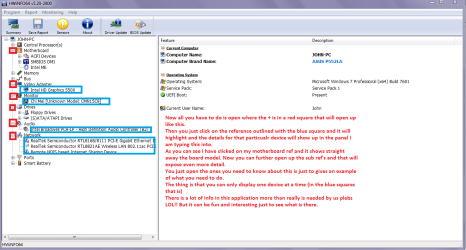
Yep the PSU is fine mate but what I meant by using PART B: was to to go to the individual components - you don't need the Sensor button and when you open each of those components it shows in sometimes very great detail the device and speeds, volts. timings etc etc If you see my pic I'll try and show you how it will look. I hope it makes sense.;)

Now monitors always best go with a brand name one and the size and type I guess is down again to your budget. Personally for general use a TN panel is fine but if you want something fancier an IPS screen is also good but overkill in my mind. For size again your choice but a 24" is a good size.
 

Attachments

  • PART B.PNG
    PART B.PNG
    42.1 KB · Views: 1

My Computer My Computer

At a glance

Desk1 7 Home Prem / Desk2 10 Pro / Main lap A...Desk1 i5 3750K / Laptop i7 GTX 860M / Desk2 i...Desk1 8GB (1866) / Desk2 16GB (1333) / Laptop...Desk 1& 2NVidia GTX 650 & Laptops on board Intel
Computer type
PC/Desktop
Computer Manufacturer/Model Number
Own build (new) Desk1 / Asus ROG Win 7 / Desk2 1st build
OS
Desk1 7 Home Prem / Desk2 10 Pro / Main lap Asus ROG 10 Pro 2 laptop Toshiba 7 Pro Asus P2520 7 & 10
CPU
Desk1 i5 3750K / Laptop i7 GTX 860M / Desk2 i5 2500
Motherboard
Desk1 Asus P877-V / Desk2 Gigabyte H67 UD3H / Laptop ?
Memory
Desk1 8GB (1866) / Desk2 16GB (1333) / Laptop 8Gb DDR3
Graphics Card(s)
Desk 1& 2NVidia GTX 650 & Laptops on board Intel
Sound Card
Desk 1 & 2 -XONAR DG Realtek High Def audio Laptop
Monitor(s) Displays
Desk 1 Benq HD 2450 / Desk2 Philips 24" / Laptop 17.5"
Screen Resolution
1920x1080 D1 & D2 & Laptop 1
Hard Drives
Desk1 Samsung 120GB 830 SSD
Asus ROG 256GB 850 Pro SSD
Desk2 Samsung 840 256 SSD
Toshiba 120GB EVO
PSU
Desk 1 Corsair HX 1050/ Laptop ? / Desk 2 Corsair HX 650
Case
Desk 1 Cooler HAF XM ? Toshiba laptop / Desk2 Coolermaster
Cooling
Fans on all Desk1 -2 Desk2 - all Coolermasters 5 Laptop ?
Keyboard
Desk 1 MS Sidewinder X6 Desk 2 MS Sidewinder X 4
Mouse
Desk 1&2 - Gigabyte MS 900 gamer - laptop - Logitec wireless
Internet Speed
ADSL2+
Other Info
One other Desktop (tester) and spare Toshba laptop both with SSD's
Running Kaspersky 2016 ISS on all machines config'd identically
Logitec audio stereo systems on each machine (x3)
Canon MG5250MFC
Router/modem TP-Link running WPA2SK
Yep the PSU is fine mate but what I meant by using PART B: was to to go to the individual components

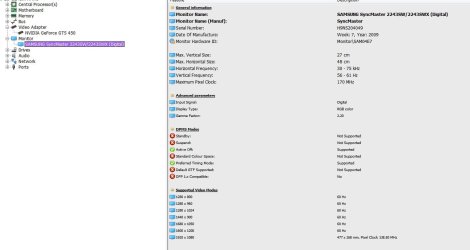
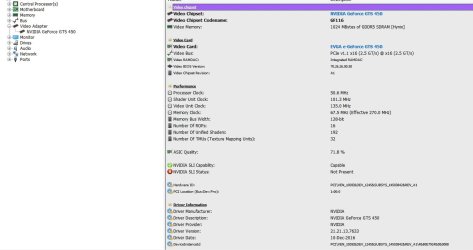
Here are the screenshots of the info from the GPU and monitor, I figure the info for the other components wouldn't be necessary. If it is the monitor, I'd probably go with 21 inches again, the current 21 inch display I have is big enough for me. The fun part is finding one that takes DVI when it comes to name brands, most of the Samsungs are VGA or HDMI, there's no HDMI port on my GPU, and the ASUS displays have DVI but speakers. How is Acer?
 

Attachments

  • monitor.jpg
    monitor.jpg
    49.3 KB · Views: 1
  • video.jpg
    video.jpg
    59.8 KB · Views: 1

My Computer My Computer

At a glance

Windows 7 64bitI5 2300 Sandy Bridge 2.80ghz4gb DDR3 PatriotNvidia GTS 450
Computer type
PC/Desktop
Computer Manufacturer/Model Number
Custom Build
OS
Windows 7 64bit
CPU
I5 2300 Sandy Bridge 2.80ghz
Motherboard
Asus P8P67 LE
Memory
4gb DDR3 Patriot
Graphics Card(s)
Nvidia GTS 450
Sound Card
Realtek Integrated Audio
Screen Resolution
1920x1080
Hard Drives
C: Seagate 500GB (Primary
D: Western Digital Black (Secondary)
Case
Antec Two Hundred
Cooling
1 120MM rear case fan, 1 140mm top of the case fan
Antivirus
Eset 5
Browser
Chrome
Ok mate now that was good that you now can use the HW Info to see what is in the machine eh?:)

Now yes a 21" is fine and really that sort of size you could pick up one for a song. The issue with inputs is annoying as I recently bought a Samsung only to find that it only had VGA (crazy move but) and HDMI which my main desky card supports.

I think I mentioned before I am not sure of where you are only that I can see the time zone form your public profile could be in Alaska Canada or the west coast of the US.

So assuming you are in the US I think a lot of folks there use either Newegg or Amazon so I have had a look at both and it seems to me Newegg is the better of the two
so I have picked a few
HP W2082a Black 20" TN 5ms LCD / LED Monitor, 200 cd/m2 DCR 10,000,000:1, Built-in Speakers, VGA DVI-D (with HDCP)-Newegg.com

BenQ GL2460HM Black 24" TN 2ms (GTG) LCD/LED Monitor, 250 cd/m2 DCR 12,000,000:1 (1,000:1), Built-in Speakers, VESA Mountable, HDMI, DVI-Newegg.com (a bit bigger than you want but I have had BenQ monitors and they are just the real deal) but a good price.

Plus if you go through this page computer monitor, LCD / LED Monitors, Monitors, Computer Systems - Newegg.com

there are some exceptional deals and far better prices than we get out here, and I have to say with Newegg you folks are spoiled for choice.
I would seriously consider a larger screen to be honest the difference is so much better. I say that because in the past I have gone for something that it is either cheaper or looks better and regretted not getting something really good. The other thing is you may even want to up the ante with the GPU and then you would find an enormous difference in what you see.

But again the choice and budget are yours, and good luck.

John:)
 

My Computer My Computer

At a glance

Desk1 7 Home Prem / Desk2 10 Pro / Main lap A...Desk1 i5 3750K / Laptop i7 GTX 860M / Desk2 i...Desk1 8GB (1866) / Desk2 16GB (1333) / Laptop...Desk 1& 2NVidia GTX 650 & Laptops on board Intel
Computer type
PC/Desktop
Computer Manufacturer/Model Number
Own build (new) Desk1 / Asus ROG Win 7 / Desk2 1st build
OS
Desk1 7 Home Prem / Desk2 10 Pro / Main lap Asus ROG 10 Pro 2 laptop Toshiba 7 Pro Asus P2520 7 & 10
CPU
Desk1 i5 3750K / Laptop i7 GTX 860M / Desk2 i5 2500
Motherboard
Desk1 Asus P877-V / Desk2 Gigabyte H67 UD3H / Laptop ?
Memory
Desk1 8GB (1866) / Desk2 16GB (1333) / Laptop 8Gb DDR3
Graphics Card(s)
Desk 1& 2NVidia GTX 650 & Laptops on board Intel
Sound Card
Desk 1 & 2 -XONAR DG Realtek High Def audio Laptop
Monitor(s) Displays
Desk 1 Benq HD 2450 / Desk2 Philips 24" / Laptop 17.5"
Screen Resolution
1920x1080 D1 & D2 & Laptop 1
Hard Drives
Desk1 Samsung 120GB 830 SSD
Asus ROG 256GB 850 Pro SSD
Desk2 Samsung 840 256 SSD
Toshiba 120GB EVO
PSU
Desk 1 Corsair HX 1050/ Laptop ? / Desk 2 Corsair HX 650
Case
Desk 1 Cooler HAF XM ? Toshiba laptop / Desk2 Coolermaster
Cooling
Fans on all Desk1 -2 Desk2 - all Coolermasters 5 Laptop ?
Keyboard
Desk 1 MS Sidewinder X6 Desk 2 MS Sidewinder X 4
Mouse
Desk 1&2 - Gigabyte MS 900 gamer - laptop - Logitec wireless
Internet Speed
ADSL2+
Other Info
One other Desktop (tester) and spare Toshba laptop both with SSD's
Running Kaspersky 2016 ISS on all machines config'd identically
Logitec audio stereo systems on each machine (x3)
Canon MG5250MFC
Router/modem TP-Link running WPA2SK
Back
Top