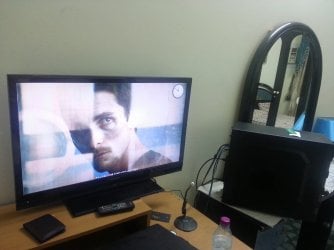
Just today,i noticed some strange flickering lines appearing on the corner of my screen.And after sometimes , these lines are spreading to other areas of the screen.
I have tried removing any metallic or magnetic objects near my screen.Since , that causes these lines sometimes near the screens.But no luck.
I tried attaching a small video that i made of these lines with my cell but seven forums won't let me attach
So , now i have attached a picture (which is not going to be enough to understand , perhaps).
Kindly guide me what to do.Is it my HDTV or does it has something to do with my RIG's graphics card or something else...
Attachments
20150805_021429.jpg
684.3 KB
· Views: 1
My Computer
At a glance
Windows 7 Home Premium 64 biti716 GBNvidia GFORCE GTX 960 2 GB
hi have you tried connecting the tv to another source like a blu-ray player to see if the line are still their. if they are and you used a different cable then i would say it's the tv.
hi have you tried connecting the tv to another source like a blu-ray player to see if the line are still their. if they are and you used a different cable then i would say it's the tv.
I JUST connected my laptop to the hdmi t.v and the screen isn't flickering. .I am getting worried.What should i do..Is it a graphics card issue..A video card issue..
I just bought ny rig some months ago....IT'S a powerful rig with 16 GB Ram
NVIDIA gtx 960 2 gb Graphics card.
I7 Processor
What do i do ....
My Computer
At a glance
Windows 7 Home Premium 64 biti716 GBNvidia GFORCE GTX 960 2 GB
ok.So,something weird that i encountered while trying to find a solution to this problem.
As i said before that , the 32 inch T.V is working fine with the Laptop on HDMI.So,i just put the wire back and after viewing my Desktop again.I noticed , no lines are appearing anymore..
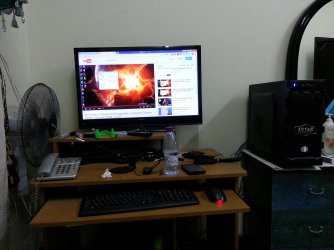
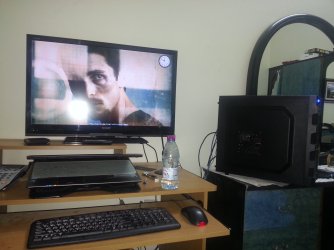
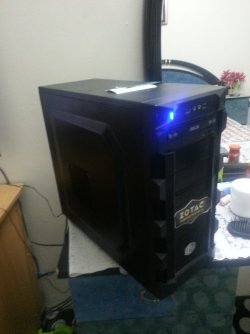
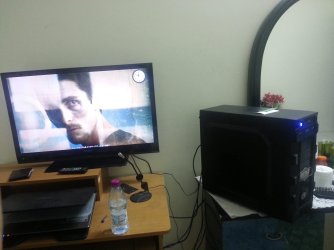
I just released that changing the position of my RIG's backside (which was like almost close to the wall , SEE PIC # 1) containing all of the ports & wiring, , the lines aren't appearing (Kindly see the attached Pictures 2,3,4 & 5)
Can someone explain , just what happened here
Attachments
1.jpg
680 KB
· Views: 0
2.jpg
441.3 KB
· Views: 0
3.jpg
472.4 KB
· Views: 0
4.jpg
441.7 KB
· Views: 0
5.jpg
455.1 KB
· Views: 0
My Computer
At a glance
Windows 7 Home Premium 64 biti716 GBNvidia GFORCE GTX 960 2 GB
It's very possible that your HDMI cable was partly disconnected on your desktop computer. Re plugging it in might have cured the problem. I would watch it for a while and see if the problem has truly gone away.
It could have also been a heat issue with your PC so close to the wall. The ports may have been blocked too much. Leave at least a couple inches between the back of the PC and the wall.
My Computer
At a glance
Win 7 Pro x64/Win 10 Pro x64 dual bootAMD FX 8350 Vishera @ 420016 GB Mushkin Blackline DDR3-2400 @ 1866 (9-1...XFX Radeon R9 280 Double D Black Edition
It's very possible that your HDMI cable was partly disconnected on your desktop computer. Re plugging it in might have cured the problem. I would watch it for a while and see if the problem has truly gone away.
No,i re-plugged the cable many times.I actually , changed the positions of the HDMI ports from 1-2 to 2-1 , since both sides of the HDMI port are the same..The problem was still there. Until now...
And yes,the gap between the wire ports and the wall was very small.So,that could have been a possible reason.The lines appearing pattern was strange.Sometimes appearing , sometimes not , sometimes appearing on the corner of the task bar on left side.Sometimes on the top right corner of the screen.Sometimes , appearing in the middle and making long horizontal lines...Sometimes appearing while viewing video files ...
Regarding watching for a while,you are right.I will do it.I am not gonna change my RIG's position.See what happens....
I hope it stays like this
My Computer
At a glance
Windows 7 Home Premium 64 biti716 GBNvidia GFORCE GTX 960 2 GB
You know , this might be the actual reason for the flickering lines.But we will have to see.I have RELUCTANTLY , changed the position of my RIG to the previous one.This time however,i have left may be 1 or 2 inch gap from the previous distance of the ports and the wall.
I am going to test this final time , before i check this post as SOLVED ...So, bear with me guys
My Computer
At a glance
Windows 7 Home Premium 64 biti716 GBNvidia GFORCE GTX 960 2 GB